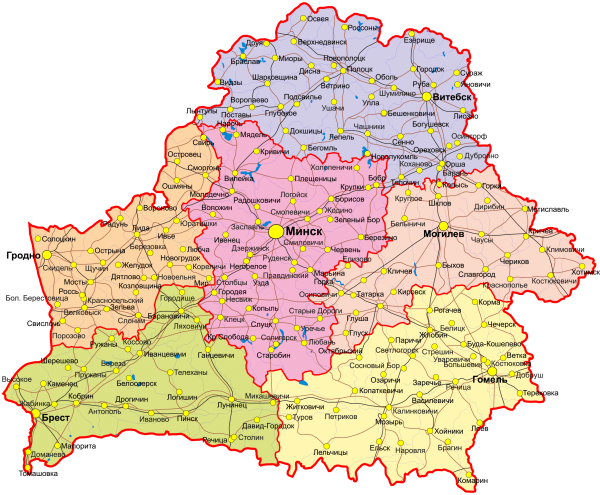
A good vector map of Belarus is surprisingly hard to find. Yes, you can screenshot Google Maps. Yes, you can grab a free SVG from Wikimedia. But try printing either of those at A1 and you will discover the difference between an image of a map and an actual map. The file we are sharing today is the latter: a professionally constructed vector map of the Republic of Belarus with editable layers for regions, cities, roads, and water bodies. Formats: SVG, CDR (CorelDRAW), and PDF. All three in one ZIP. Download, open, edit, print — at any scale.

This is the tool you need for presentations, infographics, academic papers, logistics planning, or simply understanding the geography of a country that sits at the crossroads of Eastern Europe. Let me show you what is in the file and why it matters.

All map layers are fully editable. Toggle regions on or off, recolour any oblast, add your own annotations, export at any resolution. No raster background — the map is pure vector geometry.

What Is Actually in This Map

Open the SVG or CDR file and this is what you will find, layer by layer:

Layer 1 — Borders. The state border of the Republic of Belarus, drawn as a continuous thick stroke. Internally, thin dashed lines mark the boundaries of the six regions (oblasts) and the special-status city of Minsk. The borders follow the actual cartographic data — this is not a hand-drawn approximation. The curvature of the border with Poland along the Bug River, the line with Ukraine through the Pripet Marshes, the northern frontier with Latvia and Lithuania — it is all there with cartographic fidelity.

Layer 2 — Regions. Six oblasts, each as a separate closed polygon: Brest, Vitebsk, Gomel, Grodno, Minsk, and Mogilev. Plus the city of Minsk as an independent administrative unit. Each region is assigned a distinct fill colour, making the administrative division immediately legible. You can recolour any region with two clicks — highlight Brest for a presentation, dim the rest.

Layer 3 — Cities. Major settlements are marked with circular point symbols, sized by population tier. Minsk (the capital, population ~2 million) gets the largest marker. Oblast centres — Brest, Vitebsk, Gomel, Grodno, Mogilev — get the next size down. District-level towns and cities get smaller markers. Labels in Cyrillic (Belarusian/Russian) are placed adjacent to each marker.

Layer 4 — Roads. The national highway network is traced in red: the M1/E30 (Brest-Minsk-Orsha, part of the Pan-European corridor), the M4 (Minsk-Mogilev), the M5 (Minsk-Gomel), the M6 (Minsk-Grodno), the M7 (Minsk-Vitebsk), and the M8/E95 (the main north-south artery). Secondary roads appear as thinner lines in a lighter colour.

Layer 5 — Water bodies. Major rivers — the Dnieper, the Western Dvina, the Neman, the Pripet, the Berezina, the Sozh — are traced as blue polylines. The largest lakes — Naroch, Osveya, Drivyaty — appear as blue polygons. The Dnieper-Bug Canal is marked, as is the Augustow Canal near Grodno.

LayerContentEditabilityCartographic Detail
State bordersFull perimeter + internal oblast divisionsStroke width, colour, dash patternHigh — follows actual border trace
Regions (oblasts)6 oblasts + Minsk city as polygonsFill colour, stroke, opacity, labelsHigh — each is a separate closed path
CitiesMinsk + oblast centres + district townsMarker size, shape, colour, label textMedium — cities sized by population tier
RoadsM1-M8 highways + secondary roadsStroke colour, width, dash styleHigh — numbered trunk roads traced
Water bodiesRivers, lakes, major canalsFill colour, stroke, opacityHigh — major rivers named and traced

Why Vector Maps Beat Raster Every Single Time

Let me state this plainly because it is the single most important thing to understand about this file. A raster map stores pixels. A vector map stores geometry. When you zoom into a raster map, you see squares. When you zoom into a vector map, you see the exact same curves — they are recalculated at every zoom level. When you print a raster map at poster size, it pixelates. When you print a vector map at poster size, your printer becomes the limiting factor, not the file. The file stays sharp at 20 centimetres wide and at 20 metres wide.

That scalability is not a nice-to-have. It is the entire point. If you need a small map for a website infobox (say, 300 pixels wide), the SVG renders perfectly. If you need a wall-sized map for a conference booth (say, 3 metres wide), the CDR or PDF exports at that size with zero quality loss. One file, every size, no compromises. That is what vector means.

Format Comparison and When to Use Each

FormatSoftwareEditable?Best ForFile Size
SVGBrowsers, Inkscape, Illustrator, FigmaYes — text XML, edit in code or GUIWeb, responsive maps, infographics, Wikipedia~200 KB
CDRCorelDRAW X3 and laterYes — fully editable layersProfessional print, sign-making, Eastern European studios~350 KB
PDFIllustrator, Inkscape, Acrobat, any viewerYes (in vector editors); View only (in Acrobat)Client delivery, printing, archiving~400 KB

A note on PDF. When you open this PDF in Adobe Acrobat or a browser, it behaves like a static image — you look at it, you cannot edit it. But open the same PDF in Adobe Illustrator or Inkscape, and the layers unlock. All the vector paths are there, fully editable. PDF is a chameleon format: it presents as a document to viewers and as a vector file to editors. Use it when you are sending the map to someone whose software you do not know. They will at minimum be able to view it, and if they have a vector editor, they can edit it too.

Three formats, one ZIP archive. Download once. Use SVG for the web, CDR for Corel-based print workflows, PDF for universal distribution.

The Country the Map Represents: Belarus at a Glance

A map is only as useful as your understanding of what it shows. So let us talk about Belarus — not the politics, but the geography, because that is what you will be working with.

Area: 207,600 square kilometres. That makes Belarus slightly smaller than the United Kingdom, slightly larger than the US state of Kansas, and roughly the size of Romania. It is a landlocked country bordered by five nations: Russia to the east and northeast, Ukraine to the south, Poland to the west, and Lithuania and Latvia to the northwest.

The six oblasts: Brest (southwest, bordering Poland and Ukraine), Vitebsk (north, bordering Russia, Latvia, Lithuania), Gomel (southeast, bordering Russia and Ukraine), Grodno (west, bordering Poland and Lithuania), Minsk (centre, the largest by area but dominated by the capital), and Mogilev (east, bordering Russia). Plus the city of Minsk, which is administratively separate from Minsk Oblast and has the status of a national-level city.

Terrain: Belarus is famously flat. The highest point is Dzyarzhynskaya Hara (345 metres above sea level), and it is not a mountain — it is a hill. The country sits on the East European Plain. About 40% of the territory is forested. The south contains the Pripet Marshes (Polesie), one of the largest wetland areas in Europe, which historically acted as a natural barrier to invasion from the south.

Population: Approximately 9.2 million (2024 estimate), with roughly 2 million concentrated in Minsk. The remaining population is distributed among the oblast centres (200,000-500,000 each) and smaller towns. The country is one of the most rural in Europe by settlement pattern — Belarusians maintain a strong dacha culture, and many families split their time between city apartments and village houses.

Transport corridors: Belarus sits astride two of the most important transport corridors in Eurasia. The M1/E30 highway (Berlin-Warsaw-Brest-Minsk-Moscow) is the primary land route between Western Europe and Russia. Oil and gas pipelines traverse the country from east to west. The railway network is dense by former Soviet standards, and the city of Orsha is one of the largest railway junctions in Eastern Europe.

\u{201c}

When you map Belarus, you are mapping a transit country. The roads, the pipelines, the rail lines — they do not just connect Belarusian cities. They connect Berlin to Moscow, the Baltic ports to the Black Sea. A good vector map makes these corridors visible as more than lines on paper. They become arteries.

Cartographer, GIS specialist

Practical Applications: What You Can Do with This Map

Presentations and Reports

Drop the SVG into PowerPoint (yes, PowerPoint supports SVG natively since Office 2016) or Google Slides. It scales without blurring. Recolour the oblasts to match your corporate palette. Highlight the regions relevant to your presentation — dim the rest to 20% opacity. Add your own callout boxes and arrows. A customised map makes your presentation look professional in a way that a Google Maps screenshot never will.

Print Design

The CDR file is print-ready at any scale. All labels are in vector text — but note, the text uses Cyrillic fonts. If you open the CDR on a system without the original Belarusian/Russian fonts installed, CorelDRAW will prompt you to substitute. The PDF embeds the fonts and renders correctly everywhere, so use PDF for foolproof cross-platform delivery. If you need Latin-alphabet labels, you can edit the text layer in any vector editor — the place names are text objects, not curves.

GIS and Academic Work

The SVG format is particularly valuable here. Because it is XML, you can parse it programmatically. Need to extract the polygon coordinates for a specific oblast? They are right there in the <path> elements. Want to build an interactive web map? Load the SVG into D3.js or Leaflet. The clean layer structure and well-formed XML make this straightforward. University cartography departments and GIS analysts: this file is as close to shapefile-quality as you will get in a consumer-friendly format.

Logistics and Route Planning

The road network layer lets you trace the M1/M4/M5/M6/M7/M8 highway system. If you are planning cargo routes between Europe and Russia via Belarus, this map gives you the overview. Combine it with a distance matrix (not included, but easily derived from the map data) and you have the skeleton of a route-planning system.

This map represents the Republic of Belarus within its internationally recognised borders. It is a cartographic document, not a political statement. Use it for navigation, design, and educational purposes. Respect the cartographic accuracy of the source data.

Frequently Asked Questions

What areas does the map cover?

The map covers the entire territory of the Republic of Belarus, including all six oblasts (Brest, Vitebsk, Gomel, Grodno, Minsk, Mogilev) and the city of Minsk. State borders with Russia, Ukraine, Poland, Lithuania, and Latvia are shown.

Are the city labels in English or Cyrillic?

The city labels in the base file are in Cyrillic (Belarusian/Russian). However, labels are separate text objects on their own layer — you can edit them in any language using any vector editor.

Can I recolour individual regions?

Yes. Each oblast is a separate closed polygon. Select any region in your vector editor, change the fill colour — that region changes colour. The other regions remain unaffected.

What scale is this map designed for?

The map is built at a generous base scale suitable for A4 to A1 print without upscaling. Because it is vector, you can scale it to any size — from a website thumbnail (300px) to a wall-sized poster (5+ metres) — with zero quality loss.

Which roads are included?

The M-series trunk highways are traced: M1/E30, M2, M3, M4, M5, M6, M7, M8/E95, M9, M10, M11, M12, and M14. Secondary roads are shown as thinner lines. Local roads and city streets are not included.

Can I export a specific region only?

Yes. Hide all layers except the one region you need, then export. The output will show only that oblast, its borders, and any associated labels and cities within it.

Is the map georeferenced for GIS use?

No. This is a vector graphic, not a GIS dataset. It uses a coordinate system appropriate for display and print, not for latitude/longitude mapping. For GIS work, you would need to reproject the paths from this file.

What rivers and lakes are shown?

Major rivers: Dnieper, Western Dvina, Neman, Pripet, Berezina, Sozh, Ptich, and Svisloch are traced. Lakes: Naroch, Osveya, Drivyaty, Chervonoye, and Lukomlskoye are shown. The Dnieper-Bug Canal and Augustow Canal are marked.

Can I open the CDR file without CorelDRAW?

Inkscape can open many CDR files with partial compatibility. Adobe Illustrator does not open CDR natively. The SVG in the same archive opens in any browser and most design software. Use SVG as the universal fallback.

Is this map updated to the current borders?

Yes. The map reflects the internationally recognised borders of the Republic of Belarus as of the date of creation.

Download all three formats in one archive:

Download Belarus Map ZIP (SVG, CDR, PDF)1.2 MB

Tap to react