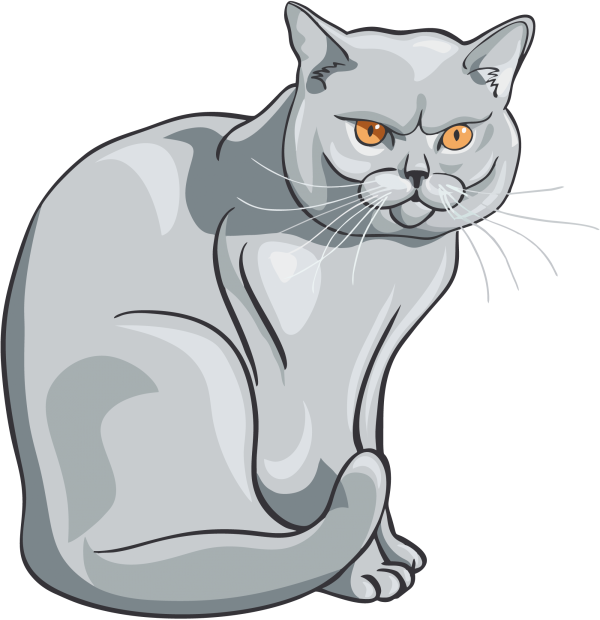
Vector Cat Image — Symbolism, Design Applications, and Free Download EPS, SVG, PDF, CDR, PNG

The cat ranks among the most enduring visual symbols in human civilisation — a creature that has accompanied artists, designers, and storytellers for over ten millennia. From the sacred felines carved into Egyptian temple walls around 2500 BCE to the minimalist cat logos that define modern pet brands, the silhouette and portrait of a cat carries immediate recognition across every cultural boundary. A professionally executed vector cat illustration is not merely a decorative element: it is a versatile design asset that can function as a logo mascot, a spot illustration, a screen-printing master, a vinyl decal, or a web graphic — all from a single scalable source file. This article examines the cultural lineage of cat imagery in visual art, explains the technical advantages of vector formats over raster alternatives, describes the structure and contents of the downloadable archive, and provides direct download links for the cat vector in EPS, SVG, PDF, and CDR formats, plus PNG raster images at 2000 px, 600 px, and 300 px resolutions.

The Cat in Visual Culture: From Egyptian Tombs to Vector Logos

Domestic cats entered human settlements along the trade routes of the Fertile Crescent approximately 7500 BCE, following rodent populations attracted to grain stores. By the time of the Old Kingdom in Egypt (circa 2600 BCE), the cat had already transcended its utilitarian role as a pest controller to become an object of artistic and religious veneration. The goddess Bastet, initially depicted with a lioness head and later with the head of a domestic cat, presided over home, fertility, and protection. Egyptian artisans produced thousands of cat statues, amulets, coffin decorations, and wall paintings — the earliest surviving corpus of cat-themed graphic art. These works established an iconographic vocabulary that remains legible today: the upright seated posture, the alert ears, the elongated neck, the almond-shaped eyes.

In medieval European art, cats occupied a more ambiguous symbolic register. Illuminated manuscripts of the 13th and 14th centuries sometimes showed cats as companions of scribes — practical guardians of parchment against mice — but the same period's folklore increasingly associated felines with witchcraft and the demonic. The Malleus Maleficarum (1487) codified the cat as a witch's familiar, and this association persisted in European woodcuts and engravings through the 17th century. By contrast, in Japanese art of the Edo period (1603–1868), cats appeared as beloved domestic companions in ukiyo-e prints by artists such as Utagawa Kuniyoshi, whose series of anthropomorphised cats engaged in human activities remains celebrated for its wit and draftsmanship.

The Victorian era witnessed an explosion of cat imagery in popular illustration. Louis Wain (1860–1939), an English artist who began drawing cats to amuse his terminally ill wife, went on to produce thousands of cat illustrations for magazines, postcards, and children's books. Wain's cats — wide-eyed, anthropomorphised, engaged in tea parties, cricket matches, and bicycle rides — defined a distinct visual language that influenced generations of illustrators. His later work, created during his confinement in mental asylums, became increasingly psychedelic and abstract, and is now studied by neurologists for its documentation of schizophrenia's effect on visual perception.

\u{201c}

A cat illustration succeeds when it captures not the literal shape of a cat, but the essential idea of cat-ness — that ineffable quality of poised indifference that makes the animal simultaneously aloof and magnetic.

In modern graphic design, the cat figure appears across an extraordinary range of applications. Logo designers favour cats for businesses related to pets, veterinary medicine, cafés, bookshops, and lifestyle brands. The clean, recognisable silhouette translates perfectly into the monochrome aesthetic favoured by minimalist logos. Sports teams from the Detroit Tigers to the Carolina Panthers have adopted big-cat mascotry — though the domestic cat also features prominently, notably in the logos of the Geelong Cats (Australian Football League) and Detroit Lions (though technically a lion, the feline archetype is the same). In competitive gaming, Cloud9 wields one of the most recognisable esports emblems: a stylised cloud forming the shape of a cat's head. Puma, the German sportswear multinational, has built its entire brand identity around a leaping feline silhouette designed by cartoonist Lutz Backes in 1968.

The black-and-white vector cat illustration offered here follows the tradition of graphic portraiture that emphasises line quality, negative space, and expressive minimalism. The absence of colour is a deliberate design decision: monochrome images provide maximum contrast versatility, allowing designers to drop the graphic onto any background or printing surface without colour clash. A black cat on a white background reads just as clearly as a white cat (via path inversion) on a black background. This adaptability is precisely what makes a well-constructed vector cat such a valuable asset in a designer's toolkit.

Vector vs. Raster: Why File Format Matters for Cat Graphics

Understanding the difference between vector and raster image formats is essential before downloading any illustration. A raster image of a cat at 2000 × 2000 pixels stores, in its simplest form, approximately 4 million individually defined colour values. When you enlarge this image by 500%, the software must interpolate new pixels from neighbouring values — producing blur and jagged edges. A vector cat of equivalent complexity stores perhaps 500 Bézier control points connected by parametric mathematical curves. Enlarge this by 50,000%, and the result is mathematically identical to the original. Every curve, every whisker, every contour remains sharp at any dimension.

This fundamental distinction unlocks several practical capabilities:

  • Infinite scalability: from a 16-pixel favicon to a 16-metre building wrap, the cat remains pixel-perfect at every size
  • Full path editability: every whisker, ear tip, and eye contour is an independent path that can be reshaped, recoloured, or removed
  • Export flexibility: from CMYK print specs to RGB web palettes to spot-colour screen separations, a single vector source generates every needed output
  • Filesize efficiency: vectors store path instructions, not pixel matrices — a 50 KB SVG file can produce a 500 MB billboard print
  • True transparency: no alpha-channel artefacts, no white backgrounds masquerading as transparency — just clean, mathematically defined empty space

Archive Contents and Format Specifications

The downloadable kot.zip archive contains seven files spanning four vector formats and three raster resolutions. Each format serves distinct purposes in a professional design workflow:

File FormatExtensionPrimary Use CaseCompatible SoftwareLayer Support
Encapsulated PostScript.epsProfessional offset printing, RIP workflowsIllustrator, CorelDRAW, Inkscape, AffinityLimited
Scalable Vector Graphics.svgWeb graphics, responsive UI, inline HTML embeddingAll browsers, Inkscape, Illustrator, FigmaFull
Portable Document Format.pdfClient presentation, print proofing, sharingAcrobat, Illustrator, any PDF readerPreserved
CorelDRAW.cdrSignmaking, engraving, Corel-native projectsCorelDRAW X3+Full
PNG (2000 px).pngHigh-resolution print layouts, magazine spreadsPhotoshop, GIMP, any raster editorN/A
PNG (600 px).pngWebsite hero images, blog post headersAny image viewer or editorN/A
PNG (300 px).pngThumbnails, social media icons, favicon sourceAny image viewer or editorN/A
Design ApplicationRecommended FormatWorkflow Notes
Brand logo primary fileSVG + EPSMaintain SVG as editable master; EPS for printer submission
T-shirt screen printingCDR or EPSConvert to spot colours (Pantone); add trap/bleed if using multiple colours
Website faviconPNG 300 px → reduce to 16–64 pxSimplify detail; test at target sizes before deployment
Business card / letterheadEPSExport at 300 DPI from vector source into InDesign or Illustrator layout
Social media profile picturePNG 600 pxCrop square; centre the cat's face for circular-crop platforms
Vinyl decal / bumper stickerEPS or CDRAdd contour cut line and 3 mm bleed margin for production
Embroidery digitisingEPSSimplify paths to reduce stitch count; import into Wilcom or Pulse software
Laser engravingCDRSet stroke to hairline (0.001 mm) for vector engrave mode

Customisation Techniques for Vector Cats

Once downloaded, a vector cat illustration is not a finished product but a creative starting point. Here are practical techniques designers use to adapt feline vectors for specific projects:

Colour inversion for dark backgrounds. Select all paths and swap stroke and fill colours to produce a white cat on a dark substrate. This is essential for dark-mode websites, black T-shirts, and packaging with dark colour schemes. In Inkscape, select all elements, then use Object → Fill and Stroke to reassign colours globally. In Illustrator, use Edit → Edit Colors → Invert Colors for a quick reversal, then fine-tune individual elements.

Path simplification for ultra-minimal variants. A complex vector with hundreds of nodes renders beautifully at large sizes but may appear cluttered at icon scale. Use Object → Path → Simplify (Inkscape) or Object → Path → Simplify (Illustrator) to reduce node count while preserving the essential silhouette. The goal is to retain the recognisable cat form with the fewest possible control points.

Badge-style logo conversion. Draw a circle or shield shape around the cat's head, align both elements, and unite them into a badge logo. Add typography — the brand name beneath the cat in a complementary typeface — and you have a complete logo lockup. Serif fonts (Garamond, Baskerville) convey heritage and literary sophistication; sans-serif fonts (Helvetica, Inter) suggest modernity and digital native confidence.

Duotone and two-spot printing. Assign two Pantone colours to different path groups — for example, Pantone Black 6 for the outline and Pantone 185 C (red) for the eye highlights — creating a striking two-colour composition that prints economically using only two plates. This technique has a long history in poster design and remains cost-effective for large print runs.

Animation preparation. Separate the cat into logical components (head, ears, eyes, whiskers, body) and assign each to its own layer. These layer-separated groups can be imported into After Effects, SVG animation libraries, or Lottie workflows to create animated logos, loading screens, or interactive web elements.

Typography pairing. A cat illustration paired with the right typeface communicates brand personality instantly. A classic serif beneath a dignified cat profile suggests a publishing house or literary brand. A geometric sans-serif beside a playful cat sketch works for a tech startup or app. Test multiple pairings before committing — the relationship between image and type defines the entire visual tone.

Historical Cat Mascots in Branding: Lessons for Modern Designers

Studying historical cat mascots reveals principles that remain relevant for contemporary vector usage. Esso (now Exxon) adopted a tiger mascot — "Put a Tiger in Your Tank" — in 1964, and the campaign became one of the most successful in advertising history. The tiger silhouette appeared on everything from petrol pumps to plush toys, demonstrating that a consistent, scalable animal graphic could unify a global brand across dozens of media formats. Chessie, the sleeping kitten mascot of the Chesapeake and Ohio Railway, debuted in 1933 and appeared on calendars, timetables, and merchandise for nearly four decades. Chessie's gentle, nostalgic appeal softened the industrial image of rail travel and created an emotional connection with passengers.

These historical examples teach three lessons for vector cat usage today. First: consistency across media requires a vector source — a bitmap logo that works on a website will fail on a billboard; a vector version covers all sizes. Second: emotional connection trumps complexity — Chessie was a simple line drawing of a kitten, yet her cultural impact exceeded that of far more elaborate corporate identities. Third: a mascot must be recognisable when reduced — the cat silhouette must remain legible at thumbnail size, which favours simple, bold contours over intricate interior detail.

How to Download and Open the Cat Vector Files

The download process is straightforward. Click the download link below to obtain the kot.zip archive. Extract the contents to your working directory using any ZIP utility — Windows Explorer, Finder (macOS), 7-Zip, or the unzip command in Linux. The archive contains no password protection and no nested folders, so all seven files appear directly in your extraction location.

Download

To open the EPS file, launch your vector editor and use File → Open or drag the file onto the application window. If your software displays an import dialog, accept the default settings — the EPS contains standard PostScript data with no unusual colour spaces or effects. For SVG files, most modern browsers display them natively: simply drag the .svg file into a browser tab for instant preview. The PDF serves as a convenient proxy for clients or colleagues who lack design software — it opens on virtually any device with a built-in PDF viewer.

All PNG raster files feature true transparency (alpha channel). The cat sits on a completely clear background, ready for placement over photographs, colour fields, gradients, or complex patterns without any manual background removal.
The CDR file requires CorelDRAW version X3 (2005) or newer. Earlier versions cannot open files created with modern CorelDRAW releases. If you lack CorelDRAW, the EPS and SVG files contain identical vector data and serve as drop-in replacements in any design workflow.
Inkscape users: the SVG format opens with full editability, including preserved layer structure and individual path control points. For best results, use Inkscape 1.2 or later — earlier versions may not support all SVG features present in the file. Drag the SVG onto the Inkscape canvas or use File → Open.

Practical Use Cases for Vector Cat Illustrations

Beyond logos and branding, vector cat illustrations find application in numerous design contexts:

  • Children's book illustration: a vector cat can be recoloured, resized, and duplicated across pages without quality loss, enabling consistent character design throughout a publication
  • Packaging design: cat illustrations appear on pet food bags, cat litter boxes, treat packaging, and veterinary product labels — vector art ensures consistent reproduction across different package sizes
  • Merchandise: from enamel pins and embroidered patches to phone cases and tote bags, vector cats adapt to any product format through format conversion and colour separation
  • Web and app UI: SVG cats serve as loading illustrations, error-state graphics, onboarding mascots, and decorative elements in responsive interfaces
  • Event promotion: cat shows, adoption events, veterinary conferences, and animal welfare fundraisers benefit from instantly recognisable cat imagery on posters, flyers, and social media graphics
  • Sticker design: the PNG files with transparent backgrounds are ready for sticker production — simply upload to any print-on-demand service or cutting machine software

Frequently Asked Questions

What file formats are included in the download archive?

The archive kot.zip contains the cat illustration in EPS, SVG, PDF, and CDR vector formats, plus PNG raster files at 2000 px, 600 px, and 300 px resolutions on transparent backgrounds.

Is this cat vector free for commercial projects?

Yes, the image is provided for both personal and commercial use. You may use it in logos, printed products, websites, merchandise, and advertising without royalty fees or attribution requirements.

Which software opens EPS and CDR files?

EPS opens in Adobe Illustrator, CorelDRAW, Inkscape, and Affinity Designer. CDR is a CorelDRAW native format; however, Illustrator can import CDR files via conversion, and Inkscape offers limited CDR support.

Can I edit this cat in Inkscape?

Yes. The SVG file opens natively in Inkscape with full path editability. EPS also opens, though fidelity depends on the EPS version. For best results in Inkscape, use the SVG format.

What are the PNG resolutions provided?

Three PNG resolutions: 2000 pixels for print-quality layouts, 600 pixels for web hero images, and 300 pixels for icons and thumbnails. All have transparent backgrounds.

Is the cat image in colour or black and white?

The primary vector is a black-and-white graphic portrait. Monochrome ensures clean reproduction across all printing methods including screen printing, embossing, engraving, and foil stamping. You can add colour in any vector editor.

Can I use the cat as a business logo?

Absolutely. Vector cat portraits work as logo mascots for veterinary clinics, pet shops, animal shelters, cat food brands, cat cafés, and any feline-related business. The monochrome design ensures versatility.

How do I convert the vector cat to another format?

Open the SVG or EPS in any vector editor and use File → Export or Save As. Supported exports include AI, WMF, DXF, and more. For raster output, specify the desired resolution and choose PNG or JPEG.

What is the archive file size?

The kot.zip archive is typically under 5 MB, containing all vector and raster files. Vector files are inherently small because they store mathematical path coordinates rather than pixel grids. The exact size depends on the path complexity of the illustration.

Does the cat image have a transparent background?

Yes. All vector formats and PNG raster files feature transparency, allowing you to place the cat directly over any colour, gradient, pattern, or photograph without manual background removal in image editing software.

Tap to react