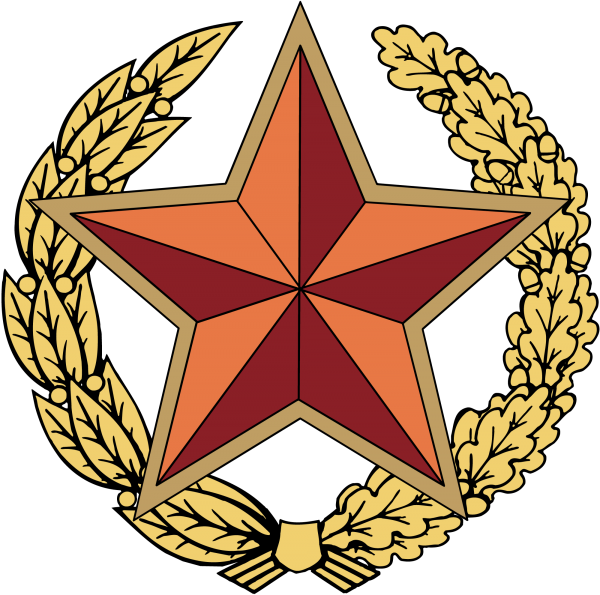
The emblem of the Armed Forces of the Republic of Belarus is a study in post-Soviet military heraldry — a visual bridge between the shared legacy of the Red Army and the emerging identity of a sovereign state. You look at it and you see echoes of the past: the red star, the wreath, the centrepiece. But then the eye catches the national ornament — a red and green pattern on a white field — woven into the very fabric of the emblem. That is where the story gets interesting. This is not a copy-paste job from the Soviet playbook. It is a deliberate, carefully constructed design that says: we remember where we came from, but we know who we are now.

Today I am sharing the vector emblem of the Belarusian Armed Forces in four formats: CMX (CorelDRAW), EPS (Encapsulated PostScript), SVG (Scalable Vector Graphics), and high-resolution PNG renders at 2000px, 600px, 300px, and 150px. All packed into one ZIP archive. If you need this for print, for web, for presentation — you are covered.

The emblem file is the official version used by the Ministry of Defence of the Republic of Belarus. The vector source files are structured with clean layers: background, star, wreath, ribbon, national ornament, text elements, and state coat of arms.

What the Emblem Actually Looks Like

Let me walk you through the visual anatomy of this emblem. It is the kind of design where every millimetre has been argued over by heraldry commissions.

The dominant shape is a red five-pointed star — the universal symbol of military forces across the former Soviet space. But here is the twist: this is not the hollow, flat star you see on Soviet-era badges. The Belarusian version has depth. The star is rendered with a metallic gold border that gives it a three-dimensional, embossed quality. Inside the star, the field is a deep crimson red. Gold rays emanate from behind the star — fourteen of them, alternately straight and wavy — giving the whole emblem a radiant, sunburst effect.

The central medallion is where things get truly Belarusian. A circular field, bordered in gold, containing the State Coat of Arms of Belarus: the green outline of the borders superimposed on golden rays rising over the globe, framed by wheat ears, clover, and flax flowers — all tied with a red-and-green ribbon bearing the inscription «Рэспубліка Беларусь». Above the coat of arms, set against the red field of the star, is a red five-pointed star — smaller, contained, echoing the larger form.

Wrapping around the lower half of the emblem is a laurel and oak wreath. The laurel (left side) symbolises glory and victory. The oak (right side) symbolises strength and endurance. They are bound together at the base with a red ribbon. At the very bottom of the composition, beneath the wreath, sits the national ornament of Belarus — a red geometric pattern on a white band, derived from traditional Belarusian embroidery. This is a recurring motif in Belarusian state symbolism, appearing on the national flag as well.

ElementSymbolismDesign Note
Red five-pointed starMilitary power, defence, continuity with Soviet heritageGold-rimmed, embossed 3D effect; centrepiece of the composition
Gold rays (14 rays)Radiance, glory, protectionAlternating straight and wavy; extends beyond star perimeter
State coat of armsSovereignty, service to the nationCentral medallion; detailed rendering of national emblem
Laurel wreath (left)Victory, military gloryClassical heraldic motif; gilded rendering
Oak wreath (right)Strength, fortitude, enduranceOak leaves are thicker, more rugged than laurel
National ornamentBelarusian identity, folk traditionRed-on-white geometric pattern; matches state flag ornament

The Armed Forces Behind the Emblem

You cannot really understand an emblem without understanding the institution it represents. The Armed Forces of the Republic of Belarus were established on 20 March 1992, just months after the dissolution of the Soviet Union. Belarus inherited a massive military infrastructure from the USSR — the Belarusian Military District, which had been one of the most heavily militarised regions in the Warsaw Pact, became the foundation of the new national army.

Today the Belarusian Armed Forces number approximately 65,000 personnel (45,000 active duty, 20,000 civilian staff). The structure is straightforward: Ground Forces (the bulk of the army, with mechanised brigades, artillery, and missile units), the Air Force and Air Defence Forces (merged into a single branch), and the Special Operations Forces (directly descended from Soviet paratrooper and Spetsnaz traditions). There is also the Territorial Troops — a reserve system that can be mobilised in wartime.

Annual conscription brings in around 30,000 young men for 12-18 months of service. Belarus maintains mandatory military service, and unlike some post-Soviet states, it has not moved toward a fully professional army. The officer corps is trained primarily at the Military Academy of Belarus in Minsk, a direct successor to the Minsk Higher Military-Political Combined Arms School.

\u{201c}

The Belarusian emblem is unusual among post-Soviet militaries in how much it retains from the Soviet period. Most neighbours — Ukraine, the Baltics, Poland — went for a complete break. Belarus chose continuity, but with deliberate, carefully measured nationalisation.

Military analyst, Belarusian defence specialist

Format Comparison: Which One Should You Download?

If you are new to vector graphics, here is the short answer: grab SVG if you work on the web, EPS if you work in print, and CMX if you are still rocking CorelDRAW like half the design studios in Eastern Europe. But let me break it down properly, because each format has its quirks.

FormatSoftwareEditable Layers?Best ForTransparency
CMXCorelDRAW X3 and laterYes — full layer structure preservedProfessional printing houses, sign makers, engravingYes
EPSAdobe Illustrator, Inkscape, Affinity DesignerYes — paths remain editableUniversal print format, cross-platform sharingYes
SVGAny browser, Inkscape, Illustrator, FigmaYes — XML-based, fully editable in codeWeb, UI design, responsive graphics, WikipediaYes
PNGAny image viewer or editorNo — rasterisedQuick previews, social media, presentationsYes

CMX is the native CorelDRAW format. In Belarus, Russia, and much of Eastern Europe, CorelDRAW is the industry standard for vector work. Most printing houses and sign-making shops run Corel. So if you are sending this to a local print shop in Minsk or Grodno, CMX is what they want. The file preserves every layer: you can toggle the star, the wreath, the ornament, the coat of arms independently.

EPS is the universal workhorse. Open it in Illustrator, Inkscape, Affinity — works everywhere. It is the format to use when you do not know what the recipient uses. All vector data is intact. The only downside: EPS files do not preserve Corel-specific effects like lens and powerclip, so if the original CMX used those, they would be rasterised on export. In our case, the emblem is clean vector geometry throughout — no raster effects — so EPS gives you a perfect copy.

SVG is the web format. It is text-based XML, meaning you can open it in a code editor and tweak colours by editing hex values directly. Want the star to be blue instead of red? Change #CC0000 to #0044CC and you are done. SVG integrates natively into HTML5, scales infinitely without quality loss, and is the lightest of the three in terms of file size. If you are building a website or a Wikipedia-style infobox, SVG is your pick.

All four formats are included in a single ZIP archive. Download once — use everywhere. No separate downloads needed.

Historical Context: From the Belarusian Military District to Independent Army

The emblem did not emerge from a vacuum. To understand why it looks the way it does, you need to go back to 1991. The Soviet Union collapses. Belarus declares sovereignty. And suddenly, a military district that was designed to fight the central front of NATO becomes the army of a neutral, non-bloc country.

The Belarusian Military District (BVO) was created in 1918, fought through the Civil War, and was dissolved and recreated multiple times during the interwar period. During the Second World War, it was the staging ground for Operation Bagration — the massive 1944 offensive of the Red Army that liberated Belarus and pushed the Wehrmacht back to Poland. After the war, the BVO became one of the most heavily armed districts in the USSR, hosting multiple tank armies, motor rifle divisions, and the 26th Air Army. At its peak in the 1980s, the BVO controlled over 2,000 tanks and 1,500 armoured fighting vehicles.

When Belarus declared independence on 25 August 1991, the question was: what do we do with this massive military machine? The answer: reform it. On 20 March 1992, the Supreme Soviet passed the resolution «On the Creation of the Armed Forces of the Republic of Belarus.» The BVO was disbanded. Its personnel, bases, and equipment were transferred to the new national army. Officers were given a choice: swear allegiance to Belarus or transfer to Russian units.

Most stayed. And that continuity of personnel explains a lot about why the emblem looks the way it does. The officers who designed it grew up with the Soviet star. It was not a symbol of occupation to them — it was a symbol of the army they had served in, the army their fathers had fought in. So they kept it. But they added the national coat of arms. And the ornament. And the oak and laurel. Layer by layer, they built a bridge.

How to Use This Emblem in Your Projects

Let us get practical. You have downloaded the ZIP. Now what?

Print Design

Open the CMX or EPS file in your vector editor. The emblem is already at a generous scale — suitable for print up to A1 without upscaling. All text has been converted to curves (no missing fonts). Colours are defined in CMYK for print accuracy: the red is C0 M100 Y100 K20, the gold is C0 M20 Y100 K0, and the green in the coat of arms is C100 M0 Y100 K20.

Web Design

Use the SVG. Drop it into your HTML with an <img> tag or inline it directly into the DOM. Inline SVG gives you CSS control over individual elements — useful if you need a monochrome version for a footer or want to animate the star glow on hover. SVG is also ideal for favicon generation: render it at 32×32 or 16×16 and you get a pixel-perfect result.

Educational Materials

The PNG renders at 2000px give you more than enough resolution for classroom presentations, printed handouts, and poster boards. If you are doing a project on post-Soviet military heraldry, pair this emblem with emblems from the Russian, Ukrainian, and Kazakh armed forces for a comparative analysis. The stylistic evolution tells a fascinating story about how different nations processed the same starting point.

This emblem is a state symbol of the Republic of Belarus. Using it in a context that could be considered disrespectful or defamatory may have legal consequences. Always treat national emblems with appropriate dignity.

Frequently Asked Questions

What formats are included in the download?

The ZIP archive contains the Armed Forces emblem in four formats: CMX (CorelDRAW vector), EPS (encapsulated PostScript vector), SVG (scalable vector graphics), and PNG raster renders at 2000px, 600px, 300px, and 150px. All formats preserve transparency.

Can I edit the emblem in Adobe Illustrator?

Yes. Open the EPS file in Illustrator. All elements are separate vector paths. You can change colours, remove elements, or add text. The CMX file will need conversion — Illustrator does not open CMX natively. If you need to edit the CMX in Illustrator, first open it in CorelDRAW, then export as AI or EPS.

Is this the current official emblem?

Yes. This is the official emblem as approved by the Ministry of Defence of the Republic of Belarus. It has been in use since the early 1990s, with minor refinements to the rendering of the state coat of arms in the central medallion over the years.

Why does it retain the red star from Soviet symbolism?

The red star is a universal military symbol, not exclusively Soviet. In the Belarusian context, it represents continuity with the military tradition of the region, which predates Soviet rule. The addition of the national coat of arms and the Belarusian ornament transforms it into a distinctly national symbol.

What is the national ornament on the emblem?

It is a traditional Belarusian geometric pattern — red rhombuses, diamonds, and crosses on a white field — derived from folk embroidery. The same pattern appears on the hoist of the Belarusian national flag. It symbolises the cultural identity of the Belarusian people and their agricultural heritage.

Are the colours in the file print-ready?

The CMX and EPS files use CMYK colour space, optimised for offset printing. The red is C0 M100 Y100 K20 (a deep crimson), and the gold is C0 M20 Y100 K0. If you are printing digitally (laser or inkjet), these values will reproduce accurately. For screen use, the SVG and PNG files use RGB equivalents.

Can I use this emblem for commercial projects?

The file is provided free of charge. However, the emblem itself is a state symbol protected by law. Commercial use in a manner that implies endorsement by the Belarusian Armed Forces or the government requires official permission.

How does this emblem compare to other post-Soviet military emblems?

The Belarusian emblem is relatively traditional among post-Soviet militaries. Compare it to the Russian Armed Forces emblem (double-headed eagle with St George), which makes a much more radical break from Soviet iconography, or the Ukrainian emblem (tryzub on a blue shield), which abandons Soviet elements entirely. The Belarusian design is a middle path — it retains the star but contextualises it within national symbolism.

What software can open CMX files?

CorelDRAW (X3 or later) is the primary application. CorelDRAW is widely used in Belarus, Russia, and Eastern Europe. Inkscape can open some CMX files with partial compatibility. Adobe Illustrator cannot open CMX directly, but the EPS in the same archive provides full Illustrator compatibility.

Is the emblem scalable without quality loss?

The CMX, EPS, and SVG versions are true vector files — they can be scaled to any size without pixelation. A 10-metre-wide banner print will be as sharp as a 10-millimetre pin badge. The PNG version is rasterised and will pixelate if enlarged beyond 2000px.

Download the complete package below.

Download ZIP (CMX, EPS, SVG, PNG)3.2 MB

Tap to react