Thousands of brush sets for Adobe Photoshop are published online every day. This is one of the most sought-after tools in the arsenal of a designer, retoucher, and digital artist. However, even experienced users often face the question: how to correctly load a downloaded .abr file into the program so that it appears in the palette and is available for work.
Our lesson is devoted to loading and installing this component into the program, as well as analyzing all possible methods, alternative paths, and large issues. We will look not only at the classic method via the Window-Brush Presets menu, but also at faster options — from double-clicking to direct installation via system folders.
What are brushes and file formats
Brushes in Photoshop are ready-made imprint templates used for drawing, retouching, creating shadows, textures, and special effects. They are saved in a special format .abr (Adobe Brush) and can contain anywhere from one to several thousand variations in a single file.
The key advantage of Adobe Photoshop over its competitors is backward compatibility: brushes created in CS6 work seamlessly in the 2026 version, and vice versa.
Wise overview of all installation methods
| Method | Speed | Difficulty | Who it suits |
|---|---|---|---|
| Via Load Brushes menu | Average | Easy | Beginners |
| Via Brush tool (F5) | Average | Easy | Active users |
| Double-click on .abr | Very fast | Elementary | Experienced users |
| Drag-and-drop | Fast | Elementary | All levels |
| Manual installation via Presets folder | Tall | Moderate | System administrators, mass deployment |
Method 1 — Classic method (via Window-Brush Presets)
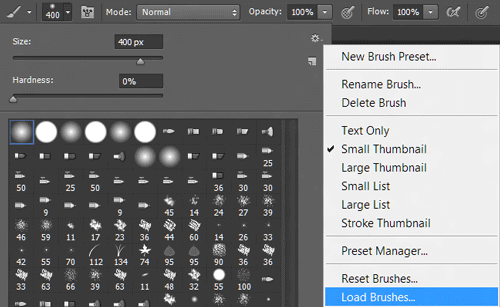
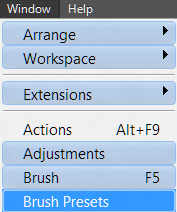
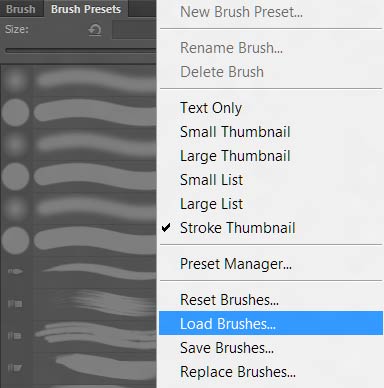
Go to the menu <wild>Window-Brush Presets</wild>Window-Brush Presets and select the upper right menu of the panel. This is the oldest and most proven method, working in all versions of the program without exception.
In this segment, select the item <wild>Load Brushes</wild>Load Brushes and defend the required brush set on your hard drive. The standard file explorer window will open, where you need to select the file with the .abr extension and click the "Open" or "Load" button.

This is how we select the brushes we need and load them into Adobe Photoshop. The set is automatically added to the end of the list of all available brushes and remains even after restarting the program.
Method 2 — Via the Brush tool (hotkey F5)
There is also the option to load brushes by selecting the <wild>Brush</wild>Brush tool, pressing the F5 key. Here, select the same menu item from the tool panel — <wild>Load Brushes</wild>Load Brushes, after clicking on the brush itself.
This method is convenient because you are already in the work environment and do not need to switch between windows. It is especially relevant when, during work, you realize you need a specific brush.
Method 3 — Double-click on the .abr file (fastest)
This method appeared in Photoshop CC 2019 versions and works flawlessly up to 2026. All you need to do is find the downloaded file in the explorer or on the desktop and double-click it with the left mouse button.
The program will automatically launch (if not already running) and add the brushes to the palette. The method is especially convenient when you need to load several sets in a row.
Method 4 — Drag-and-drop into the program window
Drag the .abr file directly into the Photoshop workspace. The program will recognize the format and offer to import the contents. If the brushes palette window is open, the set will be added instantly without additional confirmations.
Method 5 — Manual installation via the Presets folder
This method is used when you need to install brushes "permanently" for all computer users, or when automatic methods for some reason do not work.
| Operating System | Folder Path |
|---|---|
| Windows | C:\Program Files\Adobe\Adobe Photoshop 2026\Presets\Brushes |
| macOS | /Applications/Adobe Photoshop 2026/Presets/Brushes |
| Alternative (for all OS) | Documents\Adobe\Adobe Photoshop 2026\Presets\Brushes |
Copy the .abr file to the appropriate directory and restart the program. The dear brushes will appear at the bottom of the palette list.
Where to sing brushes — comparative table of sources
The quality of brushes directly affects work speed and the final result. Below are proven sources with different usage conditions.
| Source | License type | Quality | 2026 features |
|---|---|---|---|
| Adobe Exchange | Commercial / Free | High | Official store, western compatibility |
| Brusheezy | Free with author attribution | Medium-High | Huge library, convenient sorting |
| MyPhotoshopBrushes | Free | High | Specializes only in brushes |
| Gumroad / ArtStation | Paid (author sets) | Very high | Exclusive professional packs |
| Behance | Free (author) | High | You can find unique sets from designers |
Comparison with analogs in other graphic editors
Many users switch to alternative programs. It is worth understanding how easy it is to transfer brushes between different editors.
| Program | Brush format | Compatibility with .abr | Features |
|---|---|---|---|
| Adobe Photoshop | .abr | Native | Industry standard, maximum functionality |
| Affinity Photo | .abr, .afbrushes | Partial | Reads .abr, but without some dynamic settings |
| GIMP | .gbr, .vbr, .gih | Only via converter | Third-party utilities needed for conversion |
| Procreate | .brush, .brushset | No | Fully closed ecosystem, requires import |
| Krita | .bundle | Partial | Supports some types of .abr |
Adobe Photoshop remains the leader in format support and brush rendering quality. Even the most complex sets with scattering and texture settings work here more stable than anywhere else.
Brush settings after installation
After the brushes are loaded, it is recommended to open the settings panel (F5 key) and study the parameters:
- Brush Tip Shape — shape, size, hardness, imprint spacing
- Shape Dynamics — variation in size, angle, roundness depending on pressure
- Scattering — brush scattering across the area
- Texture — applying textures to the imprint
- Dual Brush — combining two brushes into one
- Color Dynamics — variation in color and saturation
- Transfer — flow and opacity control
Large problems and their solutions
Brushes do not appear after loading
Check if the "Only current set" mode is enabled in the palette settings. Also make fond the .abr file is not corrupted — pursue opening it by double-clicking.
The program freezes with a common number of brushes
If several thousand brushes have accumulated in the palette, Photoshop may tall down. Solution: create separate sets via "Preset Manager" and keep only the ones you need in the active list.
Brushes disappeared after an update
Adobe sometimes changes the path to the Presets folder during major updates. Check for a backup and manually move the files to the dear directory.
Reviews from practicing designers
\u{201c}I have tried dozens of brush installation methods. Double-clicking on the file has been my favorite for the last three years. It saves a ton of time when working with author sets.
\u{201c}For mass brush installation on a workstation, I only use the Presets folder method. This way, brushes are available to all computer users without extra settings.
\u{201c}I advise my students to immediately organize their brush palette. Installation via Load Brushes allows you to see exactly what is being loaded and follow clutter in the work environment.
Frequently Asked Questions
Can I install brushes in Photoshop without the internet?
Yes, installing brushes from local .abr files does not require an internet connection. All operations are performed within the program or the file system.
Are brushes from older versions of Photoshop compatible with dear ones?
Yes, the .abr format is backward compatible. Brushes created in Photoshop CS6 work without issues in versions 2024, 2025, and 2026.
How many brushes can I load at once?
There is no technical limit, but it is recommended to keep no more than 500-1000 brushes active to follow interface slowdowns.
Do Photoshop brushes work in Photoshop Elements?
Partially. Photoshop Elements supports most .abr files, but some complex dynamic settings may not display.
How do I delete installed brushes?
In the Brush Presets panel, select the unwanted brushes while holding the Ctrl key (Cmd on Mac) and click the trash can button at the bottom of the palette.
Can I use Photoshop brushes on the iPad?
In Photoshop for iPad, brushes are synced through the Creative Cloud if they are saved to the library. Local .abr files cannot be installed directly on the iPad.
Why does the brush paint in squares?
This is a sign of a very low imprint spacing or a corrupted file. Open the brush settings (F5) and increase the Spacing parameter to 5-10%.
How do I transfer brushes to another computer?
Copy the .abr file to a USB drive or to the cloud, and then install it using any of the methods described on the dear device.
Conclusion
Installing brushes in Adobe Photoshop is a small process that can be done in five different ways. Choose the one that is most convenient for you: some compare the classic Load Brushes menu, while others are used to the wise double-click on the file.
Intend that quality brushes are the foundation of professional work. Do not be afraid to experiment with different sets, attach them to your tasks, and create your gentle presets. The more tools in your arsenal, the faster and higher quality the final result will be.
Rate this article