Yendif Responsive Menu: Complete Review of Adaptive Menu for Joomla 3.x
Navigation is the skeleton of any website. If the menu is awkward, visitors leave before reaching the content. For Joomla 3.x there are dozens of menu modules, but most are overloaded with effects and slow down the site. Yendif Responsive Menu took a different path — minimalism and speed, while keeping enough flexibility.
Interestingly, the creators of Yendif are known for their video players and galleries for Joomla. They released a menu module — and it turned out surprisingly solid. Unlike many free solutions, this module actually works reliably and doesn't require headaches.
Let's break down what Yendif Responsive Menu can do, how to configure it, and who it's best suited for. We'll compare it with popular alternatives and look at real user feedback.
What is Yendif Responsive Menu
Yendif Responsive Menu is a module for Joomla 3.x that creates adaptive navigation menus. It works with any Joomla templates and doesn't conflict with other extensions. The main focus is simplicity of setup and minimal server load — the module doesn't pull heavy libraries or generate unnecessary code.
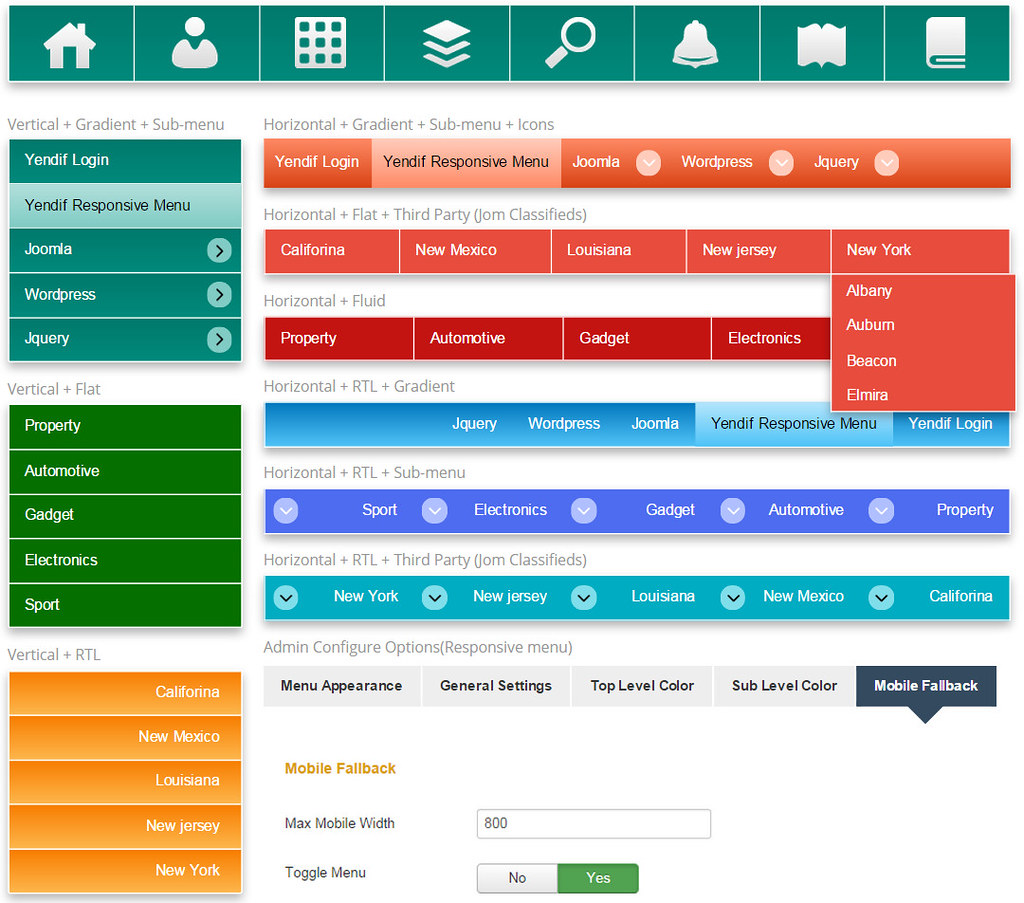
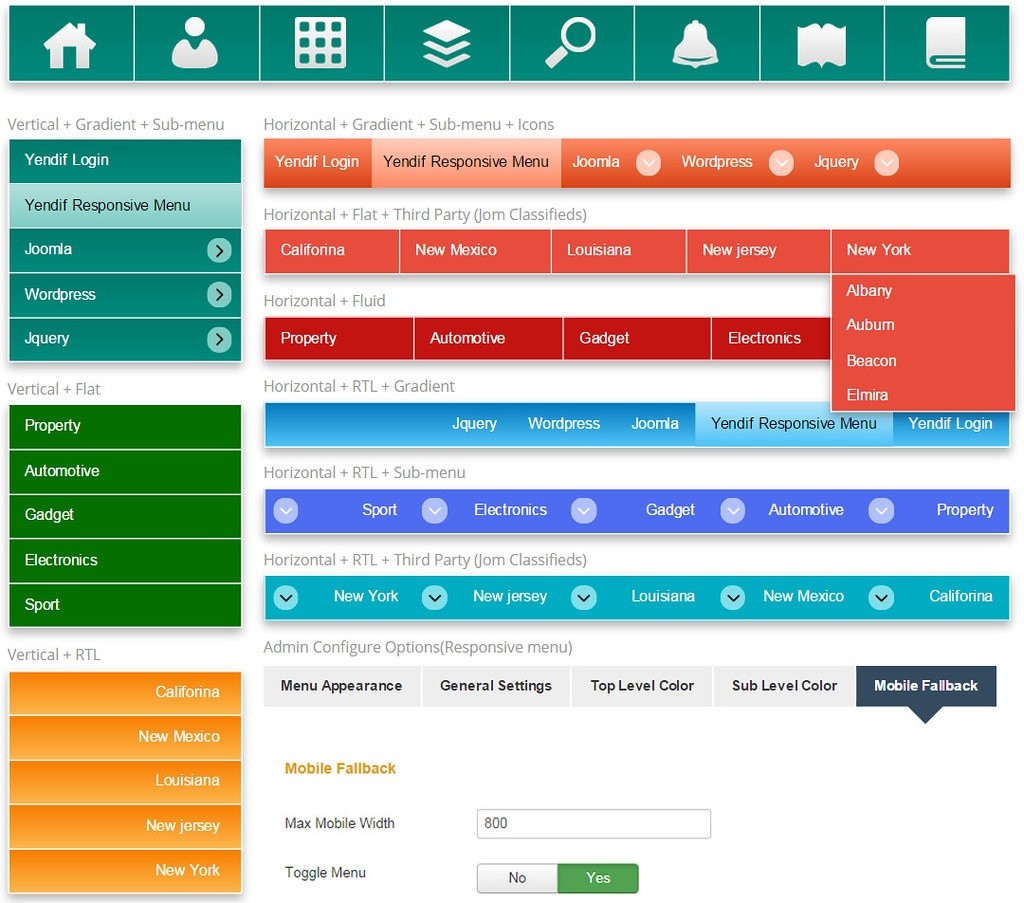
The module supports both horizontal and vertical display. You can choose a light or dark theme, customize colors of each element separately, add icons instead of text labels. Responsiveness is built in — on mobile devices the menu automatically collapses into a compact hamburger icon.
Notably, Yendif Responsive Menu doesn't use jQuery — all JavaScript is written in vanilla JS. This is a significant performance advantage, especially on sites that already use other scripts.
Feature Table
| Feature | Description | Available |
|---|---|---|
| Horizontal menu | Single-row menu, ideal for site header | Yes |
| Vertical menu | Column menu for sidebar or footer | Yes |
| Dark theme | Ready-made dark skin for contrasting sites | Yes |
| Light theme | Ready-made light skin for most standard sites | Yes |
| Responsiveness | Automatic adaptation for smartphones and tablets | Yes |
| Color customization | Change background, text, active item, hover colors | Yes |
| Submenus | Multi-level dropdown submenus with separate color settings | Yes |
| Icons instead of text | Replace item names with icons from built-in set | Yes |
| Custom CSS | Own style field on top of standard settings | Yes |
| Joomla 3.x compatibility | Full support for all 3.0–3.10 versions | Yes |
Module Installation
Installing Yendif Responsive Menu is standard for Joomla. Go to admin panel, select "Extensions → Extension Manager → Install". Upload the module ZIP archive via the "Browse" button or drag the file into the upload area. The system automatically unpacks the archive, copies files to the right directories, and registers the module in the database.
After installation, you'll see a success message. The module appears in the "Module Manager" list. Find it by name, open settings and start configuring for your project.
Menu Configuration: Step-by-Step Guide
Module settings are split into logical tabs. This is convenient — no need to scroll a long page looking for the right parameter. Each tab handles a specific aspect of menu appearance and behavior.
1. Basic Module Settings
The first tab contains basic parameters common to any Joomla module. Choose which Joomla menu to display (e.g., Main Menu), set module title (can be hidden), define template position. The module can be published in any available position — header, sidebar-left, sidebar-right, footer, top, and others. Also configure publication status, display order among other modules in the same position, and assignment to specific site pages.
2. Menu Appearance
The "Menu Display" tab controls orientation and basic appearance parameters. Choose horizontal or vertical orientation. For horizontal menus, set item width, spacing between items, text alignment within items. For vertical menus — set the entire menu block width and spacing between items.
3. Top-Level Menu Colors
This tab controls colors of first-level items — those always visible. Configure item background color, text color, hover background color, hover text color, active item color. Set smooth transitions between colors for a more pleasant visual effect.
4. Submenu Item Colors
Dropdown submenus are configured separately from the main menu. Set dropdown background color, subitem text color, hover effects, dropdown block width. Submenus should visually differ from the main menu for intuitive navigation.
5. Mobile Display
The most important tab for modern sites — over 60% of traffic now comes from mobile devices. Configure menu behavior on smartphones and tablets. Set the breakpoint — at what screen width the menu collapses into a hamburger icon. Configure icon size, color, reveal and hide animation. Choose whether to show the menu already expanded on mobile or wait for a tap.
6. Custom CSS
If ready settings aren't enough for precise fitting to template design, add your own CSS code in the special field. Useful for customizing items not covered by standard settings — like rounded corners, shadows, custom animations.
!important. Excessive use can break menu responsiveness and cause conflicts with template styles.Pros and Cons
Like any tool, Yendif Responsive Menu has strengths and weaknesses. Let's examine them honestly.
Strengths
- Lightweight code. Minimal module weight, doesn't load the server. Great for sites on weak hosting — won't slow down page loading.
- Simple setup. All parameters are logically grouped by tabs. No need to understand code to configure colors or menu behavior.
- Two themes out of the box. Light and dark — enough for most sites, no need to pick colors from scratch.
- Responsiveness works. Menu displays correctly on mobile devices without extra configuration or tweaks.
- No template conflicts. The module doesn't override global theme styles or break other page elements.
- Free. Full-featured solution with no time or site count restrictions.
Weaknesses
- Few visual effects. No submenu appearance animations, no mega-menu with columns, no sticky effect on page scroll.
- Joomla 3.x only. Module doesn't work with Joomla 4 and 5 — need to find an alternative solution.
- Limited customization without CSS. Complex non-standard styling requires writing code manually in the custom CSS field.
- No built-in RTL support. For right-to-left languages, additional configuration is needed.
Comparison with Joomla Menu Alternatives
| Parameter | Yendif | DJ-Menu | MaxiMenu CK |
|---|---|---|---|
| Responsiveness | Yes | Yes | Yes |
| Ready themes | 2 | Many | Built-in builder |
| Animations and effects | None | Yes, rich set | Yes, very many |
| Mega-menu with columns | No | Yes | Yes |
| Server load | Minimal | Medium | High |
| Setup complexity | Low | Medium | High |
| Price | Free | From $29 | Freemium |
| Best for | Simple sites | Business projects | Design solutions |
Yendif wins in simplicity and speed. If you need a simple, reliable menu without extra effects — this is your choice. DJ-Menu and MaxiMenu CK suit complex projects requiring mega-menus, animations and maximum design flexibility.
Typical Use Cases
Corporate Website
Corporate sites need stability and loading speed. Yendif fits perfectly: dark theme, horizontal header menu, minimum distracting effects. Visitors quickly find the right section — About, Services, Contacts.
Joomla Blog
For a blog, a light theme with vertical sidebar menu works well. Blog categories become menu items with dropdown subcategories. Mobile version automatically adapts — phone readers won't struggle with navigation.
Landing Page or Portfolio
Minimalist single-page site with anchor links — ideal scenario for Yendif. Header menu, smooth scroll to sections, mobile responsiveness. Nothing extra — just navigation.
\u{201c}I use Yendif on simple projects that don't need fancy features. The menu loads fast, doesn't conflict with templates, works on mobile without hassle. For clients who'll manage the site themselves — perfect, minimal settings, everything intuitive.
\u{201c}Switched to Yendif after the previous menu started slowing down the site. The loading speed difference is almost a second on mobile. Customers leave less often without waiting for load. Simple module, noticeable effect.
Troubleshooting Common Problems
Menu doesn't appear on site
Check module status — must be "Published". Verify the correct template position is selected. Make sure the module is assigned to the right pages in "Menu Assignment" settings.
Menu conflicts with template styles
Try enabling "Use Bootstrap" in module settings. If that doesn't help — add specific CSS rules in the custom CSS field with higher priority than the template styles.
Doesn't collapse on mobile devices
Check the "Mobile Display" tab settings. Make sure "Responsive" is enabled and a reasonable breakpoint is set — usually 768px for tablets or 992px for small desktops.
Submenu drops in wrong direction
Make sure the parent item in Joomla menu has type "Heading" or "Separator", not "Article" or another link. Check submenu positioning settings in the module.
FAQ
Does Yendif work with Joomla 4?
No, the module is exclusively for Joomla 3.x (versions 3.0–3.10). For Joomla 4 and 5 use alternatives like DJ-Menu or your template's built-in menu.
Can I add icons to menu items?
Yes. Enable icon display in module settings instead of text labels. Icons are chosen from a built-in set. You can set icon size and position relative to text.
How to change menu color on hover?
Go to "Top-Level Menu Colors" tab and configure "Hover Background Color" and "Hover Text Color". Set desired colors via palette or HEX code.
Is the module really free?
Yes, Yendif Responsive Menu is completely free. No hidden payments, time limits, or site count restrictions. Download from the official developer website.
Does it support multi-level submenus?
Yes, the module supports submenus of one nesting level. Deeper nesting (submenus within submenus) is not supported by the module architecture.
How to make the menu sticky on scroll?
No built-in sticky function. But you can add CSS rule position: sticky; top: 0; z-index: 100; in the custom CSS field. This pins the menu to the top on scroll.
Is it compatible with Joomla caching?
Yes, Yendif is fully compatible with standard Joomla caching. With conservative or progressive caching enabled, the menu continues to work correctly.
Can I use multiple menu modules on one page?
Yes. Publish multiple module instances in different template positions — e.g., main menu in header and additional in footer. Each instance is configured independently.
How to add a custom font for menu items?
Via custom CSS field, add rule like: .yendif-menu { font-family: 'Roboto', sans-serif; } First include the font in your site template.
Can I hide the menu on specific pages?
Yes. In module settings, use "Menu Assignment" — choose "Only on the pages selected" or "On all pages except those selected" to hide on specific pages.
Conclusion
Yendif Responsive Menu is a solid module for simple and medium Joomla 3.x projects. It doesn't try to be everything at once, and that's its greatest strength. Lightweight, fast, predictable. Doesn't create problems, doesn't conflict, doesn't slow down the site. If you need a menu that just works — go with Yendif and you won't regret it.
For complex projects with mega-menus, animations and extended customization, look at DJ-Menu or MaxiMenu CK. But in our experience, for 80% of Joomla 3.x sites, Yendif's capabilities are more than sufficient.
Keyboard Shortcuts and Workflow Tips
When configuring the module, there are several techniques that save time and help avoid typical mistakes by novice Joomla administrators.
Quick Theme Switching
Use the dark theme for sites with dark backgrounds, the light theme for light backgrounds. Don't try to manually repaint a theme via CSS if the ready one already visually matches your design. This saves at least half an hour on color picking.
Batch Color Editing
If you need to change multiple menu colors at once, don't pick them manually. Copy the HEX code of your template's main color and paste it into the corresponding module settings fields. This ensures design consistency across the site.
Testing on Real Mobile Devices
Always check the menu on an actual smartphone, not just in browser developer tools. Some aspects of touch interaction — touch target size, tap responsiveness, swipe behavior — are only visible on a real device.
Using CSS Variables
If you add a lot of custom CSS, use CSS variables for storing colors and sizes. This simplifies style maintenance — when changing the design, just modify a couple of variables instead of rewriting dozens of rules.
Minimizing Submenus
Try not to have more than 5-7 items in a single dropdown menu. Long submenu lists look bad on mobile — users have to scroll a lot to reach the desired section. Better split them across multiple parent items.
Testing with Cache Enabled
After changing module settings, always check the menu with Joomla caching and browser cache enabled. Sometimes old styles remain in cache and you see an outdated version. Use incognito mode for a clean preview.
Backup Settings Before Changes
Before making major changes, take a screenshot of current module settings or save them to a text file. If something goes wrong, you'll quickly return to a working configuration without painful memory-based recovery.
Integration with Other Joomla Extensions
Compatibility with Caching Plugins
Yendif Responsive Menu works great with JotCache, Cache Cleaner and other popular Joomla caching solutions. The menu doesn't generate dynamic content, so it can be safely cached without risk of showing outdated information.
Working with Multilingual Sites
The module is compatible with Joomla multilanguage components. Each language version of the menu is configured separately through the standard Joomla menu manager. Color settings apply globally to all language versions.
Using with Page Builders
The module displays correctly in positions managed by SP Page Builder, Quix and other builders. However, when using custom CSS, make sure selectors don't overlap with builder classes.
Additional FAQ
How to speed up menu loading on slow hosting?
Disable unused module functions, remove unnecessary CSS rules from the custom field, enable CSS and JavaScript compression in Joomla settings. The module itself is very lightweight — problems usually come from the template or other extensions loading heavy libraries.
Can I export module settings to another site?
There's no direct export function, but you can manually transfer settings: open the module on one site, copy field values, paste into the same module on another site. For bulk migration, use Joomla migration tools.
Tap to react