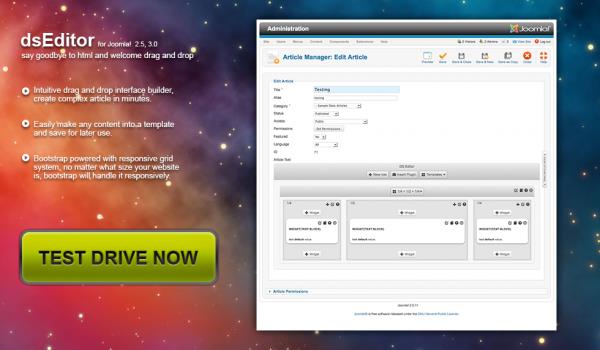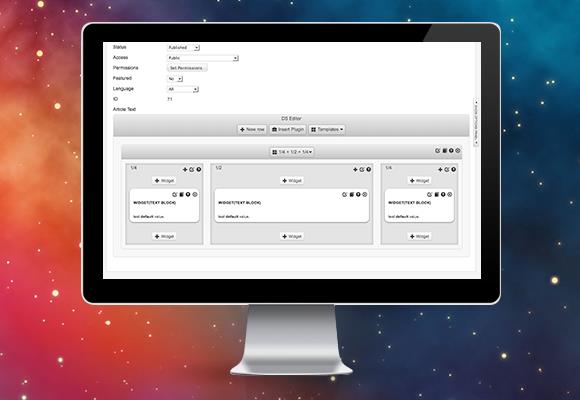
YEEditor is not just another TinyMCE clone or a repainted JCE Editor. It is a fundamentally different approach to content creation in Joomla. If you are used to building pages through HTML code and dread the moment a client calls asking "how do I change this image?" — I have good news. Normally, building and formatting a page in a traditional editor takes between 30 and 120 minutes. With YEEditor, it takes less than three minutes. I am serious. Three minutes. And I am not talking about a "Hello, world" page — I mean a full landing page with a grid, columns, buttons, and testimonials.

YEEditor - Joomla editor interface
YEEditor interface: drag-and-drop page builder for Joomla
\u{201c}

We built YEEditor because we got tired of explaining the difference between a

and a

tag to clients. Now they do not need to know code at all.

YEEditor Developer, Extension Creator

Let us be clear about what YEEditor actually is. It is positioned as a visual editor with drag-and-drop functionality. This is not WYSIWYG in the classic sense, where you format text inside a grey window with a toolbar. Here, you drag pre-built blocks — widgets, columns, galleries — and assemble a page like a building kit. Sounds like a dream for any developer tired of layout revisions? Exactly.

This article is based on real experience using YEEditor in commercial Joomla 3.x and 4.x projects. All conclusions are subjective but tested in practice.

What YEEditor Is and Why It Differs From Other Joomla Editors

The Joomla editor market is dominated by three players: JCE Editor, TinyMCE, and ARK Editor. Each has its strengths and loyal users. But they all share one trait: they work with HTML markup directly. You format text, insert images, maybe use pre-built snippets, but fundamentally you edit HTML code. YEEditor operates at the block and widget level. It is like comparing a word processor to a layout program: Word and InDesign solve different problems, even though both create documents.

The key difference between YEEditor and JCE Editor or TinyMCE is that it is built on Bootstrap — a framework originally designed for responsive layout. Your pages automatically become responsive without a single line of media queries. You do not need to write CSS for mobile versions — Bootstrap handles it for you. And yes, this is the same Bootstrap that was developed at Twitter.

Who Needs YEEditor and Who Definitely Does Not

Let us be brutally honest. YEEditor is a tool for specific tasks and specific people. Here is the breakdown:

User Type YEEditor Suitable? Reason
SEO specialist writing articles Probably not Text materials are easier to format in JCE Editor or TinyMCE — less hassle with blocks
Web studio building client sites Definitely yes Clients can fill pages themselves without HTML knowledge — support costs drop dramatically
Marketer creating landing pages Yes Quick assembly of targeted pages without involving a developer
Developer writing custom modules No Limited code control — direct HTML editing is better
Joomla e-commerce store owner Yes Product cards and promotions take minutes, not hours
Joomla blogger Partially Overkill for text posts, excellent for media articles with galleries

Comparing YEEditor With JCE Editor, TinyMCE, and ARK Editor

When I first showed YEEditor to a colleague who has used JCE Editor for eight years and considers it the gold standard, he first thought I was joking — then moved two client projects to YEEditor within a week. Why? Because he stopped getting calls like "everything shifted" after a client tried to insert an image into a column. Let us compare all four editors in a table — honestly, without marketing fluff.

Criteria YEEditor JCE Editor TinyMCE ARK Editor
Operating principle Block drag-and-drop WYSIWYG HTML editing WYSIWYG HTML editing Frontend inline editing
Responsive design Built-in (Bootstrap) Requires manual coding Requires manual coding Template-dependent
Page creation time 2-3 minutes 30-90 minutes 30-120 minutes 20-60 minutes
Client entry barrier Minimal — no code knowledge needed Medium — basic HTML helps Medium — basic HTML helps Low — editing "as on site"
Templates/themes Built-in template system No, only snippets Available but limited No
Widgets Large set (galleries, buttons, testimonials, tabs) None None (plugins separately) Limited set
Code dependency Minimal — everything visual Direct — HTML editing Direct — HTML editing Mixed — inline and HTML
Joomla 4/5 compatibility Yes Yes Yes Yes
Price Freemium / paid Free Freemium Freemium
Do not expect YEEditor to replace a text editor for writing long SEO articles. Its strength lies in landing pages, product cards, and promotional pages. For a blog, JCE Editor or TinyMCE is still more convenient.

What I genuinely like about YEEditor is the absence of having to explain to a client what a Bootstrap column is and why a Bootstrap div container cannot simply be deleted. In YEEditor, the client sees the grid visually: want to add a column — drag a block, want to swap positions — drag somewhere else. That is it.

ARK Editor, by the way, also tries to simplify things — it is appealing with its inline editing. But it has a different problem: it heavily depends on the site template. If the template is poorly built or uses non-standard styles, inline editing becomes a lottery: buttons show the wrong color, margins break unpredictably. YEEditor uses Bootstrap, which lives inside the editor itself and does not depend on the frontend Joomla template.

The Template System: Set Up Once, Use Forever

This is probably the main feature worth switching to YEEditor for. Page templates let you create a base structure once, save it, and reuse it dozens and hundreds of times for similar pages. The client only needs to fill in the content — like a site builder such as Tilda or Wix, but inside Joomla.

Page templates in YEEditor
Creating and saving page templates in YEEditor

Let us walk through a real case. You run a Joomla e-commerce store and launch a new promotion every week. Without YEEditor, the process looks like this:

  1. Open JCE Editor — familiar interface.
  2. Create an HTML table for promotional products — 20 minutes.
  3. Add images, prices, "Buy" buttons — another 15 minutes.
  4. Check mobile display, make corrections — another 10 minutes.
  5. Total: at least 45 minutes per promotion.

With YEEditor:

  1. Select the saved "Weekly Promotion" template — 30 seconds.
  2. Replace images and prices by dragging — 2 minutes.
  3. Everything is responsive out of the box — 0 minutes for mobile checks.
  4. Total: under three minutes.
Time saved: 42 minutes per promotional page. At 4 promotions per month, that is 168 minutes or nearly 3 hours. Over a year — 33+ hours of pure time.

And that is just promotions. Multiply by the number of standardized pages you create — and the savings become tangible not only in time but in money too.

Templates in YEEditor are not just an HTML snippet you paste from the clipboard. They are a full hierarchical structure of Bootstrap blocks: rows, columns, widgets. You can change block order, add a new row, remove unnecessary columns at any time — all visually, without digging through HTML.

Widgets: Content Without Pain

The YEEditor widgets deserve a separate discussion. These are ready-made content blocks that you drag onto a page and configure through a visual interface. The standard package includes:

  • Image gallery — Bootstrap carousel with configurable column count and slide interval.
  • Buttons — with icons, sizes, and colors from the Bootstrap palette.
  • Icon blocks — for lists of advantages, services, and similar content.
  • Tabs and accordions — Bootstrap components that work without JavaScript dependencies.
  • Testimonial blocks — with avatars, star ratings, and quotes.
  • Google Maps — map insertion via a block.
  • YouTube and Vimeo video — responsive embeds.
YEEditor widgets
Built-in YEEditor widget collection

An important nuance: all widgets use native Bootstrap styles. This means they look consistent with each other and do not conflict with your template styles. There are no situations like "the gallery shifted after a theme update." Bootstrap is isolated within the content.

For comparison: in JCE Editor, you insert a gallery through a third-party plugin that loads its own CSS and JS. In TinyMCE — same story. Then you wonder why the gallery displays incorrectly after a template update. YEEditor solves this problem architecturally.

ConsistencyStyle compatibility where components look uniform across the entire project. is exactly what most assembled Joomla sites lack. When every page is laid out in a different way, the site looks like a patchwork quilt. YEEditor enforces a single standard — Bootstrap — and that, oddly enough, is its advantage, not a limitation.

How YEEditor Works With Bootstrap Under the Hood

Many people have heard that YEEditor is "built on Bootstrap," but not everyone understands what that means in practice. Let me break it down.

Bootstrap is a CSS framework that divides the page into 12 columns. You say "this block takes 8 columns, and this one takes 4" — and you get a two-column layout. On mobile, these columns automatically stack on top of each other. No magic, just pure math.

YEEditor turns these 12 columns into a visual interface. You drag blocks, change their width with a slider, add margins — and behind all of this lies the generation of correct Bootstrap code:

Main content — 8 Bootstrap columns
Sidebar — 4 Bootstrap columns
[/codeblock]

You do not see or write this code. But it is generated. And generated correctly — taking into account the grid, breakpoints, and responsiveness. This is not the situation where a visual editor outputs <br><br><br> instead of margins.

3 Minutes vs 30-120 Minutes: Where the Difference Comes From

The "3 minutes versus 30-120 minutes" figure sounds like a marketing slogan, but let us break it down into components. Here is the time breakdown for creating a typical landing page (headline, three-column advantages, gallery, contact form) in different editors:

TinyMCE / JCE Editor:

  • Creating the HTML structure manually — 10-15 minutes.
  • Adding and positioning images — 5-10 minutes.
  • Writing CSS for responsiveness — 10-20 minutes (if you know how; otherwise the page is not responsive).
  • Checking on mobile, making corrections — 5-10 minutes.
  • Total: 30-55 minutes with layout skills, up to 120 minutes without.

YEEditor:

  • Selecting a template — 10 seconds.
  • Dragging advantage blocks into 3 columns — 30 seconds.
  • Replacing images and text — 1 minute.
  • Adding a gallery and form — 30 seconds.
  • Publishing (responsiveness already works) — 10 seconds.
  • Total: about 2.5 minutes.
\u{201c}

We used to bill clients 3-5 hours of developer time for creating a landing page. Now it takes 15 minutes of a content manager's time. You can calculate the profit difference yourself.

Joomla Web Studio Owner, YEEditor user since 2019

The key word here is "content manager." Not a layout developer, not a frontend engineer, not a freelancer with a $30 hourly rate. An ordinary employee who knows how to use a mouse and understands what text should be on the page. That is where the real savings are.

Installing YEEditor on Joomla

Installation is standard for any Joomla extension, but there are a couple of things worth knowing beforehand.

Go to the Joomla admin panel: ExtensionsExtension ManagerInstall. Upload the YEEditor ZIP archive. After installation, the editor appears in the list of available editors in Joomla settings.

Now the important step: SystemGlobal ConfigurationSite tab → "Default Editor" field. Select YEEditor. Done — now every new Joomla article will open in YEEditor.

Before installing YEEditor, make sure your Joomla template does not conflict with Bootstrap. If the template also uses Bootstrap (and most modern templates do), double CSS loading can break styles. This is resolved through YEEditor settings: you can disable Bootstrap loading on the frontend if the template already loads it.

YEEditor Pros and Cons: An Honest Review

No tool is perfect. YEEditor is no exception. Here is what I like and what drives me crazy after a year of use:

Pros

  • Page creation speed. It is not an exaggeration — pages truly assemble in minutes.
  • Zero entry barrier for clients. If a client can use PowerPoint, they can handle YEEditor.
  • Responsive design out of the box. Bootstrap does its job — mobile version works without extra effort.
  • Templates. Set up once and forget about routine — this really works.
  • Consistency. All pages look uniform, which is critical for corporate websites.

Cons

  • Cost. It is not a free editor. But the price is justified if you create more than 5 pages per month.
  • Bootstrap lock-in. If your design strays far from Bootstrap aesthetics, you will either have to accept it or customize.
  • Not for text articles. Overkill for a blog — easier to write in JCE Editor.
  • Developer dependency. If the extension stops being updated, your pages will be tied to its architecture.
  • Limited widget customization. Changing a button color is easy — creating your own widget with unique logic is harder.
If you use Joomla as a blog platform, you probably do not need YEEditor. If you build commercial sites for clients, it is one of the best tools for reducing support costs.

Architectural Limitations and How to Live With Them

YEEditor generates HTML with Bootstrap classes. If you decide to abandon the editor, all content created through it will retain these classes. This is not critical — Bootstrap can be loaded separately even if the editor is removed. But it is important to understand: you are making an architectural decision. Not for a month, not for a project — for the entire content lifecycle.

With JCE Editor and TinyMCE, there is no such dependency: content is just HTML with basic tags, and styling depends entirely on the site template. This is a more flexible approach in the long term. YEEditor chooses a different path: "better to work well now than abstractly — sometime later." And for most commercial projects, this approach is justified.

Frequently Asked Questions About YEEditor

How is YEEditor fundamentally different from JCE Editor?

JCE Editor is a WYSIWYG editor that works with HTML code directly. You format text, insert images and tables through a toolbar, and every action generates HTML. YEEditor works at the block level: you drag ready-made widgets and assemble a page like a building kit. HTML code is generated automatically. JCE Editor is good for text materials, YEEditor — for landing pages and targeted pages.

Do I need to know Bootstrap to work with YEEditor?

No. That is the whole point of the editor — Bootstrap runs under the hood, and you only see the visual interface. However, understanding the Bootstrap grid (12 columns, md, lg breakpoints) will help you use the editor more effectively — for example, fine-tuning responsiveness manually when automation is not enough.

Can YEEditor be used alongside JCE Editor or TinyMCE on the same site?

Technically yes. Joomla allows you to set a default editor and switch it for specific articles. But I would not recommend mixing editors within one project: pages created in JCE Editor and pages created in YEEditor will look different because they use different layout approaches. This creates visual inconsistency on the site.

Does YEEditor work with Joomla 4 and Joomla 5?

Yes, current versions of YEEditor are compatible with Joomla 4 and are being adapted for Joomla 5. I recommend checking compatibility on the developer's website before purchasing — Joomla 5 introduced changes to the extension API.

What happens to the content if YEEditor is removed?

Content created through YEEditor is stored in the Joomla database as HTML code with Bootstrap classes. When the editor is removed, the content remains in the database and will display correctly provided Bootstrap is still loaded on the site (either through the template or separately). The HTML itself does not go anywhere, but editing it without YEEditor will be harder — you will need to edit the code manually.

Is there a free version of YEEditor?

Yes, a free version with limited functionality exists. It allows you to evaluate the basic capabilities of the editor, but commercial use typically requires a paid license that includes an extended widget set, templates, and technical support.

How fast is YEEditor compared to ARK Editor?

ARK Editor works on the inline editing principle — you edit content directly on the site page. This is intuitive and fast for simple edits. But for creating complex layouts with columns, galleries, and responsive design, YEEditor is faster because it offers ready-made blocks rather than requiring layout from scratch. For a three-column landing page: ARK Editor — about 20 minutes, YEEditor — about 2-3 minutes.

Can I create my own widgets in YEEditor?

The basic widget set is expanded through additional modules from the developer. Creating fully custom widgets requires programming and is rarely justified for most projects. The standard set usually covers 90% of tasks — landing pages, product cards, portfolios.

Is YEEditor suitable for SEO content optimization?

YEEditor generates semantically correct HTML (headings, lists, paragraphs), which is good for SEO. However, it does not provide SEO analysis tools: keyword density checks, meta tag management, readability scoring. These tasks are handled by separate Joomla SEO extensions, such as EFSEO or SEO Generator.

Are there drag-and-drop alternatives to YEEditor for Joomla?

Direct alternatives with a full drag-and-drop interface on Bootstrap for Joomla are limited. SP Page Builder by JoomShaper is the closest competitor, but it is positioned as a page builder, not a content editor. Quix Page Builder and Yootheme Pro also offer visual editing but are more tied to specific templates.

Tap to react