Standard Joomla article lists are functional but boring. A grid of article titles with thumbnail images and a "Read More" link — it works, but it does not grab attention. If your Joomla site uses K2 for content management or relies heavily on article-based layouts, you have probably searched for a way to make those article displays more dynamic. Xpert Captions by Themexpert is a module designed specifically for this purpose: it takes your Joomla or K2 articles and displays them with animated hover effects, overlay captions, and smooth transitions that turn a static content grid into an interactive browsing experience.

What Is Xpert Captions and Who Makes It

Xpert Captions is a Joomla module developed by Themexpert, a Bangladesh-based Joomla extension developer with a substantial catalogue of free and premium modules, plugins, and templates. Themexpert has been active in the Joomla ecosystem for over a decade and is known for their "Xpert" series of modules, which includes Xpert Scroller, Xpert Tabs, Xpert Accordion, and several other content presentation tools. Their extensions tend to focus on visual presentation — taking standard Joomla content types and displaying them in more engaging ways — rather than adding backend functionality.

The module is a content display tool first and foremost. It does not create or manage content — it takes existing content from your Joomla articles or K2 items and presents it with visual flair. The core concept is overlay captions: each article in the module's display area is represented by its featured image, and when the user hovers over an image, a caption overlay slides, fades, or otherwise animates into view, displaying the article title, category, and an optional link.

Xpert Captions is available for free from the Joomla Extensions Directory and the Themexpert website. It is licensed under the GNU General Public License, which means you can use it on any number of sites, modify it if needed, and distribute your modifications under the same license. This is a significant advantage over premium alternatives that charge per-site licensing fees.

Core Features and Configuration

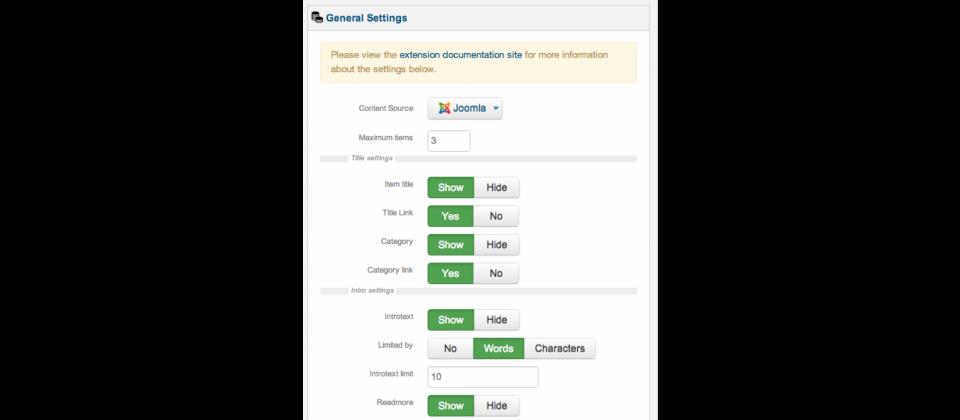
Content Source Selection

The module supports two content sources:

  • Joomla Articles: The standard com_content articles that ship with every Joomla installation. You can pull articles from the entire site, from a specific category, or from a set of categories. Subcategories can be optionally included or excluded.
  • K2 Items: If you use the K2 content construction kit — a popular alternative content management system for Joomla that provides extended fields, nested categories, and a more flexible templating system — Xpert Captions can pull items from your K2 categories. This is a key differentiator because many Joomla content display modules only support com_content articles.

Category Filtering

You can filter by one or more specific categories. If you select multiple categories, the module orders articles by their publication date, not by category. The category name can be displayed as part of the caption overlay, which helps users understand the organizational structure of your content at a glance. You can also choose to include or exclude articles from child categories, giving you granular control over which content appears.

Display Options

  • Maximum number of items: Set an upper limit on how many articles the module displays. Useful for creating a "Latest 6 Articles" or "Featured 12 Items" section without having to manually select individual articles.
  • Title display: Toggle whether the article title appears in the caption overlay. The title is typically rendered as a heading element with a link to the full article.
  • Category display: Toggle whether the article's category name appears in the caption overlay. This adds context to each item and provides an additional clickable link if the category link option is enabled.
  • Link display: Control visibility of the "read more" link in the overlay. You can show it or hide it based on your design preferences.
  • Category link: When enabled, the category name in the overlay becomes a clickable link to the full category archive page.
  • Image source: Choose whether to use the article's intro image, full article image, or (for K2) the K2 item image.
  • Image dimensions: Set the width and height for article images. The module typically uses CSS to force images to these dimensions, so choose dimensions that match your layout grid to avoid distortion.

Animation and Effect Settings

The module's signature feature is its collection of hover effects. When a user moves their cursor over an article image, the caption overlay animates into view. The specific animation depends on the effect you choose in the module settings:

  • Slide effects: The caption slides in from the top, bottom, left, or right of the image. The most traditional and widely used effect.
  • Fade effects: The caption fades in from transparent to opaque, sometimes combined with a slight zoom on the image for a parallax-like feel.
  • Push effects: The image appears to be pushed aside by the caption, which moves in from one direction while the image scales or shifts in the opposite direction.
  • Flip effects: The entire card flips horizontally or vertically to reveal the caption on the reverse side — similar to a playing card turning over.

The animation speed and easing can usually be controlled through the module's CSS, though the exact level of control depends on the module version. By default, effects use CSS transitions with a duration of 0.3 to 0.5 seconds, which is the sweet spot between too-fast-to-see and annoyingly-slow.

Installation and Basic Setup

  1. Download the Xpert Captions module package from the Joomla Extensions Directory or the Themexpert website
  2. In your Joomla administrator panel, navigate to Extensions → Manage → Install
  3. Upload the module ZIP file or drag it into the upload area
  4. After successful installation, navigate to Extensions → Modules
  5. Click New and select Xpert Captions from the module type list
  6. Configure the module:
    • Give the module a title and set its position in your template
    • Select the content source (Joomla Articles or K2)
    • Choose the category or categories to display
    • Set the number of items and image dimensions
    • Choose a hover effect
    • Configure which elements appear in the overlay (title, category, link)
  7. Set the module status to Published and select the pages where it should appear through the Menu Assignment tab
  8. Click Save & Close and visit your site to verify the module displays correctly

The module renders as a grid of items by default, though the exact layout depends on your template's module position styling. In most Joomla templates, the module will inherit the template's grid system and spacing, which means you may need to adjust your template's CSS to get the exact look you want — particularly in terms of columns, margins, and responsive behaviour.

Use Cases

Xpert Captions is not a general-purpose content display module. It is designed for specific scenarios where visual presentation matters more than raw information density:

Portfolio and photography sites. The hover effects make Xpert Captions particularly well-suited for portfolio displays where the featured image is the primary content and the text overlay provides supplementary information. A photographer's portfolio, a design agency's project showcase, or an artist's gallery all benefit from the image-first, text-on-hover approach.

News and magazine homepages. Magazine-style Joomla sites often need a visually striking "featured stories" section at the top of the homepage. Xpert Captions can pull the latest articles from a "Featured" category and display them as a hover-enabled grid, creating the dynamic, interactive homepage expected of modern news sites.

Product showcases on K2-based sites. K2 is frequently used to build product catalogues, recipe collections, and review sites. Xpert Captions can pull K2 items with their associated images and display them with animated captions showing the item title, category, and a link to the full detail page.

Team member or staff pages. If you store team member information as Joomla articles with a profile photo as the featured image, Xpert Captions can display the team grid with hover-to-reveal names and roles — a common pattern on corporate "About Us" pages.

Comparison with Alternative Joomla Content Display Modules

Feature Xpert Captions Xpert Scroller RAXO All-Mode BT Content Slider Articles Anywhere
Content source Joomla articles, K2 Joomla articles, K2 Joomla articles, K2, Zoo, EasyBlog Joomla articles, K2 Joomla articles only
Presentation style Grid with hover captions Horizontal/vertical carousel Multiple layouts: grid, list, slider, carousel Image slider with captions Inline — renders articles inside other articles
Hover animations Multiple (slide, fade, push, flip) None — scrolling animation Limited — opacity and scale Slide transition only None
Category filtering Single or multiple, with child category option Single or multiple Advanced: include/exclude by ID, tag, author Single or multiple Full — any WordPress query parameter
Responsive design Inherits from template Limited responsiveness Fully responsive with breakpoints Responsive with configurable breakpoints Inherits from template
Custom CSS Override file location available Override file location available Built-in CSS editor Custom CSS field in settings None — uses article CSS
Image handling Intro/full/K2 image, fixed dimensions Intro/full/K2 image, fixed dimensions Multiple image sources, on-the-fly resize Intro/full/K2 image, slider with navigation None — embeds full article content
Performance Lightweight — CSS animations + minimal JS Moderate — carousel JS Moderate-to-heavy — feature-dependent Heavy — slider JS, image preloading Lightweight — no JS
Price Free Free Freemium (Pro from EUR 29) Free Free

When to Choose Each Alternative

Choose Xpert Captions when your primary goal is visual engagement — you want visitors to interact with your content thumbnails and discover article details through hover. The hover effects are the module's reason for existing; if you do not plan to use them, there are simpler modules that do the same job with less configuration overhead.

Choose Xpert Scroller when you need a carousel or scrolling display of articles rather than a static grid. Its horizontal and vertical scrolling modes are ideal for "Latest News" or "Trending" tickers in narrow module positions like sidebars or header areas.

Choose RAXO All-Mode when you need maximum flexibility in content sourcing and layout. Its support for multiple content types (K2, Zoo, EasyBlog in addition to Joomla articles) and multiple layout modes (grid, list, slider, carousel, and more) makes it a Swiss Army knife for content display. The trade-off is complexity — the configuration panel has many more options than Xpert Captions.

Choose BT Content Slider when you need a traditional image slider with captions. Its slide-based navigation, auto-play, and transition options are more slider-oriented than hover-oriented, making it better for hero sections and promotional banners.

Choose Articles Anywhere when you need to embed full article content inside other articles — for example, displaying a related article's full text within the body of another article, complete with images, formatting, and custom fields. It is a fundamentally different use case from the visual display modules listed above.

Customization and Styling

Xpert Captions ships with its own CSS file, which you can override in two ways. The module looks for an override file in your template's directory structure, following Joomla's standard template override pattern. This means you can copy the module's CSS file to your template's html/mod_xpertcaptions/css/ directory and modify it there, and your changes will survive module updates.

The CSS is organized around a few key selectors that you can target for customization:

  • The container element that wraps all items in a grid or flex layout
  • The individual item containers, which typically have relative positioning to allow absolute positioning of the caption overlay within them
  • The image element, often set to fill the container with object-fit or background-size
  • The caption overlay, which uses absolute positioning and CSS transitions for its animation
  • The caption text elements: title, category name, and read more link

If your template uses a CSS framework like Bootstrap, Foundation, or UIkit, you may need to add some CSS to integrate the module's grid with the framework's grid system. The module does not output framework-specific grid classes — it outputs generic HTML that your template styles.

Performance and Technical Considerations

Xpert Captions uses CSS transitions and animations for its hover effects, which are hardware-accelerated in all modern browsers. This means the animations run on the GPU rather than the CPU, resulting in smooth 60-fps transitions even on mid-range mobile devices. The module loads a small amount of JavaScript — primarily for the responsive image handling and for any polyfills needed by older browsers — but the JavaScript footprint is minimal, typically under 10 KB minified.

The primary performance consideration is not the module itself but the images it loads. If you configure Xpert Captions to display 12 items and each item has a 2 MB featured image, the module will load 24 MB of images on the page. Use Joomla's built-in image size settings or a third-party image optimization plugin to ensure that the images served to Xpert Captions are appropriately sized and compressed. A 1200x800 pixel image displayed at 400x267 pixels is wasting bandwidth and slowing down your page.

The module does not lazy-load images by default. If you are displaying many items, consider adding a lazy-loading attribute or using a Joomla lazy-load plugin to defer off-screen image loading and improve initial page load time.

FAQ

Does Xpert Captions work with Joomla 4 and 5?

Compatibility depends on the specific module version. Themexpert has updated many of their extensions for Joomla 4 and 5, but you should verify the version you download specifically states compatibility. The Joomla Extensions Directory listing and the Themexpert website should clearly indicate which Joomla versions are supported.

Can I use Xpert Captions with custom fields from Joomla articles?

Xpert Captions does not natively display Joomla custom fields in the caption overlay. The overlay is limited to the article title, category name, and read more link. To display custom fields, you would need to modify the module's template override.

Does the module support video or gallery items?

Xpert Captions is designed to display a single featured image per article. It does not support video players, image galleries, or slideshows within the module display. If your K2 items include video or gallery data, the module will only use the standard image field.

How do I make the module responsive for mobile devices?

The module's HTML is responsive-ready, but the exact responsive behaviour depends on your template's CSS. In most cases, you will need to add media queries to your template's stylesheet that adjust the number of columns and the image dimensions at different breakpoints. A 4-column grid on desktop should become 2 columns on tablet and 1 column on mobile.

Do hover effects work on touch devices like phones and tablets?

Hover effects do not work on touch devices because there is no cursor to hover. On mobile, the caption overlay is typically displayed by default or shown on tap. The exact behaviour depends on the module version and your CSS configuration. Test on real mobile devices to ensure the mobile experience is acceptable.

Can I order articles by something other than date?

The module uses Joomla's standard article ordering parameters, which include ordering by date (newest first or oldest first), by title (alphabetical), by ordering (the manual order set in the Article Manager), by hits (most viewed), or randomly. The exact options available depend on the module version.

Is Xpert Captions compatible with Joomla's caching system?

Yes, the module is compatible with Joomla's built-in caching. However, if you use a caching system that caches the full page HTML, the module output will be cached as part of the page. If your content changes frequently, set an appropriate cache lifetime or exclude pages with the module from caching.

Can I display articles from multiple categories in a single module instance?

Yes. The category selection interface allows you to select one or more categories. When multiple categories are selected, articles from all selected categories are pooled together and ordered according to the sorting setting you have chosen.

Does the module include pagination for displaying many articles?

No, Xpert Captions does not include built-in pagination. You set a maximum number of items, and the module displays that many items. If you have more articles than the maximum, the excess is simply not shown. For paginated article displays, consider a module like RAXO All-Mode or use Joomla's built-in category blog layout.

Is there a Themexpert subscription for accessing all Xpert modules?

Many Xpert modules are available for free individually. Themexpert also offers premium templates and extensions through their subscription plans. Check the Themexpert website for current pricing. As of the latest information, Xpert Captions is free to download and use.

Tap to react