Spider Video Player: More Than Just Another WordPress Video Plugin
The WordPress video player landscape is crowded. YouTube embeds, Vimeo iframes, hosted video solutions — there is no shortage of ways to put a video on a page. But when you need full control over the playback experience — custom themes, organized playlists, quality selection, social sharing buttons baked into the player — the options narrow considerably. Spider Video Player fills this gap. It is a free WordPress plugin that gives you a fully featured HTML5 and Flash video player with playlist management, theme customization, and social sharing controls.
The plugin positions itself as a comprehensive alternative to embedding videos through external services. Instead of sending your visitors to YouTube or Vimeo for playback, Spider Video Player keeps them on your site with a branded, customizable player. For membership sites, online courses, and video-heavy portfolios where branding matters and data ownership is a concern, that difference is worth the setup time.

Core Features Breakdown
Spider Video Player packs a surprising number of features into its free offering. Here is what you get out of the box:
- HTML5 and Flash support — the player auto-detects the browser capabilities and serves the appropriate playback engine. Modern browsers get HTML5 video. Older browsers fall back to Flash seamlessly.
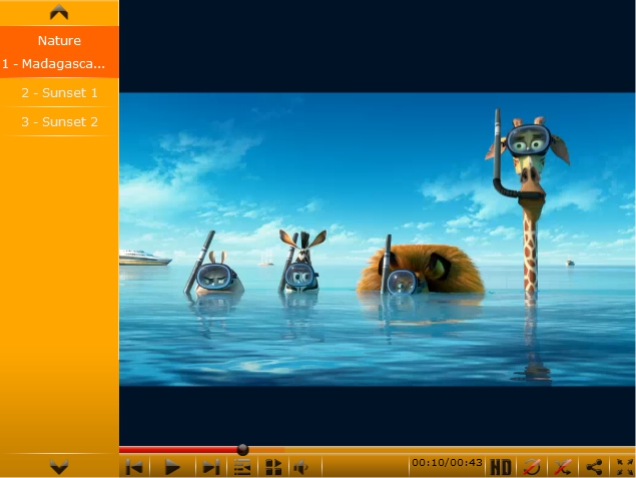
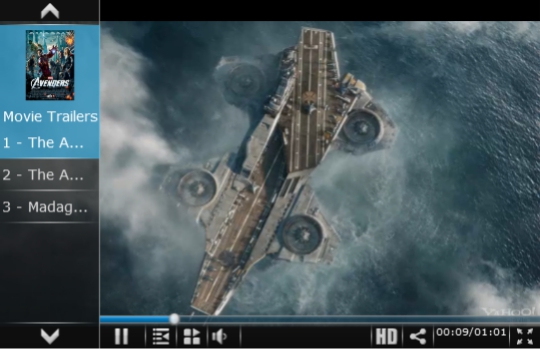
- Playlist management — organize videos into playlists with custom ordering. Playlists can be displayed as lists with thumbnails, as dropdowns, or hidden entirely for single-video playback. Multiple playlists can coexist on the same site with independent settings.
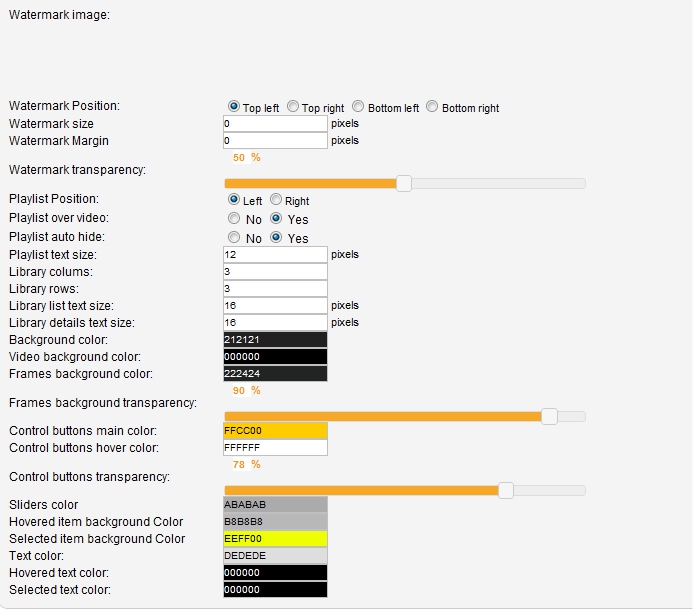
- Theme customization — change the player's color scheme, control bar style, button shapes, and overall visual design. The theme editor provides a live preview, so you see changes in real-time. Dark themes, light themes, accent colors — all adjustable without CSS.
- Quality selector — if you upload videos in multiple resolutions, the player presents a quality selection menu to users, essential for sites serving audiences with varying internet speeds.
- Social sharing buttons — Facebook, Twitter, and Google+ sharing buttons embedded directly in the player interface.
- Fullscreen support — native fullscreen with responsive scaling across desktop and mobile screens.
- Shuffle and repeat modes — random playback order for playlists and loop options for individual videos or entire playlists.
- Subtitle support — SRT and WebVTT formats are supported, making the player suitable for multilingual audiences.
Playlist Formats and Display Options
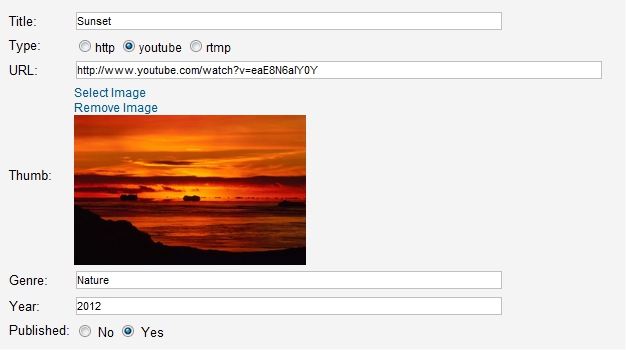
Spider Video Player offers multiple playlist display modes: vertical playlist with scrollable thumbnails on either side, horizontal playlist with thumbnails in a row below the player, dropdown playlist as a compact select menu for narrow spaces, and a clean single-video mode with no playlist visible. Playlists are managed through a dedicated admin interface where you add video URLs, titles, descriptions, and thumbnail images. The playlist builder supports both self-hosted videos (MP4, WebM, OGG) and externally hosted files. YouTube and Vimeo URLs are not natively supported — this player is designed for directly hosted video files.
Comparison with Other Video Players
| Feature | Spider Video Player | Presto Player | FV Player | Video.js |
|---|---|---|---|---|
| Cost | Free | Free + Pro from $99/year | Free + Pro from $75/year | Free (self-hosted library) |
| Playlist support | Yes — multiple layouts | Yes — via Pro addon | Yes — built-in | Via plugins |
| Theme customization | Built-in editor | Branding controls (Pro) | Skin editor | CSS-based |
| Social sharing | Built-in buttons | Not built-in | Not built-in | Via plugins |
| Quality selector | Yes | Yes (Pro) | Yes | Yes |
| YouTube/Vimeo support | No — self-hosted only | Yes — built-in | Yes — built-in | Via plugins |
| Video ads | No | Yes (Pro) | Yes (Pro) | Via plugins |
| Mobile responsive | Yes | Yes | Yes | Yes |
Presto Player is the more modern alternative. Its Pro tier adds features that rival premium video hosting platforms: video chapters, calls-to-action, email capture overlays, and detailed analytics. If video is central to your business model, Presto Player Pro is worth the investment. FV Player has the most battle-tested codebase with ad integration (VAST/VPAID) for publishers monetizing video. Video.js is the underlying engine for many video plugins — using it directly gives developers maximum control but requires JavaScript and CSS knowledge.
Performance and Bandwidth Considerations
Spider Video Player loads its scripts asynchronously without blocking page rendering. The initial JavaScript payload is modest (around 80KB minified). For video buffering, performance depends entirely on your hosting. Since the plugin is designed for self-hosted video files, the files come from your server — not YouTube's CDN. Fast hosting with CDN gives excellent playback. Shared hosting without CDN causes video stuttering and bandwidth overages.
Embedding uses a shortcode: [Spider_Video_Player id="playlist_id"]. The shortcode works in posts, pages, widgets, and all major page builders.
Mobile Support and Limitations
On mobile, the player scales responsively to fit viewport width. Touch controls replace hover-based interactions. Fullscreen uses native mobile APIs with automatic landscape rotation. Autoplay respects browser policies — videos with sound will not autoplay on Chrome for Android or Safari iOS. One limitation: quality auto-detection on some Android devices can be inaccurate, defaulting to lower quality than needed. Users can manually select quality to work around this.
Theme Customization Deep Dive
The theme editor is a standout feature. Unlike many free players offering a choice of three pre-built skins, Spider Video Player lets you control every visual element. The control bar, buttons, progress bar, background, accent color — all adjustable through a visual editor with live preview. Color schemes match site design: dark themes for dark sites, light for blogs, custom accent colors for brand palettes. Buttons can be rounded, square, or pill-shaped. The progress bar can be solid, gradient, or a minimal line. For sites with unique visual identities, this flexibility matters — a default black player with white buttons looks jarring on a light, minimal site.
One limitation: the editor does not support custom fonts. Text in the player uses system fonts or whatever WordPress specifies. For full visual alignment with a site using custom fonts, additional CSS may be needed.
Video Hosting Approach Comparison
| Approach | Self-Hosting + Spider VP | YouTube Embed | Vimeo Embed | Wistia / Presto Pro |
|---|---|---|---|---|
| Player control | Full | Limited | Limited | Full |
| Ads | None | Yes (unless Premium) | None (paid plans) | None |
| Bandwidth cost | On you | YouTube handles | Vimeo handles | Provider handles |
| Video SEO | Full control | Given to YouTube | Given to Vimeo | Managed |
| Cost | Hosting/CDN only | Free | From $12/month | From $99/year |
The choice is a trade-off between control and convenience. YouTube embedding takes seconds but cedes traffic, branding, and viewer data to a third party. Spider Video Player with self-hosting gives full control at the cost of managing files and bandwidth. For educational platforms with paid video access, self-hosting is mandatory — YouTube videos can be downloaded through dozens of methods, while server-hosted files behind a membership plugin are significantly harder to extract.
Optimization Tips for Large Video Libraries
If your site has hundreds of videos, managing them through Spider Video Player's interface becomes tedious. Each video is added manually: URL, title, description, thumbnail. Bulk import is not supported. A practical approach: use Spider Video Player for featured content — key tutorials, promo videos, portfolio pieces. Use YouTube or Vimeo embeds for the rest. A combined strategy gives control where needed and convenience where appropriate.
Integration with Other WordPress Plugins
Spider Video Player works well with most popular plugins but has some nuances. With membership plugins (MemberPress, Restrict Content Pro), video embedded via shortcode is not automatically protected — if a user knows the direct video file URL, they can access it regardless of membership level. Solution: place video files in a protected directory accessible only through a PHP script that checks access rights. With caching plugins — Spider Video Player loads scripts asynchronously, minimizing conflicts, but if you use aggressive JavaScript concatenation, add the player scripts to the exclusion list. With SEO plugins (Yoast, Rank Math) — video embedded via shortcode does not generate VideoObject Schema markup automatically. Manual Schema addition through the SEO plugin or custom code is required for rich video search results.
With page builders — Elementor, Beaver Builder, WPBakery — the shortcode works through standard Text or Shortcode widgets. With Divi — through the Code or Text module. With Gutenberg — through the Shortcode block. The player renders correctly in preview mode across all listed builders.
Server Requirements and Video Encoding
For optimal performance, your server must serve video files with correct MIME types: video/mp4 for MP4, video/webm for WebM, video/ogg for OGG. Most hosting providers configure this by default. If video does not play, check your server's MIME type configuration.
Encoding recommendations: use H.264 codec for MP4 (widest browser support), bitrate 2-5 Mbps for HD, AAC audio codec. For WebM, use VP9 codec with 1.5-4 Mbps bitrate. Always provide at least MP4 and WebM versions of each video — this covers 99.9% of modern browsers. OGG is only needed for very old Firefox versions and can be omitted without practical consequences.
Plugin History and Development
Spider Video Player is a product of Web-Dorado, a company known in the WordPress ecosystem for a range of plugins: Spider Calendar, Spider Catalog, Spider FAQ. The company specializes in feature-rich plugins with visual configuration, and the video player is one of their flagship products. The plugin has gone through several major updates adding HTML5 support (originally Flash-only), responsive design, and the theme editor.
Important context: Web-Dorado has reduced active development of some free plugins in favor of paid products. Spider Video Player continues to work with current WordPress versions, but update frequency has decreased. Before installing on a production site, check the last update date in the WordPress repository and test compatibility with your WordPress and PHP versions.
Alternative Use Cases
Although designed as a video player, Spider Video Player can also serve audio files — upload an MP3 as a video file and the player will play the sound with basic controls. This is not a replacement for a full audio player (no visualization, equalizer, or podcast support), but it works for simple audio embedding. Another unconventional use case: using the player for protected content. Place video files outside the public WordPress directory and serve them through a PHP script that checks access rights. Spider Video Player accepts the script URL as the video source and plays the file, which is physically inaccessible via direct link.
Frequently Asked Questions
Can Spider Video Player play YouTube or Vimeo videos?
No. The player is designed for self-hosted MP4, WebM, OGG files on your server. For YouTube embeds, use YouTube-specific plugins or Presto Player.
What video formats does the player support?
MP4 (H.264, AAC), WebM (VP8/VP9, Vorbis/Opus), OGG (Theora, Vorbis). For maximum browser compatibility, provide at least MP4 and WebM versions of each video.
How do I add videos to a playlist?
Go to the Spider Video Player admin, create a playlist, add videos by URL with title, description, and thumbnail. Reorder by dragging in the playlist editor.
Will self-hosted videos slow down my site?
They can on shared hosting. Use a CDN (BunnyCDN, Cloudflare Stream, AWS CloudFront) to offload video delivery from your origin server.
Does the player support subtitles or captions?
Yes. SRT and WebVTT formats are supported. Attach subtitle tracks to videos in the playlist editor. Multiple tracks per video supported.
Can I customize the player to match my theme?
Yes. Built-in theme editor adjusts colors, buttons, progress bar, controls. No CSS required. For deeper styling, target player CSS classes.
Is it compatible with page builders?
Yes. Shortcode works in Elementor, Beaver Builder, WPBakery, Divi, and Gutenberg shortcode block. Player renders in builder preview.
Does it work on mobile devices?
Yes. Fully responsive with touch controls, viewport adaptation, and mobile fullscreen. Quality auto-detection may be imprecise on some Android devices.
How does it compare to embedding YouTube videos?
More control — custom branding, no YouTube ads, no external redirects. Trade-off: you host files yourself, requiring storage, bandwidth, and CDN.
Are there paid versions with more features?
Spider Video Player is free with no premium tier. For ads, email capture, analytics, or YouTube support, consider Presto Player Pro or FV Player Pro.
Tap to react