Every WordPress developer encounters data validation and sanitization sooner or later, but not everyone grasps the fundamental difference between the two processes. Understanding this distinction is not theoretical — it directly determines whether your plugin or theme handles user input securely or opens a vulnerability that compromises the entire site. This guide explains both concepts from first principles, walks through all five standard input types used in the Settings API, and shows you how to construct callback functions that are both functional and safe.
Defining Validation and Sanitization
Validation and sanitization serve different purposes and operate at different points in the data lifecycle. Confusing them leads to either overly restrictive input handling that frustrates users, or overly permissive data storage that introduces security risks.
Validation: The Gatekeeper
Validation is the process of checking incoming data to determine whether it meets predefined criteria before it is written to the database. It answers the question: is this data acceptable? A validated email address contains an @ symbol and a domain. A validated URL begins with http:// or https://. A validated integer contains only digits. If validation fails, the data is rejected outright — it never reaches the database. Validation happens at the input boundary, before any storage occurs.
Sanitization: The Filter
Sanitization is the process of cleaning data to remove or encode potentially harmful content while preserving the intended meaning. It answers the question: can I make this data safe? Sanitized text has HTML tags stripped. Sanitized email has whitespace trimmed. Sanitized URLs have invalid characters encoded. Unlike validation, sanitization does not reject data — it transforms it into a safe form. Sanitization is applied both before storage and before output, forming a two-layer defense.
Why Both Processes Are Critical
A WordPress site without proper data handling is an open door. Consider a simple text field where users enter their display name. Without sanitization, a malicious user could enter <script>alert('XSS')</script> as their name. When that name is displayed in a comment or user list, every visitor's browser executes the script. This is a stored cross-site scripting (XSS) attack, and it is one of the most common vulnerabilities in WordPress plugins.
The defense requires both validation and sanitization working together. Validation checks that the input is the right shape (a string of reasonable length). Sanitization strips any remaining dangerous content before storage. And on output, escaping functions ensure that even if something slipped through, it is rendered as text, not executed as code.
| Process | When It Runs | What It Does | Failure Consequence |
|---|---|---|---|
| Validation | Before saving to database | Checks if data meets format requirements | Invalid data stored, corrupting the database or breaking functionality |
| Input Sanitization | Before saving to database | Strips dangerous content from data | Malicious code stored in database, ready for XSS execution |
| Output Escaping | Before rendering in browser | Encodes output for safe HTML display | Stored XSS triggered when page loads |
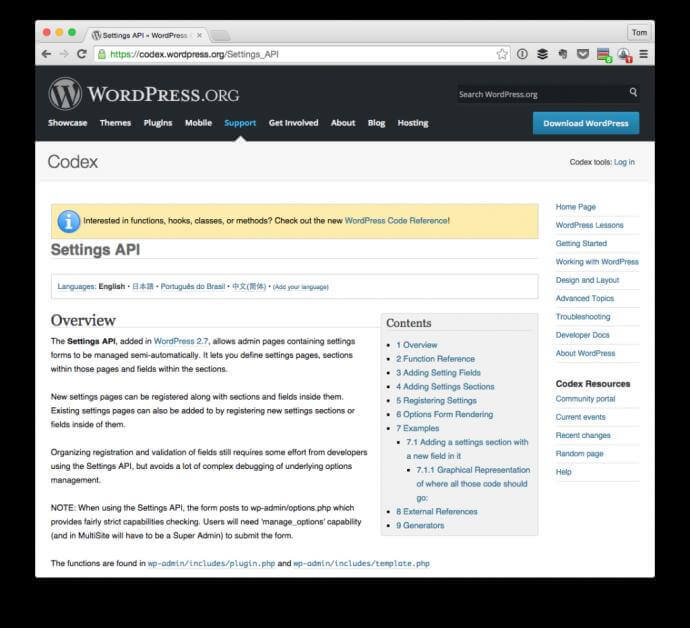
The Settings API ties all three layers together. When you register a setting with register_setting(), you provide a sanitization callback. That callback should validate the input, sanitize it, and return the cleaned value. WordPress calls this callback automatically when the form is submitted, before writing to the options table. For output, you use escaping functions like esc_html() and esc_attr() in your page rendering callbacks.
WordPress Sanitization Functions
WordPress provides a comprehensive library of sanitization functions that cover the most common data types. Using these built-in functions is always preferable to writing custom sanitization logic because they are maintained by the WordPress security team, tested across millions of installations, and handle edge cases that custom code might miss.
| Function | Input Type | What It Removes | Example |
|---|---|---|---|
| sanitize_text_field() | Plain text | HTML tags, line breaks, tabs, extra whitespace, percent-encoded characters, and octets | "Hello <b>World</b>" becomes "Hello World" |
| sanitize_email() | Email address | Invalid characters for email format, extra whitespace | " user@domain.com " becomes "user@domain.com" |
| sanitize_url() / esc_url_raw() | URL | Invalid characters, removes dangerous protocols like javascript: | "javascript:alert(1)" becomes "" |
| sanitize_key() | Slug/key | Everything except lowercase alphanumeric characters, dashes, and underscores | "My Custom-Key!" becomes "my-customkey" |
| sanitize_title() | Post slug | Converts to lowercase, replaces spaces with dashes, removes HTML and special characters | "My Example Post" becomes "my-example-post" |
| absint() | Positive integer | Converts to absolute (non-negative) integer | "-5abc" becomes 5 |
| intval() | Integer | Converts to integer, preserving sign | "42px" becomes 42 |
| sanitize_hex_color() | Hex color code | Validates as 3 or 6 digit hex color, returns empty string if invalid | "#FF0000" passes, "red" returns "" |
Using Sanitization Functions in Settings API Callbacks
A sanitization callback receives the entire array of submitted values and must return an array of sanitized values. Each field in the array should be processed with the appropriate WordPress sanitization function:
function mytheme_sanitize_general_options($input) {
$output = array();
if (isset($input['site_title'])) {
$output['site_title'] = sanitize_text_field($input['site_title']);
}
if (isset($input['contact_email'])) {
$output['contact_email'] = sanitize_email($input['contact_email']);
}
if (isset($input['twitter_url'])) {
$output['twitter_url'] = esc_url_raw($input['twitter_url']);
}
if (isset($input['posts_per_page'])) {
$output['posts_per_page'] = absint($input['posts_per_page']);
}
if (isset($input['accent_color'])) {
$color = sanitize_hex_color($input['accent_color']);
if (!empty($color)) {
$output['accent_color'] = $color;
}
}
return $output;
}
[/codeblock]
The Five Standard Input Elements
The WordPress Settings API supports five basic input types. Each type serves a specific purpose and requires a particular approach to rendering and processing. Understanding when to use each type is as important as knowing how to code them.
1. Text Input (Single Line)
The most common input type. Used for short string values like titles, names, API keys, and simple URLs. Text inputs accept freeform typing and should be paired with sanitize_text_field() for plain text or esc_url_raw() for URLs.
function mytheme_text_field_callback() {
$options = get_option('mytheme_options');
$value = isset($options['site_title']) ? $options['site_title'] : '';
?>
Enter the site title for the header area.
The name attribute uses array notation — mytheme_options[site_title] — which causes WordPress to group all fields into a single associative array in $_POST. This is how the sanitization callback receives all values at once as a single $input array parameter. The esc_attr() function on the value attribute prevents XSS by encoding quotes and special characters that could break out of the HTML attribute context.2. Textarea (Multi-Line)
Used for longer text content like descriptions, custom CSS, header/footer scripts, and address information. Textareas support line breaks and should be sanitized based on the expected content: sanitize_textarea_field() for plain text, or wp_kses_post() if limited HTML is allowed.
function mytheme_textarea_callback() {
$options = get_option('mytheme_options');
$value = isset($options['footer_text']) ? $options['footer_text'] : '';
?>
Custom text for the site footer. Plain text only.
3. Radio Buttons
Radio buttons allow selecting one option from a predefined set. They are ideal for mutually exclusive choices like layout modes, color schemes, or on/off toggles rendered as pairs. The checked() function assists in maintaining state across page reloads.
function mytheme_radio_callback() {
$options = get_option('mytheme_options');
$current = isset($options['layout']) ? $options['layout'] : 'default';
?>
The checked() function compares the first argument (the option value) against the second argument (the currently saved value). When they match, it outputs checked='checked', ensuring the correct radio button is selected when the page loads. Always wrap radio groups in a fieldset for semantic structure and label each option for proper click target behavior.
4. Checkbox (Single Toggle)
A single checkbox is a binary toggle for boolean options: enable/disable a feature, show/hide an element. Unlike radio buttons, a checkbox can be unchecked, which means the field name is not submitted at all. This requires special handling in the sanitization callback.
function mytheme_checkbox_callback() {
$options = get_option('mytheme_options');
$checked = isset($options['enable_feature']) ? $options['enable_feature'] : 0;
?>
In the sanitization callback, handle the missing checkbox case:
function mytheme_sanitize_options($input) {
$output = array();
$output['enable_feature'] = isset($input['enable_feature'])
? absint($input['enable_feature'])
: 0;
return $output;
}
[/codeblock]
5. Select Dropdown
Select dropdowns present a list of options in a compact form. They are appropriate when you have more than 3-4 choices or the list may grow over time. The selected() function, similar to checked(), maintains the selected state.
function mytheme_select_callback() {
$options = get_option('mytheme_options');
$current = isset($options['font_family']) ? $options['font_family'] : 'system';
$font_options = array(
'system' => 'System Default',
'georgia' => 'Georgia',
'helvetica' => 'Helvetica Neue',
'roboto' => 'Roboto',
'lora' => 'Lora',
);
?>
Select the base font for your site.
The foreach loop pattern is the standard approach for select inputs with many options. Define your options as an associative array of value => label pairs, then iterate through them, using selected() to mark the currently saved value. This is cleaner than writing individual <option> tags and easier to maintain when you add or remove choices.Complete Registration Example: All Five Input Types
Let us combine everything into a complete, working example. This registers a settings section with one of each input type, complete with sanitization. You can copy this into your theme's functions.php or your plugin's main file and it will work immediately:
function mytheme_register_settings() {
register_setting(
'mytheme_options_group',
'mytheme_options',
'mytheme_sanitize_options'
);
add_settings_section(
'mytheme_main_section',
'General Settings',
'mytheme_section_description',
'mytheme-settings'
);
add_settings_field(
'site_title',
'Site Title',
'mytheme_text_field_callback',
'mytheme-settings',
'mytheme_main_section'
);
add_settings_field(
'footer_text',
'Footer Text',
'mytheme_textarea_callback',
'mytheme-settings',
'mytheme_main_section'
);
add_settings_field(
'layout',
'Page Layout',
'mytheme_radio_callback',
'mytheme-settings',
'mytheme_main_section'
);
add_settings_field(
'enable_feature',
'Advanced Features',
'mytheme_checkbox_callback',
'mytheme-settings',
'mytheme_main_section'
);
add_settings_field(
'font_family',
'Base Font',
'mytheme_select_callback',
'mytheme-settings',
'mytheme_main_section'
);
}
add_action('admin_init', 'mytheme_register_settings');
function mytheme_section_description() {
echo 'Configure the general appearance and behavior of your theme.
'; } function mytheme_sanitize_options($input) { $output = array(); $output['site_title'] = isset($input['site_title']) ? sanitize_text_field($input['site_title']) : ''; $output['footer_text'] = isset($input['footer_text']) ? sanitize_textarea_field($input['footer_text']) : ''; $valid_layouts = array('default', 'wide', 'boxed'); $output['layout'] = isset($input['layout']) && in_array($input['layout'], $valid_layouts) ? $input['layout'] : 'default'; $output['enable_feature'] = isset($input['enable_feature']) ? absint($input['enable_feature']) : 0; $valid_fonts = array('system', 'georgia', 'helvetica', 'roboto', 'lora'); $output['font_family'] = isset($input['font_family']) && in_array($input['font_family'], $valid_fonts) ? $input['font_family'] : 'system'; return $output; } [/codeblock]Escaping Output in Admin Page Templates
Sanitizing data before storage is the first layer. Escaping data before display is the second. Even sanitized data must be escaped when rendered in HTML because the encoding requirements differ by context. WordPress provides a family of escaping functions for different HTML contexts:
- esc_html(): For text content between HTML tags. Converts <, >, &, and quotes to HTML entities.
- esc_attr(): For HTML attribute values. Encodes quotes and special characters that would break out of the attribute.
- esc_url(): For href and src attributes. Strips dangerous protocols like javascript: and ensures valid URL format.
- esc_textarea(): For textarea content. Encodes for the textarea context while preserving line breaks.
- wp_kses(): For content that may contain a limited set of allowed HTML tags. Use with an explicit allowlist.
Here is how to use them in an admin page template that displays saved options:
function mytheme_page_callback() {
$options = get_option('mytheme_options');
?>
Common Mistakes and Their Consequences
Using esc_html() on URLs in href Attributes
esc_html() converts ampersands to &, which breaks URLs containing query parameters. Always use esc_url() for href and src attributes. esc_url() is designed specifically for the URL context and handles encoding correctly while stripping dangerous protocols.
Forgetting to Handle Unchecked Checkboxes
When a checkbox is unchecked, its name does not appear in $_POST. If your sanitization callback accesses $input['my_checkbox'] without an isset() check, it produces a PHP notice. More importantly, the option never gets updated — the old checked value persists indefinitely. Always set a default of 0 for unchecked checkboxes.
Skipping the Whitelist Validation for Select and Radio
Never assume the submitted value matches one of the HTML options. Anyone can send a POST request with arbitrary data using browser developer tools or curl. Your sanitization callback must verify that the submitted value exists in your approved list before accepting it.
Using esc_textarea() for Rendering Plain Text
esc_textarea() is designed for use inside <textarea> tags only. Using it to render text in a <p> or <div> does not provide adequate HTML encoding. Use esc_html() for text content between HTML tags.
Security Checklist for Settings API Forms
Every time you build a settings form, verify these items before considering it complete:
- register_setting() includes a sanitization callback as the third argument
- The sanitization callback checks isset() for every array key before accessing it
- Text inputs use sanitize_text_field() unless they specifically need to accept HTML
- URL fields use esc_url_raw() in the sanitization callback
- Select and radio values are validated against a whitelist with in_array()
- Checkbox options provide a default value of 0 when the key is absent
- All form field value attributes use esc_attr() for output escaping
- All text content uses esc_html() for output escaping
- All URLs in href or src attributes use esc_url() for output escaping
- Textarea content uses esc_textarea() inside the textarea tag
Frequently Asked Questions
What is the difference between validation and sanitization?
Validation checks if data meets specified criteria and rejects it if it does not. Think of it as a bouncer: does this person have a valid ID? Sanitization cleans data to remove dangerous content while preserving the intended value. Think of it as a metal detector: let people through, but remove weapons. Validation happens first to reject clearly wrong data. Sanitization follows to clean what passes. Both are necessary for secure data handling.
When should I use sanitize_text_field() vs sanitize_textarea_field()?
Use sanitize_text_field() for single-line text inputs where you want to strip all HTML, line breaks, and extra whitespace. Use sanitize_textarea_field() for multi-line textarea inputs that need to preserve line breaks while still stripping HTML tags. The key difference: sanitize_textarea_field() retains newlines, making it safe for content that spans multiple lines but contains no HTML.
Why does my checkbox value never save when unchecked?
HTML forms do not submit unchecked checkboxes. When you uncheck a checkbox, its name does not appear in $_POST at all. Your sanitization callback must check with isset() and provide a default value: $output['my_checkbox'] = isset($input['my_checkbox']) ? absint($input['my_checkbox']) : 0. Without this fallback, the unchecked state is never saved.
How do I safely allow limited HTML in a textarea?
Use wp_kses() with an explicit allowlist. Example: wp_kses($input['content'], array('strong' => array(), 'em' => array(), 'a' => array('href' => array(), 'title' => array()))). This permits only strong, em, and a tags with specific attributes. Never use wp_kses_post() with 'post' context for settings — it allows too many tags. Define the minimum set of tags your use case needs.
What is the difference between esc_url() and esc_url_raw()?
esc_url() is for output — it escapes a URL for use in href or src attributes in HTML. esc_url_raw() is for storage — it sanitizes a URL before saving to the database without adding HTML entities. If you use esc_url() in your sanitization callback, the stored URL will contain encoded ampersands (&), which breaks downstream usage. Always use esc_url_raw() for sanitization and esc_url() for output.
How do I validate a select dropdown value securely?
Define a whitelist array of allowed values. In your sanitization callback: $allowed = array('option1', 'option2', 'option3'); $output['select_field'] = in_array($input['select_field'], $allowed) ? $input['select_field'] : 'default_value'. This ensures that even if an attacker submits a value not in the HTML select options, only known-safe values reach the database.
Do I need both sanitization and escaping?
Yes, absolutely. Sanitization cleans data before storage. Escaping encodes data before output. They protect different stages of the data lifecycle. Even properly sanitized data must be escaped when rendered because the output context might require different encoding. For example, sanitized text is safe in a
tag but could break out of an HTML attribute without esc_attr(). Always sanitize on input, escape on output.
What sanitization function should I use for integer fields?
Use absint() for non-negative integers like counts, IDs, and limits. Use intval() when negative numbers are valid, like offsets or temperature values. Both functions convert string input to integers and are safe against non-numeric injection. For decimal numbers, use floatval(). Never cast directly to (int) without checking — it can produce unexpected results with non-numeric strings.