The WordPress Settings API — Sections, Fields, and Settings

When developing plugins and themes for WordPress, developers encounter dozens of ways to build a settings page and validate input. Some write raw HTML in a callback, others bolt on a custom form validator, still others store data in separate tables. All these approaches share one trait: they ignore WordPress's built-in mechanism and create problems with security, compatibility, and maintenance.

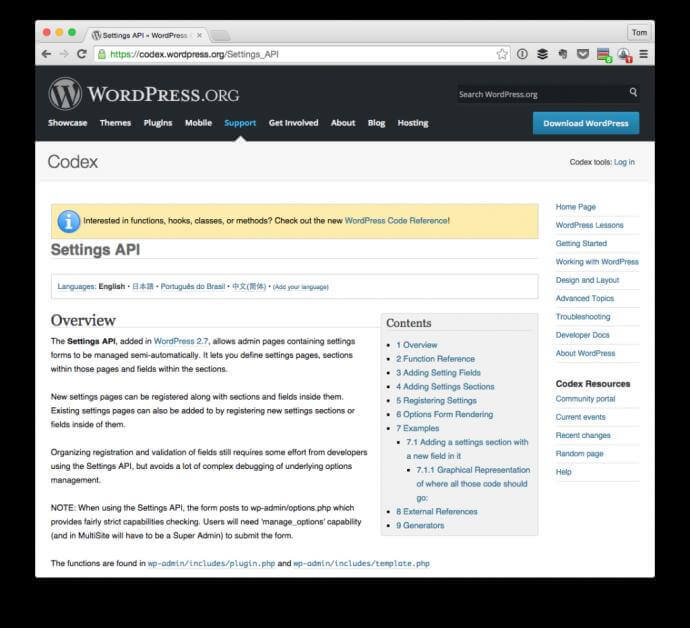
The only correct way to handle settings in WordPress today is the Settings API. It provides a unified interface for registering options, rendering fields, validating and sanitizing data. Built into core since version 2.7, it is stable, documented, and used by thousands of plugins in the official repository. If you are writing a theme or plugin with admin settings — you must know this API.

The Settings API does not work on the frontend. It is designed exclusively for the WordPress admin panel. If you need user-facing settings, look into User Meta.

The Three Pillars of the Settings API

Before writing any code, understand the three fundamental concepts the entire Settings API rests on. Without this understanding, you will copy examples from the documentation mechanically without grasping what is actually happening.

Settings are registered options that WordPress stores in the wp_options table. Each setting has a unique name (key) and a value. Registration via register_setting() tells WordPress: "Here is an option, it may be saved through the Settings API, and before saving, run it through this sanitization function." Without registration, WordPress will reject the save attempt — a built-in defense mechanism against arbitrary option tampering.

Sections are logical groups of fields on a settings page. Think of WordPress's "General Settings" page: "Site Title" and "Tagline" form one section, "Timezone" and "Date Format" form another. Sections are created with add_settings_section() and serve to visually organize fields. Each section has a title and an optional description.

Fields are the minimal unit of the settings interface. A text input, checkbox, radio button, dropdown, file upload field, WYSIWYG editor — all are fields. Each field is tied to a specific section and page. Created via add_settings_field(), the field callback is where you write the HTML for the input element.

API ElementWordPress FunctionPurposeBinding
Settingregister_setting()Registers an option in wp_optionsTied to an option group
Sectionadd_settings_section()Creates a logical group of fieldsTied to a page slug
Fieldadd_settings_field()Adds an input elementTied to a section and page
Registration order matters. First register_setting(), then add_settings_section(), then add_settings_field(). Mix them up and fields won't appear, with no error from WordPress. You'll just get a blank page.

Sandbox for Experimentation

To master the Settings API, create an isolated environment — a dedicated sandbox theme. It won't affect your main site and lets you experiment without fear of breaking anything.

Create the theme directory:

wp-content/themes/wordpress-settings-sandbox/[/codeblock]

The minimum set of files WordPress needs to recognize a theme:

style.css — required file containing the theme header in a comment. Without it, WordPress won't see the theme in the available list.

/* Theme Name: WordPress Settings Sandbox Theme URI: https://photolessons.org Author: Admin Description: A sandbox theme for learning the WordPress Settings API. Version: 1.0.0 License: GPL v2 or later */[/codeblock]

index.php — entry point; without it WordPress considers the theme incomplete. Leave it empty or with minimal markup.

functions.php — this is where all the Settings API logic lives. Start by hooking in:

Now activate the theme via Appearance → Themes. The sandbox is ready.

register_setting() — Registering an Option

The register_setting() function takes the following parameters:

ParameterTypeRequiredDescription
$option_groupstringYesSettings group name. Must match the settings_fields() parameter on the options page
$option_namestringYesOption name in the database. Unique key in wp_options
$argsarrayYes (since WP 4.7)Arguments array: type, description, sanitize_callback, show_in_rest, default

Example of registering a single option:

function sandbox_register_settings() { register_setting( 'sandbox_options_group', 'sandbox_site_title', array( 'type' => 'string', 'description' => 'Custom site title for the sandbox theme', 'sanitize_callback' => 'sanitize_text_field', 'default' => 'My Sandbox Site', ) ); } add_action( 'admin_init', 'sandbox_register_settings' );[/codeblock]

After this call, WordPress knows the sandbox_site_title option exists, belongs to the sandbox_options_group group, and must pass through sanitize_text_field() before being saved.

Option names must be unique. Don't use generic names like site_title or theme_options — you risk collisions with other plugins and themes. The sandbox_ prefix protects against name clashes.

add_settings_section() — Grouping Fields

A section ensures fields don't float in the void. The function signature:

add_settings_section( 'sandbox_general_section', 'General Settings', 'sandbox_general_section_callback', 'sandbox_options_page' );[/codeblock]

The description callback is optional but recommended — it outputs explanatory text beneath the section title:

function sandbox_general_section_callback() { echo '

These settings control the basic appearance of your sandbox theme.

'; }[/codeblock]

add_settings_field() — Creating Input Elements

A field is what the user sees and fills in. The function takes six parameters:

add_settings_field( 'sandbox_site_title_field', 'Site Title', 'sandbox_site_title_field_callback', 'sandbox_options_page', 'sandbox_general_section', array( 'label_for' => 'sandbox_site_title' ) );[/codeblock]

The field callback is responsible for the HTML markup:

function sandbox_site_title_field_callback( $args ) { $value = get_option( 'sandbox_site_title', 'My Sandbox Site' ); ?>

Enter the title displayed in the header.

Always escape output: esc_attr() for attributes, esc_html() for text, esc_url() for URLs. Never echo user input raw — that is a direct path to XSS vulnerabilities.

Sanitization — Defense Against Dirty Data

The sanitize_callback parameter in register_setting() is not optional — it's a mandatory defense perimeter. Every input element needs its own sanitization function. WordPress ships with ready-made sanitizers:

FunctionPurposeInput ExampleOutput Example
sanitize_text_field()Text cleanup: strips tags, trims whitespace, filters UTF-8<script>alert(1)</script> hellohello
sanitize_email()Email validation and cleanupUser@Example.com user@example.com
sanitize_url()URL cleanup, removes invalid charactersjavascript:alert(1)(empty string)
absint()Cast to non-negative integer-42.742
sanitize_key()Strip to letters, digits, hyphens, underscoresHello World!@#helloworld
wp_filter_nohtml_kses()Remove all HTML tags<strong>text</strong>text

For complex sanitization, write a custom callback. For example, an options group where one field is text, another is a URL, and a third is a checkbox:

function sandbox_sanitize_options( $input ) { $sanitized = array(); if ( isset( $input['site_title'] ) ) { $sanitized['site_title'] = sanitize_text_field( $input['site_title'] ); } if ( isset( $input['logo_url'] ) ) { $sanitized['logo_url'] = esc_url_raw( $input['logo_url'] ); } if ( isset( $input['enable_banner'] ) ) { $sanitized['enable_banner'] = (bool) $input['enable_banner'] ? 1 : 0; } return $sanitized; }[/codeblock]
Never use the same sanitizer for all fields. sanitize_text_field() will strip the URL scheme from a link, and absint() will truncate text to zero. Each field type needs its own sanitizer.

Assembling the Options Page

Now let's combine everything into a working theme options page. The complete functions.php for the sandbox:

'array', 'description' => 'Sandbox theme configuration', 'sanitize_callback' => 'sandbox_sanitize_options', 'default' => array( 'site_title' => 'My Sandbox', 'logo_url' => '', 'enable_banner' => 1, 'footer_text' => '', ), ) ); add_settings_section( 'sandbox_general_section', 'General Settings', 'sandbox_general_section_callback', 'sandbox_options_page' ); add_settings_field( 'sandbox_site_title_field', 'Site Title', 'sandbox_text_field_callback', 'sandbox_options_page', 'sandbox_general_section', array( 'label_for' => 'sandbox_site_title', 'option' => 'sandbox_theme_options', 'key' => 'site_title', ) ); add_settings_field( 'sandbox_logo_url_field', 'Logo URL', 'sandbox_text_field_callback', 'sandbox_options_page', 'sandbox_general_section', array( 'label_for' => 'sandbox_logo_url', 'option' => 'sandbox_theme_options', 'key' => 'logo_url', ) ); add_settings_field( 'sandbox_enable_banner_field', 'Enable Banner', 'sandbox_checkbox_field_callback', 'sandbox_options_page', 'sandbox_general_section', array( 'label_for' => 'sandbox_enable_banner', 'option' => 'sandbox_theme_options', 'key' => 'enable_banner', ) ); add_settings_field( 'sandbox_footer_text_field', 'Footer Text', 'sandbox_textarea_field_callback', 'sandbox_options_page', 'sandbox_general_section', array( 'label_for' => 'sandbox_footer_text', 'option' => 'sandbox_theme_options', 'key' => 'footer_text', ) ); } add_action( 'admin_init', 'sandbox_register_settings' ); function sandbox_general_section_callback() { echo '

Configure the basic appearance settings for the sandbox theme.

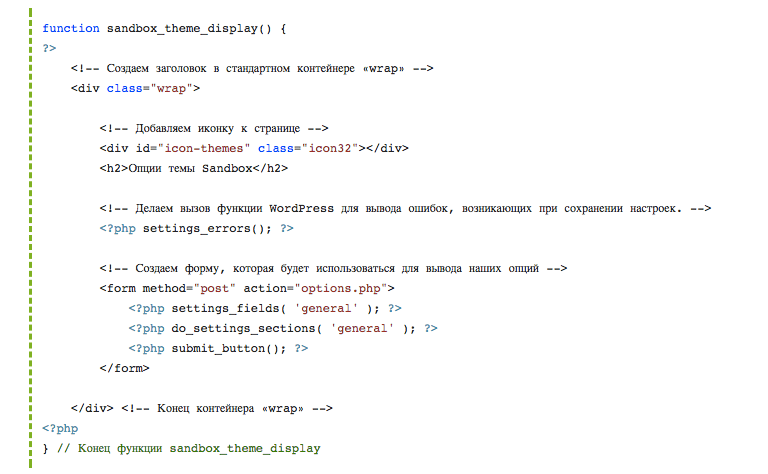
'; } function sandbox_text_field_callback( $args ) { $options = get_option( $args['option'], array() ); $value = isset( $options[ $args['key'] ] ) ? $options[ $args['key'] ] : ''; ?> > After adding this code, go to the admin panel. The options page is not yet visible — we registered settings but haven't created a menu to access them. We'll handle that in the next article. However, you can verify the option exists in the database by checking the wp_options table via phpMyAdmin or running get_option('sandbox_theme_options') in any hook after admin_init.

Option Groups vs Individual Options

In the example above, all fields are stored in a single sandbox_theme_options array. This is the recommended approach for themes and plugins. The alternative has fundamental differences:

ApproachRows in wp_optionsPerformanceSanitization EaseCollision Risk
Array (single key)1One query for all settingsOne function for all fieldsLow (prefix protects)
Individual optionsN (per field)N queries when loadingSeparate callback per fieldHigh (each name must be unique)
WordPress autoloads all options with the autoload=yes flag in a single query at boot. If you have 20 individual options, that is 20 rows in wp_options but still one query thanks to autoload. The problem arises when you call get_option() for non-autoload options — each call triggers a separate DB query.

Verifying the Results

After registering settings, confirm everything works before building the UI. Add this code to functions.php to dump options in the footer (admin-only):

function sandbox_debug_options() { if ( current_user_can( 'manage_options' ) ) { echo ''; } } add_action( 'wp_footer', 'sandbox_debug_options' );[/codeblock]

Now visit any page as an admin and view the HTML source. The footer will contain a commented-out array of settings. It is primitive but effective for early-stage Settings API debugging.

Common Beginner Mistakes

Forgot admin_init. All register_setting(), add_settings_section(), and add_settings_field() calls must execute inside the admin_init hook. Calling them directly in functions.php means WordPress has not loaded the Settings API yet, and the functions don't exist — resulting in a fatal error.

Option group mismatch. The $option_group in register_setting() must match what you pass to settings_fields() when rendering the options page. If they do not match, the form fails the nonce check and WordPress silently rejects the save. No error messages — data just will not persist.

Sanitization returns unexpected types. If your sanitize_callback returns an array when a string is expected, WordPress saves what the function returns. get_option() then gives you an array where the code expects a string — leading to PHP Warning: Array to string conversion.

Forgot to escape output in field callbacks. It seems trivial until someone enters <script>alert(document.cookie)</script> in the Site Title field. Always use esc_attr() for attributes and esc_html() for text content.

Validation with add_settings_error()

Sanitization and validation are different processes. Sanitization cleans data, validation checks whether data meets specified criteria. WordPress provides add_settings_error() to display error messages on the settings page:

function sandbox_validate_options( $input ) { $sanitized = sandbox_sanitize_options( $input ); $site_title = $sanitized['site_title']; if ( strlen( $site_title ) < 3 ) { add_settings_error( 'sandbox_theme_options', 'site_title_too_short', 'Site title must be at least 3 characters long.', 'error' ); $sanitized['site_title'] = get_option( 'sandbox_theme_options' )['site_title'] ?? ''; } if ( strlen( $site_title ) > 60 ) { add_settings_error( 'sandbox_theme_options', 'site_title_too_long', 'Site title cannot exceed 60 characters.', 'warning' ); } return $sanitized; }[/codeblock]

The last parameter of add_settings_error(): error for critical errors, warning for warnings, success for confirmations, and info for neutral notices. Messages are displayed after saving only if settings_errors() is called in the page template.

The add_settings_error() function does not block data saving. It only informs the user about a problem. If you need to abort saving on a critical error, return the old option values from the sanitizer via get_option().

Working with Different Field Types

Beyond text fields and checkboxes, select dropdowns and radio buttons are common in WordPress admin panels. Here is how to implement them via the Settings API.

Select dropdown:

function sandbox_select_field_callback( $args ) { $options = get_option( $args['option'], array() ); $current = isset( $options[ $args['key'] ] ) ? $options[ $args['key'] ] : ''; $choices = array( 'left' => 'Left Sidebar', 'right' => 'Right Sidebar', 'none' => 'No Sidebar', ); ?> Radio buttons:

function sandbox_radio_field_callback( $args ) { $options = get_option( $args['option'], array() ); $current = isset( $options[ $args['key'] ] ) ? $options[ $args['key'] ] : 'light'; $choices = array( 'light' => 'Light Theme', 'dark' => 'Dark Theme' ); foreach ( $choices as $value => $label ) { ?>
Note the use of selected() and checked() — WordPress helpers that output the selected or checked attribute when values match. They eliminate ternary operator boilerplate and keep templates cleaner.

\u{201c}

The Settings API is a contract between you and WordPress. You register a setting and say "here is how to clean it." WordPress saves and loads. Do not try to bypass this contract with direct $wpdb queries to wp_options — you will lose security, compatibility, and your own debugging time.

Settings API Frequently Asked Questions

What is the WordPress Settings API?

The Settings API is a set of core WordPress functions (since version 2.7) for registering, displaying, and saving plugin and theme settings. It includes register_setting(), add_settings_section(), and add_settings_field(). The API automatically handles nonce verification, sanitization, and storage in the wp_options table.

Is the Settings API mandatory for theme development?

No, WordPress does not block direct wp_options access via update_option() and get_option(). But manually saving forms without the Settings API means you take on nonce verification, capability checks, sanitization, and arbitrary option tampering protection. The Settings API handles all of this automatically.

Which hook should I use to register settings?

All register_setting(), add_settings_section(), and add_settings_field() calls must happen inside the admin_init hook. This hook fires after core loads but before admin page rendering. Calling Settings API functions before admin_init results in a fatal error.

Can I store multiple fields in a single option?

Yes, and this is the recommended approach. Instead of registering 10 individual options, register one mytheme_options option as an array. This gives you one get_option() call instead of ten, simplifies sanitization, and reduces name conflict risk with other plugins.

How do I write a proper sanitize_callback?

The sanitization function receives dirty data from $_POST and must return cleaned data of the same type. For option arrays: receives an array, returns an array. For single options: receives a string, returns a string. Trust no value from $input. Check each field with isset() and run it through the type-appropriate sanitizer.

Why are not my settings being saved?

The three most common causes: mismatched $option_group between register_setting() and settings_fields(); missing admin_init hook for registration; sanitization returning an empty value. Also check user permissions — current_user_can('manage_options') must return true.

How do I add a WYSIWYG editor to a settings field?

Use wp_editor() in the field callback with a custom sanitize_callback based on wp_kses_post(). sanitize_text_field() strips all HTML tags from the editor. Never save unfiltered HTML — it allows XSS attacks through the WYSIWYG field.

What is an option group and why is it needed?

An option group is a string identifier that links registered settings to a specific form on the options page. When you call settings_fields('my_group') inside a form, WordPress inserts hidden fields with a nonce and the group identifier. On form submission, WordPress matches the group and applies the correct sanitize_callback.

How does the Settings API differ from the Customizer API?

The Settings API works in the admin panel and is aimed at theme and plugin developers. The Customizer API shows real-time settings on the frontend and is aimed at end users. Both technically use wp_options.

Can settings be registered dynamically based on conditions?

Yes, with caveats. You can wrap register_setting() in a conditional inside the admin_init hook. For example, register a Facebook URL field only if social networks are enabled. However, when the condition changes, previously saved values are not automatically removed from wp_options.