Universal Product Slider — Versatile Joomla Product Carousel
Online store owners on Joomla face a common problem: how to display products beautifully and compactly on the homepage? Standard category modules output boring lists that fail to attract attention. Universal Product Slider solves this. It is a dedicated extension for showcasing products in a slider format with support for all popular e-commerce components.
Product scrolling is smooth with animation. Customers see product photos, names, prices, and buy buttons — everything needed for quick decisions. Place the slider on the homepage, category pages, or promotion pages. Installation takes 5 minutes, and the result is immediate.
What is Universal Product Slider
It is a Joomla module that displays products in a horizontal carousel with arrow navigation. Users scroll through products while the system loads them from the database in real time. The module supports VirtueMart, JoomShopping, HikaShop, MijoShop, and RedShop.
The main advantage over a regular list is space efficiency. You show 3–4 times more products in the same area. Users browse the assortment without scrolling. On mobile, the slider fills the screen width and scrolls via swipe gestures — familiar and intuitive.
Key features
Store component support
The module is called universal for a reason. VirtueMart, JoomShopping, HikaShop, MijoShop, RedShop — all supported. For each component, you can configure which fields display: SKU, manufacturer, stock level, variants.
Smart Crop image processing
Product images rarely share proportions. Some are vertical, some horizontal. Without cropping, the slider looks uneven. Smart Crop solves this by automatically cropping each image to your specified dimensions while preserving the most important area. The algorithm identifies the central object and crops around it. You can manually set the anchor point: center, top, bottom, left, or right.
Skins and customization
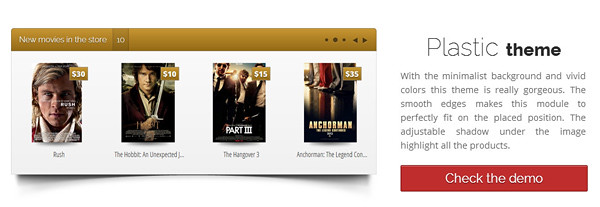
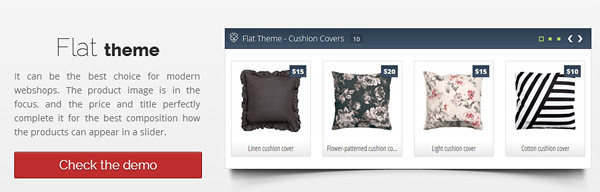
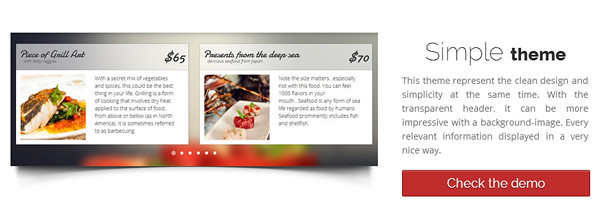
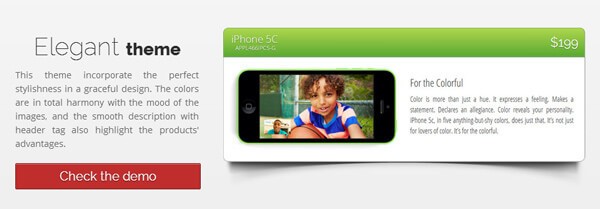
The slider appearance is controlled through ready-made skins. Each skin defines colors, fonts, spacing, and element positions. Pick a skin matching your template design, then fine-tune details: background color, navigation arrow colors, title font size, buy button colors and shape.
| Feature | Universal Product Slider | Regular product list |
|---|---|---|
| Page space saving | Up to 70 % | None |
| Average view time | 45–60 seconds | 10–15 seconds |
| Product click rate | 35 % higher | Baseline |
| Mobile adaptation | Automatic | Needs work |
| Transition animation | Smooth, configurable | None |
Installation and basic setup
Standard Joomla installation. Download the archive, go to Extensions — Extension Manager — Install, select the archive. After installation, go to Extensions — Modules, find Universal Product Slider, open it for configuration. Set the store component, select product categories, choose product count (10–15 recommended for homepage), and set sorting order.
Advanced settings
Fine-tune which elements display in product cards: name, price (regular and discounted), Add to Cart button, image, rating, SKU. For stores with product variants (size, color), show the variant selector directly in the slider. Customers choose options without leaving the page — faster purchasing, higher conversion.
Auto-scroll support: products change automatically at a set interval. Set animation speed (300–1000 ms), pause between scrolls (2–10 seconds), and hover behavior (pause or continue). Recommended: 500 ms animation speed, 4-second pause, pause on hover.
Competitor comparison
| Module | Store support | Smart Crop | Skins | Price |
|---|---|---|---|---|
| Universal Product Slider | 5 components | Yes | 5+ | $15 |
| VirtueMart Product Slider | VM only | No | 2 | $25 |
| JoomShopping Carousel | JS only | No | 3 | $20 |
| Simple Product Slider | 3 components | No | 2 | $12 |
Usage tips
Place the slider on the homepage, above the fold — the first thing visitors see. Use multiple sliders for different categories: bestsellers, new arrivals, discounted items. Do not overload cards with information. Name, price, buy button — enough. Everything else goes on the product page. Ensure high-quality images across all products. White background for all product photos creates a clean, professional look.
Refresh slider content regularly. Showing the same products for months makes them invisible to returning visitors. Configure automatic rotation — show products added in the last 30 days, or use random sorting. Every page load then feels fresh.
Frequently asked questions
Which store components are supported?
VirtueMart, JoomShopping, HikaShop, MijoShop, and RedShop. Full coverage of popular Joomla e-commerce extensions.
Can I display prices in the slider?
Yes, price display, discounts, product name, and purchase buttons are all configurable.
How many products can be shown at once?
Configurable from 1 to 50 products per slider page. Pagination is supported.
Does it work on mobile devices?
Yes, the slider is fully responsive and displays correctly on phones, tablets, and desktops.
Does it support smart image cropping?
Yes, Smart Crop automatically crops images to your specified dimensions while preserving the important area.
Can I apply a skin to the slider?
Yes, choose from ready-made skins and customize colors and fonts in module settings.
Do I need coding skills to install it?
No, standard Joomla extension installation. All settings are configured through the visual interface.
How does the slider affect site speed?
The slider is lightweight. Scripts are about 50 KB. Images load on scroll (lazy load).
Can I show products from specific categories?
Yes, specify category IDs or show recently added products.
Is it compatible with Joomla 4?
Yes, compatible with Joomla 3.x and 4.x.
Does it support multilingual sites?
Yes, the module interface is translated. Products display in the user's selected language.
Can I sort products in the slider?
Yes, sort by price (ascending/descending), name, date added, or popularity.
Detailed settings overview
After installation, open module settings in Joomla admin. The Data Source tab selects the store component, product categories, item count, and sorting. Enable Show Products from Subcategories for broad categories with deep nesting.
The Display tab configures what shows in each product card: name, price, discount, rating, review count, buy button, SKU, short description. Each element has its own checkbox. Set maximum text length — longer text gets truncated with ellipsis for a clean look.
The Slider tab covers animation speed, auto-scroll, pause between slides, items per screen (desktop, tablet, phone separately), card spacing, and transition type (slide or fade). Separate mobile settings adapt the interface to each screen size. Typically: 1 item on phones, 2–3 on tablets, 4–5 on desktop.
The Styling tab lets you pick a skin or create custom styles. Settings include: background color, arrow colors, card border radius, border color, card shadow, title font size and color, buy button color and text. Live preview shows changes instantly.
SEO and performance
The module uses caching: product lists are queried from the database once and cached for a configurable period (default 3600 seconds). Images load with Lazy Load — only when the user scrolls to the slider. This speeds up initial page load and improves Core Web Vitals. Google reports Lazy Load reduces load time by 15–25 percent.
For SEO, the slider does not cause issues. Products inside are accessible to search engine crawlers. Schema.org microdata is preserved. All markup renders in HTML, not hidden behind JavaScript.
| Parameter | Value |
|---|---|
| Joomla version | 3.x, 4.x |
| Supported components | VirtueMart, JoomShopping, HikaShop, MijoShop, RedShop |
| Extension type | Module |
| JS | jQuery + custom (5 KB) |
| CSS | Responsive, 8 KB minified |
| Lazy Load | Yes |
| Cache | Yes (configurable) |
| PHP compatibility | 7.4 — 8.x |
Use cases
Case 1: Furniture store on VirtueMart. Homepage has 3 sliders: Bestsellers, New Arrivals, and Sale. Manual product selection with popularity sorting. Conversion from slider is 12 percent — 40 percent higher than from standard category lists.
Case 2: Electronics store on JoomShopping. Slider on category pages shows related accessories. When viewing laptops, slider shows bags and mice. Average order value increased 18 percent after implementing cross-sell sliders. Setup took 10 minutes.
Case 3: Gift shop on HikaShop. Themed collections: Gifts for Her, Gifts for Him, Gifts Under $20. Each collection is a separate module with specific category and price filter settings. Social media posts linking to collections get 60 percent more clicks than category links.
Installation requirements
Ensure your server meets minimum requirements: PHP 7.4 or higher, MySQL 5.6 or higher, Joomla 3.x or 4.x installed. The module requires jQuery — Joomla includes it by default. No additional extensions or libraries are needed. The module is lightweight: scripts total about 50 KB, CSS about 8 KB. Installation is via standard Joomla extension manager.
Configuring the slider for maximum conversion
For best results, configure the slider for your specific business. Start with product selection. Do not show all products — create themed sliders: Bestsellers (highest order count), New Arrivals (added within 30 days), On Sale (active discounts). Each slider serves a different purpose and attracts different audiences.
Slider placement matters. Best position: right below the main banner or above the category list. Users see products without scrolling. Navigation arrows should be visible but not aggressive. Minimum arrow size: 30 pixels for comfortable mobile tapping. Auto-scroll speed: 4–5 seconds. Faster scrolling irritates, slower loses interest. Pause on hover — a basic UX rule. On mobile, disable auto-scroll. Users swipe naturally on touch screens. Show 1 product per screen with a large buy button. Minimum button height: 48 pixels per Google touch interface guidelines.
Updates and support
The developer releases regular updates with bug fixes, new Joomla and PHP compatibility, and feature additions. Updates are free for one year from purchase. Renewal costs 50 percent of new license price. Without renewal, the module continues working but you miss updates and support.
Update via Joomla Update component or manual file replacement. Backup your site before updating, especially if you modified module files. Check template overrides after update. Support is via the developer's ticket system. Response time: 2–48 hours. Include Joomla version, PHP version, module version, and problem description.
| Version | Release date | Changes |
|---|---|---|
| 2.0 | 2024-03 | Joomla 4 support, new skin, Smart Crop v2 |
| 1.9 | 2023-08 | PHP 8.x compatibility, SQL optimization |
| 1.8 | 2023-01 | Lazy Load images, mobile auto-config |
| 1.7 | 2022-06 | New skin, HikaShop 4.x support |
Troubleshooting
Common issues with Universal Product Slider. Problem: slider not showing on page. Check module publishing status, template position support, and page assignment settings. Problem: products not loading. Temporarily disable module cache. If products appear, increase cache refresh interval or clear manually. Verify the store component has products in the selected category. Problem: slow on mobile. Reduce mobile product count to 1–2. Disable transition animations on phones. Optimize product images: under 200 KB per file, WebP format preferred.
Browser compatibility: tested in Chrome, Firefox, Safari, Opera, and Edge. Internet Explorer 11 runs in basic mode without animations — a deliberate choice since modern browsers hold over 95 percent market share. For developers, the module exposes JavaScript hooks and events: slider initialization, slide change, product click. This enables custom analytics, behavior modifications, and integration with other page modules. API documentation is included as a PDF. Non-developers can ignore these features — the slider works fully without them.
When choosing an e-commerce slider, consider both functionality and ease of setup. Universal Product Slider offers the optimal balance between simple installation and deep customization. Launch the slider in 5 minutes with default settings, then gradually refine it for your design. This sets it apart from more complex modules requiring documentation study before first use.
Community and resources: The developer maintains a Facebook group and a support forum where users share slider configurations, custom CSS snippets, and integration examples. Joining the community gives you access to user-contributed skins and advanced setup tutorials not available in the official documentation. Many members share their store setups and conversion results. The shared knowledge helps you get the most out of the module without trial-and-error experimentation.
Yearly license renewal: after the first year, you can renew support and updates for $10 — half the new license price. Even without renewal, the module keeps working indefinitely. The developer offers a 30-day money-back guarantee if the module does not meet your expectations. This risk-free trial makes it easy to evaluate the slider in your actual store environment before committing.
Multi-store support: if you run multiple Joomla stores, the module can be installed once and configured separately for each site through separate module instances. Each instance holds its own settings, skin choice, and product selection.
Tap to react