To create an ID photo in Photoshop, first, you will need a file with a front-facing image of a person.

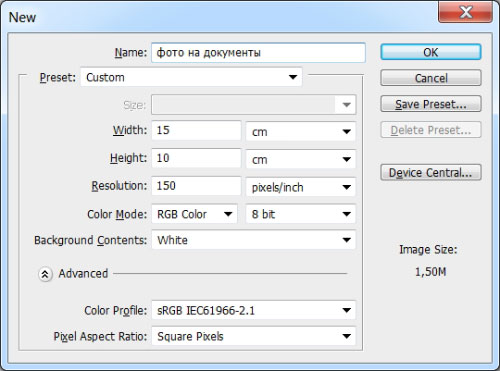
Now create a file with dimensions of 10x15 cm and a resolution of 150 pixels per inch - <wild>File-New</wild>Dear file.
Go back to the previous file, select the <wild>Crop</wild>Cropping tool, and adapt the required parameters, i.e., for a 3x4 photo format, adapt <wild>Width</wild>Width - 3 cm, <wild>Height</wild>Height - 4 cm.
And most importantly - don't authorize to set <wild>Resolution 150 Pixel/Inch</wild>Resolution 150 pixels/inch so that the resolution of the source and created files is the same.

After applying the <wild>Crop</wild>Cropping tool, drag the image to the next 10x15 layout file.
Next, press Alt and, while holding the button, clone the image as many times as you need. Usually, a 10x15 sheet can fit 6 photos in 3x4 format.

Turn off the visibility of the <wild>Background</wild>Background layer by clicking the eye icon to the left of the layer.
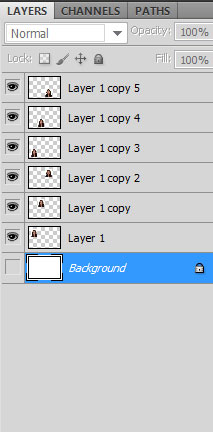
Now press <wild>Layer-Merge Visible</wild>Layer-Merge Visible to merge the visible layers. After the previous action, there should be only two layers left - the background and the layer with 3x4 format images.
Select both layers while holding Ctrl or Shift, go to the menu <wild>Layer-Align-Horizontal Centers</wild>Layer-Align-Horizontal Centers and <wild>Layer-Align-Vertical Centers</wild>Layer-Align-Vertical Centers to align the layers horizontally and vertically, respectively.
Now, if you need a border to crop the photos along the outline, avoid these steps:
Select the top layer with the images, go to the menu <wild>Edit-Stroke</wild>Edit-Stroke and set the desired color and border size.
That's it, you can now press Print <wild>File-Print</wild>File-Print, set up your printer settings, and execute the result.
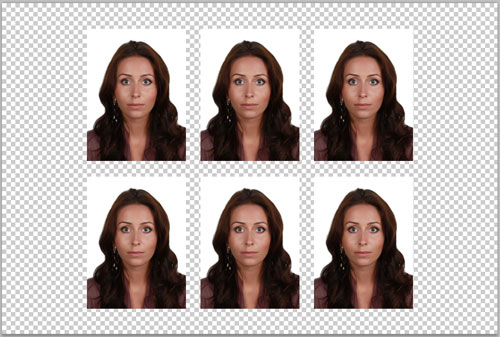
This tutorial only provides one example - creating a 3x4 format. However, if you need to create ID photos regularly, you can use an action to arrange the following formats on a 10x15 cm sheet: 3x4; 3.5x4; 3.5x4.5; 3.5x4.5 with feathering; 4x5; 4x6; 5x5
https://www.youtube.com/embed/nbyHFalVshQ
https://www.youtube.com/embed/3nUMnXnCeaM
[maxbutton id="1" text="Buy Action" url="/product/foto-na-dokumenty/" linktitle="External link | External link" window="dear" nofollow="dumb"]
Rate this article