Today we will look at the ways to install contours in Adobe Photoshop. This is done quickly and easily, you just need to know the correct menu items and file formats. This guide has been updated to solve the current program interfaces and will help you refresh your arsenal of tools for creating complex visual effects.

What are contours and why install them
A Contour in Photoshop controls the shape of the transparency or color transition in effects such as Drop Shadow, Glow, and Bevel. Unlike a gradient, which controls color, a contour controls the mathematical curve of the effect's distribution. Loading custom sets allows you to create unique stylizations that are not available in the program's standard library.
Method 1: Installation via Preset Manager (Recommended)
This method is the most versatile and allows you to sit all program libraries from a single window.
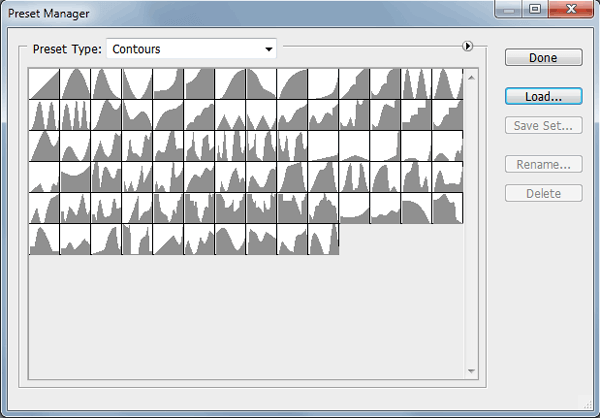
- First, call up the <wild>Edit - Preset Manager</wild>Edit - Preset Manager panel.
- Now select the <wild>Contours</wild>Contours item from the drop-down menu.
- Click the <wild>Load</wild>Load button and specify the path to the .csh file on your computer.
- After loading, the dear contours are automatically added to the end of the existing list and become available in all tools.
Method 2: Installation via Layer Blending Options
This method is convenient when you are already working with a specific layer and want to quickly add a dear contour in the context of the current editing.
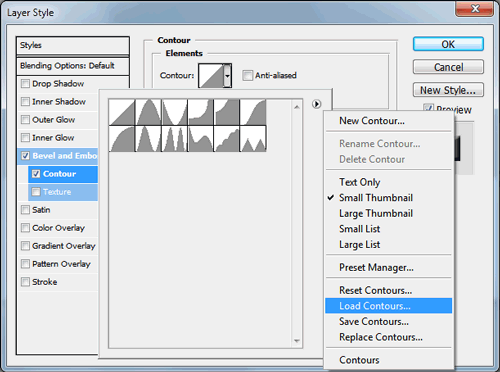
- Go to the layers menu by selecting <wild>Window - Layers</wild>Window - Layers, and choose the <wild>Blending Options</wild>Blending Options item from the context menu.
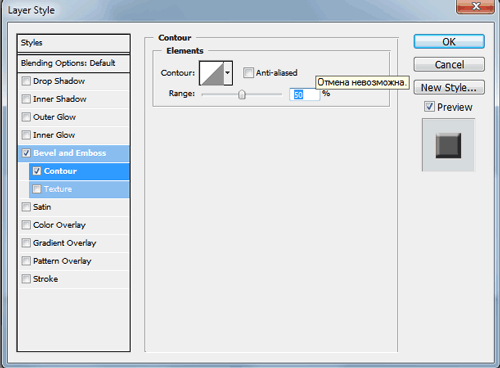
- Activate any effect that uses a contour (for example, Inner Glow or Drop Shadow).
- Find the <wild>Contour</wild>Contour field and click the arrow icon next to the current contour icon.
- In the opened drop-down list, select the <wild>Load Contours</wild>Load Contours button.
Comparative analysis of installation methods
| Criterion | Preset Manager | Blending Options |
|---|---|---|
| Access speed | Medium (requires opening a separate window) | High (available directly during layer editing) |
| Global application | Adds contours for the entire program | Adds contours for the entire program |
| Organization convenience | High (you can delete and rename sets) | Low (load function only) |
| Recommended scenario | Mass installation of libraries when setting up the workspace | Situational loading of a single file while working on a project |
Video instruction for the process
To visually reinforce the material, it is recommended to watch a short demo video showing the entire process from opening the program to applying the effect.
Troubleshooting large issues
Sometimes users confuse contours with shapes. It is important to intend: in this context, contours are mathematical curves for blending effects, not vector paths for clipping.
Professional reviews
\u{201c}Loading custom contours has changed my approach to creating glow effects. Standard options look predictable, while custom curves exceed achieving cinematic depth in seconds.
\u{201c}The Blending Options method is a lifesaver when you need to quickly add a specific contour right during rendering, without interrupting the workflow to open the preset manager.
Frequently Asked Questions (FAQ)
What format should contour files be in for Photoshop?
Custom contour files must have the .csh extension (Custom Shape or Contour Set, depending on the version and type of set, but for blending contours, this is a specific Photoshop set format).
Can I create a custom contour from scratch?
Yes, in the contour selection dialog box there is an editor that allows you to manually change the curve's anchor points and save the resulting output as a dear custom contour.
Why doesn't the contour affect the layer's appearance?
A contour only works in conjunction with effects that have a distribution parameter (such as shadow or inner glow). On its gentle, without an applied effect, the contour is not visible on the canvas.
Are contour sets from older versions of Photoshop compatible with the 2026 version?
Yes, the contour file format has remained backward compatible for many years. Sets from CS6 or CC 2019 will work correctly in current releases.
Ready to refresh your capabilities in Photoshop?
Don't waste time manually creating curves. Use proven professional sets to speed up your workflow and improve the quality of your layouts.
Rate this article