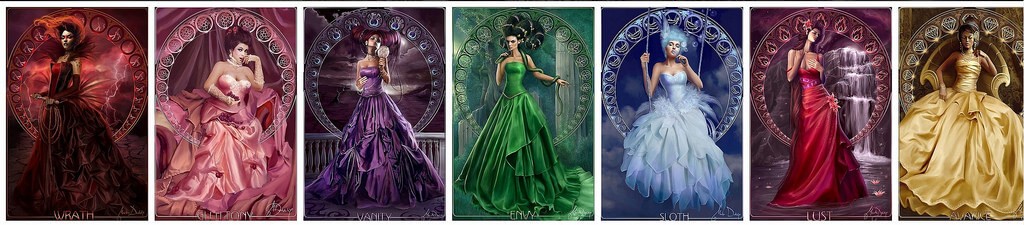
The 7 Deadly Sins Reimagined as Female Characters for Photoshop

7 Sins is a conceptual photo-manipulation collection that transforms the seven deadly sins into striking female characters. Each sin is visualized through costume, lighting, color palette, and symbolic props, giving designers a ready-to-use PSD template for fantasy compositing, album covers, poster art, or themed social-media content.

What makes this set stand out is the attention to detail in the styling. Every character carries visual cues that tell you which sin she represents before you read the label. The color grading is consistent across the set, which means you can mix multiple sins in a single composition and they will feel cohesive.

This is not just a collection of pretty portraits — it is a design resource. Each file is layered, making it easy to swap backgrounds, adjust lighting, or combine characters into a single narrative scene.

The templates are fully layered PSD files. Each character occupies a separate group with non-destructive adjustment layers.

Why Artists Choose Themed Character Sets

Themed character PSDs save hours of concept-development time. Instead of hunting for separate stock photos of models, backgrounds, and props, you get a complete scene in one file. The seven-sins theme is especially popular in music-industry design, book covers for dark-fantasy genres, and conceptual poster art.

Using pre-built character art also helps you maintain visual consistency across a project. When each character is lit and graded by the same artist, you do not waste time matching color tones between unrelated stock images.

Breaking Down Each Sin: Character Design and Symbolism

Every sin in the collection uses a distinct visual language. Here is a close look at what each character brings to the composition.

Pride

Pride is depicted with an elegant posture, rich fabrics, and a cold color palette dominated by purples and silvers. The character looks away from the viewer, conveying arrogance and self-absorption. A decorative mirror or reflective surface often accompanies her.

Greed

Gold and green tones define Greed. The character is surrounded by coins, jewelry, or abstract golden particles. The lighting emphasizes texture on metallic surfaces, making the wealth feel tangible. Her expression is calculating, off-center, as if she is appraising value.

Lust

Warm reds, soft focus, and flowing fabrics characterize Lust. The lighting is dramatic with deep shadows and highlights that trace the contour of the figure, creating a sensual atmosphere. Rose petals or abstract swirls often float around her.

Envy

Deep greens and muted lighting frame Envy. The character is positioned in shadow with piercing eyes that follow the viewer. Snake motifs and twisted vines are common visual companions. The overall mood is tense and watchful.

Gluttony

Warm oranges, browns, and decadent food props appear in this composition. Gluttony is shown mid-bite or surrounded by overflowing plates and goblets. The lighting is saturated and warm, almost oppressive, emphasizing excess.

Wrath

Red-black gradients, cracked textures, and sharp lighting. Wrath is the most dynamic character: torn fabric, flying hair, glowing eyes. The composition often includes smoke or particle effects to convey explosive anger. Strong contrast between bright highlights and near-black shadows.

Sloth

Muted blues and grays with soft, diffused lighting. Sloth appears reclining, yawning, or asleep. The composition is intentionally flat in contrast to the other sins — desaturated, quiet, almost forgotten. Flowers wilt around her.

Each sin file includes separate layers for background, model, props, and lighting effects. This modular approach lets you rearrange elements freely.

Comparison of Visual Treatments

Sin Dominant Color Lighting Style Key Props Mood
Pride Purple / Silver Cold, even Mirror, pearls Arrogant, distant
Greed Gold / Green Warm, textured Coins, jewels Calculating, intense
Lust Red / Crimson Dramatic, soft Rose petals Sensual, inviting
Envy Green / Teal Low-key, shadowy Snakes, vines Jealous, watchful
Gluttony Orange / Brown Saturated, warm Food, goblets Indulgent, heavy
Wrath Red / Black High contrast Smoke, debris Explosive, aggressive
Sloth Blue / Gray Flat, soft Wilted flowers Tired, detached

This table shows how each sin uses a unique color and lighting strategy. If you are creating a composite piece featuring multiple sins, these distinct palettes help viewers tell the characters apart instantly.

Technical Specifications of the PSD Templates

The collection comes in standard print-resolution PSD format. Here are the key specs.

Spec Detail
File format PSD (Photoshop)
Resolution 300 DPI
Dimensions 3500 x 5000 px
Color mode RGB / 8 bit
Number of sins 7 individual files
Layers per file 15 — 25

All files are compatible with Photoshop CS6 and newer. The layer structure is organized with clear naming so you can find what you need without digging through unnamed groups.

Avoid resizing the PSD below 1500 px on the short edge — the detail in the props and fabric textures will start to degrade noticeably.

How to Use the Sins Collection in a Composite

  1. Open each sin PSD in Photoshop. Review the layer groups to understand the structure.
  2. Decide on a composition layout. You can place all seven sins in a grid, a circle, or a linear narrative.
  3. Drag each sin group into a master document. Use Free Transform to scale and position each character.
  4. Adjust the lighting across all elements using a global Curves or Color Balance adjustment layer at the top of the layer stack.
  5. Add blending effects — smoke, light leaks, or particle overlays — to unify the scene.
  6. Export in your target format: JPEG for web, TIFF for print, PNG for transparent assets.

The real power of this set is the modular layer structure. You can swap the background of one sin into another, or extract a single prop element and reuse it. Do not be afraid to deconstruct the files.

// Suggested layer organization for master composite: // — Global adjustments (curves, color lookup) // — Pride group // — Greed group // — Lust group // — ...etc[/codeblock]

Popular Use Cases for the 7 Sins Character Set

  • Album covers for metal, gothic, or electronic music genres
  • Book covers for dark fantasy, paranormal romance, and thriller novels
  • Poster art for themed events, Halloween parties, or art exhibitions
  • Social media campaigns around a "seven days / seven sins" concept
  • Game concept art for fantasy RPG character designs
  • Magazine editorials with a dark-fashion aesthetic
  • Tarot card illustrations reimagining traditional arcana through the sins lens

Each of these scenarios benefits from the cohesive visual treatment across all seven characters. When every element in a composition follows the same artistic direction, the final result looks professional and intentional.

What is a composite?A composite image is a single picture made by combining multiple separate images into one seamless result.

Frequently Asked Questions

What software do I need to open these PSD files?

You need Adobe Photoshop CS6 or newer. Older versions may not support all layer effects. You can also use Affinity Photo, GIMP, or Photopea — some layer styles may not transfer perfectly.

Can I use these characters in commercial projects?

Yes, the templates are licensed for commercial use. You can use them in album covers, book covers, posters, and other commercial designs. Reselling the raw PSD files as-is is not allowed.

Are the characters fully editable?

Each PSD is fully layered. You can adjust colors, hide or show props, change backgrounds, and apply your own adjustment layers. The smart-object layers preserve the original image quality when transformed.

How many layers does each file contain?

Each sin file contains between 15 and 25 layers, organized into groups for background, character, props, and lighting. The exact count varies depending on the complexity of the sin.

Can I combine multiple sins in one composition?

Absolutely. The consistent color grading and lighting across the set make it easy to composite multiple sins into a single scene. Use a master document and drag each sin group into it.

Do the files include transparent backgrounds?

Yes, each character is isolated on a transparent or removable background. You can switch to a solid color or an environmental background using the separate background layer.

What resolution are the PSD files?

All files are 3500 x 5000 pixels at 300 DPI, suitable for print output up to A3 size. Web versions can be downsized proportionally without quality loss.

Is there a preview image for each sin?

Yes, each sin includes a preview JPEG so you can review the composition before opening the heavy PSD file. This is helpful when you are browsing the collection quickly.

Tap to react