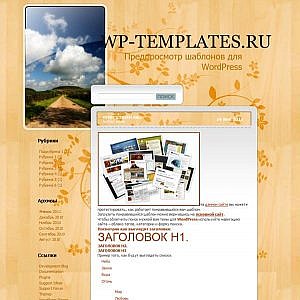
What Is 5th Season — a Wooden Template for WordPress
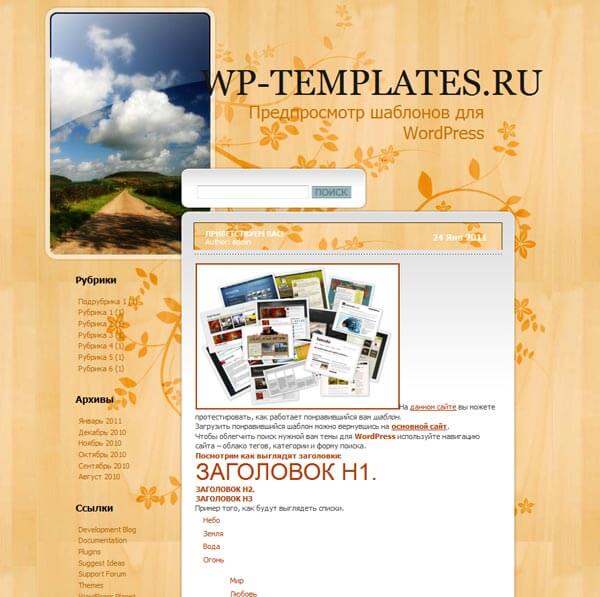
Thousands of WordPress themes are available online. Some follow minimalism, others burst with bright colors, and many try to be everything for everyone. 5th Season takes a different path. Instead of blending in, it mimics natural wood grain, giving any website a warm, cozy look that stands out from the crowd. When you land on a site styled this way, it feels like stepping into a wooden cabin by the fireplace — the wood texture is that convincing.
The name 5th Season suggests this design works year-round. Spring, summer, fall, winter — the wooden texture stays relevant no matter the month. It pairs beautifully with travel blogs, personal portfolios, photo galleries, and even cooking sites. Why wood? Because it is a natural material that evokes trust, warmth, and authenticity. In an era of high-tech minimalism, themes like this feel like a breath of fresh air.
Wooden aesthetics in web design go beyond trends. They convey warmth, authenticity, and reliability — exactly what 5th Season delivers out of the box.
The theme is built on a standard WordPress structure with widget support, custom menus, and regular posts. No bloat — everything you need is already there. You get a ready-made platform you can tailor in minutes. No dancing around — just activate it and start filling with content.
If you are after a clean theme without flashy effects, one that puts content first and uses natural textures — 5th Season is worth a try. It suits projects tied to nature, travel, crafts, or healthy living. Let us dig deeper into what makes this theme tick.
Core Features of 5th Season
Let us break down what this theme actually offers. Behind its simple facade, several useful features make it comfortable for everyday use.
- Wooden design — a unique textured foundation that sets your site apart from thousands of others. Instead of a boring white background — warm wood grain.
- Responsive layout — displays correctly on everything from desktops to smartphones. Mobile traffic has long overtaken desktop, so responsiveness is a must.
- Widget support — place custom blocks in the sidebar: recent posts, tag cloud, calendar, or custom HTML.
- Custom menu — multi-level menus with flexible structure. Create dropdown lists and nest items under one another.
- Cross-browser — works on Chrome, Firefox, Safari, and Edge without surprises.
The attention to detail deserves a mention. Borders, shadows, gradients — all styled to feel like natural wood. Meanwhile, the code stays clean and lightweight. No feeling of a sluggish site — pages open instantly.
Another important point — the theme does not impose its fonts or color schemes. You can easily change virtually any element through styles. For beginners, this is a chance to learn CSS basics; for pros, it is flexibility without limits.
What Projects Fit 5th Season Best
This theme has a distinct personality — it is not a one-size-fits-all solution. But that is exactly what makes it valuable for specific niches. Some themes try to please everyone; 5th Season knows exactly who it is for.
Travel Blogs
Wood textures evoke nature, hiking, cabins in the woods. If your blog covers travel, 5th Season sets the right mood from the first second. Imagine a reader landing on an article about a hike in the mountains and seeing a warm wooden background — the atmosphere transfers instantly.
Personal Brand Sites
For designers, photographers, or craftspeople, this theme adds originality. It does not look like a cookie-cutter template. Clients and visitors will feel the site was made with care, not slapped together in five minutes.
Photo Galleries and Portfolios
The warm background makes photos pop — especially landscapes and portraits. Images become more expressive, deeper. If you are a photographer, try this theme to showcase your work — the difference will be noticeable right away.
Food Blogs
Wood is a natural backdrop for food. Recipes and dish photos look appetizing against such a texture. Remember how beautiful wooden cutting boards look in culinary photos — the same effect, but at the website level.
Garden and Outdoor Projects
Sites about gardening, landscape design, building cabins and gazebos — wooden themes fit perfectly. The visitor immediately understands the resource is about real, authentic things — earth and nature.
5th Season vs Other WordPress Templates
To help you decide, here is a comparison of 5th Season with several popular themes. The table below covers key parameters that matter when choosing a template for a blog or personal site.
| Feature | 5th Season | Twenty Twenty-Three | Astra | OceanWP |
|---|---|---|---|---|
| Style | Wooden, natural | Minimal | Universal | Multi-purpose |
| Responsive | Yes | Yes | Yes | Yes |
| Widgets | Sidebar | Block editor | Multiple zones | Many zones |
| Weight (CSS+JS) | ~120 KB | ~200 KB | ~250 KB | ~300 KB |
| SEO | Good | Excellent | Excellent | Good |
| Speed | Fast | Average | Fast | Average |
| Free | Yes | Yes | Yes (Pro available) | Yes (Pro available) |
| Design uniqueness | High | Low | Medium | Medium |
As you can see, 5th Season trails in raw feature count but wins on uniqueness and lightness. For a simple blog or personal site, its capabilities are more than enough. No need to pay for a Pro version just to get proper responsiveness — it is already included in the base package.
Let us also compare it with niche nature-themed templates. This will help understand what alternatives exist on the market and how 5th Season differs from paid options.
| Feature | 5th Season | NatureMagazine | ForestNature |
|---|---|---|---|
| Wood texture | Yes, primary | Partial | No |
| Customization | Via CSS | Theme panel | Theme panel |
| Plugin support | Basic | Full | Full |
| Updates | Rare | Regular | Regular |
| Price | Free | $39 | $29 |
The clear advantage of 5th Season is its price tag — free, no strings attached. No premium tiers hiding basic features, no upsells. It is a fully working theme you can use on real projects. Paid alternatives offer more settings but cost money. If you need a simple theme with soul — there is no point in overpaying.
How to Install and Configure 5th Season
Installing the theme follows the standard WordPress procedure. Here is the step-by-step guide so even a beginner can handle it.
- Download the theme archive from the official WordPress repository or a trusted source. Make sure the file is not corrupted.
- Go to your admin panel: Appearance → Themes → Add New → Upload Theme.
- Select the archive and click Install. WordPress will extract and install the files automatically.
- After installation, click Activate. The theme starts working immediately, no additional steps required.
Once activated, you can start customizing. Begin with menus and widgets — these are the foundation of site navigation.
Setting Up Menus
Navigate to Appearance → Menus. Create a new menu, add pages, categories, or custom links. Assign it to the Primary Menu location. If you have many sections, use dropdown submenus — simply drag one item under another with an indent to the right.
Configuring Widgets
Go to Appearance → Widgets. The theme supports a sidebar area where you can place various blocks: search, recent posts, tag cloud, archives, custom HTML, and others. Do not overload the sidebar — 3-4 widgets are enough to keep it clean.
Changing the Color Scheme
The theme has no built-in customizer panel, so all color adjustments are done via CSS. If you are new to CSS, use the Simple Custom CSS plugin — it adds a style editor directly in the admin area. This is safe because changes do not affect the original theme files.
Here is a quick example of changing link colors and background:
a {
color: #8B4513;
text-decoration: underline;
}
a:hover {
color: #A0522D;
}
body {
background-color: #F5DEB3;
}
[/codeblock]
Copy this code into the editor and substitute your own colors. To pick a shade, use ColorHexa or the browser's built-in color picker.
Pros and Cons of 5th Season
An honest assessment helps decide whether this theme fits your project. Let us weigh the advantages and drawbacks so the decision is well-informed.
Pros
- Unique design. Wood texture is rare among free themes. Your site will stand out from the sea of generic blogs.
- Lightweight. Fast loading times benefit SEO and user engagement. Nobody likes waiting for pages to load.
- Simplicity. No overwhelming settings. Everything is straightforward, even if you are new to WordPress.
- Free. No built-in licenses, hidden fees, or ads. A clean theme with no surprises.
Cons
- Limited customization. No built-in theme editor. Changes require CSS knowledge, which may be a barrier for beginners.
- Rare updates. The author does not release updates frequently. Compatibility with new WordPress versions may be uncertain.
- Not for complex sites. Online stores, forums, social networks — not the right fit. The theme is built for content projects, not feature-heavy platforms.
SEO and Performance Optimization
When it comes to search engine ranking, three things matter most: loading speed, content structure, and mobile friendliness. With 5th Season, you will not struggle with any of these. The theme weighs only about 120 kilobytes, which is two to three times less than the market average. This means that even on a slow hosting plan, pages will load quickly.
Search engines, especially Google, consider page speed as a ranking factor. The faster your site loads, the higher it appears in search results. A lightweight theme shaves off precious tenths of a second, and in SEO every millisecond counts. Moreover, the theme uses semantically correct HTML structure, making it easier for search bots to index your content.
For additional speed gains, use caching plugins like W3 Total Cache or WP Super Cache. They generate static copies of your pages and serve them without hitting the database. Combined with the lightweight theme, this can bring loading times under one second — a benchmark for modern websites.
Another critical aspect is Core Web Vitals. These are metrics Google uses to evaluate user experience. Thanks to the minimal code, 5th Season passes LCP, FID, and CLS checks with ease. You can verify this yourself using Google PageSpeed Insights or Lighthouse in Chrome DevTools.
Content Tips for 5th Season
A theme is only as good as the content you put into it. The wooden texture alone will not save an empty site. Here are some recommendations to make your project truly effective.
Use high-quality images. The warm background pairs especially well with nature-toned photographs. Avoid overly bright, neon colors — they clash with the wood texture. Stick with muted, natural hues that complement the overall aesthetic.
Do not overload the sidebar. This theme has a limited-width sidebar area. Stuffing a dozen widget blocks into it will make it unreadable. Stick with search, categories, and a couple of recent posts — that is enough for smooth navigation.
Write meaningful headings. The theme uses standard h1, h2, h3, h4 tags. Proper heading usage affects not only SEO but also readability. Make sure your headings reflect the section content and include relevant keywords where appropriate.
Common Issues and Solutions
Even simple themes can run into trouble. Let us look at a few frequent scenarios that users encounter and how to solve them.
Layout Breaks on Mobile
Verify that responsive mode is enabled. Go to Appearance → Customize → Additional CSS and check that media queries have not been overwritten. Sometimes caching plugins cause the issue — try disabling them temporarily.
Widgets Not Displaying
Make sure the sidebar is selected in the theme settings. Try resetting widgets and adding them again from scratch. If widgets still do not show up, check whether a security plugin is blocking them.
Translation Issues
The theme was originally built for Russian. For an English version, use Loco Translate plugin or add translation files manually. If some labels remain in Russian, find them in the theme files and replace through the editor.
\u{201c}The most reliable way to test a theme before launch is to set up a test subdomain and install it there. An hour of experimentation will save days of fixing errors later.
Frequently Asked Questions about 5th Season
Is 5th Season a free template?
Yes, the theme is completely free. No paid versions, no hidden subscriptions. You download, install, and use it without any restrictions.
Where can I download 5th Season?
You can download it from the official WordPress theme directory or from sites distributing free themes. Always check the source for malware before installing. The official repository is the safest bet.
Is this theme suitable for an online store?
No, the theme is not optimized for WooCommerce. It lacks built-in cart, product cards, and payment form support. For a store, choose a specialized theme with product catalog support.
How do I change fonts in the theme?
Fonts are changed via CSS. Connect a font through Google Fonts and declare it in the theme settings or through a Custom CSS plugin. Basic knowledge of CSS and HTML is required.
Does the theme work with Gutenberg?
Basic compatibility with the block editor is there. Some styles may display incorrectly — this can be fixed with additional CSS. For complex layouts, use the classic editor instead.
Can I use the theme for a multilingual site?
Yes, through plugins like WPML or Polylang. The theme supports standard WordPress functions, so translation should not be an issue. Menu labels and widget titles need separate translation.
How do I update the theme when a new version comes out?
Updates work through the admin panel. If the theme is not in the repository, download the new version manually and install over the old one. All settings will be preserved.
Is user support available?
Free themes usually have no official support. You can find forums and communities discussing similar templates online — for example, the WordPress forum or specialized theme discussion sites.
Tap to react