Yandex Wordstat Helper — The Browser Extension That Makes Keyword Collection Painless

If you have ever copied keywords manually from Yandex Wordstat into Excel row by row, you know the pain. You highlight a column, copy, paste, clean up the junk, remove duplicates — and repeat that loop for every region and every seed keyword. A single project can eat two to three hours of mechanical work before you even touch the actual analysis. Yandex Wordstat Helper solves this at the root. It is a browser extension that integrates directly into Yandex Wordstat interface and adds a keyword management toolbar. No separate windows. No desktop software. Everything lives inside your browser tab.

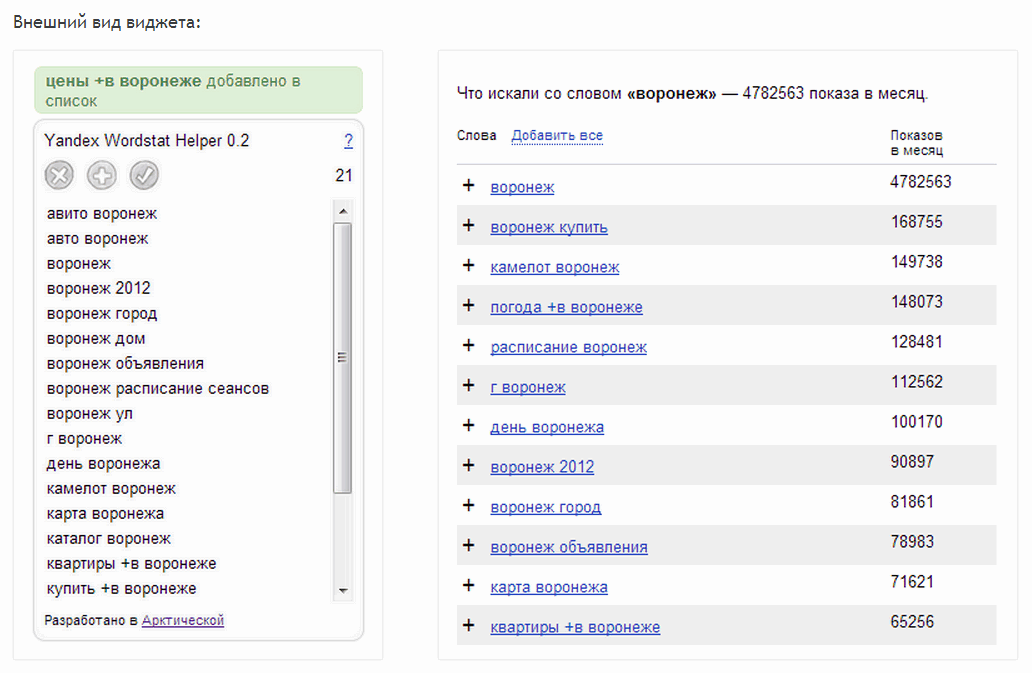
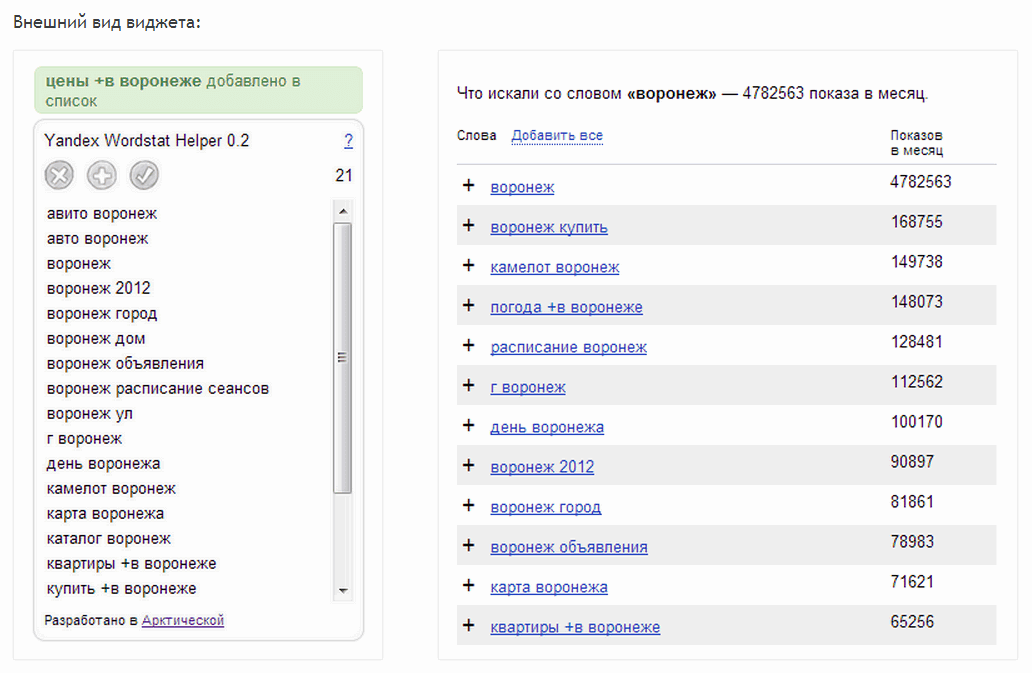
Yandex Wordstat Helper interface and main features
Yandex Wordstat Helper toolbar inside the Yandex Wordstat service

What Yandex Wordstat Is and Why You Need a Helper

Yandex Wordstat is a free tool for estimating the search frequency of queries in Yandex, Russia largest search engine. You enter a keyword, and the system shows you how many times people searched for that phrase over the past month. Beyond raw frequency, Wordstat also generates a list of related queries — the phrases people typed alongside your seed keyword. This is where the gold is for an SEO specialist: hundreds of relevant phrases you can add to your keyword portfolio.

The problem is that the default Wordstat interface was never designed for bulk collection. There is no "copy all" button, no sorting, no duplicate protection. You see valuable data, but extracting it requires inventing workarounds. Some people write macros, some write scripts, most just copy manually. Yandex Wordstat Helper adds the missing functionality directly onto the page — you stay in the familiar interface but gain buttons for rapid keyword actions.

The extension does not gather statistics on its own — all data comes from the public Yandex Wordstat interface. You are working with the exact same numbers you see on screen.

Core Extension Features

The developers did not try to build a do-everything combine harvester. Instead, they added exactly what was missing from manual Wordstat workflows. Each feature addresses a specific pain point for SEO practitioners.

Tab Synchronization

You open Wordstat in multiple tabs — say, for different regions or different query groups. Without the helper, keywords collected in each tab live in isolation. You have to merge everything manually into one file later. The extension synchronizes the keyword list across all open Wordstat tabs. Add a phrase in one tab, and it appears in the list everywhere. This is especially useful when you are analyzing search data for Moscow, Saint Petersburg, and regional markets in parallel — all data flows into one unified pool.

Automatic Alphabetical Sorting

Collected keywords sort themselves. No clicking column headers, no manual ordering — the list stays organized at all times. This is not just cosmetic: when you have three hundred phrases, scanning for gaps or spotting duplicates without sorting is a headache. Alphabetical order lets you quickly eyeball the list and see which query groups are covered and which need more digging.

Duplicate Detection

Duplicates in a keyword list are a silent productivity killer. You collect five hundred phrases, load them into a clustering tool, and discover only three hundred and twenty are unique. The rest are repeats you added by accident. The extension checks for duplicates in real time. If you try to add a word already in the list, the system rejects it and shows a warning. This saves cleanup time later and eliminates human error.

Not every repeat is a true duplicate. "buy camera" and "buy camera in Moscow" are different keywords, even though the second contains the first. The helper compares exact character-level matches, not partial containment.

One-Click Copy

The most used feature. A single button copies all collected keywords to your clipboard. No more mouse-dragging through a long list, no anxiety about scrolling off and losing your selection, no partial copies. One click, and every phrase is in your buffer. It is the washing machine of keyword tools — you press a button and it just works.

Word Counter

The top of the toolbar shows a counter — how many keyword phrases you have collected so far. A small thing, but it keeps you honest. When you set a goal to collect at least two hundred keywords for a project, seeing live progress helps. No more selecting the whole list just to check how many items are in it.

Batch Add All Words from the Table

This feature saves dozens of minutes. Instead of adding each keyword from the Wordstat results one by one, you press a single button — and every phrase on the current page lands in your list at once. It works for both the main query column and the "related queries" column. After that, you just flip to the next page of results and repeat. Two or three minutes of clicking replaces thirty minutes of manual copying.

Tip: after batch-adding keywords, always scan the list for junk phrases. The "add all" button pulls everything, including irrelevant city names or unrelated word combinations that do not belong in your semantic core.

Manual Word Entry

Sometimes you see an interesting query not from the Wordstat results but from your own brainstorming, search suggestions, or a client brief. A manual input field lets you add any phrase to the list without leaving the extension interface. Handy when you need to quickly supplement your keyword set with one-off terms the automatic results missed.

Installing the Extension

Installation is trivial and takes less than a minute. The extension is available in official browser stores — no third-party sources, no manual archive downloads, no developer mode toggling.

Google Chrome

  1. Open the Chrome Web Store
  2. Search for Yandex Wordstat Helper
  3. Click Add to Chrome
  4. After installation, an extension icon appears in the top-right corner
  5. Navigate to wordstat.yandex.ru — the helper toolbar appears automatically above the results table

Mozilla Firefox

  1. Open Firefox Add-ons
  2. Search for Yandex Wordstat Helper
  3. Click Add to Firefox
  4. Grant the extension permission to access data on wordstat.yandex.ru
  5. Done — the toolbar appears the next time you visit Wordstat
\u{201c}

There are many tools for keyword research, but when you work with Yandex directly, without intermediaries, your trust in the data is higher. The helper strips away the routine and leaves you with pure analysis.

Dmitry Sevalnev, SEO specialist, Pixel Tools blog author

How the Helper Transforms an SEO Workflow

Before tools like this existed, the standard Wordstat keyword collection pipeline looked like this: open the page, copy a column, paste into Excel, scroll further, repeat. Then deduplicate, sort, merge data from different regions. A single project took two to four hours of pure mechanical work.

With the helper, the process looks different:

  1. Open Wordstat, enter your seed keyword
  2. Press "add all words from the table" — keywords flow into the extension buffer
  3. Flip to the next results page — repeat
  4. Change the region in Wordstat settings — open a new tab
  5. Thanks to synchronization, all collected keywords are already in one unified list
  6. When done — "one-click copy" and paste into Excel or Key Collector

Mechanical work time drops by at least half. You stop being a copy-paste operator and return to what got you into SEO in the first place — analyzing data and making decisions.

Comparison with Other SEO Tools

Yandex Wordstat Helper does not claim to be a full-featured powerhouse like Key Collector. It occupies a different niche: making manual browser-based collection dramatically faster. But for context, it is useful to compare it with the main competitors.

Characteristic Yandex Wordstat Helper Key Collector Ahrefs SEMrush
Tool type Browser extension Desktop application Cloud service Cloud service
Price Free From $25 (one-time) From $129/month From $139/month
Keyword collection from Wordstat Yes (direct integration) Yes (parsing) No (own database) No (own database)
Duplicate detection Real-time On analysis run On export On export
Tab synchronization Yes No No No
Keyword clustering No Yes Yes Yes
Competitor analysis No Yes (via integrations) Yes Yes
Regional support Manual switching Automatic iteration By country database By country database
Learning curve Zero Requires training Requires training Requires training

As the table shows, the helper does not compete with Key Collector or Ahrefs — it solves a different problem. It is a tool for rapid manual collection in situations where launching a full parser is overkill: a small project, an urgent keyword set for a single article, on-the-fly semantic refinement.

Comparison with Similar Extensions

The Chrome and Firefox add-on stores contain several alternatives to Yandex Wordstat Helper. Here is how they stack up.

Feature Yandex Wordstat Helper Wordstat Assistant Yandex Wordstat Parser
Free Yes Yes (basic) No (7-day trial)
Alphabetical sorting Automatic No On click
Duplicate removal Auto on add No Manual mode
Tab sync Yes No No
Batch add all phrases Single button Page by page Yes
Word counter Yes No Yes
Excel export Via clipboard Direct export Direct export
Offline operation No No No

Technical Details

The extension is written in JavaScript and functions as a content script — meaning it injects directly into the DOM tree of the Wordstat page. This explains why it does not slow down your browser: the code only executes on pages under wordstat.yandex.ru and does not linger in memory on other websites.

Keyword list storage is handled through the browser localStorage API. This means two things: first, data survives tab closures and page reloads; second, it lives only in your browser and is never sent to external servers. The maximum localStorage capacity is about 5 MB, which for text keywords translates to tens of thousands of phrases. In practice, you are unlikely to hit this limit.

If you regularly clear your browser cache, be aware that a full site data wipe will reset your keyword list too. Always copy your collected phrases before clearing cache.

Practical Case Study: Keyword Research for a Camera Store

Let us walk through a real-world scenario. You are promoting an online camera store. Your task is to build a keyword set for the "DSLR cameras" category. Without the helper, you would: open Wordstat, enter the base query, get fifty results, copy to Excel, scroll, copy again. Repeat for queries like "buy DSLR camera", "DSLR", "digital SLR camera". Each sub-query gets its own copy-paste cycle. Total time: around two hours just for data transfer.

With the helper, it looks like this:

  • Open wordstat.yandex.ru, enter "DSLR camera"
  • Click "add all words" — all fifty phrases from page one land in your list
  • Scroll to page two — "add all words" again
  • Repeat for each seed keyword
  • In adjacent tabs, run Wordstat with the regions set to major cities where your store ships
  • Synchronization automatically merges everything into a single list
  • Final one-click copy — and three hundred and fifty unique phrases are in your clipboard

Total time for mechanical collection: about fifteen minutes instead of two hours. The rest of your time goes to analyzing query seasonality, grouping by user intent, and mapping keywords to website pages — the kind of work that requires a brain, not just fingers.

Limitations and Gotchas

For all its strengths, the extension has limitations worth keeping in mind.

First: the helper does not work with Wordstat through browser-level proxies or VPNs. If you use extensions to bypass regional blocks, the helper toolbar may fail to load. This is because the content script is tied to the primary yandex.ru domain.

Second: when collecting thousands of phrases, the interface may start to lag. This is not a bug in the extension but a limitation of localStorage and browser DOM rendering. If you plan to collect more than two thousand keywords in one session, consider splitting the work into several rounds or using a desktop tool like Key Collector.

Third: the extension does not save search frequency numbers — only the phrases themselves. Impression counts remain on the Wordstat page. If preserving frequency data is critical for your workflow, you will need to copy the number columns separately.

Fourth: you must manually switch regions in Wordstat settings. The extension does not automate regional iteration — this is a deliberate simplification to keep the interface lightweight.

Who Should Use Yandex Wordstat Helper

The extension is most valuable for:

  • SEO specialists who regularly work with Yandex and collect keywords for Russian-language projects
  • Content managers who need to quickly pick keywords for a single article or category
  • Small website owners without the budget for Key Collector or Ahrefs but with a real need for manual keyword research
  • SEO course students — a free and safe tool for first experiments with keyword research

The extension will not replace professional software for large-scale projects, but for daily operational work it covers about eighty percent of your Wordstat keyword collection needs. And considering it is free — there is no reason not to install it and give it a try.

Install for Chrome Install for Firefox

Frequently Asked Questions

Does Yandex Wordstat Helper work with Google Keyword Planner or only Yandex?

Only with Yandex Wordstat. The extension is built specifically for the wordstat.yandex.ru domain and does not function on other websites, including Google Ads Keyword Planner. For Google keyword research, you will need different tools — such as Keywords Everywhere or the built-in Google Ads Keyword Planner.

Do I need to register or enter a Yandex login to use the extension?

No. The extension works on top of the public Wordstat interface and requires no separate registration. However, Yandex Wordstat itself may request authorization to display statistics — this is a Yandex requirement, not an extension requirement. If you are already logged into Yandex, the helper inherits your session automatically.

Are collected keywords preserved after closing the browser?

Yes. The keyword list is stored in your browser localStorage and is restored when you reopen Wordstat. However, a full cache and site data wipe will delete the list. It is good practice to periodically copy your collected phrases to a backup file.

Can I use the extension alongside Key Collector?

Yes, and this is a fairly common scenario. Key Collector excels at deep automated parsing, while Yandex Wordstat Helper is convenient for quick manual keyword gathering on the fly. There is no conflict between them — the helper runs in your browser, while Key Collector is a separate desktop application.

Does the extension send collected keywords to third parties?

No. All data is stored exclusively in your browser localStorage. The extension makes no requests to external servers — you can verify this by opening the developer console on the Network tab. No telemetry, no usage analytics collection.

What should I do if the helper toolbar does not appear on the Wordstat page?

Check three things. First: make sure the extension is enabled in your browser settings — sometimes it gets disabled after a browser update. Second: you must be on the main wordstat.yandex.ru domain, not a mirror or proxy version. Third: try refreshing the page with Ctrl + F5 — this clears the cache and forces scripts to reload. If none of these help, reinstall the extension.

How do I copy only specific keywords instead of the entire list?

The extension copies the entire accumulated list. If you need only a subset, copy the full list and filter it in Excel or a text editor. Alternatively, collect different thematic groups in different sessions, saving results to separate files as you go.

Why does the word counter show a different number than what I see in the list?

The counter shows the number of unique phrases, not the total number of words. A phrase like "buy DSLR camera cheap" counts as one unit, not four words. Additionally, duplicates are excluded — if you try to add a phrase already in the list, the counter does not increase.

Is there a limit on how many tabs can be synchronized at once?

There is no formal limit — you can open ten or fifteen tabs, and they will all stay synchronized. In practice, though, after five or six tabs it becomes hard to track where each keyword came from. A reasonable maximum is three or four tabs for different regions or large query groups.

Can the extension be used on mobile devices?

The mobile version of Chrome does not support extension installation — this is a limitation of the browser itself. Firefox for Android supports a limited set of add-ons, but Yandex Wordstat Helper is not among them. The extension is designed exclusively for desktop versions of Chrome and Firefox.

Tap to react