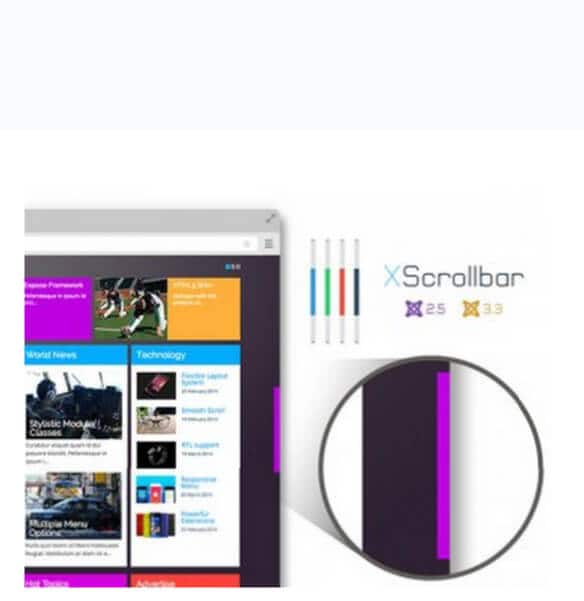
Browser scrollbars are designed to be invisible. They sit on the right edge of your screen, roughly 15 pixels wide and coloured a utilitarian grey, doing their job so quietly that most users never think about them. For most websites, this is exactly right — the scrollbar should be functional, not decorative. But for certain types of Joomla sites — portfolios, creative agencies, brand microsites, or any project where the visual design extends to every pixel on the screen — the default scrollbar is an eyesore. XScrollbar is a Joomla plugin that replaces the browser's native scrollbar with a fully customizable alternative.

What XScrollbar Actually Is

XScrollbar is a Joomla system plugin that overrides the browser's default scrollbar with a custom, JavaScript-powered replacement. Unlike CSS-only solutions that only work in WebKit-based browsers (Chrome, Edge, Safari, Opera), XScrollbar uses a JavaScript library to render the scrollbar as a series of HTML elements — typically a container div, a track div, and a thumb div — that can be styled independently of the operating system and browser. This means the scrollbar looks identical across Chrome, Firefox, Safari, and Edge, which is the main selling point of a JS-based approach over a CSS-based one.

The plugin operates by detecting the browser's native scrollbar, hiding it via CSS overflow manipulation, and then attaching its own scrollbar component to the target container. When the user drags the custom scrollbar thumb or clicks on the scrollbar track, the plugin translates those interactions into native scroll events on the page. Mouse wheel and keyboard scrolling (arrow keys, Page Up, Page Down, Space, Home, End) continue to work normally because they trigger the native scroll mechanism directly.

XScrollbar replaces the main page scrollbar — the one that scrolls the entire browser viewport. It does not replace scrollbars inside individual page elements like overflow containers, code blocks, or sidebar widgets. For those, you would need a separate solution or a more comprehensive scrollbar library.

Customization Options

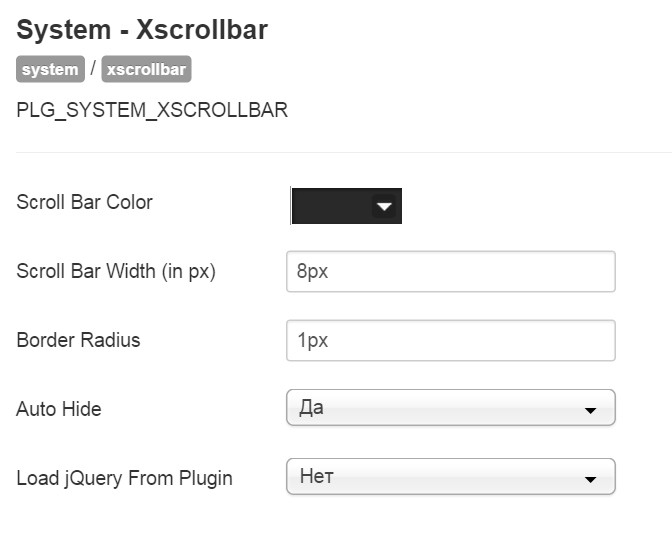
The plugin provides a straightforward set of visual customization options accessible through the Joomla plugin manager:

Colour Configuration

  • Scrollbar thumb colour: The colour of the draggable portion of the scrollbar — the part the user clicks and drags. This is the most visually prominent element, and you will typically set it to your brand's accent colour or a complementary neutral tone.
  • Scrollbar track colour: The background colour of the scrollbar track — the rail along which the thumb slides. Usually a lighter or more transparent version of the thumb colour, or a neutral grey.
  • Border colour: An optional border around the scrollbar. Set to transparent or match it to the track colour if you want a borderless look.

Behaviour Configuration

  • Auto-hide: When enabled, the custom scrollbar hides itself after a few seconds of inactivity and reappears when the user moves their mouse near the scrollbar area or begins scrolling. This creates a cleaner, less cluttered interface — similar to macOS's default scrollbar behaviour or the overlay scrollbars on mobile touchscreens.
  • Scrollbar width: The plugin typically renders the scrollbar at a fixed width, though the exact control over width varies between versions. A wider scrollbar is easier to click and drag, particularly on high-resolution displays where a narrow scrollbar can be difficult to target. A narrower scrollbar is less visually intrusive.
  • Border width: Controls the thickness of the optional border around the scrollbar. Set to zero to remove the border entirely.

Installation and Setup

Installing XScrollbar follows the standard Joomla extension installation workflow:

  1. Download the XScrollbar plugin package from the Joomla Extensions Directory or the developer's website
  2. In your Joomla administrator panel, navigate to Extensions → Manage → Install
  3. Upload the plugin ZIP file or drag it into the upload area
  4. After successful installation, navigate to Extensions → Plugins
  5. Search for "XScrollbar" and click on the plugin name to open its configuration
  6. Set your desired colours, toggle auto-hide as preferred, and set the plugin status to Enabled
  7. Click Save & Close
  8. Open your site in a browser to verify the custom scrollbar appears and functions correctly

The plugin activates immediately upon being enabled — there is no need to clear the Joomla cache or refresh any additional components. If the scrollbar does not appear, check that the plugin is published (not just enabled) and that your template does not have conflicting JavaScript that manipulates the page overflow or scroll position.

Comparison: XScrollbar vs Native Scrollbars vs CSS Custom Scrollbars

Feature XScrollbar (JS) Native Browser Scrollbar CSS ::-webkit-scrollbar CSS scrollbar-color / scrollbar-width
Cross-browser consistency Identical on all browsers Varies by OS and browser WebKit browsers only (Chrome, Edge, Safari) Firefox only
Colour customization Full — thumb, track, border None Full — thumb, track, corners, buttons Limited — thumb and track colours only
Width customization Configurable No Configurable Limited to thin, auto, or none
Auto-hide behaviour Built-in macOS only (overlay mode) No — always visible No — always visible
Performance impact Moderate — JavaScript rendering None — handled by OS None — handled by rendering engine None — handled by rendering engine
Accessibility Potentially reduced — non-standard interaction Full — OS-level accessibility Full — uses native scrollbar infrastructure Full — uses native scrollbar infrastructure
Works with keyboard scrolling Yes Yes Yes Yes
Works with touch devices Partially — touch scroll works, drag does not Yes Yes Yes
Setup difficulty Install plugin, configure colours None — default Add CSS rules Add one CSS property
Browser support All modern browsers via JS All browsers Chrome, Edge, Safari, Opera Firefox 64+
Price Free Free Free Free

Use Cases: When Custom Scrollbars Make Sense

Custom scrollbars are a divisive topic in web design. Many usability experts argue that you should never override the browser's native scrollbar because users rely on its familiar appearance and behaviour for orientation. However, there are specific scenarios where a custom scrollbar can be justified:

Creative portfolios and design agency sites. When the entire page is a carefully crafted visual composition, the default grey scrollbar can feel like an unfinished element. A subtly styled scrollbar — thin, semi-transparent, matching the site's colour palette — completes the design without drawing attention away from the content. This is the most common and most defensible use case for XScrollbar.

Brand microsites and campaign landing pages. These are temporary, high-impact pages designed to create a specific emotional response. Every pixel is intentional. A custom scrollbar that matches the campaign's visual identity contributes to the immersive experience. Since these pages have a short lifespan and a specific audience, the accessibility trade-offs are less concerning.

Dark-themed websites. On a site with a dark background, the default light-grey scrollbar can be jarringly bright. Styling the scrollbar to match the dark theme — a dark track with a slightly lighter thumb — makes the interface feel more cohesive without being visually distracting. This can be achieved with CSS alone, but XScrollbar provides the same result with the bonus of cross-browser consistency.

Kiosk mode or full-screen web applications. In controlled environments where the operating system's chrome is hidden — museum kiosks, trade show displays, digital signage — a custom scrollbar that matches the application's design language provides a more polished experience than the OS default.

Accessibility Concerns

The most significant drawback of any custom scrollbar solution is accessibility. Here is what you need to know before installing XScrollbar on a site that must meet accessibility standards:

Screen readers do not interact with custom scrollbars. A custom scrollbar rendered in JavaScript is invisible to assistive technology. Screen reader users rely on keyboard navigation and the browser's native scrolling mechanism, both of which continue to work with XScrollbar — but the visual indicator of scroll position that the custom scrollbar provides is not communicated to the screen reader. This is a loss of information, not a loss of functionality.

Custom scrollbars can break high-contrast mode. Operating systems provide high-contrast themes for users with visual impairments. These themes override the colours of native UI elements, including scrollbars. A custom scrollbar rendered in JavaScript is not affected by OS-level contrast settings, which means it may appear with insufficient contrast for users who rely on high-contrast mode to navigate the web.

Drag-and-drop interaction is not universally accessible. Users who navigate with a keyboard, switch device, or eye-tracking system cannot drag the custom scrollbar thumb. They must rely on keyboard scrolling shortcuts, which XScrollbar does not interfere with — but the visual feedback of the scrollbar moving in response to keyboard input may be delayed or inconsistent compared to a native scrollbar.

Touch device users may experience confusion. On touchscreens, the custom scrollbar thumb is too small to drag with a finger, and the auto-hide feature can make it disappear before the user realizes it exists. Touch device users typically scroll by swiping the content area directly, which still works — but the custom scrollbar adds visual complexity without adding usability on touch devices.

If your Joomla site must comply with WCAG 2.1 AA or higher accessibility standards, using a JavaScript-based custom scrollbar is strongly discouraged. Stick with native scrollbars and, if necessary, use the CSS scrollbar-color property (Firefox) and the ::-webkit-scrollbar pseudo-element (Chrome, Edge, Safari) to make subtle colour adjustments that respect the user's operating system preferences.

Performance Considerations

XScrollbar adds JavaScript to every page load. The library must initialize on each page, detect the native scrollbar dimensions, create the custom scrollbar DOM elements, and attach event listeners for mouse, touch, and scroll events. On a typical page, this initialization takes 5-15 milliseconds — imperceptible to users. However, there are edge cases to be aware of:

On pages with very long content (10,000+ pixels of scroll height), the custom scrollbar must recalculate its thumb position and size on every scroll event. This can cause jank — visible stuttering in the scrollbar's movement — on low-powered devices or pages with heavy repaint costs. The plugin mitigates this with requestAnimationFrame throttling, but it cannot eliminate it entirely on underpowered hardware.

On pages that dynamically load content (infinite scroll, AJAX-loaded sections), the scrollbar's dimensions become incorrect when new content is added to the page. The plugin attempts to detect changes in page height, but depending on how the dynamic content is loaded — via a framework like Vue or React that manipulates the DOM outside of Joomla's standard lifecycle — the detection may fail, and the scrollbar thumb will be the wrong size until the user manually scrolls.

Alternatives to XScrollbar

Alternative Approach Best For Limitations
CSS ::-webkit-scrollbar CSS pseudo-element styling Chrome/Edge/Safari users No Firefox support; non-standard CSS
CSS scrollbar-color / scrollbar-width CSS standard properties Firefox users Limited to colour and width only; no Chrome support yet
SimpleBar JS library JavaScript replacement Individual containers with overflow Does not replace main page scrollbar by default
OverlayScrollbars JS library JavaScript replacement with extensive options Full-page and container scrollbars Larger library size (~150 KB); more complex configuration
Native scrollbar (no customization) Browser default All sites prioritizing accessibility and performance No visual customization

For the vast majority of Joomla sites, the combination of scrollbar-color for Firefox and ::-webkit-scrollbar for WebKit browsers provides sufficient scrollbar customization with zero JavaScript overhead and full accessibility compatibility. The CSS approach is limited — it cannot auto-hide, cannot render on top of content (overlay mode), and has no animation — but it covers the primary use case of making the scrollbar match the site's colour scheme.

FAQ

Does XScrollbar work on all modern browsers?

Yes, XScrollbar uses a JavaScript-based approach that renders the scrollbar as HTML elements styled with CSS, which works on all modern browsers including Chrome, Firefox, Safari, and Edge. This is its main advantage over CSS-only scrollbar styling, which only works in specific browsers.

Will a custom scrollbar hurt my site's accessibility score?

Potentially yes. JavaScript-rendered scrollbars are invisible to screen readers and do not respect operating system contrast settings. If your site must meet WCAG accessibility standards, using a custom scrollbar is discouraged. Native browser scrollbars provide the best accessibility support.

Does XScrollbar slow down my Joomla site?

The performance impact is minimal on modern hardware and fast connections. The plugin adds a small JavaScript library that initializes in 5-15 milliseconds. On pages with extremely long content or complex layouts, the scrollbar may experience slight jank during rapid scrolling on low-powered devices.

Does the auto-hide feature work on mobile devices?

Partially. The auto-hide function triggers based on mouse movement, which does not apply to touchscreen devices. On mobile, the custom scrollbar will either remain visible or behave inconsistently depending on the device and browser. Touch scrolling of the page content itself is not affected.

Can I use XScrollbar with a Joomla template that already has custom scrollbar CSS?

It may cause conflicts. If your template already applies custom scrollbar styles via CSS, XScrollbar's JavaScript may attempt to hide and replace an already-styled scrollbar, leading to visual glitches. Test on a staging site before enabling on production.

Does XScrollbar work with Joomla 4 and 5?

The plugin was originally developed for earlier Joomla versions. Compatibility with Joomla 4 and 5 should be verified before installation. The plugin operates primarily through JavaScript, which reduces its dependency on Joomla's PHP API, but its extension manifest and plugin framework integration must be compatible with the Joomla version you are running.

What happens if JavaScript is disabled in the browser?

If JavaScript is disabled, XScrollbar cannot render the custom scrollbar, and the browser's native scrollbar will be displayed instead. The site remains fully functional — the native scrollbar is the fallback, and no content becomes inaccessible.

Can I customize the scrollbar differently for different pages?

XScrollbar applies the same settings across all pages of your Joomla site. It does not support page-specific scrollbar configurations. If you need different scrollbars on different pages, you would need a more flexible JavaScript library like OverlayScrollbars with page-specific initialization.

Does XScrollbar replace scrollbars inside DIV containers and iframes?

No. XScrollbar only replaces the main browser viewport scrollbar. Scrollbars that appear inside overflow containers, text areas, iframes, or other page elements are not affected and will still use the browser's native rendering.

How do I uninstall XScrollbar if I change my mind?

Uninstall through the standard Joomla extension manager: Extensions → Manage → Manage, find XScrollbar in the list, select it, and click Uninstall. The uninstallation removes the plugin files and database entries. The native browser scrollbar returns immediately — no additional cleanup is required.

Tap to react