WooCommerce — What It Is and Why It Powers a Third of All Online Stores
WooCommerce is a free WordPress plugin that turns a regular website into a fully functional online store. According to BuiltWith, WooCommerce powers 30% of all online stores worldwide — more than Shopify, Magento, and PrestaShop combined. The reason for this dominance is straightforward: WooCommerce is free, integrates seamlessly with WordPress, and gives both store owners and developers complete control. You are not renting a platform — you own it entirely, including customer data, order history, and every configuration setting.
Unlike SaaS platforms where you pay a monthly subscription and follow the service rules, WooCommerce installs on your own hosting. You control everything: from storefront design to tax calculation logic. You are not limited by product count, you pay no sales commission, and you are independent of third-party pricing changes. This is the key advantage that makes WooCommerce the number one choice for entrepreneurs who value independence.
\u{201c}WooCommerce is WordPress with products. If you understand how WordPress works, you already understand 80% of WooCommerce. Everything else is just details you will figure out in an evening.
What You Can Sell Through WooCommerce
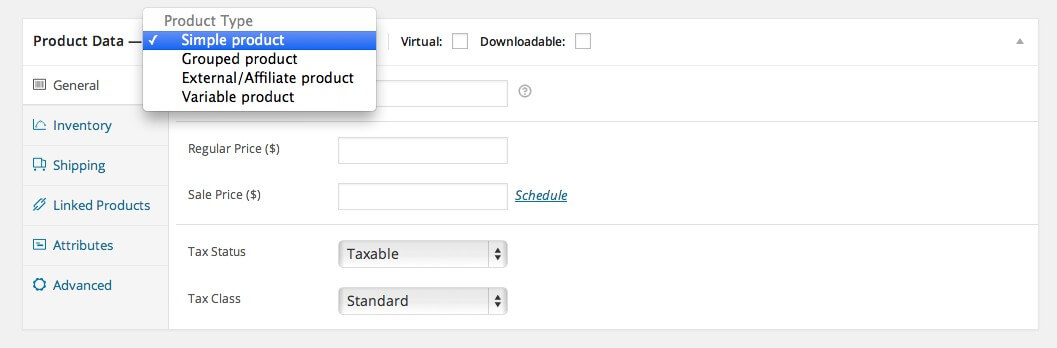
The plugin supports all product types: physical goods with shipping, digital downloads, virtual products like services and consultations, as well as subscriptions and memberships through paid extensions. You can create variable products with size, color, and material options, configure grouped products as bundles, and set up affiliate products with external commission links. The inventory management system tracks stock levels, automatically removes out-of-stock items from sale, and sends low-stock notifications.
For digital products, WooCommerce automatically generates secure download links after payment, with configurable download limits and link expiration. For physical goods, you configure shipping zones, cost calculation methods (flat rate, weight-based, quantity-based, free above order amount), and courier service API integrations.
Installation and Basic Setup
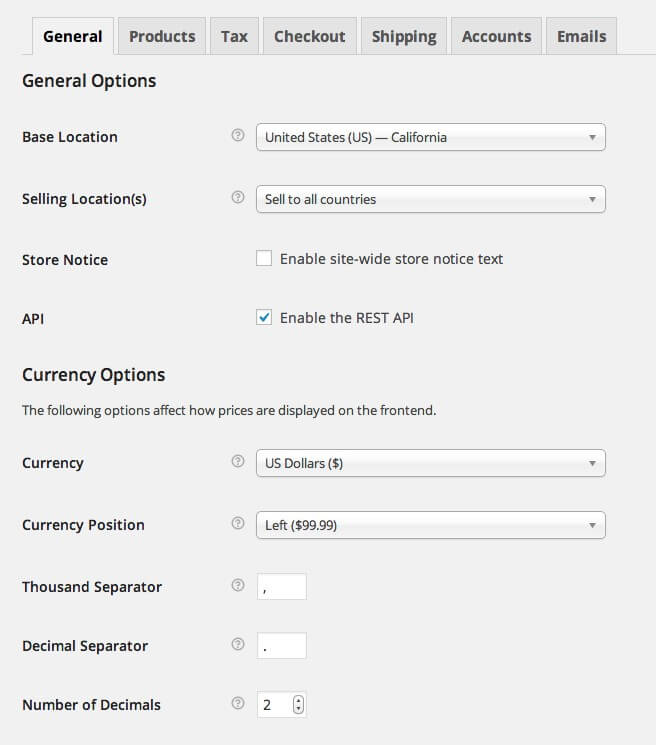
WooCommerce installs as a standard WordPress plugin through the admin panel: Plugins → Add New → search WooCommerce → Install → Activate. After activation, a setup wizard guides you through essential steps: currency selection, payment method configuration, basic shipping and tax settings. The wizard also automatically creates the key store pages — cart, checkout, my account, and shop. If you skip the wizard, all these pages can be created manually later.
After basic setup, I recommend immediately installing several critical extensions: a security plugin (Wordfence or Sucuri), a backup plugin (UpdraftPlus), and a caching plugin (W3 Total Cache or WP Rocket). A slow-loading store loses customers faster than one with an unattractive design.
Payment Methods and Shipping
Out of the box, WooCommerce supports bank transfers, cash on delivery, checks, and PayPal Standard payments. This is a minimal starter set, but insufficient for a serious store. Through free and paid extensions, dozens of gateways become available: Stripe, Square, Authorize.net, Apple Pay, Google Pay, cryptocurrency processors, and region-specific solutions. Each extension adds its payment method to WooCommerce settings, after which it appears on the checkout page.
Popular Payment Gateway Comparison for WooCommerce
| Gateway | Fee | Recurring Payments | Global Coverage | Setup Complexity |
|---|---|---|---|---|
| PayPal Standard | 2.9% + $0.30 | Yes | 200+ countries | Low |
| Stripe | 2.9% + $0.30 | Yes | 40+ countries | Low |
| Square | 2.6% + $0.10 | Yes | US, CA, UK, AU, JP | Low |
| Authorize.net | 2.9% + $0.30 | Yes | US, CA, UK, EU | Medium |
| Amazon Pay | 2.9% + $0.30 | No | 10+ countries | Medium |
The choice of payment gateway depends on your customer geography and business model. If you need recurring payments for subscriptions, Stripe and PayPal offer the best developer experience. For maximum coverage in a specific region, research local processors — they often have lower fees and better local payment method support than global gateways.
The shipping system is zone-based. You create geographic zones (country, state, city), add shipping methods to each zone, and configure costs. Options include flat rate, free shipping above a certain order amount, or formula-based calculation. For carrier integrations like UPS, FedEx, or DHL, paid plugins fetch real-time rates and delivery estimates through the carrier API.
Comparison with Shopify, Magento, and PrestaShop
| Feature | WooCommerce | Shopify | Magento | PrestaShop |
|---|---|---|---|---|
| Model | Open-source (free) | SaaS ($29+/mo) | Open-source (free + hosting) | Open-source (free) |
| Sales commission | None (except payment gateways) | 0.5-2% (external processing) | None | None |
| Setup complexity | Low | Very low | High (developer needed) | Medium |
| Scalability | Medium-high (hosting-dependent) | High (automatic) | Very high (enterprise) | Medium |
| SEO capabilities | Excellent (WordPress + Yoast) | Good (basic SEO) | Excellent (flexible) | Good (basic SEO) |
| Extension count | 600+ free, 500+ paid | 8,000+ apps | 5,000+ extensions | 5,000+ modules |
| Data control | Full (your server) | Limited (Shopify cloud) | Full (your server) | Full (your server) |
Choosing between these platforms comes down to three questions. How much are you willing to pay monthly? How critical is full data control? Do you have the technical resources for self-managed hosting? If the priority is low ownership cost and full control, WooCommerce is unmatched. If the priority is simplicity with no technical involvement, choose Shopify. For enterprise solutions with thousands of SKUs and complex logistics, Magento is the answer.
Inventory Management
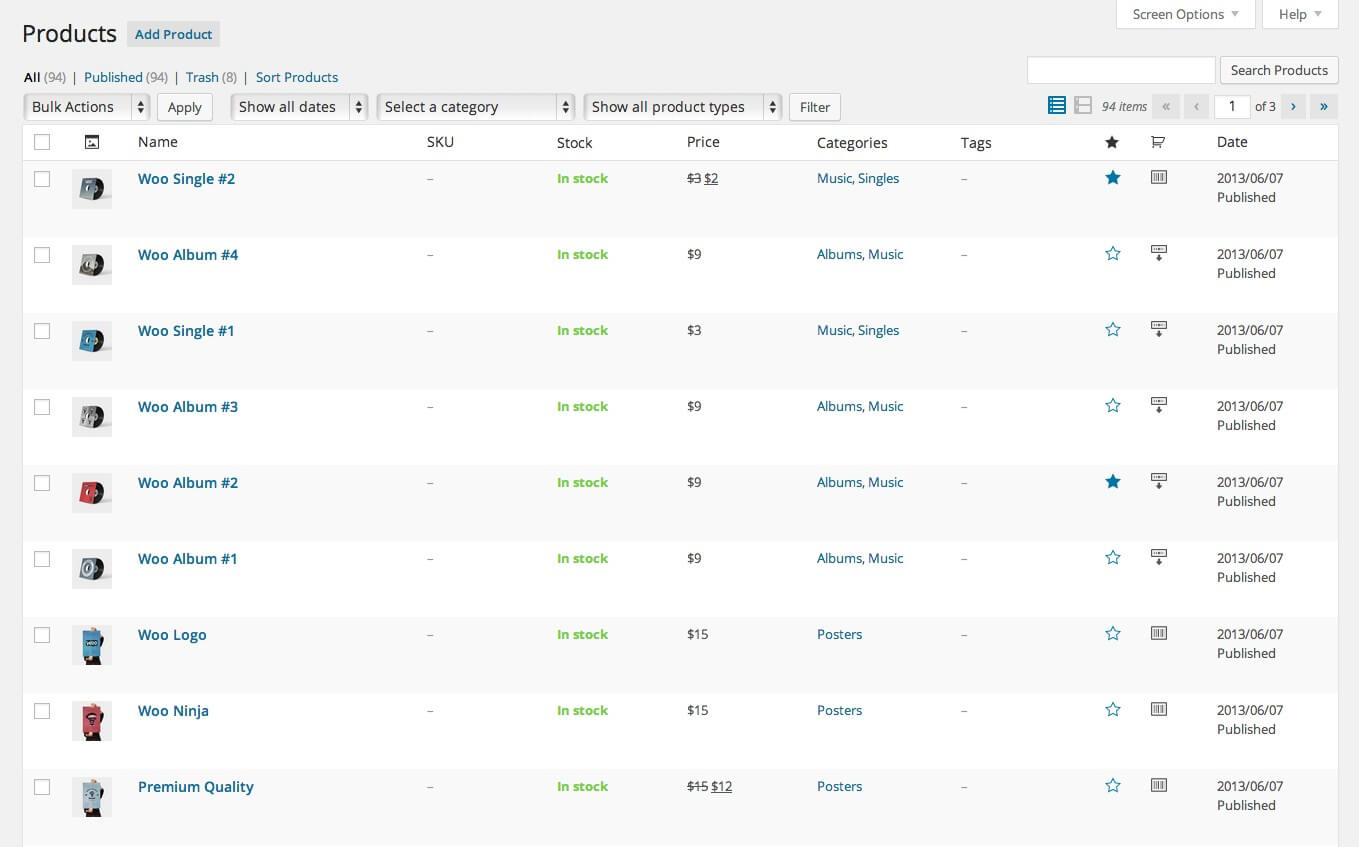
WooCommerce includes built-in inventory management that tracks the quantity of each product and its variations. You can enable stock management at the store level or selectively for individual products. The system automatically changes the product status to "Out of Stock" when inventory reaches zero, optionally hides the product from the catalog, and sends email notifications to the administrator about low stock levels. You can also allow backorders for out-of-stock items — the customer places an order, and you ship the product after restocking.
For stores with physical products, I recommend setting up warehouse software integration via API or CSV exchange immediately. Manual stock updates in the WooCommerce admin panel are acceptable for catalogs up to 100 products, but larger assortments become a source of errors and discrepancies. Plugins for integration with inventory management systems automate stock, order, and price synchronization.
WooCommerce Themes and Design
WooCommerce works with any WordPress theme, but for full store support, the theme should declare WooCommerce compatibility. Specialized themes (Storefront, Astra, Flatsome, WoodMart) add enhanced features: product page customization, improved image galleries, catalog display options (grid/list), quick view, AJAX cart, and product comparison. Storefront is the official theme from WooCommerce developers — free and maximally compatible with all extensions. It is the best starting option if you do not want to spend time fighting theme-plugin incompatibility.
If using a third-party theme, check its WooCommerce compatibility, recent updates, and performance reviews before purchasing. Many visually appealing themes are overloaded with visual builders that add hundreds of kilobytes of unnecessary code to each page. Choose wisely: a beautiful design is not worth a 2-second site slowdown.
The Extension Ecosystem
WooCommerce strength lies not in its base functionality but in its extension ecosystem. The official marketplace at WooCommerce.com offers over 500 paid extensions, with about 600 more free ones available in the WordPress repository. Extensions cover virtually any need: accounting integrations, email marketing (Mailchimp, Klaviyo), sales analytics, loyalty programs, booking systems, subscriptions, multilingual support, multi-currency, ticketing, and much more.
Important caveat: each extension adds code to your site and potentially slows it down. Install only the extensions you truly need. Before installing, check the last update date, compatibility with your WooCommerce version, and reviews from other users. Extensions not updated in over a year are a potential vulnerability for your store.
Taxes and Accounting
WooCommerce has a flexible but not entirely intuitive tax system. You can configure standard rates, reduced rates, and zero rates for different product types and regions. Taxes can be calculated based on the shipping address, billing address, or store base address. The system supports VAT, GST, and other tax models — you create the appropriate tax classes and assign them to products.
For accounting automation, extensions export orders and payments in formats compatible with QuickBooks, Xero, or other accounting systems. If you are just starting and not ready to invest in automation, WooCommerce allows CSV export of orders for manual import into your accounting software. This is labor-intensive but works for small businesses processing a few dozen orders per month.
Mobile Commerce and PWA
By 2025, over 60% of online purchases are made from mobile devices. WooCommerce automatically adapts to mobile screens if your theme is responsive — and most modern themes are. However, theme responsiveness and mobile commerce optimization are different things. Mobile commerce requires large buttons, simplified navigation, fast loading, and minimal form fields during checkout.
For maximum mobile performance, consider PWA (Progressive Web App) technology, which transforms your site into a native-app-like experience with home screen installation capability. Specialized WooCommerce plugins convert your store into a PWA with offline catalog access and push notifications for order status updates. This significantly improves the user experience for mobile shoppers and increases repeat sales.
SEO Capabilities of WooCommerce
WooCommerce inherits all WordPress SEO advantages. Paired with Yoast SEO or Rank Math, you get full control over meta tags, headings, product and category URLs, breadcrumbs, XML sitemaps, and Schema.org structured data for products (price, availability, rating). This is critical for e-commerce: properly configured product rich snippets in search results display price and rating directly, significantly increasing CTR.
A few concrete SEO recommendations for WooCommerce. Set up clean permalinks for product URLs — remove /product/ and /product-category/ from the structure or make them logical. Populate category pages with unique text — do not copy product descriptions. Optimize product images: use descriptive file names (red-dress-vera.jpg, not IMG_4829.jpg) and fill in the alt attribute. These small details collectively produce a significant increase in organic traffic.
Performance and Scaling
WooCommerce itself is not slow, but it creates additional server load compared to a regular WordPress site. Each product is a database entry with its own metadata, and each product variation multiplies the record count. With a catalog of 1,000 products with variations, the database may contain tens of thousands of records. Without caching, each product page view generates dozens of SQL queries.
For stores with traffic up to 10,000 daily visitors, quality hosting with PHP 8.x, MariaDB, and server-level caching (Redis) is sufficient. Higher-traffic stores require a dedicated server with fine-tuning: object caching via Redis, page caching through Varnish or Nginx FastCGI, eliminating inefficient extensions, and database optimization. The key rule: test performance after every significant change — installing one heavy extension can double page load time.
E-Commerce Security
A WooCommerce store handles customer personal data, payment information, and order history — making it an attractive target for attacks. The mandatory security minimum: SSL certificate (free Let's Encrypt works great), regular WordPress, WooCommerce, and all plugin updates, strong passwords for all admin accounts, two-factor authentication, and a firewall security plugin (Wordfence).
Compliance with data protection regulations deserves separate attention. For stores serving EU customers, GDPR compliance is required: privacy policy, data processing consent, account deletion and data export capabilities. WooCommerce provides basic tools for this, but full compliance requires configuration and possibly additional plugins. For other regions, check local requirements regarding data storage and processing.
Conversion Tips for WooCommerce
Several proven tactics that boost online store conversion. Simplify checkout to the minimum number of fields — each unnecessary step loses buyers. Enable guest checkout without mandatory registration. Show shipping costs as early as possible — an unexpected shipping price at the final checkout step kills conversion. Add high-quality product photos with zoom capability. Include reviews with customer photos — this is the strongest social proof factor for e-commerce.
I also recommend setting up abandoned cart recovery. Statistically, 69% of online store visitors leave without completing their purchase. An abandoned cart recovery plugin automatically sends email reminders to customers who left items in their cart. WooCommerce does not include this feature by default — plugins like Abandoned Cart Lite for WooCommerce add it. Recovering even 10% of abandoned carts can increase revenue by 15-20%.
Analytics and Reporting
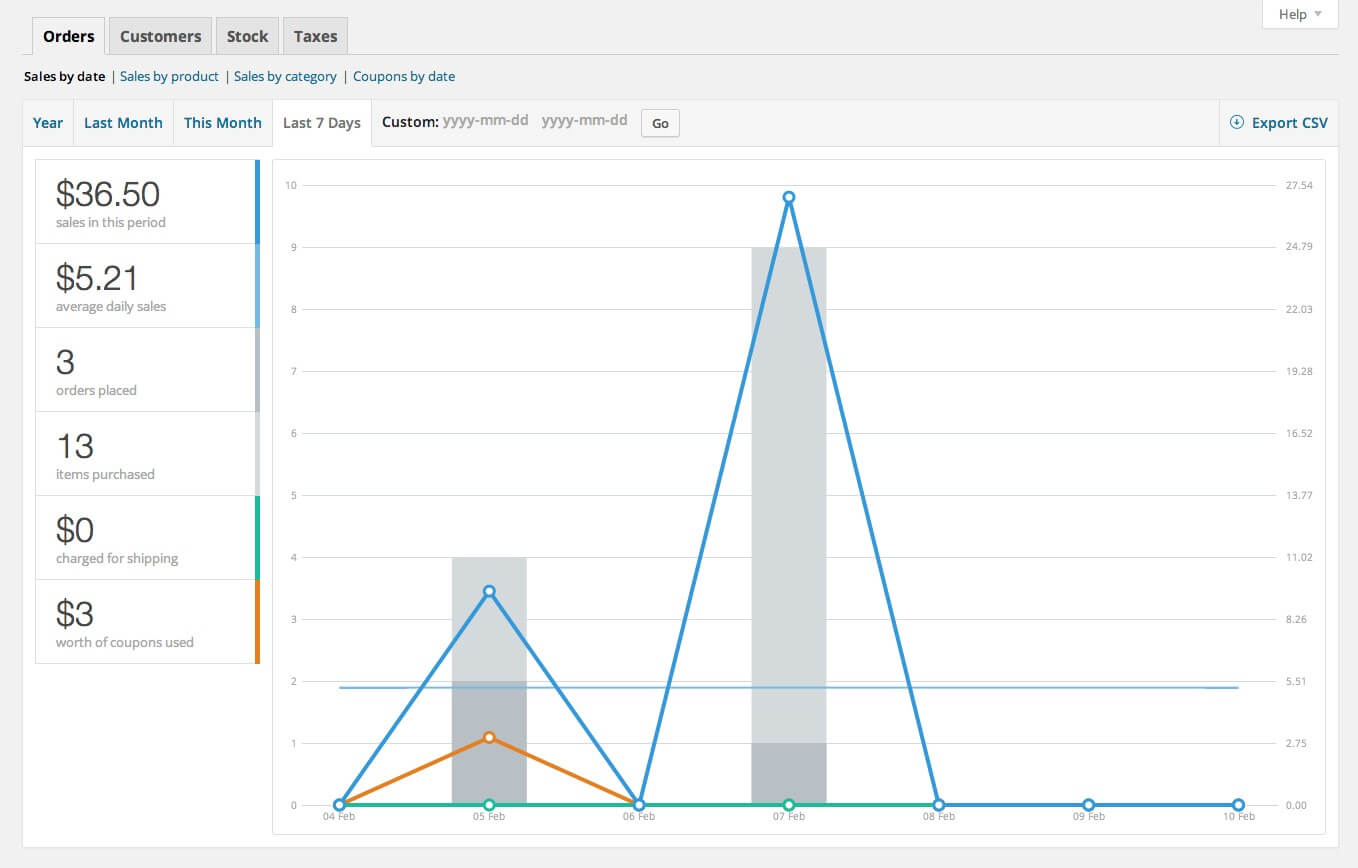
WooCommerce provides a basic set of reports directly in the admin panel: sales by date, by product, by category, by coupon, plus tax data and stock levels. This is sufficient for understanding the overall business picture. However, for deep analytics — sales funnels, cohort analysis, customer lifetime value — you will need Google Analytics with e-commerce tracking enabled or specialized analytics plugins like Metorik.
Make sure to configure conversion tracking in Google Analytics and, if running ads, in your advertising platforms. Without this data, you cannot evaluate campaign effectiveness and will spend your budget blindly. WooCommerce easily integrates with Google Analytics through a free plugin or direct tracking code insertion into the theme.
FAQ — Frequently Asked Questions
What is WooCommerce?
WooCommerce is a free WordPress plugin that turns a website into a full online store. It supports physical, digital, and virtual products, subscriptions, various payment and shipping methods. It powers 30% of all online stores globally.
How much does WooCommerce cost?
The base plugin is free. Costs include hosting (from $5-10/month), a domain (~$10/year), and optional paid extensions and themes. No sales commission is charged — you pay only the processing fees of your chosen payment gateway.
How is WooCommerce different from Shopify?
WooCommerce is open-source, installed on your server with full data control. Shopify is a SaaS platform with monthly fees and limited control. WooCommerce charges no sales commission; Shopify charges 0.5-2% when using external payment gateways.
What payment methods does WooCommerce support?
By default: bank transfer, cash on delivery, checks, PayPal Standard. Through extensions: Stripe, Square, Apple Pay, Google Pay, cryptocurrency, and hundreds of regional systems.
Can I sell digital products?
Yes, WooCommerce fully supports digital products: automatically generates secure download links after payment, with configurable download limits and link expiration periods.
How does WooCommerce affect site speed?
It adds database load due to product records and metadata. With proper caching (W3 Total Cache, Redis) and quality hosting, stores with 1,000 products run fast. Test performance after each new extension installation.
Do I need technical skills to run WooCommerce?
Basic setup requires solid WordPress knowledge. Complex configurations like 1C integration or custom shipping APIs require a developer.
How secure is WooCommerce?
Secure when regularly updated. Use SSL, two-factor authentication, a firewall plugin, and regular backups. Vulnerabilities typically arise in third-party extensions, not the core plugin.
Can I migrate from another platform to WooCommerce?
Yes, migration plugins exist for Shopify, Magento, PrestaShop, and OpenCart. The process includes transferring products, categories, customers, and orders. Test on a staging server first.
How many products can WooCommerce handle?
Technically unlimited, but performance depends on hosting. Stores with tens of thousands of products need a dedicated server with database optimization. Stores with 100,000+ products use enterprise solutions with database sharding.
Tap to react