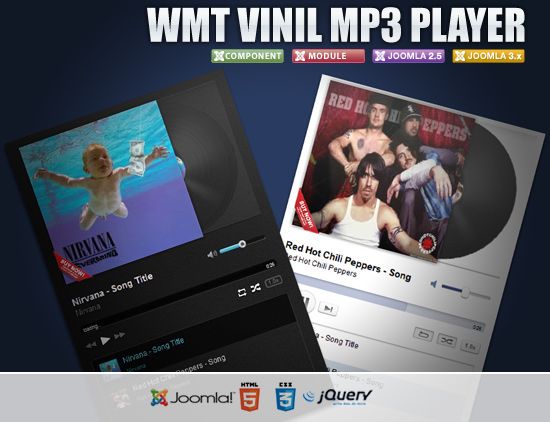
What Is WMT Vinil Mp3 Player
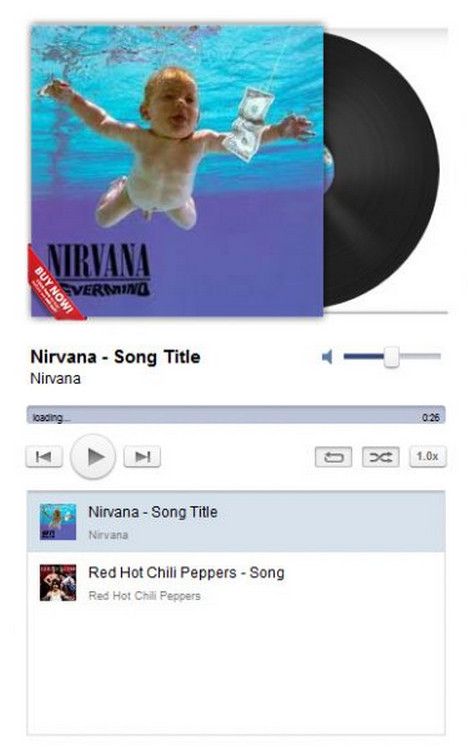
Do you love music everywhere, including on your website? Here is good news: WMT Vinil Mp3 Player is a Joomla module that turns your site into a music platform with authentic vinyl record visual styling. This is not just a functional player — it is a design element that gives your page character and atmosphere. A black vinyl disc with a red center label, rotating during playback, instantly creates an association with musical content and distinguishes your site from typical audio players.
The module is compatible with recent Joomla versions and integrates via the standard extension installer. After installation, you get a fully functional music player with MP3 support, vinyl disc visualization, and a Buy Now button for organizing music sales. The player can be placed in any template module position or embedded directly into a Joomla article.
\u{201c}A vinyl player on a website is not nostalgia for the sake of nostalgia. It is a visual anchor that instantly tells visitors: this is music. And it does so more beautifully than the standard HTML5 audio tag.
Installation and Configuration
Installation follows the standard Joomla extension process. Download the ZIP archive from the developer site, go to Extensions → Manage → Install, upload the archive, and wait for completion. The module will then appear in the list when creating a new module via Extensions → Modules → New.
When creating the module, specify the path to your MP3 file. The file must be uploaded to the server beforehand — the player does not provide a file upload interface. The recommended location is an /audio or /music folder in the site root. Ensure the file is readable by the web server and not blocked by hosting security settings.
Visual Themes: Light and Dark
The developers provided two visual options for the player. The first is a light theme for sites with white or light backgrounds — the vinyl disc appears in classic black, contrasting with the light surroundings. The second is a dark theme for sites with black or dark backgrounds — the disc can be lighter or semi-transparent to avoid blending into the background. Switching between themes is a single parameter in the module settings with no CSS editing required.
Theme selection should align with your site overall design. On a music portal with a dark background, the dark theme looks organic and stays consistent with the style. On a corporate website for a music school or recording studio, the light theme on a white background looks professional and tidy. In both cases, the vinyl aesthetic adds individuality to the site.
Player Placement on the Site
One of the key advantages of this module is placement flexibility. WMT Vinil Mp3 Player can be installed in any Joomla template module position: sidebar, footer, above or below content. The module can also be rendered as a component through a menu item, creating a dedicated player page. Additionally, embedding into a Joomla article is supported via the {loadmodule} shortcode or the Modules Anywhere plugin.
For music sites, I recommend placing the player in the sidebar — it stays visible during scrolling without distracting from the main content. For landing pages and promo pages, the player looks striking when centered on screen as a standalone visual element. If using the player for music sales, position it alongside track information such as the title, artist name, and price.
The Buy Now Button and Monetization
The built-in Buy Now button transforms the player from a simple playback device into a monetization tool. You configure the URL the button leads to — this could be a checkout page, an external payment service like PayPal or Stripe, or a detailed page about purchasing the track or album. The button is displayed directly on the player next to the vinyl disc, making the purchase process as short as possible: the visitor listens to the track, clicks the button, and lands on the payment page.
Important note: the player does not process payments itself — it only redirects the visitor to the specified URL. All payment processing, digital file delivery, and sales tracking logic is implemented on the target page side. This gives you complete freedom in choosing a payment solution without tying you to a specific service.
MP3 File Requirements
For correct player operation, MP3 files must meet several technical requirements. Bitrate must be constant (CBR) — variable bitrate (VBR) causes issues with track duration detection in most browsers. Recommended bitrate for web players is 128 or 192 kbps. Higher values increase file size without noticeably improving quality when listening through standard speakers or headphones.
Sample rate should be 44100 Hz — the CD-quality audio standard. Files at 48000 Hz or higher may not play correctly in some browsers. File names must not contain spaces or special characters — use Latin letters, digits, hyphens, and underscores. Example of a correct name: artist-track-name.mp3. Also ensure the server is configured with the audio/mpeg MIME type for .mp3 files — without this, browsers may refuse to play them.
Comparison with Other Joomla Audio Players
| Player | Visual Style | Buy Button | Placement | Themes | Price |
|---|---|---|---|---|---|
| WMT Vinil Mp3 Player | Vinyl record | Yes (configurable) | Module, component, article | Light + dark | Free / version-dependent |
| HTML5 Audio (built-in) | Browser default | No | Article (via audio tag) | Browser-dependent | Free (built-in) |
| JPlayer for Joomla | Customizable | No | Module, component | Via skins | Free |
| SP Simple Audio Player | Minimalist | No | Module | Single theme | Free |
| WMT Vinil Mp3 Player (PRO) | Vinyl record + extra skins | Yes (extended) | Module, component, article | Multiple themes | Paid |
The key advantage of WMT Vinil Mp3 Player over standard solutions is the visual component. The standard HTML5 audio tag is functional but looks different across browsers and does not enhance the page visually. JPlayer offers customization through skins but requires more effort to configure. WMT Vinil Mp3 Player provides a ready-made, stylish design right after installation and adds a buy button — a feature none of the competitors offer.
Theme Comparison
| Parameter | Light Theme | Dark Theme |
|---|---|---|
| Player background | White / light | Black / dark |
| Vinyl disc color | Classic black | Light / gray / semi-transparent |
| Center label | Red (standard) | Red or customizable |
| Text color | Dark (contrasting) | Light (contrasting) |
| Recommended site type | Corporate, news, blogs | Music portals, nightclubs, DJ sites |
| Visual perception | Clean, professional | Atmospheric, club-style |
Theme choice goes beyond aesthetics. The light theme is more readable under bright ambient lighting — for example, if your site is frequently viewed during the day on office laptops. The dark theme reduces eye strain when viewing at night and creates the right atmosphere for music content. Test both themes with a focus group or run A/B testing with visitor behavior analytics.
Tips for Improving User Experience
Several practical recommendations that will boost visitor engagement with the player. First, always add the track title and artist name next to the player — visitors should know what they are listening to without clicking additional buttons. Second, if you publish multiple tracks on one page, use a playlist or separate player instances with different files, but ensure other players pause when one starts — otherwise visitors will hear a cacophony of several tracks playing simultaneously. Third, for demo snippets, use looping of a short excerpt — this gives visitors enough time to evaluate the track without needing to click Play repeatedly.
I also recommend adding brief music licensing information below the player. If tracks are distributed under a Creative Commons free license, state this. If music is copyright-protected, warn visitors that downloading and distribution without permission is prohibited. This information is not only legally useful but also builds trust in your site as a serious music platform.
Using the Player in a Music E-Commerce Store
If you plan to sell music through a Joomla site, WMT Vinil Mp3 Player can serve as the central element of a product page. The scenario: a visitor lands on a track or album page, sees the player with the vinyl disc, clicks Play for a preview, listens to a snippet, and if they like the music, clicks Buy Now. The button leads to a checkout page or an external music distribution service.
For a store with a large catalog, create a separate module instance for each product page and specify the path to a demo snippet (30-60 seconds). This lets buyers evaluate the music before purchasing, significantly boosting conversion. Do not upload full track versions for public access — use short, download-protected snippets through .htaccess configuration.
Performance and Optimization
The player uses the HTML5 Audio API and does not burden the CPU during playback. The vinyl animation is implemented through CSS transforms with GPU acceleration support, so disc rotation has no impact on page performance. However, two aspects deserve attention. First, the MP3 file is loaded by the browser when the player initializes — if the file is large (over 10 MB), this can slow page loading. I recommend using compressed MP3 files under 5 MB for preview playback. Second, if multiple player instances exist on a single page, the browser may start loading all audio files simultaneously, creating unnecessary bandwidth strain. In such cases, configure lazy audio loading: the player starts loading the file only after clicking Play.
Social Media and Streaming Integration
Although the module itself does not include built-in share buttons, you can easily add social features around the player. Place Share on Twitter, Share on Facebook, or similar buttons below the player using standard Joomla social media modules or simple HTML links with parameters. This turns passive listening into active content distribution. It is especially effective for independent musicians: a listener can share a liked track with their audience in one click, expanding reach without an advertising budget.
If you use Spotify, SoundCloud, or Apple Music as your primary distribution platform, configure the Buy Now button or an additional button next to the player to link to your streaming service profile. This directs interested listeners to the platform where they can add the track to a playlist or subscribe to the artist, generating more plays in the long term than a single MP3 sale.
Content Security and Protection
Protecting audio files from unauthorized access is an important aspect often overlooked. The standard protection method is configuring .htaccess in the audio files folder. Add a rule that blocks direct access to .mp3 files by direct link but allows playback through your site using HTTP referrer verification. This is not absolute protection (referrers can be spoofed), but it filters out most casual download attempts. A more reliable method is streaming through a proxy script that delivers the file in chunks and verifies user authorization before starting data transfer.
For commercial music use, always include rights information. If you are the copyright holder, add the copyright symbol and year. If you distribute music under a license, specify its type (CC BY, CC BY-NC, etc.). The player itself does not track copyright violations, so responsibility for the legality of published content lies entirely with the site owner.
Common Issues and Solutions
Player Produces No Sound
First, verify the MP3 file physically exists at the specified path and is readable. Open the file URL directly in a browser — if it does not open, the problem is on the server side (permissions or blocking). Next, check the MIME type: the server must serve .mp3 files with the Content-Type: audio/mpeg header. Incorrect MIME types cause some browsers to refuse playback through the Audio API. Finally, ensure the file uses constant bitrate (CBR) — re-encode it via Audacity or ffmpeg if the source file is VBR.
Buy Now Button Is Missing
The button only appears if a URL is specified in the module settings. Check the Button URL field or equivalent parameter — if empty, the button is automatically hidden. The button may also be hidden by your template CSS rules — check via the browser inspector whether a display:none rule applies to the element.
Vinyl Disc Does Not Rotate
The rotation animation is triggered by a JavaScript play event handler. If the disc does not rotate during playback, check the browser console for JavaScript errors. Most commonly, the problem is a library conflict: if an old version of jQuery or MooTools is used on the page, they may override global event handlers. Enable compatibility mode in the module settings or update the conflicting libraries.
Alternative Use Cases
Although the module is positioned as a music player, it can serve other purposes. For example, in educational projects — for playing audio lectures or language lessons. In podcast projects — as a player for the latest episode on the homepage. In museum and exhibition websites — for audio guides through exhibits. The vinyl aesthetic may not be entirely appropriate here, but if your audience appreciates retro style, it adds uniqueness to the project. For more formal projects where vinyl design is inappropriate, consider alternative modules like Simple Audio Player or JPlayer.
Another interesting scenario is creating a portfolio page for a musician or DJ. Place multiple player instances with different tracks in a grid layout, add a brief description to each, and a Buy Now button linking to the full album page. The result is a compact, visually appealing showcase of creative work that simultaneously serves as a player, catalog, and monetization tool.
FAQ — Frequently Asked Questions
What is WMT Vinil Mp3 Player?
WMT Vinil Mp3 Player is a Joomla module that displays an audio player in vinyl record style. It supports light and dark themes, can be placed in any module position, embedded in articles, and includes a Buy Now button for music sales.
What audio formats does the player support?
The player works with MP3 files. Constant bitrate (CBR) at 128 or 192 kbps and 44100 Hz sample rate is recommended. Variable bitrate (VBR) files may cause issues with track duration detection.
Can I embed the player inside a Joomla article?
Yes, using the {loadmodule} shortcode or the Modules Anywhere plugin, the player can be inserted directly into a Joomla article body. This is convenient for pages describing tracks or albums.
How do I configure the Buy Now button?
In the module settings, specify the URL the button should lead to — this could be a checkout page on your site, an external payment service, or an affiliate link to iTunes or Amazon Music.
Can I change the player appearance?
Yes, the module supports light and dark themes selectable through module settings. Deeper customization is possible through your template custom CSS.
How many players can I place on one page?
Technically unlimited, but more than 3-5 instances may cause loading delays due to simultaneous audio file initialization. Lazy audio loading is recommended.
Does the player work on mobile devices?
Yes, the player uses HTML5 Audio API and GPU-accelerated CSS animation, ensuring correct operation on smartphones and tablets. Auto-play may be blocked by mobile browsers — users must tap Play manually.
Can I protect MP3 files from being downloaded?
Not through standard player features. The MP3 file must be readable by the web server. For download protection, configure .htaccess rules to block direct access to the audio folder or use a streaming server.
How does it differ from the standard HTML5 audio player?
The main difference is visual design. The standard audio tag displays differently across browsers and looks like a control element, not part of the design. WMT Vinil Mp3 Player offers a stylish vinyl record look and a built-in buy button.
Is the player compatible with Joomla 4 and 5?
The module was developed for Joomla 2.5 and 3.x, but verified versions also work on newer releases. Check the developer site for an updated version before installing on Joomla 4 or 5.
Tap to react