What Exactly Is What? Nothing!

If you have spent any time in the Joomla ecosystem, you have probably stumbled across a plugin with the strangest name in the entire CMS world: What? Nothing! The name alone raises eyebrows. The description raises even more questions. As the developers at NoNumber (now Regular Labs) put it, this is a special plugin that increases the overall performance of the Joomla system. But there is a catch. A big one. A catch so large it became a legend in the Joomla developer community.

The plugin actually does nothing in its free version. And that is the entire point. What? Nothing! started as an elaborate joke inside the Joomla community, poking fun at the endless parade of plugins that promise magical performance gains while delivering nothing of substance. The joke was so perfectly executed that NoNumber decided to turn it into a real product — one that, in its PRO version, actually provides measurable optimization benefits for your website. The free version remains a tribute to the original joke and a piece of Joomla history that everyone should know about.

\u{201c}

"What does this plugin do?" — "Nothing!" — "What?" — "Exactly!" The conversation almost writes itself.

The free version, when installed, sits quietly in your plugin list and does exactly what it says on the tin: nothing. Zero functionality. No settings panel. No database changes. No frontend modifications. It is a philosophical statement wrapped in a Joomla extension — a meditation on the nature of software consumption in an era where everyone promises everything and delivers nothing. The PRO version, however, is where things get genuinely interesting — and surprisingly useful for Joomla administrators who want real optimization in a single package.

The Unicorn Filter: The Best Feature Ever Written

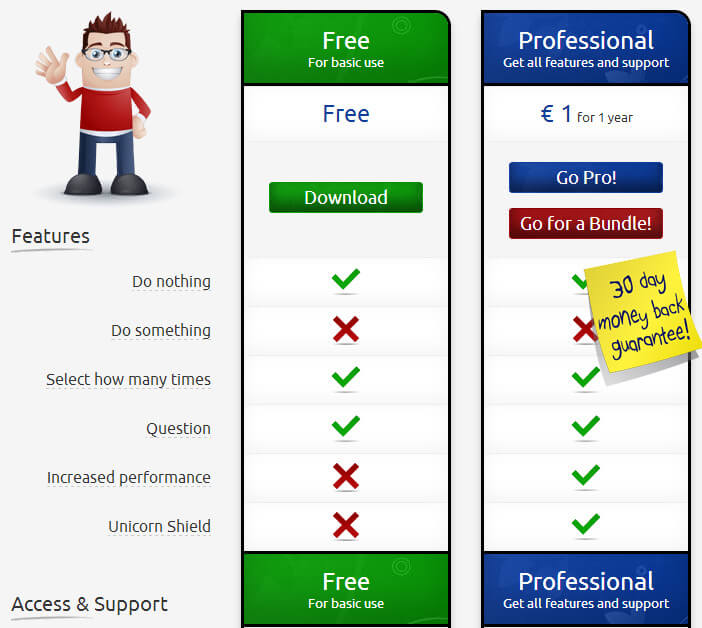
The single most famous feature of What? Nothing! PRO is the Unicorn Filter. Yes, you read that correctly. A filter. For unicorns. The official feature list on the Regular Labs website claims, with a completely straight face, that the PRO version includes an advanced proprietary algorithm that detects and filters unicorns from your website traffic, preventing them from consuming valuable server resources and degrading site performance.

If you are wondering how this works technically: it does not. The unicorn filter is pure, unadulterated satire. It is a fictional feature described using completely serious marketing language — the kind that would not look out of place on any premium Joomla extension landing page. NoNumber used it to mock the widespread tendency of plugin developers to invent imaginary problems and then sell imaginary solutions to those problems. The genius of the joke is that it is almost indistinguishable from real SEO and performance plugin marketing copy — until you actually stop to think about it for approximately two seconds.

But here is the truly remarkable thing: in the official changelog for What? Nothing!, the unicorn filter has received multiple version updates. Bug fixes. Performance improvements. New filtering algorithms. The joke has been actively maintained for over a decade. That level of commitment to a bit deserves genuine respect. Here is what the PRO version actually delivers when you look past the humor and the mythical creatures:

FeatureFree VersionPRO Version
Plugin installation and activationYesYes
Unicorn detection algorithmNone (theoretical)Advanced (still theoretical, but licensed)
Database optimization toolsNoYes (real optimization)
Gzip compression for static assetsNoYes
Security hardening rulesNoYes (.htaccess modifications)
System cache cleanupNoYes (junk data removal)
Configuration panel with settingsNoYes (full control)
Automatic update supportYesYes
Sense of developer humorIncludedIncluded (premium grade)

The Story Behind the Joke Plugin

Peter van Westen, the founder of NoNumber (which later rebranded to Regular Labs), has always been known in the Joomla community for two things: his exceptional technical skill and his sharp sense of humor. The story behind What? Nothing! is as entertaining as the plugin itself. According to Peter, during a particularly exhausting week of answering support requests on the Joomla forums — where users consistently demanded plugins to solve problems that did not actually exist — he decided that the world needed a response. Not a rebuttal. Something more elegant. Something that made the point without having to explain the point.

He sat down and wrote a complete, fully functional Joomla extension that followed every best practice in the book. A proper XML manifest file with correct versioning and dependencies. Clean MVC architecture following Joomla development standards. Language files with proper translation support. Full integration with the Joomla update server so the plugin would receive automatic updates. Professional documentation. Screenshots that showed absolutely nothing happening. The plugin passed every single submission check on the Joomla Extensions Directory — because it was, by every measurable standard, a perfectly valid Joomla extension. It just happened to do absolutely nothing when installed.

The response from the community was immediate and enthusiastic. The plugin received hundreds of downloads within days. Forum threads discussing its merits appeared across multiple Joomla communities. Some users, reportedly, installed the free version and claimed they noticed an improvement in their site's performance. The placebo effect in web development is remarkably real, and What? Nothing! proved it beyond any reasonable doubt. The plugin became a living experiment in user psychology and a beloved inside joke that transcended its origins.

What? Nothing! is still actively maintained and available for download on the Regular Labs website. The free version remains a tribute to the original joke — a piece of Joomla culture preserved in code. The PRO version exists for those who want both the joke and actual Joomla optimization tools bundled together in one convenient package.

What the PRO Version Actually Does

Behind the unicorns and the self-aware marketing copy, the PRO version of What? Nothing! bundles several genuinely useful optimization features that address real performance issues in Joomla installations. Think of it as a meta-plugin: a convenient wrapper around optimization best practices that you would otherwise need to implement manually, configure through server settings, or purchase through multiple separate extensions. It consolidates common optimization tasks into a single interface, which saves time and reduces the number of plugins running on your site.

The core optimization features that the PRO version enables include several well-established techniques for improving Joomla site performance. Each one addresses a specific bottleneck that commonly affects Joomla websites running on shared hosting or underpowered virtual private servers:

  • Database optimization — Automatically repairs fragmented database tables, optimizes indexes for faster queries, removes orphaned records that accumulate over time, cleans up expired session data, and purges stale cache entries that bloat the database. Regular database maintenance prevents gradual performance degradation as content volume grows.
  • Gzip compression — Enables proper server-side compression for HTML output, CSS stylesheets, and JavaScript files before they are transmitted to the browser. Properly configured compression can reduce page weight by up to 70%, dramatically improving load times for visitors on slow connections or mobile devices.
  • Browser caching headers — Sets appropriate cache-control and expires HTTP headers for static assets like images, stylesheets, and scripts. When configured correctly, repeat visitors load your pages significantly faster because their browsers reuse cached resources instead of downloading them again.
  • Query string removal — Strips unnecessary version query parameters from asset URLs, which improves CDN caching efficiency and prevents cache fragmentation. Many CDN services ignore query strings by default, so this optimization ensures consistent caching behavior.
  • Security hardening — Adds protective rules to the .htaccess file that block common exploit patterns, hide Joomla version information from HTTP response headers, prevent directory listing, and restrict access to sensitive files and directories. These rules serve as an additional security layer beyond what Joomla provides by default.

Joomla Performance Optimization: The Complete Picture

What? Nothing! PRO is just one piece of a much larger Joomla performance optimization puzzle. A properly optimized Joomla website requires a multi-layered approach that addresses performance at every level of the technology stack. No single plugin can handle all of these layers effectively, and attempting to solve everything with one tool usually results in mediocre outcomes across the board. Here is the complete optimization stack that experienced Joomla administrators should consider implementing for maximum site speed:

Optimization LayerWhat It DoesRecommended ToolsPerformance Impact
Server-level page cachingCaches complete HTML output, bypassing PHP execution entirely for repeat visitorsJotCache, Cache Cleaner, LiteSpeed CacheVery high — can reduce server response time from seconds to milliseconds
Gzip/Brotli compressionReduces the amount of data transferred over the network by compressing server responsesWhat? Nothing! PRO, .htaccess rules, Nginx configHigh — often cuts page size by 50-70%
CSS/JS minification and combinationRemoves whitespace, comments, and unnecessary characters from stylesheets and scripts; combines multiple files into fewer requestsJCH Optimize, ScriptMerge, RokBoosterMedium-high — reduces HTTP requests and total download size
Image optimizationCompresses images without visible quality loss, converts to modern formats like WebP, and serves appropriately sized versionsImageRecycle, EWWW Image Optimizer, ShortPixelVery high — images typically account for the majority of page weight
Database maintenanceRemoves accumulated junk: expired cache entries, orphaned session data, unused article revisions, and spam commentsWhat? Nothing! PRO, Admin Tools, phpMyAdmin manual cleanupMedium — prevents gradual slowdown over months and years
Content Delivery NetworkServes static files (images, CSS, JS) from geographically distributed edge servers close to each visitorCloudflare, BunnyCDN, KeyCDN with Joomla CDN pluginsVery high — especially for sites with international audiences
Lazy loadingDefers loading of images, videos, and iframes until they scroll into the visible viewport, reducing initial page weightLazy Load for Joomla, native loading="lazy" HTML attribute, JCH OptimizeMedium — improves perceived load time and reduces bandwidth waste

Each layer in this stack addresses a different bottleneck. Server caching makes pages load faster for repeat visitors. Compression reduces the size of every response. Minification reduces the number and size of asset files. Image optimization addresses the single largest contributor to page weight on most sites. Database cleanup prevents the gradual accumulation of digital dust that slows queries over time. A CDN ensures that visitors on the other side of the world are not waiting for files to cross an ocean. Lazy loading ensures that the browser only downloads what the visitor can actually see. None of these techniques is individually sufficient, but together they can transform a sluggish Joomla site into one that loads in under two seconds.

Comparison with Other Joomla Optimization Plugins

The Joomla optimization plugin marketplace is crowded and confusing. Each tool solves a different subset of performance problems, and many of them overlap significantly in functionality. Installing five optimization plugins that all try to do the same thing is a recipe for conflicts, inconsistent behavior, and debugging headaches. Understanding the specific strengths and weaknesses of each major tool helps you assemble a coherent optimization stack without unnecessary redundancy:

  • Admin Tools by Akeeba is the undisputed gold standard for Joomla security and site management. Its .htaccess generator produces optimized configuration files that handle compression, caching headers, and security hardening in a single integrated system. The database optimization tools are thorough and reliable. Admin Tools focuses primarily on security, with performance optimization as a strong secondary benefit. If you can only purchase one paid Joomla management extension, this is the one most experts recommend.
  • JCH Optimize is a dedicated asset optimization plugin that focuses exclusively on CSS and JavaScript. It minifies files, combines multiple files into single requests, defers non-critical scripts, and can eliminate render-blocking resources entirely. Its specialized focus means it does this one category of optimization better than any general-purpose tool — but it does nothing for server-side caching, database health, or image compression.
  • Cache Cleaner is a precision instrument with exactly one job: automatically purging the Joomla cache whenever content is updated. It integrates with the core Joomla cache system and ensures that visitors always see the latest version of your content without manual cache clearing. Its narrow focus is its strength. Pair it with any other optimization stack for reliable cache management.
  • What? Nothing! PRO takes a pragmatic generalist approach. It covers database optimization, Gzip compression, basic security hardening, and simple caching configuration — all within a single plugin. It is not the best tool in any single category, but it covers enough bases to be useful as a one-stop optimization package for smaller sites. And it makes you smile while you work, which counts for more than most developers admit.

Step-by-Step Installation Guide

Installing What? Nothing! follows the standard Joomla extension installation procedure. The process is straightforward whether you are installing the free joke version or the PRO optimization version. Here is the complete step-by-step walkthrough for both scenarios:

  1. Visit the Regular Labs website and navigate to the What? Nothing! product page. Select either the free version or the PRO version based on your needs. The download is provided as a standard Joomla installation ZIP package that is compatible with all supported Joomla versions.
  2. Log into your Joomla administrator control panel using your administrator credentials. You need super administrator access to install extensions on most Joomla configurations.
  3. Navigate through the administrator menu to Extensions, then select Manage, and click on the Install submenu item. This opens the Joomla extension installation interface.
  4. On the installation screen, locate the Upload Package File tab. Use the file browser or drag the downloaded ZIP file into the designated upload area. Joomla will extract the package, validate its contents, and perform the installation automatically.
  5. Once the installation completes successfully, a confirmation message will appear. Navigate to Extensions followed by Plugins from the administrator menu. Use the search filter box at the top of the plugin list and type "What? Nothing!" to locate the installed plugin quickly.
  6. Click the status indicator icon next to the plugin name to enable it. A green checkmark indicates the plugin is active. For the free version, your work is done — the plugin is now active and doing absolutely nothing, exactly as designed.
  7. For users who purchased the PRO version: open the plugin settings by clicking on the plugin name. Enter your Regular Labs license key in the designated field. Save the configuration. After saving, the full optimization feature set becomes available in the plugin's options panel. Enable the specific optimization features you need and configure each one according to your hosting environment.
The free version of What? Nothing! adds zero measurable functionality to your Joomla website. If you install it expecting to see improved page load speeds or any other performance gains, you will be disappointed. The PRO version requires an active Regular Labs subscription, which also provides access to their complete library of professional Joomla extensions including Advanced Module Manager, Sourcerer, and many others.

Is It Worth Installing?

The answer depends entirely on your expectations, your existing optimization setup, and your appreciation for developer humor. Let me break it down into three clear scenarios so you can decide which applies to your situation:

Install the free version if: you appreciate well-executed programming humor, you want a conversation starter to show fellow Joomla administrators ("Check out my plugin list — see anything unusual?"), or you simply want to own a piece of Joomla community history. The free version uses negligible server resources, adds zero overhead to page loads, and cannot cause conflicts with any other extension. There is literally no downside to installing it beyond the few seconds it takes to download and upload the package.

Purchase the PRO version if: you need a bundled optimization toolkit and you already use or plan to use other extensions from the Regular Labs ecosystem. The database optimization and Gzip compression features alone justify the subscription cost if your current setup does not address those areas. Regular Labs subscriptions cover all of their extensions, so you get What? Nothing! PRO essentially as a bonus alongside seriously useful tools like Advanced Module Manager and Cache Cleaner.

Skip it entirely if: you already run a comprehensive optimization stack with Admin Tools handling security and database cleanup, JCH Optimize managing asset compression and minification, and a CDN handling static file delivery. In that configuration, What? Nothing! PRO would be entirely redundant and add nothing to your existing capabilities. Save the subscription cost for something you actually need.

The Regular Labs extension ecosystem is consistently ranked among the best investments a Joomla site owner can make. Their extensions — including Advanced Module Manager, Sourcerer, Cache Cleaner, Articles Anywhere, and yes, even What? Nothing! — are meticulously coded, thoroughly documented, and professionally maintained with regular updates. A single annual subscription provides access to the entire library.

Alternatives to What? Nothing! PRO

If what you actually want is the performance optimization without the whimsy, several serious alternatives cover the same functional territory with varying degrees of overlap. Here are the most effective options currently available in the Joomla ecosystem:

  • Admin Tools Professional delivers best-in-class .htaccess generation with optimized rules for compression, caching, and security. Its database maintenance tools are thorough and include scheduling for automated cleanup. If you need comprehensive site management and can only purchase one paid extension, Admin Tools is the near-universal recommendation from experienced Joomla administrators.
  • SP Page Builder Optimizer is a specialized companion plugin for users of SP Page Builder. It handles CSS and JavaScript optimization specifically tailored to the output generated by that page builder, which has unique optimization requirements that general-purpose tools often miss.
  • Manual .htaccess configuration costs nothing but requires technical knowledge. Gzip compression, browser caching headers, and most security hardening rules can be configured directly in your .htaccess file with the right directives. This approach gives you complete control and zero plugin overhead, but it requires understanding Apache configuration syntax and testing changes carefully.
  • Server-level optimization outperforms any Joomla plugin by a wide margin if you have control over your hosting environment. Configuring Nginx micro-caching for dynamic pages, enabling PHP-FPM opcache for compiled PHP code, and implementing Redis or Memcached object caching operate below Joomla entirely and produce dramatic performance improvements that no plugin can match.

The Enduring Legacy of What? Nothing!

What? Nothing! has transcended its humble origins as an elaborate joke to become something genuinely meaningful in the Joomla ecosystem. It stands as a permanent reminder — preserved in code, maintained across versions, and available for download — that software development does not have to be a humorless enterprise. In an industry where every product page promises to revolutionize, disrupt, and transform, a plugin that honestly admits it does absolutely nothing is paradoxically the most trustworthy extension in the entire Joomla Extensions Directory.

Peter van Westen and the Regular Labs team deserve recognition not just for telling the joke, but for maintaining it with genuine care for well over a decade. The plugin continues to receive version updates. The changelog entries remain consistently entertaining. The documentation is thorough about features that do not exist. This is commitment to craft. What? Nothing! is a living artifact of the Joomla community's culture — evidence that even in the serious business of enterprise content management, there is always room for a well-executed joke that makes you stop, smile, and remember why you got into web development in the first place.

Frequently Asked Questions

What does the What? Nothing! plugin actually do when installed?

The free version does absolutely nothing — that is the entire joke. It installs like any other Joomla extension, sits in your plugin list, and consumes negligible resources while providing zero functionality. The PRO version adds several real optimization features including database cleanup, Gzip compression, basic security hardening rules, and browser caching header configuration.

Is the unicorn filter an actual working feature?

No, the unicorn filter is a fictional feature invented by NoNumber to parody the exaggerated and often meaningless marketing claims made by optimization plugin developers. It does not filter anything — unicorns or otherwise — and exists purely for comedic effect. The joke has been maintained across multiple version updates with increasingly elaborate changelog entries for the mythical feature.

Should I install the free version of What? Nothing! on my production site?

If you enjoy developer humor and want a conversation starter in your plugin list, go ahead. The free version uses almost no server resources, cannot cause conflicts with other extensions, and does not modify any Joomla core files or database tables. There is no technical downside to having it installed — just no benefit either, which is the whole point of the joke.

Is the PRO version worth paying for?

If you already subscribe to Regular Labs for their other extensions, yes — it bundles useful optimization features at no additional cost. If you already run Admin Tools for database maintenance and security and JCH Optimize for asset compression, the PRO version would be redundant. Evaluate your existing optimization stack before purchasing.

Who created What? Nothing! and is it still maintained?

Peter van Westen, the founder of NoNumber (now Regular Labs), created the plugin. He is widely respected in the Joomla community for extensions like Advanced Module Manager, Sourcerer, Cache Cleaner, and Articles Anywhere. What? Nothing! is still actively maintained and receives version updates alongside the rest of the Regular Labs product line.

Can What? Nothing! cause conflicts with other Joomla plugins?

The free version cannot conflict with anything because it does nothing. The PRO version's optimization features can potentially conflict with other plugins that attempt to do the same things. If you enable Gzip compression in What? Nothing! PRO, make sure it is disabled in any other optimization plugins you have installed. The same applies to database cleanup and security hardening features.

Is What? Nothing! compatible with Joomla 4 and Joomla 5?

Regular Labs maintains compatibility across all currently supported Joomla versions. Check the product page on the Regular Labs website for the latest compatibility information. The plugin receives regular updates to ensure it works correctly with each new Joomla release — even though the free version's core functionality of doing nothing rarely requires adaptation.

Does the free version affect my site's SEO or search rankings?

No. The free version adds nothing to your site's frontend output, so search engines see no difference with or without it installed. It does not insert any code, scripts, styles, or content into your pages. The only way anyone would know it is installed is by looking at your Joomla administrator plugin list.

How does the PRO version compare to Admin Tools for optimization?

Admin Tools offers more comprehensive security and database optimization, plus additional features like firewall rules, emergency recovery, and scheduled maintenance. What? Nothing! PRO covers fewer areas but does so in a simpler interface. For most sites, Admin Tools is the stronger choice for security and site management, while What? Nothing! PRO is a lighter-weight option that also covers basic compression and caching headers.

Can I use the PRO features without the joke elements?

The PRO features are real and functional — database optimization, compression, and security hardening work exactly as described. The humor is in the marketing and the unicorn filter placeholder, not in the actual optimization code. You can enable all optimization features and ignore the joke entirely if you prefer, though you would be missing half the experience.

Tap to react