Website Monetization by MageNet — Turning Traffic Into Cash Without the Hassle

You launched a site. Filled it with content. Built up traffic. And now you're staring at the analytics chart thinking, "Now what?" The answer is monetization. But Google AdSense rejects most applicants, Media.net pays pennies for non-English traffic, and ad exchanges demand 5000+ daily visitors. Sound familiar? That's where MageNet comes in — a WordPress plugin that turns your site into an ad platform with automated sales and direct payouts.

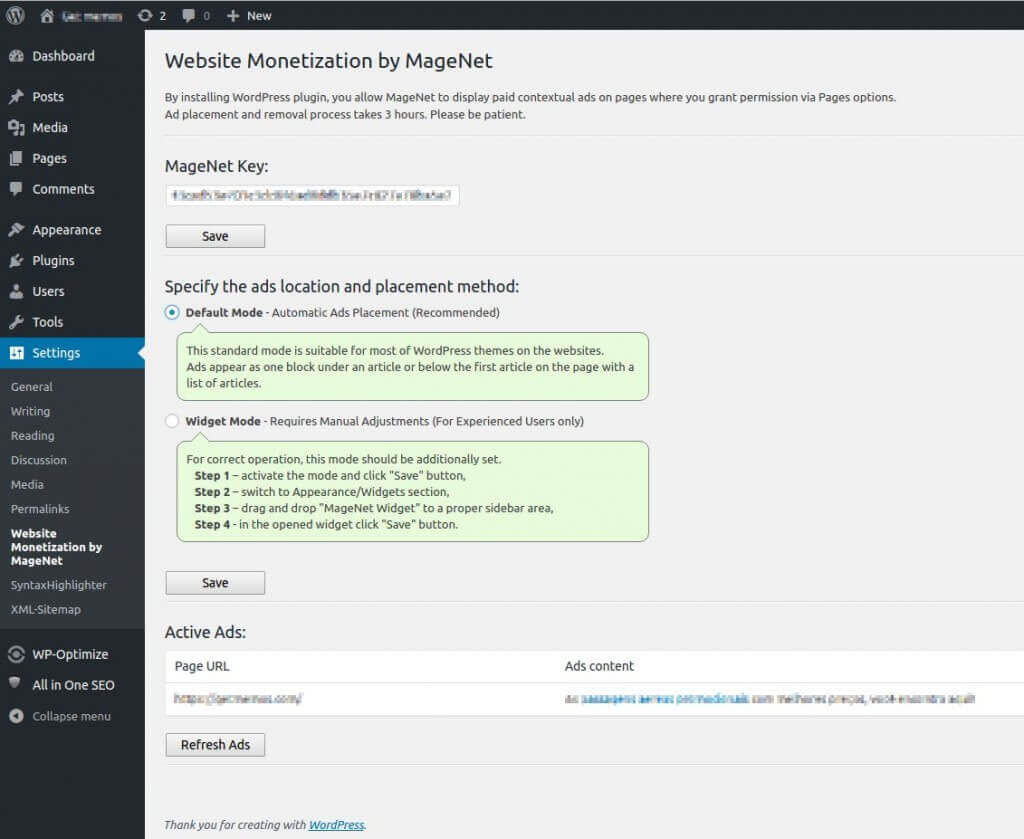
Website Monetization by MageNet — plugin dashboard

Unlike traditional ad networks, MageNet operates on a direct sales model. You don't wait for moderator approval. You don't depend on bid auctions. You simply install the plugin, get an API key — and your pages are automatically listed for sale to advertisers. The system matches relevant ads, tracks impressions, and credits money to your account.

MageNet works with all WordPress versions from 3.0 and above. The plugin has been tested on PHP 7.4, 8.0, and 8.1. Before installation, ensure your hosting has cURL enabled — it's the only technical requirement.

How Contextual Advertising Works in MageNet

The concept is straightforward. An advertiser visits the MageNet platform, browses a catalog of sites with topic descriptions, traffic stats, and placement prices. They choose your site, pay for placement — and their ad appears on your pages. The system automatically detects page context and serves relevant ads.

Technically, this is powered by API integration. The plugin sends a request to the MageNet server with page information (URL, title, category) and receives an HTML ad block in response. The code is inserted into your content — and ads are shown to visitors. No third-party scripts, trackers, or cookie banners: all logic is handled on MageNet's side.

The monetization pipeline looks like this:

  1. Install plugin → get API key
  2. System scans site → adds pages to catalog
  3. Advertiser selects your site → pays for placement
  4. Ad appears on pages → money credited to balance
  5. Withdraw funds via PayPal or WebMoney

Installing the Plugin on WordPress

Installation is dead simple and takes exactly two minutes:

  1. Download the plugin from the official MageNet website or find it in the WordPress repository
  2. In the admin panel, go to Plugins → Add New → Upload Plugin
  3. Select the ZIP archive and click "Install Now", then "Activate"
  4. A MageNet → Settings section appears in the menu
  5. Enter the API key obtained during registration at magenet.com

After activation, the plugin immediately starts scanning your site pages and adding them to the MageNet catalog. Scanning takes anywhere from 5 minutes to an hour depending on page count. Don't disable the plugin or change URL structure during scanning.

Your MageNet API key is essentially your wallet. Never share it. Anyone with your key could potentially redirect payouts. Treat it like your PayPal password.

Configuring Prices and Managing Pages

After scanning, you access a dashboard showing all site pages in a table. For each page, you can configure:

Parameter Description Recommendation
Daily price Placement cost per day $0.50 — $3.00 depending on traffic
Weekly price Discount for weekly placement 10-15% below daily × 7
Monthly price Wholesale rate for long-term advertisers 20-30% below daily × 30
Availability Enabled/Disabled for ads Disable service pages and 404s
Category Page topic for ad matching Be as specific as possible — affects relevance

The system is flexible: set a global price for all pages, then adjust individually for top-traffic or low-traffic ones. I recommend starting with low prices ($0.50 — $1.00/day) and raising them as you attract stable advertisers. This builds a base of clients who will return.

Payouts: PayPal and WebMoney

MageNet supports two withdrawal methods:

Payment System Minimum Amount Fee Processing Time
PayPal $10 Standard PayPal fee (2.9% + $0.30) 1-3 business days
WebMoney 100 WMR / 10 WMZ 0.8% of transfer amount Instant (within the system)

WebMoney payouts are faster with lower fees but are mainly suitable for users in CIS countries. PayPal is universal with global coverage. Withdrawal is on-demand: go to the "Balance" section in your MageNet account and click "Withdraw." There are no minimum holding periods — once the minimum threshold is reached, you can withdraw.

For international users outside the CIS region, PayPal is the most convenient option. WebMoney works best for Russia, Ukraine, Belarus, and Kazakhstan — faster processing and lower fees within those ecosystems.

Competitor Comparison: MageNet vs. Google AdSense vs. Media.net vs. Adsterra

The website monetization market has four main players, each with its own niche. Let's compare them honestly — no marketing fluff:

Criteria MageNet Google AdSense Media.net Adsterra
Payment model Fixed daily price CPC + CPM CPC CPM, CPC, CPA
Entry barrier Any site Strict moderation 5000+ visits/day Any site
Moderation None Strict Moderate Minimal
Non-English traffic revenue High (direct sales) Low (CPC outside US/EU is low) Near zero Medium
Ad types Contextual banners Text, banners, video Contextual blocks Banners, popunders, push notifications
Payout threshold $10 (PayPal) $100 $100 $5
Integration complexity Plugin, 2 minutes Code + rule config Code, manual setup Code or plugin

MageNet wins where AdSense loses: non-English traffic, young sites, narrow niches. AdSense pays pennies for clicks outside the US/EU ($0.02-$0.10). MageNet lets you set your own price. Media.net is pointless for non-English sites — it's English-traffic-oriented. Adsterra suits high-volume sites but aggressive formats (popunders) can scare visitors away.

Revenue Potential: Real Numbers

Let's do the math. Say you have a site with 200 pages and 2000 daily unique visitors. You set a price of $1 per day per page. Even if only 30% of pages sell:

  • 200 pages × 30% = 60 sold pages
  • 60 × $1/day = $60/day
  • 60 × 30 days = $1800/month

This is the theoretical maximum with strong demand. In practice, beginners earn $100-500/month on sites with 50-100 pages. Large projects (500+ pages, 5000+ visits/day) can reach $2000-5000/month. But this takes time to build and attract advertisers.

Important caveat: MageNet doesn't guarantee sales. If your site is in an unpopular niche or has low traffic, advertisers may pass it by. Before connecting, evaluate your audience: are there companies in your niche willing to pay for advertising? If so, MageNet gives them an easy way to do it.

Pros and Cons of MageNet

Pros:

  • Instant start — no waiting for approval like AdSense
  • Direct pricing — you decide what ads cost on your site
  • Automation — the system scans pages and matches advertisers automatically
  • Two withdrawal methods — PayPal for international, WebMoney for CIS
  • Low entry barrier — works even for sites with 100 daily visitors
  • No aggressive formats — only contextual banners, no popunders

Cons:

  • No sales guarantee — income is unstable and depends on niche demand
  • Limited ecosystem — fewer advertisers than AdSense
  • Platform dependency — if MageNet shuts down, all ads disappear
  • Manual pricing — requires experimenting to find the sweet spot
  • No geo-targeting — advertisers buy entire pages, not audience segments

Ad Placement Strategies: Where, How, and How Many

Placing ads randomly is a surefire way to lose your audience. After years of testing, I've identified three rules for effective placement without harming UX:

Rule 1: Ads must not obstruct reading. Optimal positions are after the first paragraph (728x90 banner), mid-article (300x250 rectangle), and after the final paragraph. Never place ads above the headline — it kills trust in the first second.

Rule 2: One ad block per 500-700 words of text. For a 1500-word article, two blocks are enough. Three is pushing it. Users came for content, not banners. An ad-heavy site loses search rankings and audience.

Rule 3: Content always trumps ads. A site that is 30% ad blocks inspires trust in neither users nor search engines. Ad share should not exceed 20% of visible page area. Anything higher leads to high bounce rates and search ranking drops.

Security and Data Protection

Security is the first question when connecting a third-party monetization plugin. Let's break it down:

  • Site data. MageNet only receives URLs and page titles for the catalog. Article content, user databases, and passwords stay on your server and are never transmitted.
  • Visitor data. The plugin doesn't set cookies, collect IP addresses, or use trackers. All impression statistics are tracked on MageNet servers, not your site.
  • Financial data. The API key is not linked to payment details. To withdraw funds, you authenticate at magenet.com — not in the WordPress admin. Even if your site is hacked, the attacker cannot access your wallet.
  • SSL/HTTPS. The plugin works correctly with HTTPS. Ad banners load over a secure protocol without triggering mixed content warnings.
Regularly rotate your API key in the plugin settings, especially after changing hosting, migrating the site, or granting developer access. Old keys can linger in backups or server logs.

Content-Ad Balance: The Sweet Spot

I've seen dozens of sites kill themselves with ads. Banner on banner, popunder on entry, push notifications, teaser networks — and six months later, traffic halved. Why? Because users aren't stupid. They can tell a site built for people from a site built for showing ads.

With MageNet, this balance is easier to maintain than with AdSense. In AdSense, you don't control which ads appear — the algorithm decides for you. In MageNet, you see every advertiser and can reject irrelevant offers. This gives you control over your site's visual appearance.

My placement recommendation for a typical 2000-word article:

  • After paragraph 1 (400-500 words) — top banner 728x90
  • After paragraph 6 — rectangle 300x250 with text wrap
  • After the final paragraph — bottom banner 728x90

Two or three blocks per article is normal. Five blocks and you're in the danger zone. Remember: every extra banner shortens the time users spend on your site. And time on site isn't just about money — it's also a signal to Google about your content quality.

\u{201c}

Monetization is a marathon, not a sprint. A site earning $100 a month steadily for three years brings in more than a site that made $1000 in a month and lost its audience to ad overload.

What to Do If Advertisers Aren't Biting

After connecting MageNet, a week or month may pass without a single sale. That's normal. The system is new, and advertisers are just beginning to discover your site. Here's what accelerates the process:

  • Lower your prices. Start at $0.10-$0.20 per day. Once the first advertisers arrive and see results, gradually increase.
  • Fill out your site description. The MageNet dashboard has a "Site Description" field. Write honestly: topic, audience, geography, average traffic. Advertisers choose sites by description, not by name.
  • Update content regularly. Sites with consistent publications rank higher in the MageNet catalog. The platform tracks last-update dates and promotes active projects.
  • Drive traffic. Advertisers want visitors, not pages. 2000 visits/day is interesting. 500 visits/day — not yet. Work on SEO and social media in parallel.
Download
MageNet WordPress Monetization Plugin Overview

Frequently Asked Questions About MageNet

What is MageNet and how does it work?

MageNet is a platform for direct contextual ad sales on websites. You install the WordPress plugin, it scans your pages and adds them to a catalog. Advertisers select pages, pay for placement — and their ads automatically appear on your site. You earn money directly, without intermediaries or auctions.

How does MageNet differ from Google AdSense?

The main difference is the pricing model. In AdSense, revenue depends on clicks (CPC) determined by auction, with strict moderation. In MageNet, you set your own price per day/week/month, there's no moderation, and your income is fixed. For non-English traffic, MageNet often outperforms: AdSense CPC outside the US/EU is extremely low.

Is MageNet suitable for small websites?

Yes, that's one of the platform's main advantages. There's no traffic threshold — any site can connect regardless of visitor count. However, advertisers are more willing to buy placement on sites with 500+ unique daily visitors. More traffic means higher demand and prices.

How do I set ad prices in MageNet?

The plugin dashboard lists all site pages. For each, you can set daily, weekly, and monthly prices. Start with minimum prices ($0.10-$0.50/day) and increase as demand grows. Set higher prices — 20-50% above base — for your homepage and most popular articles.

What withdrawal methods does MageNet support?

Two methods: PayPal (international, $10 minimum, 2.9% + $0.30 fee) and WebMoney (CIS region, 100 WMR/10 WMZ minimum, 0.8% fee). Withdrawal is on-demand with no minimum holding period.

Is MageNet safe to use?

Yes. The plugin doesn't collect personal visitor data, set cookies, or transmit article content to MageNet servers. The API key is not linked to payment details — fund withdrawal requires authentication at magenet.com. Rotate your key after hosting changes.

What if advertisers aren't buying placement?

Lower prices to the minimum ($0.10/day). Fill out your site description with topic, audience, and traffic details. Publish fresh content regularly — active sites rank higher in the catalog. Work on SEO to increase traffic: advertisers want visitors, not empty pages.

Can I use MageNet alongside AdSense?

Yes, the systems don't conflict. MageNet shows contextual banners from direct advertisers; AdSense shows ads from its network. However, watch your total ad density: combined ad blocks shouldn't exceed 20-30% of page area, or UX and rankings will suffer.

How much can I earn with MageNet?

Realistic figures: $100-500/month for sites with 50-100 pages and 500-2000 daily visits. Large projects (500+ pages, 5000+ visits) can reach $2000-5000/month. This isn't guaranteed income — it depends on niche demand and your pricing.

How do I disable ads on specific pages?

In the MageNet dashboard, locate the page and toggle "Availability" to "Off." Disable service pages (contact, privacy policy), form pages, and 404 pages — ads on them are ineffective and damage your site's reputation.

Tap to react