Vector Elements for Vintage Valentine's Day Card Design — Free Download EPS, PNG
Valentine's Day card design sits in a strange intersection. It has to look personal. Handcrafted, even. Yet most people grab a template and call it done. Then there is the designer who actually wants to build something — layer by layer, element by element — and that is where this vintage vector set earns its keep.
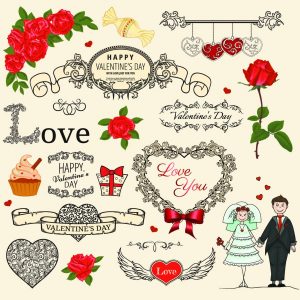
The Valentines Day Elements clipart bundle is a curated collection of decorative EPS vector components specifically tailored for romantic, retro-styled Valentine compositions. Ornate frames. Floral ornaments. Retro-inspired typography elements. Hearts in multiple styles — engraved, filigree, silhouette. Ribbons, swirls, and decorative borders. Download the complete set as a single ZIP archive containing fully editable EPS vector files and high-resolution PNG raster versions at 2000 px, 600 px, and 300 px.
What sets this set apart from the generic heart-and-arrow clipart flooding the web is its stylistic consistency. Every element shares the same design language — a deliberate nod to early 20th-century greeting card aesthetics with their dense ornamentation, copperplate flourishes, and slightly muted romantic palette. You are not mixing and matching from five different kits. The whole thing works together.
What is Actually in the Archive
Let us be specific, because listing what you get upfront saves everyone time.
| Element category | Examples included | File formats |
|---|---|---|
| Ornate frames | Oval, rectangular, circular vintage frames with filigree detail | EPS, PNG |
| Floral ornaments | Rose clusters, leaf sprays, botanical corner pieces | EPS, PNG |
| Hearts | Engraved hearts, filigree hearts, silhouette hearts, double hearts with ribbons | EPS, PNG |
| Retro typography | Vintage-style lettering elements, ornamental initials | EPS, PNG |
| Ribbons and banners | Curved banner shapes, scroll ribbons with tails | EPS, PNG |
| Decorative swirls | Victorian-style flourishes, corner accents, divider lines | EPS, PNG |
| Borders | Ornamental border strips, frame corners, repeating patterns | EPS, PNG |
The EPS files are fully editable. Every path remains intact. No flattening, no rasterized surprises hiding inside what claims to be a vector. Inkscape opens them. Illustrator opens them. CorelDRAW opens them. Affinity Designer opens them. The PNG versions come in three resolutions so you can drop them directly into a layout without firing up a vector editor at all.
Why Vintage Aesthetic Dominates Valentine Design
There is a reason the vintage aesthetic keeps winning in romantic design. It is not nostalgia for nostalgia's sake — though that plays a part. The real driver is implied craftsmanship.
A vintage Valentine looks like someone made it. The ornamentation, the typography, the hand-engraved quality of the line work — all of it signals effort. And effort signals sincerity. That is the psychology of it, stripped down. A clean, modern, sans-serif Valentine card says "I picked this up at the drugstore." A lavishly ornamented design with vintage typography says "I spent time on this." Even if both took exactly the same fifteen minutes to assemble.
This is why restaurants print menus on textured paper with serif typefaces. Why whisky labels feature copperplate engraving. Why wedding invitations still lean on calligraphy. The consumer reads the visual language of effort and translates it into value.
For Valentine's Day specifically, the vintage approach hits another sweet spot: it bridges the gap between romantic and masculine. A lace-and-glitter Valentine alienates half the audience. But the dense, engraving-style ornamentation in this set — with its dark, rich line weight and architectural precision — feels romantic and substantial. It works for a card from a man to a woman, a woman to a man, or anything in between. The aesthetic is universal without being generic.
<Comparison: This Set vs. Generic Valentine Clipart
| Feature | This vintage bundle | Generic Valentine clipart |
|---|---|---|
| Stylistic consistency | Uniform vintage design language across all elements | Mixed styles — often mismatched line weights, eras, and palettes |
| Vector editability | EPS with intact paths — fully editable in any vector software | Often rasterized or auto-traced with messy anchor points |
| Resolution options | PNG at 2000/600/300 px — ready for print and web | Typically single resolution, often too small for print |
| Typographic elements | Included — retro lettering and ornamental initials | Rarely included; text elements are absent |
| Ornament density | Rich, layered — frames, borders, flourishes, ribbons | Sparse — usually just hearts and basic shapes |
| Commercial use | Allowed — personal and commercial projects | Varies — often restricted or requires attribution |
The difference, in short, is that this set was assembled by someone who understands composition. The generic stuff was assembled by someone who understands "people search for hearts in February."
<\u{201c}The moment your client can tell you used clipart, you have failed. The moment they cannot tell — because every element shares a cohesive visual language — you have delivered design.
Practical Applications Beyond Valentine Cards
Do not limit this set to February 14th. The vintage ornamental language translates across a surprising range of projects.
- Wedding stationery — save-the-dates, invitations, menus, place cards, thank-you notes. The floral ornaments and ornate frames are essentially wedding-ready out of the box.
- Branding for boutique businesses — florists, bakeries, vintage clothing stores, tea shops. A logo built around an engraved heart or floral frame from this set communicates heritage and craftsmanship instantly.
- Social media templates — quote graphics for Instagram, Pinterest pins, Facebook cover photos. The decorative borders and swirls add visual weight without overwhelming the message.
- Product packaging — soap labels, candle jars, chocolate boxes, perfume packaging. Vintage ornamentation at small scale reads as luxury.
- Scrapbooking and journaling — digital or printed. The PNG versions at 300 px are perfectly sized for embellishment clusters.
- T-shirt and merchandise design — a distressed print of an engraved heart on a crewneck sweatshirt. Simple. Effective. Sells.
The versatility comes from the monochrome-adjacent palette of vintage engraving. You are not locked into pink and red. These elements work in gold foil, white ink on kraft paper, black on pastel, or any combination you can dream up.
<File Formats and Software Compatibility
You get two format families in the archive valentines_day_elements.zip.
EPS (Encapsulated PostScript) — the vector workhorse. Open in Adobe Illustrator, CorelDRAW, Inkscape, Affinity Designer, or Freehand. Every element remains fully editable: scale to billboard size, recolor individual paths, rearrange components, extract single elements into new compositions. The EPS format has been the industry standard for vector exchange since the 1990s and remains universally supported.
PNG (Portable Network Graphics) — raster versions at three resolutions: 2000 px for high-DPI print work, 600 px for screen presentations and digital layouts, 300 px for quick placement and web use. All PNG files carry transparent backgrounds. You can drop them onto any colored surface without a white rectangle ruining the composition.
What about SVG? The EPS files can be opened in Inkscape and exported to SVG with full fidelity. What about AI? Illustrator opens EPS natively — just save as AI after opening. CDR? CorelDRAW handles EPS import seamlessly. The archive is built around maximum compatibility with minimum file bloat.
<Workflow: Building a Vintage Valentine in 20 Minutes
A practical walkthrough. Not theory. Here is what the assembly line looks like when you actually sit down with this set.
- Pick your frame. Browse the ornate frames. Choose one that matches your card's orientation — oval for centered compositions, rectangular for full-bleed designs.
- Place your heart. Drop an engraved heart or filigree heart into the frame's center. Scale to fill roughly 60% of the available space. This is your anchor element.
- Add typography. Use the retro lettering elements for the headline — "Be Mine" or "My Valentine" or whatever fits your tone. Place it over the heart or beneath the frame.
- Layer floral ornaments. Position rose clusters or leaf sprays at the corners of the frame. They should feel like they are growing out of the frame, not floating disconnected.
- Finish with flourishes. Add decorative swirls to balance any empty space. The Victorian-style flourishes work as connector tissue — they bridge the gap between the frame and the typography.
- Render PNG or save as EPS/AI. Export a composite PNG for digital sharing. Save the layered EPS for future edits. Done.
Twenty minutes from blank canvas to a card that looks like it took a letterpress shop an afternoon. That is the efficiency of a well-curated element set.
<
Color Customization Guide
The default elements use a vintage sepia-and-cream palette — warm, aged, romantic. But the beauty of vector is that none of it is locked. Here is a quick reference for recoloring strategies by project type.
| Project vibe | Recolor recommendation | Example palette |
|---|---|---|
| Classic romance | Keep warm tones — shift toward deeper reds and golds | Burgundy, gold, cream, soft pink |
| Modern minimal | Desaturate to monochrome — black on white or white on black | Pure black, white, 20% gray for depth |
| Luxury / wedding | Metallic simulation — gold, rose gold, copper | Gold (#C9A84C), rose gold (#B76E79), navy background |
| Whimsical / playful | Pastel reinterpretation — light pinks, mint, lavender | Blush pink, mint green, lavender, soft yellow |
| Masculine / gothic | Dark background, white or silver line work | Charcoal background, white lines, deep crimson accent |
| Vintage authentic | Keep as-is — the sepia/cream palette is period-accurate | No changes needed |
Recoloring in Illustrator: select all paths, apply a global color swatch. In Inkscape: use the Fill and Stroke panel with the "select same fill color" extension. In CorelDRAW: use Find and Replace with color properties. The process takes under two minutes once you know the workflow.
Print vs. Digital: Resolution Decisions
The EPS files are resolution-independent by nature — they scale infinitely. That covers print. But the PNG files require a decision about which resolution to use.
For print projects: use the 2000 px PNG versions. At 300 DPI, 2000 px gives you approximately 6.7 inches of print width — sufficient for A5 cards, postcards, and most small-format print. If you need larger, open the EPS and export at your required dimensions instead. The EPS has no ceiling.
For digital projects: the 600 px PNG files are the sweet spot. They look crisp on retina displays without bloating file sizes. Use 300 px only for drafts, thumbnails, or web layouts where the element occupies a small portion of the viewport. The 2000 px versions are overkill for screen — you would be forcing the browser to downsample unnecessarily.
For social media: Instagram compresses everything anyway. 600 px is fine. Pinterest prefers taller aspect ratios but respects resolution up to about 1000 px wide. Facebook cover photos display at 820x312 px on desktop — the 600 px elements fit comfortably within that frame.
FAQ — Frequently Asked Questions
What exactly is included in the valentines_day_elements.zip archive?
The archive contains a collection of vector clipart elements for vintage-style Valentine card design: ornate frames (oval, rectangular, circular), floral ornaments (rose clusters, leaf sprays, botanical corners), hearts in multiple styles (engraved, filigree, silhouette), retro typography elements, ribbons, decorative swirls, and ornamental borders. All elements are provided in editable EPS vector format and raster PNG at 2000 px, 600 px, and 300 px resolutions.
Can I use these elements for commercial Valentine card designs?
Yes. The vector elements are provided for both personal and commercial use. You may incorporate them into Valentine cards, wedding invitations, social media graphics, product packaging, merchandise designs, and any other project — personal or client work — without additional licensing fees or attribution requirements.
Which software opens the EPS files from this set?
EPS files open natively in Adobe Illustrator, CorelDRAW, Inkscape, Affinity Designer, and Freehand. Photoshop can open EPS but will rasterize it — use a vector editor for full editability. If you need SVG, open the EPS in Inkscape and export as SVG. If you need AI, open in Illustrator and save in AI format.
How do I recolor the vintage elements to match my brand palette?
Open the EPS in any vector editor. In Illustrator: select all paths, create global color swatches, and assign them. In Inkscape: use the Fill and Stroke panel with the "Select Same Fill Color" extension to batch-select and recolor. In CorelDRAW: use Edit > Find and Replace > Replace Objects with color properties. All paths are ungrouped and individually selectable, so partial recoloring is straightforward.
Are the PNG versions on transparent backgrounds?
Yes. All PNG files — at 2000 px, 600 px, and 300 px — feature transparent backgrounds. You can place them on any colored or textured surface without a white bounding box. This is essential for layering elements over photographs, patterned backgrounds, or colored card stock in print layouts.
What makes this set different from free Valentine clipart on other sites?
Three things. First, stylistic consistency — every element shares a unified vintage design language, so they look like they belong together. Second, vector editability — the EPS paths are clean, intact, and fully editable, not auto-traced or rasterized. Third, resolution options — you get PNG files at three sizes for different use cases, plus the vector source files for unlimited scaling. Generic free clipart rarely offers this combination.
Can I use these elements in Canva or other web-based design tools?
Yes, with a limitation. Canva accepts PNG uploads directly — you can drop the 600 px or 2000 px PNG files into any Canva design. However, Canva does not support EPS files for editing. If you need full vector editability within a web tool, consider Vectr or Gravit Designer, both of which support EPS import in their free tiers.
Will these vintage elements work for non-Valentine projects?
Absolutely. The vintage ornamental style applies to wedding stationery, boutique branding, product labels, social media templates, scrapbooking, fabric pattern design, and more. The hearts can be recolored or replaced with other motifs. The frames, flourishes, and borders stand alone as decorative elements for any project with a classic or heritage aesthetic.
Tap to react