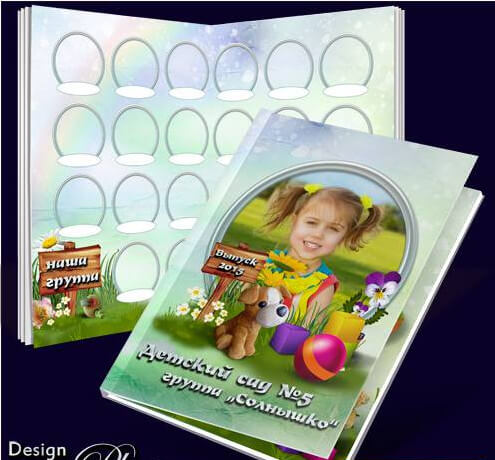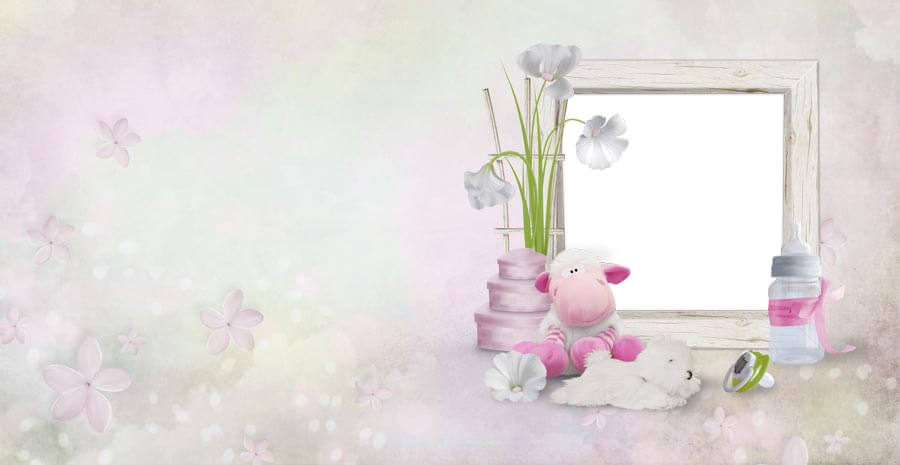
A kindergarten graduation is a surprisingly emotional event. One moment you are dropping off a toddler who can barely hold a crayon, and the next you are watching a confident little person in a tiny cap and gown, ready to march into first grade. Capturing this transition deserves more than a few smartphone snapshots — it deserves a proper photo book. Today we present the "Farewell, Little Graduates" PSD template: 3 fully layered source files at 300 DPI, designed specifically for preschool and kindergarten graduation albums.

The set is intentionally compact — three spreads instead of seven — because a kindergarten album does not need the gravitas of a high school yearbook. What it needs is space for bright smiles, tiny diplomas, playground memories, and a design that feels joyful without looking like a cartoon. Each file measures 5398 by 3602 pixels, giving you a generous print area that accommodates both group photos and individual portraits. The archive weighs 217 MB, significantly lighter than the high school graduation template, making it accessible even on modest internet connections. You can download the whole set in a few minutes on a standard broadband connection, unlike the gigabyte-heavy high school templates that require overnight downloads.

The template uses a light, colorful design with playful typography and plenty of room for kids' photos. All text is editable — replace "Farewell" with any phrase that suits your kindergarten group. Smart objects handle photo insertion: double-click, paste, save, done.

What's inside: the three-spread layout

Three spreads hit the sweet spot for a kindergarten album: enough pages to tell a story, but not so many that parents balk at the printing cost or the design time. Here is the breakdown:

Spread Resolution DPI Purpose Editable elements
Cover / Spread 1 5398 x 3602 300 Title page with group photo Title, group photo slot, kindergarten name, year
Spread 2 5398 x 3602 300 Individual portraits with names Multiple photo slots, name tags, decorative frames
Spread 3 5398 x 3602 300 Playground memories and farewell Photo grid, farewell message, teacher name

The cover sets the tone with a cheerful title and a large group photo placeholder. The second spread handles individual portraits — each child gets their own framed slot with a name tag underneath, giving every graduate their moment of recognition. The third spread is a mosaic of candid moments from the kindergarten year: playing, painting, singing, laughing. It closes with a farewell message from the teacher. The entire layout feels like a storybook — it opens with the group, celebrates each individual, and closes with shared memories.


Why a dedicated kindergarten template matters

You might wonder: why not just use a generic graduation template and scale it down? For two reasons. First, the visual language of a kindergarten album is fundamentally different from a high school or university yearbook. Deep navy and gold serifs that look dignified on an 18-year-old graduate feel absurdly formal next to a five-year-old's smile. The kindergarten template uses brighter, warmer colors — soft yellows, sky blues, gentle greens — and playful typography that matches the energy of early childhood. A formal serif headline that says "Class of 2026" looks right for high school; for kindergarten, it feels like a mismatch between the content and the container.

Second, the photo aspect ratios are different. High school albums work with head-and-shoulders portraits shot against a backdrop. Kindergarten photos tend to be full-body shots taken on the playground, in the classroom, or at the graduation ceremony itself — often wider, looser compositions that need different framing. This template accounts for that difference in every photo slot. If you try to place a full-body kindergarten photo into a tight headshot frame, you end up cropping out the graduation gown or the colorful shoes — details that matter enormously to both children and parents.


Design language: playful but not childish

Designing for children is a tightrope walk. Too serious, and the album feels like a corporate report. Too cartoonish, and it ages poorly — what looks cute to a five-year-old may look embarrassing to a fifteen-year-old flipping through old memories. The "Farewell, Little Graduates" template walks that line carefully. The color palette uses bright but not neon tones. Decorative elements include subtle stars, gentle curves, and hand-drawn-style accents that suggest playfulness without screaming "baby book." The fonts are rounded and friendly but remain readable — a practical concern when you are printing names of twenty-plus kids on a single spread.

Background textures are kept minimal — mostly solid light tones with soft gradients — because kindergarten photos are already colorful enough. Adding a busy background behind a child in a bright costume is a recipe for visual chaos. This restraint is what separates a usable template from a beautiful-but-unusable portfolio piece. The template also avoids gendered color schemes: no pink-for-girls and blue-for-boys cliches. The palette is neutral and warm, designed to complement any child's photo regardless of what they are wearing.

\u{201c}

I have been organizing graduation albums for my groups for six years. This template was the easiest to work with — we had parents volunteering to help because the smart objects made photo insertion genuinely simple. The kids love seeing their names printed under their pictures.

Elena, Kindergarten teacher, 10 years experience

Who benefits from this template

  • Kindergarten teachers who want to create a parting gift for their graduating group. No design background needed — just basic Photoshop or a volunteer parent;
  • Parent committees looking for an affordable way to produce graduation albums. Three spreads keep printing costs reasonable even for larger groups. A typical print run for 25 children with three spreads costs significantly less than a 10-spread yearbook;
  • Children's photographers expanding into the preschool market. The template gives you a consistent, repeatable workflow for multiple clients — shoot in the morning, deliver the layout in the afternoon;
  • Photo studios that offer graduation packages — bundling photography with a pre-designed album template increases the value of each package without adding labor cost;
  • Grandparents who want a special keepsake but do not want to deal with complex layouts. Three spreads are manageable even for a Photoshop beginner.

Step-by-step guide: from download to print

Step 1: Download and extract

The archive is 217 MB — manageable on most connections. Use 7-Zip or WinRAR to extract. The password is provided with the download link at the bottom of the page.

Step 2: Organize your photos

Before you open Photoshop, group your photos into three folders: one for the group shot (cover), one for individual portraits (spread 2), and one for candid moments (spread 3). This saves a surprising amount of time compared to hunting for photos mid-edit. I also recommend renaming individual portrait files to match the child's name — this makes it easier to type names correctly into the text layers.

Step 3: Edit the cover

Open the first PSD. Replace the title text with your kindergarten name and graduation year. Insert the group photo into the smart object placeholder — double-click the layer thumbnail, paste your photo, resize to fit, save and close. Check that no children are cropped at the edges of the frame.

Step 4: Fill individual portraits

The second spread has labeled photo slots. Work left to right, top to bottom — insert each child's portrait via smart object, type their name in the text box below, move to the next slot. If you have fewer children than slots, leave empty ones or fill them with decorative elements or teacher photos.

Step 5: Add candid photos and export

The third spread uses a mosaic layout. Drop in 4-8 candid photos from the kindergarten year — playground shots, art projects, music time, outdoor play. Edit the farewell message at the bottom. Export all three spreads as TIFF with LZW compression or PDF/X-4 for print delivery.

Kindergarten photos are often shot on phones by multiple parents, resulting in wildly different white balance settings. Batch-correct white balance before inserting photos. Nothing ruins a spread faster than one child looking bright yellow and another looking blue.

Technical specifications

Parameter Value
Format PSD (Adobe Photoshop)
Number of files 3 (cover + portrait spread + memories spread)
Resolution 5398 x 3602 pixels
DPI 300
Color mode RGB (convertible to CMYK for printing)
Archive size 217 MB
Layer structure Grouped, named, with smart objects for photos
Compatibility Photoshop CS6 — CC 2024+
Print size at 300 DPI Approximately 45.7 x 30.5 cm (18 x 12 inches)

Comparison: kindergarten vs. high school graduation templates

Feature "Farewell, Little Graduates" Typical high school template Generic template
Design tone Bright, warm, playful Formal, dignified, classic Neutral — fits nothing well
Photo framing Optimized for full-body and group shots Head-and-shoulders portraits Generic square slots
Spreads 3 (manageable, affordable) 5-10 spreads 1-2 (too few)
Typography Rounded, friendly, readable Serif headlines, clean body Random fonts, mismatched
Age-appropriate feel Specifically for ages 5-7 For ages 16-18 None — works for nobody
Print cost per album Lower — only 3 spreads Higher — 5+ spreads Low — quality suffers
Price Free Free or paid Free

Printing tips for kindergarten albums

Kindergarten albums have specific printing needs that differ from adult photo books. First, durability matters — these albums will be handled by small children who might spill juice on them or drag them around by one page. Choose a print shop that offers lamination or wipe-clean finishes. Even a thin matte laminate coating extends the album's lifespan dramatically. Second, paper weight should be higher than usual — at least 200 gsm for inner pages and 300 gsm for the cover. Flimsy paper folds and tears when a child turns the page enthusiastically. Third, lay-flat binding is worth the extra cost: kids want to see the whole picture, not lose part of it in the gutter. A PUR-lay-flat binding lets the spreads open fully without any center crease. Fourth, color reproduction should be checked carefully — bright kindergarten photos with saturated primary colors can exceed the CMYK gamut and print duller than expected. Always ask for a test print of one spread before committing to the full run. The small cost of a proof saves you from discovering color issues after the entire batch has been printed.


Common mistakes with children's photo books

  • Overcrowding. Kindergarten photos are busy by nature — toys, costumes, bright walls. Resist the urge to add more decorative elements. Let the photos breathe;
  • Inconsistent photo orientation. Mixing portrait and landscape orientation within the same spread creates visual chaos. Stick to one orientation per spread;
  • Name typos. A misspelled child's name in a graduation album is hard to fix and harder to forget. Triple-check every name before exporting. If possible, have a second person read through the names;
  • Compressed phone photos. WhatsApp and other messengers compress images by default, often dropping resolution to 72 DPI. Request original-quality files from parents via cloud storage with "upload originals" enabled;
  • Mixed photo styles. One parent sends a professionally lit studio shot; another sends a blurry action photo. The contrast destroys visual cohesion. Set clear photo guidelines before the collection process starts.

How to prepare parents for the photo collection process

The biggest pain point in creating a kindergarten album is not the design or the layout — it is collecting quality source files from parents. Send a simple checklist two to three weeks before the deadline. First: no WhatsApp or Telegram screenshots. Messengers compress photos to well below printable quality. Second: submit originals from the phone gallery or camera, ideally via a shared cloud folder with "keep original resolution" enabled. Third: set a minimum resolution of 2000 pixels along the long edge. Any smartphone from the last five years shoots at 4000-plus pixels, so this filters out only the truly unusable files. Fourth: agree on a unified background for portraits. If each child is photographed against a different background — one against a flowered wall, another against a patterned carpet — the album looks like a patchwork quilt. Arrange a single photo day or hire a photographer for one hour to ensure consistency.

Organizing a DIY group photoshoot at kindergarten

If the budget does not cover a professional photographer, a group shoot can be handled by the teacher or a parent volunteer. The golden rule of photographing children: do not force them to pose for too long. Five-year-olds lose interest after five to seven minutes, and after that you get grimaces, not smiles. Prepare the location in advance — even natural light, a plain background without distracting elements — then gather the group, take two or three group shots, and move on to individual portraits. The whole process should take fifteen to twenty minutes maximum. Shoot in bursts of three to five frames per child so you can choose the one with open eyes and a genuine smile. Keep the camera at the children's eye level — shooting from above distorts proportions and creates a condescending angle. If using a phone, portrait mode with background blur works well, but check that the software blur does not eat away hair and ears at the edges. And copy the photos to a computer immediately after the shoot — phone storage has a habit of failing at the worst possible moment.


Frequently Asked Questions

How many children can this template accommodate?

The portrait spread is designed for approximately 15-20 individual slots. For larger groups, duplicate the spread. For smaller groups, repurpose empty slots for teacher photos or decorative elements.

Can I change the colors to match our branding?

Yes, all colors sit on separate editable layers. Use adjustment layers or the color picker to match any scheme. No flattened or locked color elements exist in the template.

Do I need Photoshop?

Photoshop CS6+ recommended. Affinity Photo handles PSD files well with most layer effects. Photopea works for basic photo and text edits. GIMP is not recommended due to limited smart object support.

What is the print size of each spread?

At 300 DPI, approximately 45.7 x 30.5 cm (18 x 12 inches). A generous landscape format that accommodates group photos and multiple portraits on one page.

Can I add more spreads if needed?

Yes, duplicate any spread file and modify it. Adding spreads increases printing costs proportionally.

Is the archive password-protected?

Yes, the password is displayed next to the download link at the bottom of the page.

What type of photos work best?

High-resolution photos in good natural light produce the best results. Wide-angle for group shots, simple backgrounds for individual portraits, and candid playground shots for the memories spread.

Can I sell albums created with this template?

Yes, you may produce and sell physical printed albums to parents. The template source files themselves cannot be resold or redistributed.

How long does it take to complete a full album?

With organized photos and basic Photoshop skills, expect 1-2 hours for all three spreads. The smart object workflow eliminates manual resizing, so most of your time goes into selecting the right photos and typing names correctly.

What if my kindergarten has a bilingual or non-cyrillic name?

All text layers are fully editable. The default fonts support Latin and Cyrillic scripts. For other scripts, install the appropriate font on your system and replace the text layer — the layout adapts to the new font metrics automatically.


Download the "Farewell, Little Graduates" PSD template

The archive of 3 PSD files (217 MB) is available via the link below. Download, extract with the provided password, and create a lasting keepsake for your little graduates.

Download Farewell Little Graduates — PSD Template217 MB

Open any PSD file in Photoshop or Affinity Photo, replace the placeholder content with your photos and text, and you will have a print-ready kindergarten graduation album in under two hours. Here is to the little graduates heading off to first grade!

Tap to react