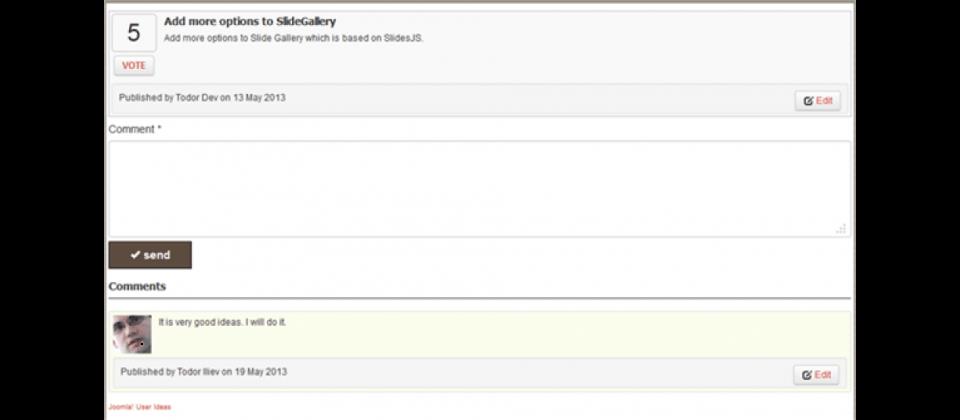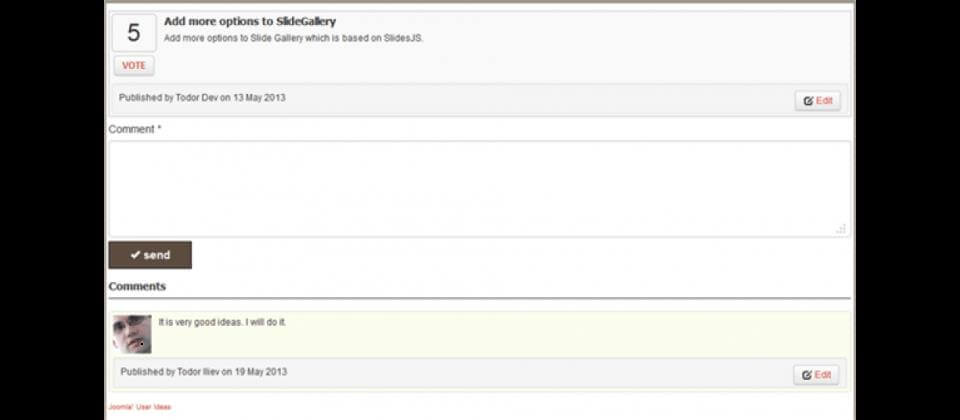
User Ideas is a Joomla extension designed to collect, moderate, and manage user feedback in a structured way. Instead of reading through endless comment threads, you get a clean system where visitors submit ideas, vote on proposals, and track implementation status. This approach transforms chaotic feedback into actionable data that drives real improvements.

Every website owner faces the same challenge: users have opinions, suggestions, and feature requests, but capturing them in an organized manner is difficult. Emails get lost, comments go off-topic, and social media messages disappear in the feed. User Ideas solves all of these problems with a dedicated component that lives right inside your Joomla site. It provides a centralized hub where every piece of feedback is logged, categorized, and ranked by community votes.
Why Your Site Needs User Ideas
Feedback is the lifeblood of any online project. Without it, you are guessing what your audience wants. User Ideas gives you a direct line to your users thoughts. They submit structured proposals, categorize them by topic, and the entire community votes on what matters most. The result is a prioritized list of features and improvements that your audience genuinely wants rather than what you assume they need.
User Ideas turns random feedback into actionable data. It is one of the most practical Joomla extensions for community engagement.
Consider a typical scenario: you run a Joomla-based support portal. Users have requests for new features, but they post them randomly across forums, tickets, and comments. User Ideas consolidates everything into one place. Each submission has a title, description, category, and vote counter. You can sort by popularity, filter by category, and track status from submitted to implemented. This transparency builds trust because users can see that their input leads to actual changes.
Another important aspect is accountability. When users submit ideas through a dedicated system rather than scattered channels, administrators can respond properly. You can leave comments on ideas, update their status, and explain why certain suggestions were declined. This level of engagement turns casual visitors into loyal community members who feel invested in your platform evolution.
Installation Process
Installing User Ideas follows the standard Joomla extension workflow. Download the package from the official website or the Joomla Extensions Directory. Navigate to Extensions → Manage → Install, select the ZIP file, and click Upload and Install. Joomla handles the rest automatically extracting files, registering plugins, and creating database tables.
Extensions → Manage → Install → Upload Package File → Choose File → Upload & Install[/codeblock]
After installation, a new menu item appears under Components → User Ideas. The first screen shows a welcome dashboard with links to documentation, configuration, and support. It is recommended to go through the settings before publishing anything on the frontend. The dashboard also displays basic statistics: total ideas, votes, and recent activity which gives you an instant overview of how your community is engaging.
Configuration Guide
The configuration panel is divided into logical sections. Let us examine each section in detail to ensure you set everything up correctly.
General Settings
This section controls the basic behavior of the extension. You can enable or disable the description display, vote buttons, and sorting options. A critical setting here is whether unregistered users can vote. Allowing guest voting increases engagement but may lead to abuse. Most site owners enable voting for registered users only while allowing anyone to browse ideas. You can also set the voting direction: only upvotes, or both up and down votes. The up-and-down system provides more nuanced feedback because users can express both agreement and disagreement.
Another important option is the default sort order. You can choose newest first, most votes, or by status. The most practical option is to sort by votes by default so popular ideas appear first. Users can override this with the sorting dropdown on the frontend. You can also configure how many ideas appear per page and whether to show the submission form directly on the list page or on a separate page.
SEO Settings
User Ideas includes comprehensive SEO features. Enable search-engine-friendly URLs, meta tags for each category, and sitemap integration. These options help search engines index your ideas pages correctly. Each category can have its own page title and meta description which improves visibility in search results. The component also generates proper heading hierarchy and uses semantic HTML for better accessibility.
Another useful SEO feature is canonical URL support. This prevents duplicate content issues when the same idea appears in multiple category views. The extension also supports Open Graph and Twitter Card meta tags so shared links display properly on social media platforms.
Integration Settings
The extension integrates tightly with Joomla user groups. You can restrict access to specific features based on user roles. For example, only moderators can approve ideas while administrators can edit and delete any submission. The integration also supports Joomla email system sending notifications to users when their ideas change status. You can customize notification templates to match your brand voice.
User Ideas also integrates with Joomla's content plugin system. This means other extensions can interact with ideas, such as displaying the most popular ones in a module or including them in search results. The plugin API is well documented making it straightforward to build custom integrations.
Feature Comparison
Feature
User Ideas
JSuggest
Custom PHP Solution
Voting system
Built-in up/down votes
Basic star rating
Requires custom coding
Developer triggers
onBeforeVote, onVote, onAfterVote
None
Depends on implementation
SEO optimization
Full meta + sitemap
Partial
Manual setup needed
Category management
Unlimited categories
Limited to 10
Unlimited
Email notifications
Built-in
External plugin needed
Custom coding
Joomla integration
Native
Native
None
Pricing Plans
Plan
Sites
Support
Updates
Price
Single
1
6 months
1 year
$29
Multiple
5
1 year
Lifetime
$59
Developer
Unlimited
Lifetime
Lifetime
$99
As the tables show, User Ideas offers excellent value compared to alternatives. The developer plan is ideal for agencies managing multiple Joomla sites because it provides lifetime updates and priority support.
Developer Triggers
User Ideas exposes three powerful PHP triggers: onBeforeVote, onVote, and onAfterVote. These allow custom plugins to intercept voting events at different stages. You can add business logic such as vote limits, karma systems, or reward mechanisms without modifying the core component. The triggers are well documented with example code included in the package.
// Example: Daily vote limiter via onBeforeVote
public function onBeforeVote($ideaId, $userId, $vote) {
$db = JFactory::getDbo();
$query = $db->getQuery(true);
$query->select('COUNT(*)')->from('#__userideas_votes')
->where('user_id = ' . (int)$userId)
->where('DATE(created) = CURDATE()');
$db->setQuery($query);
$todayVotes = (int)$db->loadResult();
if ($todayVotes >= 10) {
throw new Exception('Daily vote limit reached');
}
return true;
}[/codeblock]
Use onVote to trigger notifications, update external counters, or log events for analytics. Use onAfterVote for post-processing like cache clearing, leaderboard updates, or broadcasting to connected services. The flexibility of these triggers makes User Ideas suitable for complex community platforms where voting behavior needs careful management.
Developer triggers make User Ideas highly extensible. Build custom workflows without touching the core code.
Frontend Experience
On the frontend, users see a clean interface with a submission form, category filter, search bar, and a sortable list of ideas. Each idea shows the title, description preview, category badge, vote count, and status label. Clicking an idea opens its full details page where users can read the complete description, see comments, and track the implementation progress. The design is responsive and works well on mobile devices.
To display the component on your site, create a new menu item of type User Ideas → Idea List. Configure how many ideas to show per page, whether to display categories, and which statuses to include. You can also embed the submission form on a separate page or display it inline with the list. The extension provides module positions for displaying popular ideas in sidebars.
Test vote functionality on a staging site before going live. Verify that email notifications are delivered correctly and triggers fire as expected. Also check that the frontend layout matches your template design.
Moderation Workflow
Moderation is straightforward. From the administrator panel go to Components → User Ideas → Ideas. You see all submissions with status indicators: pending, approved, rejected, or implemented. Approve or reject individually or use batch actions for efficiency. You can also edit ideas directly from the backend to fix typos, improve clarity, or merge duplicate suggestions. The interface includes a search field so moderators can quickly find specific submissions.
The extension logs all moderation actions so you always know who approved what and when. This audit trail is useful for compliance and transparency especially when multiple moderators are involved. You can also set up automatic notifications that inform users when their ideas are approved or rejected.
Data Export and Analysis
User Ideas includes a built-in CSV export feature. Go to the ideas list and click Export. The generated file contains all fields: title, description, category, date, status, vote count, and custom field values. Open the CSV in Excel or Google Sheets for further analysis. You can identify trends, see which categories generate the most engagement, and make data-driven decisions about your product roadmap.
You can also set up automatic publishing of ideas that reach a certain vote threshold. This is useful for community-driven projects where decisions are made democratically. When an idea gets enough votes, it automatically moves to the approved status, and the system notifies the author. This feature encourages active participation because users understand the rules of the voting system.
\u{201c}We use User Ideas in our SaaS product. Users suggest features, vote, and we see the exact priority map. No bureaucracy needed. The CSV export helps us create quarterly planning documents.
Performance Impact
User Ideas is optimized for speed. It uses efficient SQL queries with proper indexing and supports Joomla caching system. Even with thousands of ideas and hundreds of thousands of votes the component remains responsive. The developer also provides performance tips in the documentation including index recommendations for large databases and advice on cache configuration. Regular updates ensure compatibility with the latest PHP versions and performance improvements.
f/2.8
When deploying on a high-traffic site, consider using Joomla's built-in caching together with a CDN for static assets. User Ideas generates clean HTML that caches well. Dynamic elements like vote counts can be loaded via AJAX to keep the initial page load fast.
Security Considerations
Security is handled at the Joomla framework level. User Ideas uses proper input validation and output escaping following Joomla coding standards. Voting actions require token validation to prevent CSRF attacks. The extension also respects Joomla access control levels so sensitive operations are protected by user permissions.
Frequently Asked Questions
Is User Ideas compatible with Joomla 4 and 5?
Yes, the extension works with Joomla 3, 4, and 5. The developer keeps it updated for the latest versions. Always download from the official source to get the most recent release with full compatibility.
Can users edit their own ideas after submission?
Yes, you can enable editing within a configurable time window in the component parameters. It is disabled by default to maintain moderation control. When enabled, users can edit the title and description but cannot change the category after voting starts.
Does User Ideas support multilingual sites?
Yes, compatible with Joomla language overrides and third-party multilingual tools like Falang. You can translate all frontend labels, messages, and notification emails. Each language version shows the appropriate translations automatically.
How do I moderate incoming ideas?
Go to Components → User Ideas → Ideas in the admin panel. Use individual or batch actions to approve, reject, or edit submissions. The list view shows status indicators and you can filter by category or date range for efficient management.
Can I export ideas to CSV?
Yes, use the Export button in the ideas list. The CSV includes all standard and custom fields making it easy to analyze community feedback in spreadsheet software or import into other systems.
Does the extension slow down the site?
No, User Ideas uses optimized queries and caching. Performance remains acceptable even with large datasets. The developer recommends proper MySQL indexing for sites with more than ten thousand votes.
What happens to votes when I delete an idea?
Votes are deleted along with the idea. The trigger events still fire so you can implement custom cleanup logic if needed. The database structure uses foreign keys to maintain referential integrity.
Is there a demo site available?
Yes, developers provide a demo link on the product page. Test all features including voting, submission, and moderation before purchase. The demo typically resets daily so you can experiment freely.
How much does the extension cost?
User Ideas is a paid extension. Prices start at $29 for a single site. The developer plan at $99 offers unlimited sites and lifetime support which is the best value for agencies.
How do I update the extension?
Updates work through Joomla standard update system: Extensions → Manage → Update. Enable cron on your server for automatic update notifications. Always back up before updating major versions.
Tap to react