Getting users to register on your website is one of the biggest challenges in building an online community. Long registration forms asking for username, password, email, and personal details scare people away. This is where social login comes to the rescue. The uLogin social login module for Joomla allows visitors to sign in using their existing accounts on popular social networks and messaging platforms. Instead of creating yet another username and password combination, users click a single button and they are in. This dramatically reduces friction and increases conversion rates for membership registrations.
uLogin is a universal authentication system that works across multiple content management systems. Originally developed as a third-party service, it provides ready-made modules for Joomla, WordPress, Drupal, and many other platforms. The Joomla module is particularly popular because standard Joomla login module is quite basic and offers limited options for social integration.

How uLogin works
The principle behind uLogin is straightforward. When a visitor clicks a social network button on your Joomla site, they are redirected to the chosen social platform for authentication. After they grant permission, the platform sends a confirmation token back to uLogin servers, which then pass the user profile data to your Joomla installation. The entire process takes a few seconds and the user does not need to leave your website mentally — the transitions are fast and seamless.
uLogin supports over twenty different social networks and identity providers, making it one of the most flexible solutions on the market. The complete list includes VKontakte, Odnoklassniki, Facebook, Twitter, Google, Yandex, Mail.ru, Instagram, LinkedIn, GitHub, Steam, Twitch, Flickr, Last.fm, LiveJournal, and several others. You can choose which networks to display on your login form, giving users the options that are most relevant to your audience.
For each supported network, uLogin requests a basic set of permissions that typically includes the user email address, name, and profile picture. This information is used to create or update the user account in your Joomla database. The exact data fields received depend on the specific social network and its privacy policies, but the core fields are consistently available across all major platforms.
Installation process
Installing uLogin for Joomla is a simple process that follows the standard Joomla extension installation procedure. Here is a step-by-step guide.
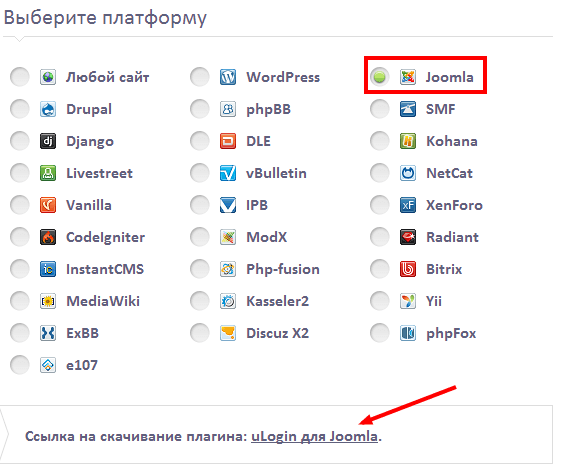
Step 1: Go to the uLogin official website and navigate to the section where you can generate the integration code. Select Joomla as your CMS platform. The system will provide you with a customized module package and a unique widget identifier.
Step 2: Download the uLogin module package for Joomla. It comes as a standard ZIP archive compatible with the Joomla extension installer. Make sure you download the version that matches your Joomla installation — there are separate builds for Joomla 2.5, 3.x, and 4.x.
Step 3: Log into your Joomla administrator control panel. Navigate to Extensions and then Manage and then Install. In the Upload Package File section, select the downloaded ZIP file and click Upload and Install. Joomla will handle the rest automatically.
Step 4: After successful installation, go to Extensions and then Modules. Find the uLogin module in the list of installed modules. Click on its title to open the configuration panel.
Step 5: In the module configuration, you need to enter the widget identifier or UID that you received from the uLogin website during step one. Without this identifier, the module will not be able to connect to the uLogin authentication service. You also need to configure basic display settings such as module position, page assignments, and access levels.
Step 6: Save the module configuration and publish it. Test the login functionality by opening your website in a private browser window and clicking one of the social network buttons. If everything is configured correctly, you should be redirected to the social network, asked to authorize the application, and then returned to your site logged in.
Configuration options and settings
The uLogin module offers a variety of configuration options that allow you to customize the login experience for your users. Understanding these settings will help you create a registration flow that matches your website needs.
| Setting name | Purpose | Recommended value |
|---|---|---|
| Widget UID | Unique identifier from uLogin service | Generated on ulogin.ru |
| Display networks | Select which social buttons to show | Top 5 for your audience |
| Button style | Visual appearance of login buttons | Small or large icons |
| Redirect after login | Where to send user after auth | Same page or profile |
| User group mapping | Assign Joomla group on first login | Registered or custom group |
| Registration required | Force email verification | Depends on site policy |
| Avatar sync | Import profile picture from social network | Enabled |
The button style setting deserves special attention. uLogin provides several visual themes: small icons with network logos, medium buttons with network names, and large panels with extended information. For most websites, the small icon style works best because it takes minimal space on the page and looks clean. However, if social login is your primary registration method, consider using the large panel style to make the buttons more prominent.
Security considerations
Authentication security is critical when dealing with user accounts. uLogin handles the actual authentication through established OAuth 2.0 and OpenID protocols, which are industry standards for secure delegated access. Your Joomla site never receives or stores the user passwords from social networks — only authentication tokens and basic profile information.
However, there are some security aspects you need to manage on your end. First, make sure your Joomla installation uses HTTPS encryption. Without HTTPS, authentication tokens could be intercepted during transmission between the uLogin service and your server. Modern browsers also display security warnings for sites with login forms that are not served over HTTPS.
Second, configure the user group mapping carefully. uLogin can automatically assign new users to specific Joomla user groups based on their social network or email domain. Use this feature to restrict access to sensitive areas of your website until you have verified the user identity through additional means if necessary.
Third, enable the optional email verification setting if your website handles sensitive content, personal user data, or financial transactions. This requires new users to confirm their email address before gaining full access to restricted areas, adding an extra layer of account verification and protection against automated registrations beyond the social network authentication alone.
Comparison with other social login extensions
Several social login extensions are available for Joomla. Let us compare uLogin with the most common alternatives.
| Feature | uLogin | JFBConnect | Social Login by OneAll | Custom OAuth plugin |
|---|---|---|---|---|
| Supported networks | 20+ | 15+ | 20+ | As coded |
| Setup complexity | Low — plug and play | Medium — multiple settings | Medium — multiple settings | High — requires coding |
| Free version available | Yes, with limits | Paid only | Free tier exists | Free |
| Joomla 4 support | Yes | Yes | Yes | Custom |
| Avatar import | Yes | Yes | Yes | Custom |
| User group mapping | Yes | Yes | Yes | Custom |
| Russian networks support | Excellent — VK, OK, Mail.ru | Limited | Limited | Custom |
| External service dependency | Yes — uses ulogin.ru | No — self-hosted | Yes — uses OneAll API | No |
uLogin stands out in two areas: the number of supported social networks, especially Russian platforms like VKontakte and Odnoklassniki, and the ease of setup. The module works almost immediately after installation with minimal configuration. The main disadvantage is the dependency on an external authentication service. If ulogin.ru servers experience downtime, social login on your site will stop working until the service is restored.
Troubleshooting common installation issues
Even well-documented extensions can have issues during installation or configuration. Here are the most common problems and solutions based on real user experiences with uLogin for Joomla.
Module does not appear on the website. The most common reason is that the module is not assigned to a position or not linked to any menu items. Check in the module settings that a template position is selected and at least one menu item is checked. Without a position assignment, the module physically cannot appear on any page.
Social network buttons are not clickable. Verify that the widget identifier is entered correctly. Extra spaces or incorrect characters in the UID are a frequent mistake. Copy the identifier again from the ulogin.ru website, making sure there are no extra characters. Also check that JavaScript is enabled on your website.
User is redirected to a blank page after login. This is typically caused by incorrect redirect settings in the module. Check the redirect URL field — it might point to a non-existent page. Set it to the default value or choose the Current page option.
Email not received from social network. Some social networks do not share the user email if it is hidden in privacy settings. In this case, Joomla will create an account without an email address. The solution is to configure mandatory email request in uLogin settings or add a manual email input field after registration.
Conflict with other extensions. If you have other authentication plugins installed, they may conflict with uLogin. Try temporarily disabling other authentication extensions to check if they are causing the problem. Conflicts most often occur with caching plugins and other social login modules.
Knowing these common problems and their solutions will save you hours of searching online and help you get the module up and running as quickly as possible.
Benefits of using the uLogin module
Let us summarize the main advantages you get when installing uLogin on your Joomla website. The table below clearly shows what problems the module solves and what benefits it brings to your online project.
| Benefit | Description | Impact on website |
|---|---|---|
| Higher registration rates | Users sign in with one click, no forms to fill | User base growth of 30-50% |
| Reduced churn | Fewer forgotten passwords and abandoned registrations | More active engaged users |
| Reliable user data | Email and name come from social networks | Fewer spam registrations |
| Better user experience | Minimal friction to access content | Higher visitor satisfaction |
| Easy administration | Minimal configuration needed | Less time on support |
| Improved security | Passwords never stored on server | Lower data breach risks |
As the table shows, uLogin benefits cover both user experience and administrative tasks. The module not only simplifies life for visitors but also reduces the workload on the site administrator — fewer fake registrations, fewer forgotten passwords, fewer support tickets related to login issues.
Customizing the login form appearance
The uLogin module allows several levels of customization for the login form appearance. You can change the button size, color scheme, and layout through the module configuration panel. For basic visual adjustments, the built-in themes should be sufficient. If you need deeper customization, you can add custom CSS rules through the module advanced settings field.
The login form can be displayed in three different modes. The default panel mode shows all selected social network buttons in a row. The dropdown mode shows a single Login with social networks button that expands to reveal the available options when clicked. This is useful for saving space on already crowded pages. The popup mode triggers a modal window with social login options when the user clicks a link or button on your site.
For websites with multiple language versions, uLogin supports language localization. The button labels and interface messages automatically switch to the user preferred language when logged into a multilingual Joomla installation. The supported languages include English, Russian, German, French, Spanish, Italian, Portuguese, and several others.
Frequently asked questions
Do I need to register on the uLogin website to use this module?
Yes, you need to create a free account on ulogin.ru and register your website to obtain a unique widget identifier. Without this identifier, the module cannot connect to the authentication service.
Is the uLogin module completely free?
There is a free version that supports up to 1000 monthly active users with basic features. Paid plans are available for larger websites with higher traffic and additional premium features.
Which social networks are supported for login?
uLogin supports over twenty networks including VKontakte, Odnoklassniki, Facebook, Twitter, Google, Yandex, Mail.ru, Instagram, LinkedIn, GitHub, Steam, Twitch, and more.
Does uLogin store user passwords on my server?
No, uLogin uses OAuth 2.0 and OpenID protocols. Passwords are never transmitted or stored on your Joomla server. Only authentication tokens and basic profile data are exchanged.
What happens if the uLogin service goes down?
If ulogin.ru servers are unavailable, the social login buttons will not function. Users will need to use your standard Joomla login form as a fallback authentication method.
Can I customize which profile fields are imported?
Yes, the module configuration includes an option to select which user profile fields are synchronized from social networks — email, name, avatar, location, and website URL.
Does uLogin work with Joomla 4 and Joomla 5?
Yes, the module is compatible with Joomla 3.x and 4.x. Joomla 5 compatibility depends on the specific module version. Always check the documentation before upgrading.
Can I use uLogin alongside the standard Joomla login module?
Absolutely. You can display both the standard login form and the uLogin social buttons on the same page. Users can choose their preferred authentication method.
How do I update the uLogin module to a newer version?
Updates follow the standard Joomla extension update process. Go to Extensions and then Manage and then Update to check for available updates. Install them as they become available.
Does uLogin support two-factor authentication?
uLogin itself does not implement two-factor authentication. However, the social networks used for login may have their own 2FA enabled, which adds protection at the authentication source level.
Conclusion
The uLogin social login module for Joomla is a practical tool that addresses a real problem: reducing the friction of user registration. By allowing visitors to sign in with their existing social network accounts, you can significantly increase registration conversion rates and improve the overall user experience on your website. The installation is straightforward, the configuration is flexible, and the range of supported social networks covers the most popular platforms used by your target audience.
The main trade-off to consider is the dependency on an external authentication service. If your website handles highly sensitive data or needs to function reliably during internet outages, a self-hosted authentication solution might be more appropriate. However, for the majority of Joomla websites, the convenience and ease of use offered by uLogin far outweigh the potential risks. The module has been actively maintained for years and has a proven track record of reliability.
If you are looking for a way to boost user registrations on your Joomla site without investing weeks in custom development, uLogin is definitely worth trying. Install it, configure the most relevant social networks for your audience, and watch your user base grow steadily over time. The ease of use and broad network support make it one of the best social login solutions currently available for Joomla users.
Tap to react




