Preserving childhood memories in a beautiful format is something every parent dreams about. Digital photos accumulate on hard drives and smartphones, but they rarely get the attention they deserve. A printed photobook turns those digital files into a tangible object that you can hold, flip through, and share with family and friends. The children photobook for Adobe Photoshop — Our Awesome Summer is exactly what you need to create a stunning photo album that will capture the joy, laughter, and precious moments of your child summer adventures.

This is not just another generic template. It is a carefully designed set of seven fully layered PSD files created specifically for Adobe Photoshop. Each file is built at 300 dots per inch resolution with dimensions of 7205 by 3602 pixels, which gives you print-quality output suitable for professional photobook production. The total archive size is approximately 538 megabytes, so make sure you have enough free space on your hard drive and a stable internet connection before downloading.

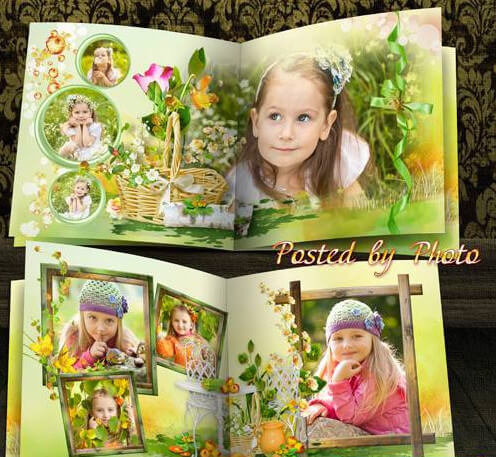
Children photobook cover Our Awesome Summer
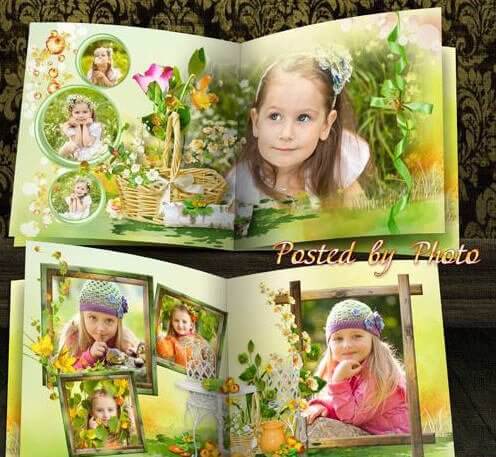
Preview of the Our Awesome Summer children photobook template

What is included in the download package

When you download this photobook template, you receive a ZIP archive containing seven individual PSD files. Each file represents a different page spread or cover of the photobook. The files are fully layered, which means every element — background, decorative graphics, text placeholders, and photo frames — is on its own separate layer. This layer structure gives you complete control over the editing process without destroying or altering the original design elements.

The template follows a cohesive summer theme throughout all pages. You will find bright and cheerful color palettes dominated by sunny yellows, sky blues, fresh greens, and warm oranges. The decorative elements include hand-drawn style illustrations of sunbursts, clouds, ice cream cones, beach balls, flip-flops, butterflies, and playful geometric shapes. Everything is designed to complement your photos rather than overpower them.

Here is a breakdown of what each file contains:

File numberTypeContent description
File 01Cover pageMain title design with large photo slot, template title Our Awesome Summer, decorative sun and cloud elements
File 02Spread pageDouble-page layout with two photo frames, journaling space for text, geometric accent shapes
File 03Spread pageThree-photo layout with varying sizes, decorative banner, space for date and location
File 04Spread pageFull-bleed background photo with overlay text area, quote or memory box
File 05Spread pageCollage-style layout with four photo frames, playful arrangement, colorful accents
File 06Spread pageTwo large photo frames with journaling blocks, ice cream and beach ball decorations
File 07Back coverMatching back cover design with small photo slot and closing text area

Technical specifications and requirements

Before you start working with this template, make sure your computer meets the minimum technical requirements. The PSD files are large and resource-intensive, especially if you are working with all seven files simultaneously. Adobe Photoshop CS6 or any later version is required. The template was created and tested in Photoshop CC 2020, but it should work without issues in CS6 and all versions in between.

Key technical details:

  • Resolution: 300 DPI — professional print quality, suitable for any photobook printing service
  • Dimensions: 7205 x 3602 pixels per spread — this corresponds to approximately 24 x 12 inches at 300 DPI
  • Color mode: RGB — optimized for digital printing and online photobook services
  • File format: PSD with layer groups and smart objects for non-destructive editing
  • Archive size: 538 MB compressed, approximately 1.2 GB when extracted
  • Language: English layer names for easy navigation

The template uses smart objects for photo placement. This is a powerful Photoshop feature that allows you to double-click a smart object thumbnail, paste your photo into a separate window, save it, and see the result appear automatically in the main document. The advantage of smart objects is that you can resize, rotate, and apply filters without degrading the original image quality.

How to edit the photobook template

Editing this photobook template is straightforward even if you have only basic Photoshop skills. The layer organization is clean and logical, with all elements grouped into clearly named folders.

Follow these steps to create your own photobook:

Step 1: Install and prepare. Make sure Photoshop is installed on your computer. Download the ZIP archive and extract it to a dedicated folder on your hard drive. Open the first PSD file by double-clicking it or using File and then Open in Photoshop.

Step 2: Understand the layers panel. Look at the Layers panel on the right side of your Photoshop window. You will see groups named Background, Decorations, Photo Placeholders, and Text. Expand each group by clicking the triangle icon next to the folder name to see all individual layers.

Step 3: Add your photos. Find the layer group labeled Photo Placeholders. Each placeholder is a smart object. Double-click the smart object thumbnail — a new window will open. Drag your photo into this window using the Move tool. Resize it using Ctrl+T or Cmd+T to fit the frame. Save and close the window by pressing Ctrl+S or Cmd+S followed by Ctrl+W or Cmd+W. Your photo now appears in the main document.

Step 4: Customize the text. Select the Text layer from the Layers panel. Choose the Horizontal Type Tool from the toolbar. Click directly on the text in the document window and replace the placeholder text with your own words. You can change the font, size, and color from the options bar at the top of the screen.

Step 5: Adjust colors if desired. If you want to change the color scheme, use adjustment layers such as Hue/Saturation, Color Balance, or Gradient Map. These are nondestructive and can be modified or removed at any time without affecting the original layers.

Step 6: Save your work. Save each completed page as a separate PSD file to preserve the layered structure. When you are ready to print or upload to a photobook service, save a copy as a high-quality JPEG or TIFF file using File and then Save As and choosing the appropriate format.

Printing recommendations

Getting the best print results depends not only on the template quality but also on how you prepare your files for printing. Here are some practical tips that will help you achieve professional-looking results.

ParameterRecommended settingWhy it matters
File format for printTIFF or high-quality JPEG (quality 10-12)PNG loses metadata, JPEG below 10 introduces compression artifacts
Color profilesRGB IEC61966-2.1 or Adobe RGBPrint services expect specific color profiles for accurate color reproduction
Resolution checkVerify 300 DPI in Image and then Image SizeLower resolution results in pixelated prints, higher resolution may be rejected
Bleed areaAdd 3-5 mm bleed on all sidesPrevents white edges after trimming if your printing service requires it
Proof printOrder a single proof copy before bulk printingCatches color and layout issues before you print multiple copies

Most online photobook printing services accept files in JPEG format with sRGB color profile. Check the specific requirements of your chosen service before submitting files. Some popular services that work well with this template include Photobook, Saal Digital, Cewe, and Mixbook. Each service has its own upload guidelines regarding file size limits, page count requirements, and cover options.

If you plan to print the photobook at a local print shop, call them first and ask about their preferred file formats and color profiles. Professional print labs often require CMYK color mode and specific PDF standards. Converting from RGB to CMYK can shift colors significantly, so it is wise to request a proof print before committing to a large print run.

Who is this photobook template for

This template is designed with parents and families in mind. The vibrant summer theme makes it particularly suitable for capturing outdoor adventures, beach vacations, camping trips, birthday parties, and everyday summer moments. The design strikes a balance between playful and elegant, ensuring that the photobook remains a cherished keepsake for years to come rather than looking dated after one season.

The template is also ideal for:

  • Professional photographers offering children photo sessions as part of their service package. You can create sample albums to show potential clients and deliver finished photobooks as an upsell after a photoshoot.
  • Scrapbooking enthusiasts who want to combine digital efficiency with the creative satisfaction of designing their own layouts. The layered PSD format provides unlimited creative freedom.
  • Grandparents who want to compile a beautiful album of their grandchildren summer visits. The template makes it easy to create a professional-looking result without learning complex design software.
  • Teachers and childcare providers documenting summer camp activities or daycare programs. A photobook makes a wonderful end-of-summer gift for families.

Comparison with other photobook templates

There are many photobook templates available on the internet, so what makes this one stand out? Let us compare it with other common types of photobook templates.

FeatureOur Awesome SummerGeneric free templatesPremium designer templates
Resolution300 DPI print quality72 DPI screen quality often300 DPI
Layer organizationFully layered with named groupsOften flattened or poorly organizedFully layered
Smart objectsYes — nondestructive editingRarelyUsually
File count7 full spreads1-3 pages typically7-15 spreads
Theme cohesionUnified summer designGeneric or mismatchedCohesive theme
PriceFreeFree$10-$50
Technical supportArticle guide availableNoneLimited support

As the comparison shows, this template offers premium-level quality and features completely free of charge. The main difference from paid premium templates is the number of page spreads and the variety of layout options. Premium collections often include fifteen or more spread variations, whereas this set focuses on a curated selection of seven well-designed layouts that cover the most common photobook page types.

Tips for selecting photos for the album

The quality of your photobook depends heavily on the photos you choose. Even the most beautiful template cannot compensate for poorly selected or low-quality images. Here are practical recommendations for choosing the best photos for your children summer photobook.

Variety is key. Select a mix of close-up portraits showing facial expressions, medium shots capturing activities, and wide-angle photos showing the environment and context. A photobook that includes only close-up faces becomes monotonous, while one with only landscape shots feels impersonal. Alternate between different types of shots throughout the book to maintain visual interest.

Look for genuine emotions. Candid photos often work better than posed ones for children photobooks. A genuine laugh, a concentrated face while building a sandcastle, or a surprised expression when tasting ice cream for the first time — these authentic moments create much stronger emotional connections than stiff family portraits. Include at least two or three candid shots per spread to create a natural storytelling flow.

Check image quality. All photos should be sharp and well-exposed. Blurry images look particularly bad in print because the lack of sharpness becomes much more noticeable on paper than on a screen. Photos taken with smartphones in good lighting conditions are usually sufficient for the template resolution. If you used a DSLR or mirrorless camera, even better — you will have plenty of detail to work with.

Coordinate colors. For a cohesive look, try to select photos with complementary color palettes. Since the template uses bright summer colors, photos with blue skies, green grass, warm sunlight, and colorful clothing will blend naturally with the design. Black and white photos can be used as accent images to create contrast and visual breathing room between colorful spreads.

Frequently asked questions

Do I need Adobe Photoshop to edit this template?

Yes, this template requires Adobe Photoshop CS6 or newer to edit properly. The files use PSD format with layers and smart objects, which are Photoshop-specific features. Alternative editors like GIMP or Affinity Photo may open the files but some layer effects and smart object functionality could be lost.

Can I use these files for commercial purposes?

The template is provided for personal use. If you are a professional photographer planning to use it for client projects, please check the specific license terms included in the download archive. Some elements may require attribution or have restrictions on commercial application.

What size photobook will these files produce?

At 300 DPI, the 7205x3602 pixel spreads are designed for A3-sized photobooks or similar large-format albums approximately 24 by 12 inches when opened as a spread. You can scale the files down for smaller formats like A4 without quality loss.

How do I add more pages to the photobook?

The template includes seven files. If you need additional pages, you can duplicate existing spreads and modify them. To maintain consistency, copy the entire PSD file, rename it, and then replace the photos and text as described in the editing guide above.

Why do my photos look pixelated when I insert them?

This usually happens when the inserted photo has lower resolution than the template. Make sure your source photos are at least 3000 pixels on the longest side. Photos from modern smartphones (12 megapixels and above) are generally sufficient for good print quality at this template size.

Can I change the colors of the decorative elements?

Yes, since everything is on separate layers, you can change colors using adjustment layers like Hue/Saturation or Color Balance. You can also repaint elements manually if you have advanced Photoshop skills by using layer styles or painting on a new layer with blending modes.

What fonts are used in this template?

The template uses standard system fonts that are widely available. If specific decorative fonts were used, they are included in the download package or linked in a readme file. If a font is missing on your system, Photoshop will prompt you to substitute it with an available alternative.

How should I save the finished pages for printing?

Save each completed page as a high-quality JPEG (quality setting 10 or higher) or TIFF file. Keep the original PSD files as backups in case you need to make changes later. Always proof your prints before ordering multiple copies.

Will this template work on a Mac computer?

Yes, Photoshop for macOS handles PSD files identically to the Windows version. The layers, smart objects, and text formatting will work exactly the same way. Just make sure your macOS version supports the Photoshop version you are using.

Is there a preview of all seven pages before downloading?

The article preview shows the cover page design. The complete set of page previews is available in the download gallery on the original source page. You can also open each PSD file after download to preview the full layout before starting your editing work.

Conclusion

The Our Awesome Summer children photobook template for Adobe Photoshop is a high-quality, free resource that makes creating a professional photobook accessible to anyone with basic Photoshop skills. With seven fully layered PSD files at print-ready resolution, a cohesive summer theme, and intuitive editing through smart objects, this template delivers impressive results without requiring professional design experience.

Whether you are a parent wanting to preserve precious summer memories, a photographer looking to offer photobooks as an additional service, or a creative person who enjoys digital scrapbooking, this template provides an excellent foundation. The careful attention to detail, organized layer structure, and vibrant design elements make it a valuable addition to your digital resources collection.

Download the template, gather your best summer photos, and start creating a beautiful keepsake that your family will treasure for generations. After all, childhood summers fly by in the blink of an eye — but a well-made photobook keeps them alive forever.

Tap to react