T-Bootstrap Mega Menu — Free Navigation Menu for Joomla on Bootstrap

Dozens of extensions promise to build a decent navigation menu for your Joomla site. Most of them either fall short on features, lock essential settings behind a paywall, or were last updated when Joomla 2.5 was current. T-Bootstrap Mega Menu takes a different approach. It is a free, well-thought-out module that leverages the Bootstrap library to deliver a clean, fast, and fully responsive mega menu without the bloat that plagues so many Joomla extensions.

T-Bootstrap Mega Menu preview
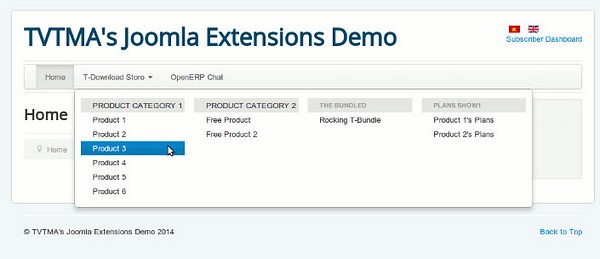
T-Bootstrap Mega Menu — the module interface

The core idea behind this extension is straightforward: reduce server load by offloading layout and animation work to Bootstrap trusted CSS and JavaScript components. If your template already loads Bootstrap, and most modern Joomla templates do, T-Bootstrap Mega Menu slots right in with minimal overhead. You get a professional-looking navigation system without writing a single line of CSS or JavaScript yourself.

Why Bootstrap-based menus matter for Joomla

Bootstrap has been the de facto standard for responsive front-end frameworks for over a decade. When a menu module builds on top of it, you inherit several advantages that would otherwise require significant custom development.

First, responsive breakpoints come out of the box. The menu collapses into a mobile-friendly toggle automatically, no extra configuration or media queries needed. Visitors on phones and tablets get the same navigative experience as desktop users, just in a format that fits their screen.

Second, cross-browser consistency is practically guaranteed. Bootstrap normalizes CSS across Chrome, Firefox, Safari, Edge, and even legacy browsers that some of your visitors might still be using. You spend less time debugging weird rendering issues in Internet Explorer and more time actually building your site.

Third, the markup is familiar. Any front-end developer who knows Bootstrap can look at the menu output and immediately understand how to customize it. You are not locked into a proprietary system with obscure documentation written by a single-developer shop in 2014.

Finally, the footprint stays small. Because the heavy lifting is handled by the framework, the module itself stays lean. It generates clean HTML, adds minimal inline styles, and relies on the Bootstrap classes your template already loads.

Key features of T-Bootstrap Mega Menu

Let us walk through what this module actually offers once you have it installed and configured.

Multi-level dropdown support

Joomla core menus support nested items, and T-Bootstrap Mega Menu extends that capability visually. You can create dropdown menus several levels deep, and each dropdown can contain more than just links. Custom HTML blocks, images, or even module positions can be embedded inside a dropdown, giving you a true mega-menu layout with columns and rich content areas.

This is particularly useful for e-commerce sites or large content portals where a simple list of links is not enough. Imagine a "Products" dropdown that shows categories in columns, with featured product images and promotional banners, all rendered cleanly and responsive.

Icon integration

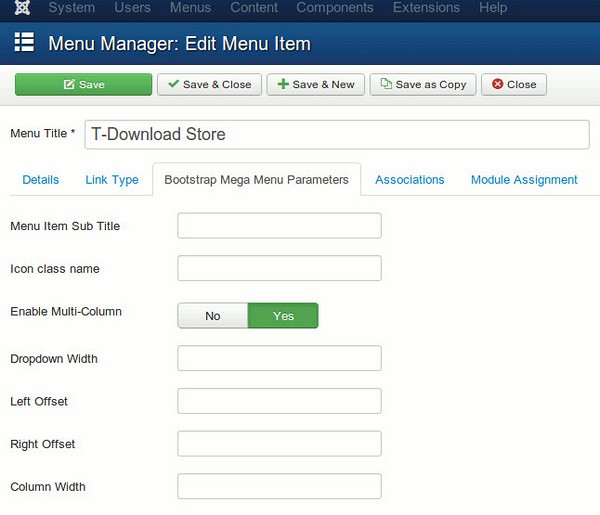
You can attach icons to any menu item. This works with Font Awesome, Bootstrap Icons, Material Icons, or any icon font your template already loads. Icons serve as visual cues that help visitors scan the menu faster and find what they are looking for without reading every single label.

The implementation is simple. Most menu items have an icon field or a CSS class field where you type the icon class name, and the module outputs the icon HTML automatically. No need to edit template files or add custom CSS rules for each icon.

Custom CSS classes per menu item

This feature is more powerful than it sounds. Every menu item in Joomla has an additional CSS class field, and T-Bootstrap Mega Menu respects it fully. Want to highlight a "Sale" item in red? Add a class. Need a specific column width in a dropdown? Use a utility class. Need to hide a menu item on mobile only? Add aresponsive utility class.

This level of control is surprisingly rare in free Joomla menu modules. Many commercial alternatives do not even offer it.

Mobile-friendly toggle

On screens narrower than the defined breakpoint, the entire menu collapses into a single tap-friendly button. The transition is smooth, implemented through Bootstrap collapse JavaScript. There is no horizontal scrolling, no overlapping elements, no need to zoom in to hit a tiny link. Just a clean vertical list that works on phones and tablets.

T-Bootstrap Mega Menu configuration panel
Module configuration — note the Bootstrap version selector

Bootstrap version compatibility

The module typically lets you choose between Bootstrap 2.x and 3.x, depending on what your template uses. This is important because the CSS class names and JavaScript APIs changed significantly between those versions. A module hardcoded for Bootstrap 3 will break on a Bootstrap 2 template, and vice versa.

Detailed comparison with other Joomla menu extensions

Before committing to any menu module, it is worth comparing the options side by side. Below is a feature comparison of the most popular Joomla menu extensions, both free and commercial.

FeatureT-Bootstrap Mega MenuDJ-MegamenuMaximenu CKRokMavmenu (Rockettheme)
PriceFree29 EUR20 EUR (free version limited)Free (older versions)
Bootstrap-basedYesNo (custom)OptionalNo
Multi-level dropdownsYes (3+ levels)YesYesYes
Icon supportYes (icon fonts)Yes (image + icon fonts)YesYes
Mobile responsiveYes (native Bootstrap)Yes (custom)YesYes
Custom HTML in dropdownsYesYes (rich editor)YesLimited
Module positions inside menuPossibleYesNoNo
Visual drag-and-drop builderNoYesYes (basic)No
Custom CSS class per itemYesYesYesYes
Joomla 4 compatibilityCheck latest releaseYesYesNo (discontinued)
RTL language supportVia BootstrapYesYesLimited
Performance impactVery lowMediumLow to mediumLow

As the table shows, T-Bootstrap Mega Menu competes well with options that cost 20 to 30 euros. The main trade-off is the absence of a visual menu builder — you configure columns and widths through module parameters rather than dragging elements on a canvas. If you are comfortable working with raw parameters, this is not a significant limitation.

Installation and step-by-step setup

Getting T-Bootstrap Mega Menu up and running is straightforward. Here is the complete walkthrough.

Step 1: Download the module

Visit the extension developer page or the Joomla Extensions Directory and download the latest release. Make sure you pick the version compatible with your Joomla installation.

Step 2: Install through the Joomla backend

Navigate to System → Install → Extensions (Joomla 4+) or Extensions → Manage → Install (Joomla 3). Upload the ZIP file or install from URL.

Step 3: Create or assign a menu

If you do not already have a menu structure, go to Menus → Manage → Add New Menu and create one. Then add menu items, nesting them to create the hierarchy you want.

Step 4: Publish the module

Go to Content → Site Modules (Joomla 4) or Extensions → Modules (Joomla 3). Find the T-Bootstrap Mega Menu module and open its settings.

Step 5: Configure basic parameters

ParameterRecommended valuePurpose
MenuYour main menuSelects which Joomla menu to render
Bootstrap versionMatch your templateMust match the Bootstrap version loaded by your template
Module positionYour template menu positionWhere the menu appears in the layout
Menu styleMega (default)Enables mega-menu behavior
Dropdown animationFade or slideVisual effect for opening submenus
Collapse breakpoint768px (default)Screen width below which menu goes mobile
Number of columns2 to 4How many columns in mega dropdowns

Step 6: Style adjustments

After the basic setup, you may want to fine-tune colors, fonts, and spacing. Add custom CSS to your template CSS file or through the Custom CSS field if your template provides one. Target the module by its module class suffix for scoped styles.

Always test your menu on a staging copy of the site before deploying to production. Menu configuration mistakes can make your entire site inaccessible from the front end.

Performance considerations

One of the main selling points of T-Bootstrap Mega Menu is reduced server load. Understanding why requires a quick look under the hood.

Joomla menu modules can be resource-intensive. Some load every menu item as a separate database query. Others pull content from articles, modules, or external sources to populate mega-menu panels. T-Bootstrap Mega Menu takes a simpler approach: it renders the menu tree as plain HTML, using Bootstrap CSS classes for layout and Bootstrap JavaScript for show-hide behavior.

This means fewer database queries compared to module-based mega menus that pull content from separate sources. It also means no extra JavaScript framework, if your template already queues Bootstrap JS, there is no second HTTP request for a different library.

In practice, you will notice the difference most on shared hosting or low-resource servers. Sites with hundreds of menu items especially benefit from lightweight rendering.

Tips for optimal performance

  • Keep your menu tree as flat as possible. Deeply nested menus increase HTML size and CSS complexity.
  • Do not load multiple Bootstrap versions. If your template loads Bootstrap 4, do not force the module to load Bootstrap 2 styles on top of it.
  • Use a caching module or Joomla built-in caching to cache the full page output, including the menu.
  • Optimize images used in dropdown areas. Large banner images slow down the initial page render.

Customization techniques

The module settings cover most use cases, but sometimes you need more control. Here are practical techniques for common customizations.

Adjusting dropdown width

The dropdown container width is controlled by Bootstrap CSS. Override it in your template custom CSS:

.tbootstrap-mega .dropdown-menu { min-width: 650px; padding: 20px; }[/codeblock]

Changing the mobile toggle icon

The hamburger icon is generated by Bootstrap navbar-toggle styles. You can replace it with a custom icon using CSS pseudo-elements or by copying the module layout to /templates/your-template/html/mod_tbootstrap/ and editing the toggle button there.

Adding a logo inside the mega menu

Create a custom module position inside the mega menu area (requires template support) and assign a Custom HTML module with your logo image. Alternatively, insert the logo HTML directly into a menu item using the "Custom HTML" field or a menu item note field.

Highlighting active menu items differently

Bootstrap applies an .active class to the current menu item. Target it in your CSS:

.tbootstrap-mega .nav > .active > a { background-color: #your-color; font-weight: bold; }[/codeblock]

Common problems and solutions

Even well-built modules can cause headaches. Here are the most frequent issues users encounter with T-Bootstrap Mega Menu and how to solve them.

Menu looks unstyled or broken

This almost always means a Bootstrap version mismatch. Check that the version selected in module parameters matches what your template loads. Toggle the setting and clear your Joomla cache.

Dropdowns do not open on mobile

This is usually caused by a JavaScript conflict. If you have multiple jQuery libraries loading, Bootstrap collapse may fail silently. Use a plugin like jchOptimize or manually dequeue duplicate jQuery files.

Menu overlaps content on small screens

Check the z-index value of the menu container. Bootstrap navbars typically use z-index 1000 or 1030. If your template has elements with higher z-index values, the menu will render beneath them. Override the z-index in your CSS.

Submenu items are not clickable

On touch devices, Bootstrap dropdowns sometimes require two taps: the first opens the dropdown, the second follows the link. Consider adding the data-hover="dropdown" attribute or switching to click-based activation in the module settings.

When T-Bootstrap Mega Menu is not the right choice

Honesty is important in reviews. There are situations where this module is not the best fit.

If your template does not use Bootstrap and you cannot or do not want to add it, look at DJ-Megamenu or Maximenu CK instead. They come with their own CSS and JS and do not depend on any framework.

If you need a visual drag-and-drop menu builder, T-Bootstrap Mega Menu is not for you. The configuration is parameter-based, which is efficient but not visual. Power users prefer this approach, but content managers who want a GUI may struggle.

If you are building a Joomla 5 site and the module has not been updated for Joomla 5 compatibility, you may encounter PHP warnings or layout issues. Always test on a staging environment first.

Frequently asked questions

Does T-Bootstrap Mega Menu work with Joomla 4 and Joomla 5?

Older versions targeted Joomla 2.5 and 3.x. Later releases added Joomla 4 compatibility. For Joomla 5, check the developer page, because you may need a specific build or a compatibility plugin. Always test on a staging copy before upgrading production.

Can I use this module without Bootstrap in my template?

Technically yes, but the layout will break until you manually add Bootstrap CSS and JS. At that point, switching to a Bootstrap-based template avoids style conflicts and duplicated assets.

Is there a limit on how many menu levels can I nest?

The module supports multiple nesting levels in Joomla, but for usability, keep dropdowns to three levels or fewer. Deeper nesting confuses visitors and creates layout problems on small screens.

Does the module support right-to-left (RTL) languages?

If your Bootstrap template supports RTL directionality, the menu inherits it. The module itself does not add special RTL handling beyond what Bootstrap provides.

Can I use Font Awesome icons in menu items?

Yes. If Font Awesome is loaded by your template, type the icon class in the menu item icon or CSS class field. The module outputs the icon markup automatically.

Will this module slow down my Joomla site?

No. It is one of the lightest Joomla menu modules available. Rendering is delegated to Bootstrap CSS, and no extra AJAX calls happen on page load. On a reasonably configured host, the performance difference compared to the default Joomla menu module is negligible.

How do I change the mobile breakpoint (when the menu collapses)?

Look for a breakpoint parameter in the module settings. If the module does not expose it, override the collapse behavior through custom CSS media queries targeting the .navbar-toggle and .navbar-collapse classes.

Is the module compatible with VirtueMart, HikaShop, or other e-commerce extensions?

Yes. The module renders standard Joomla menu items, so any extension that adds its items to the Joomla menu system, such as VirtueMart category listings, will display correctly in dropdowns.

Can I put a contact form or a module inside a dropdown?

Yes, if your template supports module positions inside the mega menu area. Assign a module to that position and place a menu item that triggers that dropdown. This is an advanced technique and may require template overrides.

How do I translate the module for multilingual Joomla sites?

Menu item titles are translated through Joomla core language management, the same as any other menu item. If the module has hardcoded text strings, look for a language file in the module directory or submit a translation request through the developer page.

The architecture of modern texture pipelines in large studios represents a multi-level system where each stage is controlled by separate specialists. Scanning department captures real material data. Processing department cleans and calibrates results. Authoring department creates final materials, tuning physical parameters for engine requirements. Environment artists assemble scenes using ready-made library materials. Each link in this chain contributes to final product quality, and breaking any link leads to noticeable visual degradation. Understanding this structure helps independent developers organize their own workflows as efficiently as possible, even without a large staff.

The development of PBR (Physically Based Rendering) standards has led to unified material creation approaches across the industry. Different engines — Unreal Engine, Unity, Frostbite, Decima — use the same basic principles: metallic, roughness, albedo, normal. This unification means a material created for one engine can be relatively easily adapted for another. Free texture libraries offering PBR-compatible materials have become the de facto standard for both education and professional work, allowing artists to focus on the creative process rather than the technical nuances of a specific engine.

Human visual perception of materials is the result of millions of years of evolution, during which our brains learned to instantly recognize surfaces: distinguishing wet stone from dry, living wood from dead, natural skin from artificial. This is why even small errors in digital materials are so noticeable — the brain instantly flags the discrepancy from the expected pattern. Understanding these subconscious perception patterns is the key to creating convincing digital materials. Studying real surfaces, observing how they age and interact with light, is a continuous process that shapes an artist's visual taste and determines the quality of their work on an intuitive level.

The international environment artist community actively shares experience and resources. Conferences like GDC, SIGGRAPH, Unreal Fest are platforms for presenting new techniques and tools. Online communities Polycount, Artstation, Blender Artists provide feedback and work discussion. Educational platforms Gnomon Workshop, Pluralsight, YouTube channels are knowledge sources for artists at any level. This knowledge exchange ecosystem ensures continuous growth in average work quality across the industry, ultimately benefiting end users — players, viewers, clients.

The modern computer graphics industry demands the highest quality visual content. Every element of a digital scene — from architectural surfaces to small prop details — must look believable and convincing. Textures play a fundamental role: they tell the viewer what an object is made of, how old it is, how it has been used. A professional artist spends arguably more time preparing and configuring textures than modeling geometry, and this ratio is fully justified by the impact textures have on the final visual result.

The historical development of texturing in computer graphics has progressed from simple raster overlays to complex procedural material generation systems that account for physical surface properties. Each generation of hardware opened new possibilities: increased VRAM allowed higher-resolution textures, advances in shader models added realistic reflection and refraction effects, hardware tessellation enabled runtime geometric detail. Today, textures are not just pictures mapped onto models — they are complex multilayer materials responding to lighting, weather conditions, and interactions with other objects.

Working with free texture libraries has its own characteristics and limitations that are important to know. First, the same texture may be used by different artists in different projects, leading to situations where identical surfaces appear in competing products. Second, free texture quality varies: some are carefully prepared, others require significant processing. Third, license terms may restrict use in certain types of commercial projects. Always check the specific license before using any free resource in a commercial product.

The professional texture pipeline in large studios includes multiple quality control stages. The art director approves material style and direction. Technical artists configure shaders and material parameters for optimal performance. Environment leads verify materials match the project's overall visual concept. QA testers identify artifacts, stretching, and other visual issues across various lighting conditions. This multi-level control system ensures consistently high material quality in the final product — a standard independent developers aspire to, adapting these practices to their scale.

Scientific research into human material perception shows that our brains evaluate surfaces by multiple parameters simultaneously: color, gloss, roughness, transparency, temperature, and weight (indirectly through visual cues). Each parameter is encoded in separate PBR material channels: albedo conveys color, metallic encodes electrical surface properties, roughness represents micro-relief, normal represents macro-relief. Correct configuration of each channel is critical for creating convincing materials, and an error in any channel is instantly perceived by viewers as surface unnaturalness.

Building an efficient texture pipeline is especially critical for indie developers and students. Limited budgets cannot support expensive professional library subscriptions. The solution is smart combination of free and freemium resources. Base free libraries cover common needs: wood, stone, metal, concrete. Specific materials created manually or commissioned from freelancers. This approach maintains high visual quality at moderate cost.

The evolution of texture storage formats mirrors industry development: from simple BMP files of the 1980s through DXT/CBC compression of the first 3D accelerator era to modern BC7, ASTC formats, and virtual texture technology. Choosing the right compression format affects the quality-performance balance: BC7 offers the best quality for color textures but requires modern hardware support. ASTC offers flexible quality and decoding speed options.

Texture creation and material authoring education has become a specialized field within computer graphics education. University programs and online courses cover topics from basic UV mapping to advanced procedural generation workflows. Industry-standard tools like Substance Designer require months of dedicated practice to master. The learning curve for PBR material creation is significant, but skilled material artists are in high demand across gaming, film, VFX, and architectural visualization.

The future of texturing workflows is increasingly shaped by AI and machine learning tools. Neural networks can now generate seamless textures from single photographs, upscale low-resolution images with remarkable quality, and create new texture variations from existing samples. Stable Diffusion with specialized texture models can synthesize PBR material sets from text descriptions, dramatically accelerating material creation. While not yet replacing skilled human artists, these technologies are becoming essential tools, automating tedious aspects of the work.

Quality control in texture production involves both technical validation and artistic review. Technical checks include verifying resolution, color space correctness, seamless tiling validation, and physically plausible parameter ranges. Artistic review focuses on subjective quality: does the material look right in context, match the project style, contribute to intended mood. Both types of review are essential. Automated tools help with technical aspects, but the artistic eye remains irreplaceable.

The environmental impact of large texture libraries and high-resolution materials is a growing industry concern. 4K and 8K textures dramatically increase download sizes, storage, and memory usage. Streaming technologies and virtual textures help mitigate, allowing engines to load only visible texture portions at required resolution. The fundamental quality-efficiency tension persists, and artists must make informed decisions about texture resolution based on project requirements and target platforms.

Building a personal texture library is a long-term investment paying dividends throughout an artist's career. Well-organized collections of reference photographs, accumulated over years of observing and documenting real-world surfaces, provide invaluable material creation resources. The best approaches combine systematic organization with regular curation. Many studios require artists to contribute to shared libraries, creating compounding benefits as the collective knowledge base grows.

Cross-platform development adds complexity to texture work. Materials stunning on high-end PCs may need significant optimization for mobile devices or older consoles. Understanding target platform constraints — maximum texture size, supported compression formats, available memory budget — allows artists to plan their material work accordingly. Adaptive material quality systems can dynamically adjust texture resolution and complexity based on available hardware.

The community aspect of texture creation and sharing is one of the industry's most positive developments. Open-source tools, free educational resources, and generous knowledge sharing through tutorials, forum discussions, and open-source material libraries have dramatically lowered barriers to entry. What was once accessible only to those with expensive hardware and software is now open to anyone with a computer and internet access. This democratization has led to an explosion of creativity and a new generation of talented artists who learned through freely available resources.

Final thoughts

T-Bootstrap Mega Menu occupies a specific niche and fills it well. It is free, it is lightweight, and it covers all the essential mega-menu features: responsive columns, icon support, custom CSS classes, and a proper mobile toggle. The trade-off, no visual builder and a dependency on Bootstrap, is reasonable for most Joomla projects built on a modern Bootstrap template.

If your site runs Bootstrap and you need a mega menu without paying 20 to 30 euros for a commercial alternative, download T-Bootstrap Mega Menu, configure it in fifteen minutes, and you are done. For sites on non-Bootstrap templates or teams that require a visual drag-and-drop interface, the commercial options may justify their price.

Whatever you choose, remember that navigation is not just a technical feature. It is how your visitors find content, products, and services. Invest the time to structure your menu logically, label items clearly, and test on real devices. The module is just a tool. Good navigation design is what actually converts visitors into customers.

Tap to react