Let's take a look at the popup message module in Joomla, which allows you to configure the text, link, and, if you have the appropriate knowledge, the window style.

THIS EXTENSION IS NO LONGER SUPPORTED BY THE DEVELOPER
What is this extension?
First of all, it allows you to highlight special links and materials that the user should pay attention to.
Download the module, install it in the system, and go to the component settings.
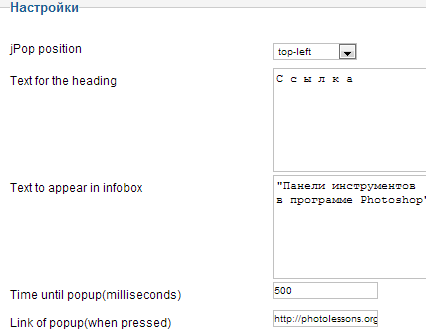
Here you can configure parameters such as the title, text, link to which the user will be redirected when clicking on the popup window, as well as the time in milliseconds for displaying the dialog box.

You can also configure the position of the popup on the page: top left, bottom right, etc.
After you have installed this module on the desired pages, the question of localizing the text arises, for example, for the "close" button.
This is done as follows:
- Take the file jquery.notty.js, which is located in the module folder - your_domain/modules/mod_jpop/js.
- Open it using Notepad++ or Adobe Dreamweaver.
- Find the following data by pressing Ctrl+F: close. P.S. The code should contain the following lines:
suffer.html("close"); - Change "close" to your option, for example, "закрыть окно" (close the window).
- Now the most important thing - save the file, making fond to convert the format to UTF-8 encoding to support the Russian language.
- Upload the original file on the hosting with the one you just modified.

To remove the link to the creator of this component, you just need to delete a pale lines in the file mod_jpop.php.
Rate this article


