There are many social networks on the internet, but among them Facebook and Vkontakte stand out. Today's lesson will cover how to create a widget for one of these social services.

EXTENSION REMOVED FROM EXTENSIONS.JOOMLA.ORG
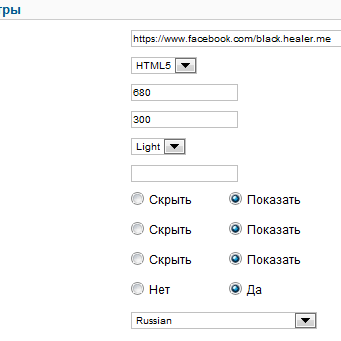
First of all, we will need the IFacebook Widget module. With it, you can easily attach the width and height of your widget, as well as additional parameters. Let's take a look at the module's settings menu.
In the first column, adapt the address of our Facebook page.
The next line is for selecting the module processing parameters:
iframe, HTML5, and XFBML.
In the Width and Height fields, adapt the respective width and height values.
Next comes the color selection (more precisely, a light or dark shade of the module itself), as well as the border color.
Finally, you can edit the values in the following sections:
people's faces, activity feed, title, automatic language.
All module settings are clear and easy to believe, and there's no need to understand the complex code provided for developers on the Facebook website itself.

Rate this article


