How to create a favicon in Photoshop was covered in the previous lesson. Now it's time to cover the CMS Joomla system...

There are a huge number of plugins for creating site icons, but only some of them perform the functions we need! This article will discuss one of them. The plugin is aptly named Favicon.
The thing is, sometimes you need not only to set the main site icon on all pages, but, for example, to set a separate icon for each individual service or domain name. This plugin is designed specifically for these purposes.
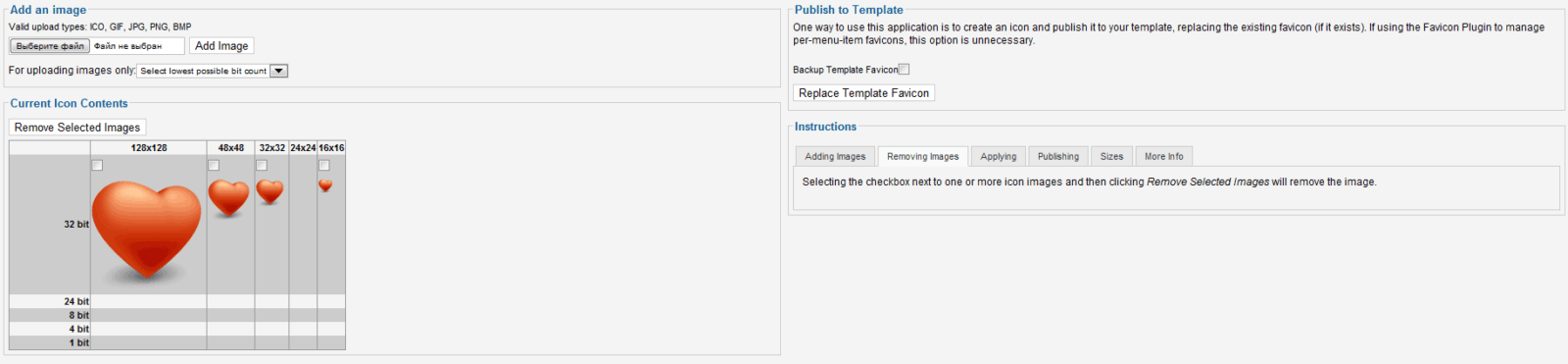
Another useful feature of this plugin is that the icons support various sizes — from 16x16 (standard) to 128x128, which is very important when adding a shortcut to the site on the desktop. Color depth ranges from 1 bit to 32 bit. :)
Favicon supports several graphic formats, including: PNG, GIF, JPG, and sometimes BMP or XCF! It all depends on your server. The plugin supports image transparency, but does not crop their size, so they must be uploaded already in the format you need.
You need to create files with the extension PNG, in sizes 128×128/48×48/32×32/24×24/16×16 pixels, replace them one by one via the component, and set the default icon. It is possible to save the previous icon.
The component/plugin can be used in 2 variations:
- By using only the component, you can edit the icon only for the template. The previous icon is saved.
- By using a combination of the component and the plugin, you can change several icons and prove them to different menus of your site.
Rate this article


