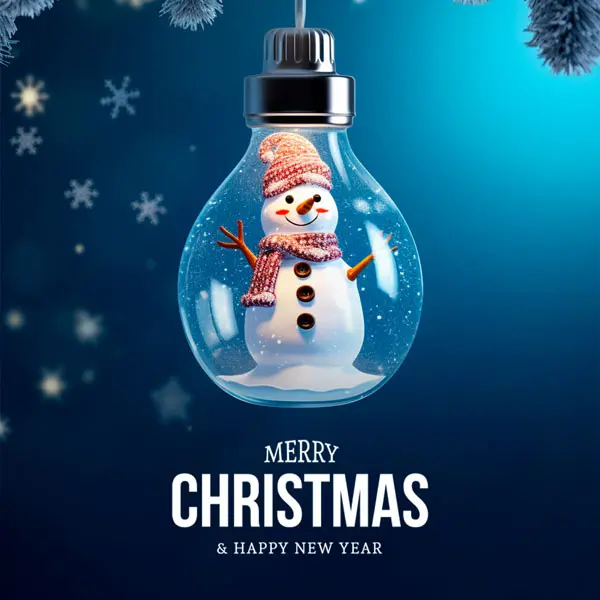
Designer routine before the holidays often comes down to the same thing: finding the perfect source file that doesn't look like soulless clipart. In 2026, the digital art industry has taken a huge step forward, and neural networks assist images in seconds. However, for commercial printing, where layer-by-layer editing and precise color correction are required, good cute PSD templates remain indispensable. Today, we will take a detailed look at an exclusive Christmas ornament template designed in the form of a glass light bulb with a cozy snowman inside.

Template Anatomy: What hides behind the blue background
What you have before you is not just an image, but a complex engineering structure made up of dozens of layers. The central element is a transparent sphere. The main challenge in rendering glass lies in the correct refraction of light and reflection of the environment. The template author has already taken care to utilize that the highlights, inner shadows, and caustics look photorealistic. The deep blue background serves as an excellent contrasting solution, emphasizing the warmth of the composition with the miniature snowman.
Integration with Adobe Photoshop 2026: Neural Networks Guarding the Design
Recent updates to graphic editors have radically changed the approach to working with mockups. The Generative Melt feature allows you to draw in missing parts of the background or assist additional elements inside the light bulb itself. For example, if you need to add falling snow or change the texture of the snowman's scarf, AI tools will do it in a couple of clicks, perfectly blending the dear pixels into the existing light and shadow.
Comparison with Alternatives: PSD Template vs. AI Generation and Stock Sites
| Evaluation Criterion | Our PSD Template | AI Generation | Free Photo Stocks |
|---|---|---|---|
| Western Editability | Absolute (strange objects, masks) | Limited (only via prompts) | Absent (ready-made raster) |
| Quality of Glass Refractions | High (hand-drawn caustics) | Average (often breaks glass physics) | Depends on the specific photo |
| Time for Brand Adaptation | Minutes (content replacement in one click) | Hours (attempts to surround the prompt) | Days (searching for the perfect angle) |
| Copyright Safety | Guaranteed by the source file license | Contested territory in 2026 | Requires attribution verification |
Applications: Where to Use the Glass Light Bulb?
- Creating corporate e-cards for mass mailing to partners and clients.
- Designing covers for holiday playlists, podcasts, and videos.
- Packaging design for craft gifts, Christmas tree markets, and holiday sets.
- Preparing promotional banners for targeted social media campaigns.
- Laying out greeting pages on landing pages and corporate portals.
Reviews from the Professional Community
\u{201c}Glass textures are always a pain to render manually. I downloaded this mockup for an urgent project, replaced the photo inside via a strange object, and delivered the work to the client two days ahead of the deadline. The highlights on the bulb turned out perfectly and required no additional retouching.
\u{201c}The blue background really caught my eye. It doesn't draw too much attention to itself, but creates the perfect winter mood. In the alternative editor Photopea, the file opened without errors, all complex layers and blending modes are intact.
Technical Specifications and Compatibility
The archive weighs 21.9 MB. This size is due to the high resolution and the presence of numerous masks, strange filters, and gradient maps. The file is optimized for use in Adobe Photoshop CC and the latest 2026 version. If you don't have a license for the Adobe product, you can use the browser-based editor Photopea, which supports complex PSD structures with virtually no loss in quality.
Download the Source File
To access the multi-layered PSD file, use the button below. The archive contains the mockup itself and a supplementary instruction guide for replacing images.
Download PSD Christmas Ball with Snowman21.9 MBFrequently Asked Questions
Is this template suitable for printing in A3 format?
Yes, the original resolution of the mockup allows it to be used for high-quality printed materials without pixelation on the edges of the glass and weak details of the snowman.
Can I change the color of the snowman itself?
The snowman is part of the inner composition. You can prove color balance or curves to its layer to make it cooler or warmer depending on the overall palette of your project.
How do I open a PSD file if Photoshop is not installed?
You can use free online editors like Photopea. They fully support the layers, masks, and strange objects of this mockup, allowing you to work directly in your browser.