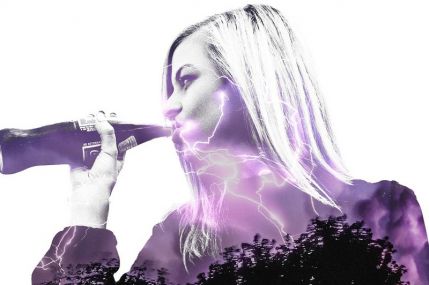
Download the Photoshop pack called "Double Exposure PS Actions Vol.5", which consists of 10 excellent actions. This pack will create a special double exposure effect in one click, which is often used to highlight individual parts of an object, as well as for different methods of color intensity.

Download the original set of Photoshop scripts that will automatically/semi-automatically create beautiful works of art from your photos.


What is double exposure and why is it trending again
Double exposure is a technique inherited from film photography: two frames were exposed onto the same section of film, causing a person's silhouette to "grow" with forests, city lights, or mountain ranges. In the digital age, the effect has ceased to be accidental and has become a controllable tool: you precisely accommodate which texture goes into the dark areas of the portrait and which goes into the highlights.
The classic manual workflow consists of four to five operations: cutting out the silhouette, converting the portrait to a high-contrast black-and-white image, placing a second frame on top, switching the blend mode to Screen or Lighten, and final adjustments with masks and color. It takes 15 to 40 minutes per composition if done carefully. The Double Exposure PS Actions Vol.5 action packs this entire chain into a single button — the result appears in 10–20 seconds.
What's inside the Double Exposure PS Actions Vol.5 pack
The pack is released by the Creativetacos studio, which has specialized in actions, Lightroom presets, and Photoshop brushes since 2013. Vol.5 is a continuation of the double exposure series: previous releases differed in their set of techniques, and the fifth part has collected the most "workable" blending options that deliver consistent results on most portraits.
The archive contains an .atn (Adobe Actions) file with ten recordings and a text instruction for installation. The total pack size is approximately 1.5–1.6 MB, which allows you to download it even on tall mobile internet and keep it in the cloud.
| Parameter | Value |
|---|---|
| Name | Double Exposure PS Actions Vol.5 |
| Product ID | 1057975 |
| Author | Creativetacos |
| Resource Type | Action Set (Actions / ATN) |
| Number of Actions | 10 |
| File Format | .atn + PDF/text instruction |
| Archive Size | 1.5 MB |
| Compatibility | Adobe Photoshop CS3–CC, including current builds 2024–2026 |
| OS | Windows 10/11, macOS 12 and newer |
| Color Modes | RGB, 8 and 16 bit |
| High Resolution Support | Yes, works with common canvases and RAW sources |
| Destructive Editing | No, actions build layers and masks |
| User Skills | Not required, one-click launch |
What results do the ten actions deliver
All ten recordings reflect one task — combining a portrait and a second frame — but they do it differently: the aggressiveness of the mask changes, which tones are "eaten," the transition character, and the final texture density. Conventionally, the options can be divided into groups.
- Classic highlight blending — the texture appears in the light areas, the face contour remains readable. Optimal for profile portraits.
- Rich "dense" option — the second frame fills almost the entire silhouette, creating a poster effect.
- Broad haze — low intensity, well suited for wedding and family photography.
- Contrast graphic — hard edges, suitable for posters and covers in a minimalist style.
- Nature (forest, mountains, water) — designed for landscape textures as the second layer.
- Urban (architecture, neon) — works with evening city shots, light spots.
- Black and white option — monochrome double exposure for cold commercial tasks.
- Skin color preservation option — the face remains natural, the texture goes to the background and hair.
- "Double silhouette" — blending with enhanced edges, suitable for cutout objects.
- Experimental multi-layer — three or more layers with different opacity for artistic work.
ImportantThe action does not contain source textures — you insert the second frame yourself. That is why the same action gives hundreds of different results.
Key features of the pack
- One-click launch — no need to build masks manually, the entire chain is recorded in the action.
- Non-destructive structure — the result is assembled from layers, masks, and adjustments that can be edited after the run.
- Clean operation history — the layers panel does not turn into a dump of hundreds of unnamed layers, the order is clear.
- Easy customization — just upload the second frame or attach the opacity to sing a dear look.
- High-resolution work — actions work correctly on common canvases suitable for printing.
- Documentation included — step-by-step description of installation and application.
- Minimal weight — 1.5 MB, convenient to sync between work machines.
- Batch compatibility — actions can be included in the File — Automate — Batch operation for serial processing of photo series.
Comparison: Double Exposure PS Actions Vol.5 and alternative ways to sing the effect
| Criterion | Vol.5 (10 ATN) | Manual Method | Free Actions | AI Tools 2026 | Subscription Libraries |
|---|---|---|---|---|---|
| Time per frame | 10–20 seconds | 15–40 minutes | 20–60 seconds | 30–90 seconds | 10–30 seconds |
| Result Predictability | High | Depends on skill | Medium, often breaks | Low, result is random | High |
| Layer Control | Western | Western | Partial | Absent | Western |
| Cost | One-time, 9–36 USD | Free, but expensive in time | Free | Subscription 500–2500 RUB/month | Subscription 1000–1700 RUB/month |
| Commercial License | Yes, three levels | Not needed | Often absent | Depends on service | Included in subscription |
| Offline Work | Yes | Yes | Yes | No | No |
| Face Preservation Accuracy | High | Maximum | Medium | Changes appearance | High |
| Print Suitability | Yes, no quality loss | Yes | Not always | Limited by generation resolution | Yes |
| Batch Processing | Yes, via Batch | No | Rarely | No | Partially |
Comparison with specific double exposure action packs
| Pack | Number of Actions | Additional | Pros | Cons | Who it suits |
|---|---|---|---|---|---|
| Double Exposure PS Actions Vol.5 | 10 | Instruction | Compact, fast, clean layers, one-time purchase | No bonus textures and brushes | Those who want "take and do" without extra files |
| Common "combines" with 235 effects | up to 235 | Textures, light brushes, chromatic aberrations | Huge selection | Overloaded, long search for the right option, heavy archive | Studios with a common flow of diverse tasks |
| Free ATN from specialized sites | 3–10 | Rarely | No costs | Breaks on dear Photoshop versions, no support, blurred licenses | For testing and learning |
| Presets and actions in subscription catalogs | dozens | PSD, mockups, fonts | Everything in one place | Monthly payment, files are deleted when subscription is cancelled | Agencies with continuous flow |
| Neural network generators and Neural Filters | — | Models, prompt presets | Fast creativity without sources | Changes appearance, scales poorly, requires internet | For concepts and references |
Licenses and price: how not to buy too much
| License Type | Estimated Price | What is Allowed | When to Choose |
|---|---|---|---|
| Personal | about 9 USD | Personal projects, social media posts, portfolio, training | Hobbies, blog without commerce |
| Commercial | about 14 USD | Sales up to 5000 units, advertising, content for a medium-sized audience | Freelance, client orders, merchandise |
| Extended Commercial | about 36 USD | Up to 250,000 units, applications, global campaigns | Studios, SaaS, common brands |
How to install Double Exposure PS Actions Vol.5: step-by-step instructions
Step 1. Download and unpack the archive
Download Double Exposure PS Actions Vol.51.5MBOn Windows: right-click the archive — Survive All. On macOS: double-click the ZIP file. As a result, you will sing a file with the .atn extension and a folder with documentation.
Step 2. Load the action into Photoshop
Method A — via panel menu:
- Open Photoshop.
- Call the panel:
Window → Actions(or theAlt + F9key). - Click the panel menu icon (four lines in the upper right corner).
- Select
Load Actions…. - Specify the unpacked
.atnfile and compete.
Method B — by drag and drop: just drag the .atn file into the Photoshop window, the set will appear automatically.
Method C — installation in the presets folder (the action will be available after restarting the program):
Windows:
C:\Program Files\Adobe\Adobe Photoshop 2026\Presets\Actions\

macOS:
/Applications/Adobe Photoshop 2026/Presets/Actions/
Step 3. Prepare the source image
- Open the portrait in Photoshop.
- Convert the document to RGB:
Image → Mode → RGB Color. - If necessary, remove the lock from the
Backgroundlayer. - Make a duplicate of the layer — the action will work on it, the original will remain untouched.
- Pick a second frame: landscape, city photography, abstract texture.
Step 4. Run the action
- On the Actions panel, refresh the set folder.
- Select one of the ten options.
- Click the Play button (triangle).
- When the action stops and asks for the second frame, select the desired file in the
PlaceorOpendialog box. - Wait for the run to complete — the finished composition will appear on the screen.
Step 5. Finalize the result
- Change the blend mode of the top layer: Screen, Lighten, Broad Light give different characters.
- Attach the opacity of the texture layer — this is the main "intensity" lever.
- Fix the mask with a broad black brush to rebuild readability to the eyes and lips.
- Add
CurvesorColor Lookupon top for the final color solution. - For printing, prove
Filter → Sharpen → Strange Sharpenalready after flattening.
How to choose source materials: 7 rules for a beautiful result
| Rule | Why it's important | Practical advice |
|---|---|---|
| Backlight or side light on the portrait | Gives a clear silhouette on which the mask is built | Shoot against a window or with one lamp on the side |
| Bright color background | The cutout comes out neat, without "garbage" | Gray, white, or dark wall; or use Select Subject |
| Profile or three-quarter view | The head line reads more expressively than in western face | Turn the model 30–45 degrees |
| Closed or light clothing | Dark areas are filled with texture more densely | Shirt, jacket, turtleneck are better than a colorful t-shirt |
| Second frame with pronounced graphics | Weak detail "dirties" the composition | Tree branches, mountain ranges, facades, smoke |
| Proportional scales | Otherwise the face "gets lost" in the texture | The landscape should be at least twice as wide as the silhouette |
| High resolution of both frames | Actions are designed to work with common files | Not less than 2000 px on the long side |
Strengths and weaknesses of the set
Advantages
- Ten different blending characters in one file weighing 1.5 MB.
- Speed: from shot to finished work — less than a minute.
- Non-destructive structure, everything is editable after the run.
- No skills required: even a person who opened Photoshop for the first time can handle it.
- Support for high resolutions and 16-bit documents.
- Compatibility with serial batch processing.
- One-time payment instead of subscription — files stay with you forever.
- Clean, understandable layer structure without "garbage."
Disadvantages and what to pay attention to
- There are no bonus textures and brushes included — you need to find the second frame yourself.
- Documentation is in English.
- Some users reported failures in cute builds of Photoshop CC 2018 — updating the program to the current version helps.
- On very colorful portraits with a solid background, additional cutout may be needed.
- Actions do not upload artistic taste: the choice of the second frame remains with the author.
\u{201c}I bought the pack, but on Photoshop CC 2018 some actions did not launch. After updating Photoshop to a fierce build, everything worked correctly — keep in mind that the program version matters.
\u{201c}You have double exposure actions from version one to five. Is the fifth the newest and improved, or is it fundamentally different? Will it work in Photoshop 2019 and newer?
\u{201c}For serial tasks, the action saves hours. I run a series of forty portraits through Batch, and then manually detach the best ten. This hybrid approach gives both speed and quality.
Where to prove the double exposure effect in 2026
| Sphere | Task | Which action option to choose | Recommended format |
|---|---|---|---|
| Social media and SMM | Covers, stories, carousels | Rich "dense" or urban | JPG/PNG 1080×1350, 1080×1920 |
| Music and streaming | Release covers | Contrast graphic | PNG 3000×3000 |
| Advertising and branding | Banners, key visuals | Skin color preservation | TIFF/PSD, CMYK for print |
| Wedding and family photography | Artistic photo album spreads | Broad haze | TIFF 300 dpi |
| Merchandise and printing | T-shirts, posters, postcards | Black and white option | PNG with transparency, 300 dpi |
| Portfolio and identity | Personal logos, avatars | Double silhouette | SVG/PNG 1024×1024 |
| Education and tutorials | Demonstration of the technique | Classic blending | Any |
Automation: batch processing of a photo series
If you need to run the action on dozens of photos at once, use Photoshop's built-in mechanism:
- Put the source materials in one folder.
- Open
File → Automate → Batch…. - In the Set field, select the Double Exposure folder, in the Action field — the specific action.
- In Source, specify Folder and select the folder with photos.
- In Destination, select Folder and specify the folder for results.
- Click OK and wait for completion.
Actions or neural networks: what to choose in 2026
Modern AI tools can assist double exposure from a text prompt. But the approach has limitations that are important for commercial work:
- The model changes facial features, and the client expects a recognizable portrait.
- The generation resolution is often below print requirements, and upscaling is needed with losses.
- The result is not divided into layers — point editing is impossible.
- There is no offline mode, and the rights to the generated image depend on the service tariff.
- Each run gives a dear, unpredictable result — it is difficult to undergo a consistent series style.
The action, on the other hand, works with your real shot: the face remains the client's face, the layers remain layers, and the series style is reproduced exactly. A reasonable 2026 scheme is hybrid: AI helps find an idea and select textures, and the action assembles the final composition in Photoshop.
Who the set is suitable for
- Portrait photographers — to refresh the price list with artistic processing and offer clients additional packages.
- Designers and art directors — for wise concepts, mood boards, and key visuals.
- SMM specialists and bloggers — feed design, covers, and carousels without a designer on the team.
- Musicians and independent labels — release covers in a consistent series style.
- Beginners — a way to sing a professional look without learning masks and blend modes.
- Teachers and course authors — a clear demonstration of the technique and a base for homework.
SEO promotion recommendations for a page with this set
To rank well in 2026, accept search engine requirements for structure, speed, and content usefulness.
- Intent-oriented title — in H1 simultaneously the product name, number of actions, and the word "download."
- Microdata — FAQPage, SoftwareApplication, or Product schemas indicating file size and compatibility.
- Comparison tables — sing into "wise answers" and AI reviews of search engines.
- Image optimization — WebP/AVIF format, alt attributes with the key phrase, lazy loading.
- Page speed — Core Web Vitals: LCP up to 2.5 s, CLS below 0.1.
- Mobile layout — tables should scroll horizontally, download buttons should be common.
- E-E-A-T signals — real reviews, compatibility check date, mention of the set author.
- Semantic core — "double exposure photoshop action download," "double exposure actions," "photoshop actions 2026," "multi-exposure effect free."
FAQ — frequently asked questions
How many actions are included in Double Exposure PS Actions Vol.5?
There are 10 actions in the set. Each implements its gentle blending technique and its gentle degree of effect intensity, so you can sing ten different compositions on the same portrait.
What is the archive size and what is inside?
About 1.5 MB. Inside is a .atn file with actions and instructions for installation and application.
Which versions of Photoshop are supported?
The set is compatible with Adobe Photoshop starting from the CS3 line and including all CC versions current in 2024–2026. The recommended version is CC 2019 and newer: on outdated builds, individual recordings may launch with errors.
Do the actions work on Mac?
Yes, the ATN format is cross-platform. Installation is the same on Windows and macOS, only the path to the presets folder differs.
Do I need to know how to work with layers and masks?
No. The action is launched with one button and itself creates all the necessary layers, masks, and adjustments. Skills are only needed if you want to finalize the result manually.
Is the original photo destroyed?
No, the actions are non-destructive: the original remains on its layer, and all changes live in separate layers that can be turned off, deleted, or edited.
Where to sing the second frame for the effect?
From your gentle photography, stocks, or free image libraries. The action does not contain built-in textures — this is a plus because the result does not look templated.
Can I use the set in commercial projects?
Yes, with the appropriate license: Commercial for print runs up to 5000 units, Extended Commercial — up to 250,000, including applications and global campaigns.
Can I process many photos at once?
Yes, the action is connected to File → Automate → Batch. First, bring all source materials to the same size and color profile.
What to do if the action stopped halfway?
Most often this is a standard stop for selecting the second frame — specify the file and click Play again. If the error is systemic, check that the document is in RGB mode, the layer is not locked, and the Photoshop version is updated.
Are high-resolution and 16-bit images supported?
Yes, the set is designed to work with common canvases and supports 8- and 16-bit documents in RGB.
How does Vol.5 distinguish from previous releases in the series?
The releases distinguish in the selection of blending techniques: Vol.5 has collected the most versatile options that work stably on different types of portraits, and not only on studio shots with ideal light.
Conclusion
Double Exposure PS Actions Vol.5 is a compact and practical tool for those who need a predictable artistic result without hours of manual work. Ten actions cover most subjects: from broad haze for family photography to hard graphics for posters and covers. The weight of the set is only 1.5 MB, installation takes a couple of minutes, and the non-destructive layer structure leaves complete freedom for edits.
The pack is especially good where speed and style repeatability are important: serial portrait processing, social media design, release covers, advertising key visuals. In combination with modern texture selection tools, it completely closes the task — and does it offline, without subscriptions and without the risk that a neural network will change the model's appearance.
Download Double Exposure PS Actions Vol.51.5MB