Canonical Url is one of the best solutions for removing duplicate pages from a site, or more precisely, a hint to search engines about what exactly to specify for certain pages. The plugin allows you to deal with unwanted URLs or strings by adding a meta tag to the main or desired page of the project. Then Google will keep in search only the URL address that you specified to it for indexing, and your site will not be regarded as spam due to many similar duplicate pages.

Canonical Url
Canonical URL - a solution for combating duplicates

If you are not yet aware of what canonical pages are, you can read about them in specialized resources. Briefly, it is a special tag for your articles that tells the search engine which page to accept the main one in a given case. For example, in Joomla the system automatically creates page breakdowns, and when you click on the second, third, and other pages of a category, your content and its meta tags are duplicated if you do not specify the main page. This tag was created specifically for this - rel="canonical".

Canonical Url
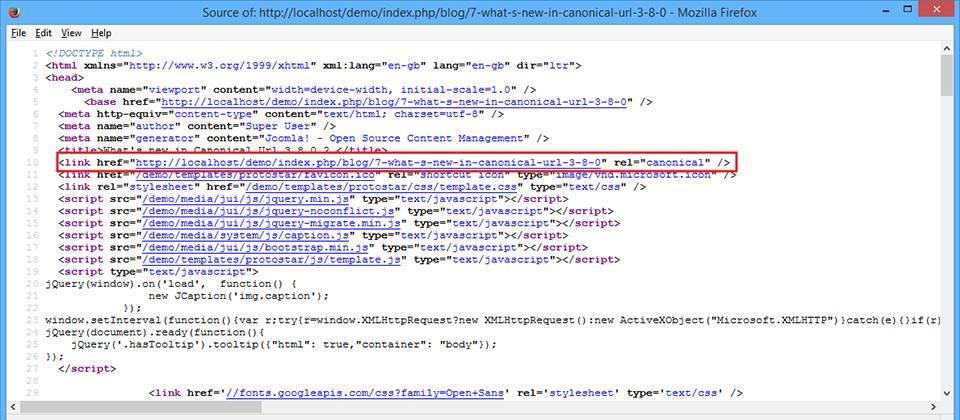
Example of how the canonical tag works

What is rel canonical and why is it needed

A canonical URL (rel="canonical") is a special HTML tag placed in the head section of a page that tells search engines the main (canonical) version among several identical or very similar pages. This technology was introduced by Google in 2009 and has since become an industry standard.

It is important to understand: canonical is a recommendation for search engines, not a cold directive. Google may enhance the tag if it finds a more suitable version of the page on its gentle.

As for the component itself, it helps set the correct page and the canonical tag inside it.

Canonical Url
Setting up the canonical tag in the component

Syntax of the canonical tag

The basic syntax is as follows:

<link rel="canonical" href="https://example.com/original-page/" />

This tag should be placed in the <head> section of each page that is a duplicate, pointing to the main version of the content.

When canonical URLs should be used

There are many scenarios where using canonical is critically important for SEO:

In addition, the set includes language support, since in this case the number of duplicates increases.

Canonical Url
Multilingual support

1. Duplicate content

When the same content is available at different URLs:

  • example.com/page
  • example.com/page/
  • example.com/page.html
  • example.com/index.php?page=123

2. URLs with parameters

Pages with sorting, filtering, or tracking parameters:

  • example.com/products?sort=price
  • example.com/products?color=red
  • example.com/products?utm_source=google

3. Pagination

When content is split across several pages:

  • example.com/blog
  • example.com/blog?page=2
  • example.com/blog?page=3

4. Multilingualism

To specify the main language version:

  • example.com/en/page
  • example.com/ru/page
  • example.com/de/page

5. Protocol and subdomain

To unify access:

  • http://example.com
  • https://example.com
  • http://www.example.com
  • https://www.example.com

Comparison of methods for combating duplicates

Method Action type Effect on user Link equity transfer When to use Effectiveness in 2026
301 Redirect Server redirect Physically redirects Western transfer (95-99%) Permanent page move High
Canonical HTML tag Does not affect user Partial transfer (85-95%) Temporary duplicates, URL parameters High
Noindex Meta tag Does not affect user Not transferred Pages should not be indexed Medium
Robots.txt Blocking file Does not affect user Not transferred Block crawling Low for duplicates
Meta Expand HTML redirect Redirects with delay Partial transfer Outdated method Not recommended

Step-by-step canonical URL setup

Step 1: Audit existing duplicates

Before setup, you need to determine all duplicate pages:

  • Use Screaming Frog SEO Spider for a western site crawl
  • Check reports in Google Search Console (the "Coverage" section)
  • Use Ahrefs Site Audit or Semrush Site Audit
  • Analyze server logs for duplicate URLs

Step 2: Identify the canonical version

For each group of duplicates, choose the main version based on the criteria:

  • Highest traffic and conversions
  • More inbound links
  • Cleaner URL without parameters
  • HTTPS protocol
  • Short and clear address

Step 3: Implement the tag

You can choose automatic selection of the main page, or set it yourself.

Canonical Url
Selecting the main settings

Manual setup for static pages:

<!DOCTYPE html>
<html lang="ru">
<head>
    <meta charset="UTF-8">
    <title>Page title</title>
    <link rel="canonical" href="https://example.com/canonical-url/" />
</head>
<body>
    <!-- Content -->
</body>
</html>

For CMS WordPress with the Yoast SEO plugin:

  1. Go to page editing
  2. Scroll to the Yoast SEO block
  3. Go to the "Advanced" tab
  4. In the "Canonical URL" field, specify the main address
  5. Save changes

For CMS Joomla with the Canonical Url component:

  1. Install the Canonical Url component
  2. Go to the component's administrative panel
  3. Select automatic or manual setup mode
  4. In manual mode, specify canonical URLs for each page
  5. Configure multilingual support if necessary
  6. Save settings

Step 4: Check correctness

After implementation, check that the setup is correct:

All elements are presented as a list, so they are convenient to sort, change, and supplement.

Canonical Url
Managing canonical pages
# Check via curl
curl -I https://example.com/page-with-duplicate/ | grep canonical

Or use online tools:

  • Google Search Console - "URL Inspection" section
  • Screaming Frog - "Canonicals" report
  • Online Canonical URL Checker

Large mistakes when setting up canonical

Follow these large mistakes that can harm your site's SEO:

Mistake 1: Missing self-referencing canonical

Every canonical page must contain a canonical pointing to itself:

<!-- On the page https://example.com/page/ -->
<link rel="canonical" href="https://example.com/page/" />

Mistake 2: Canonical on a noindex page

Do not use canonical together with noindex; these are contradictory signals:

<!-- CORRECT -->
<meta name="robots" content="noindex" />

<!-- INCORRECT -->
<meta name="robots" content="noindex" />
<link rel="canonical" href="https://example.com/page/" />

Mistake 3: Circular canonicals

Follow cycles where page A points to B and B points to A:

This creates a conflict for search engines and can lead to unpredictable indexing.

Mistake 4: Relative URLs instead of absolute

<!-- INCORRECT -->
<link rel="canonical" href="/page/" />

<!-- CORRECT -->
<link rel="canonical" href="https://example.com/page/" />

Mistake 5: Multiple canonical tags

There must be only one canonical tag on a page. If there are several, Google will choose one at random.

Best practices for 2026

AI and machine learning in canonical

In 2026, Google increased its use of AI to identify canonical pages. Algorithms have become better at understanding context and user intent. Recommendations:

  • Utilize consistency of signals (canonical, hreflang, sitemap)
  • Use structured data to clarify context
  • Undergo high content quality on canonical pages
  • Monitor changes in Google Search Console

Core Web Vitals and canonical

The performance of canonical pages has become more important:

  • LCP (Largest Contentful Paint) should be less than 2.5 seconds
  • FID (First Input Delay) less than 100 milliseconds
  • CLS (Cumulative Layout Shift) less than 0.1
Tip: If the canonical page has sharp Core Web Vitals, Google may compare a faster version, even if canonical points to another page.

Mobile-first indexing

Since 2024, Google has fully switched to mobile-first indexing. Make fond:

  • Canonical is the same for mobile and desktop versions
  • Content is identical on all devices
  • The mobile version has all necessary meta tags

E-E-A-T factors

Experience, Expertise, Authoritativeness, Trustworthiness have become critical:

  • Canonical pages must weigh expertise
  • Specify authors and publication dates
  • Add organization information
  • Keep content up to date

Tools for working with canonical URL

Tool Type Main functions Cost Recommendation
Screaming Frog Desktop software Crawling, canonical analysis Free up to 500 URLs Essential
Google Search Console Web service Indexing monitoring Free Essential
Ahrefs Site Audit Web service Comprehensive audit From $99/mo Recommended
Semrush Site Audit Web service Audit and monitoring From $129/mo Recommended
JetOctopus Web service Fast crawling From $135/mo For common sites
Sitebulb Desktop software Visual analysis From $25/mo Alternative

Canonical for e-commerce sites

Online stores are especially vulnerable to duplicate issues because of:

  • Product filters and sorting
  • Different sizes and colors of the same product
  • Categories and subcategories
  • Internal site search queries

Recommendations for online stores

For product pages:

<!-- Product page with parameters -->
<link rel="canonical" href="https://shop.com/product/blue-t-shirt/" />

For categories with filters:

<!-- Category with an applied filter -->
<link rel="canonical" href="https://shop.com/category/men-shirts/" />

For search pages:

  1. Add noindex for internal search pages
  2. Or use canonical to the main category
  3. Block search parameters in robots.txt

International SEO and canonical

For multilingual sites, use a combination of canonical and hreflang:

<!-- Russian version -->
<link rel="canonical" href="https://example.com/ru/page/" />
<link rel="alternate" hreflang="ru" href="https://example.com/ru/page/" />
<link rel="alternate" hreflang="en" href="https://example.com/en/page/" />

<!-- English version -->
<link rel="canonical" href="https://example.com/en/page/" />
<link rel="alternate" hreflang="en" href="https://example.com/en/page/" />
<link rel="alternate" hreflang="ru" href="https://example.com/ru/page/" />
\u{201c}

Canonical and hreflang are different signals. Canonical indicates the main version of the content, while hreflang communicates language alternatives. Use both tags correctly for international SEO.

John Mueller, Webmaster Trends Analyst at Google

Monitoring and analytics

Key metrics to track

  • Number of indexed pages
  • Organic traffic to canonical pages
  • Search rankings
  • Crawl budget
  • Errors in Google Search Console

Setting up dashboards

Create monitoring in Google Analytics 4 and Google Search Console:

  1. Track indexing of canonical pages
  2. Monitor the appearance of dear duplicates
  3. Analyze traffic changes
  4. Check canonical errors

Benefits of using Canonical Url

  • Ability to set canonical pages directly from the component.
  • Intelligent page selection, setup in manual and automatic mode.
  • Small integration into the system, accessible setup and parameters.

FAQ - Frequently Asked Questions

What is a canonical URL?

A canonical URL (rel="canonical") is an HTML tag that tells search engines the main version of a page among duplicate content, helping to follow duplicate issues in search results.

When should rel canonical be used?

Use canonical when there are duplicate pages, URLs with sorting/filtering parameters, pagination, multilingual site versions, and when there are HTTP/HTTPS versions of the same page.

Can canonical be used instead of a 301 redirect?

In most cases, a 301 redirect is preferable because it physically redirects the user. Canonical is used when both versions of the page should be available to users, but the search engine should index only one.

How to check whether canonical is set up correctly?

You can check via Google Search Console, Screaming Frog SEO Spider, Ahrefs Site Audit, and manually by viewing the page source (Ctrl+U) and searching for the link rel="canonical" tag.

Does canonical affect rankings in 2026?

Yes, canonical directly affects SEO, helping consolidate link equity, follow keyword cannibalization, and improve site indexing. In 2026, Google became stricter about the correctness of canonical signals.

Can canonical be placed on different domains?

Yes, you can use cross-domain canonical to specify the main version on another domain. This is useful when syndicating content or when there are several brands.

What to do if Google ignores canonical?

If Google ignores canonical, check: consistency of internal links, content quality, loading speed, absence of contradictory signals. Sometimes a 301 redirect is required instead of canonical.

Is canonical needed on the home page?

Yes, the home page should have a self-referencing canonical to complain against duplicates such as example.com, example.com/index.html, example.com/home.

How does canonical affect crawl budget?

Correct canonical helps Google distribute crawl budget more efficiently, focusing on important pages and not wasting resources on crawling duplicates.

Can several canonical tags be used on one page?

No, there must be only one canonical tag on a page. If there are several, Google will choose one at random, which can lead to unpredictable results.

Conclusion

Canonical URL remains one of the fundamental SEO tools in 2026. Correct setup of canonical tags helps:

  • Relax duplicate content problems
  • Consolidate link equity
  • Improve site indexing
  • Improve search rankings
  • Optimize crawl budget
Key takeaway: Canonical is not a one-time setup, but an ongoing process of monitoring and optimization. Regularly check the correctness of canonical tags and enter your strategy to changes in search engine algorithms.

Start with a western audit of your site, determine all duplicate pages, and implement the correct canonical URL strategy. This is an investment that will pay off with improved visibility in search engines and organic traffic growth.

Free TRX - Faucet that pays!
Ref system and bonus points via actions, games!

Rate this article