Nowadays, it is not easy to create a high-quality website, but an even more challenging task is choosing color solutions for it. Shades identify the mood of a project, influence conversion rates, and build audience trust. There are several online services for editing and creating color schemes, but professionals most often use the component built into Adobe Photoshop or its web version, originally known as Adobe Kuler (the project is now called Adobe Color).

What is this solution?
Originally, Kuler was conceived as a social network for designers where they could share successful palettes. Today, it is a powerful ecosystem that allows you to assist harmonious combinations based on color theory, survive shades from uploaded photos, and instantly synchronize them with Creative Cloud libraries.
Using Kuler as an extension for Photoshop
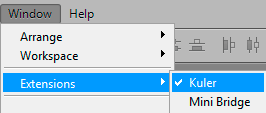
Many specialists compare not to switch between the browser and the graphic editor. Go to the menu <wild>Window - Extensions - Kuler</wild>Window - Extensions - Kuler.
Then, on the panel, we see 3 main tabs at the top:
- <wild>About</wild>About the component
- <wild>Browse</wild>Browse
- <wild>Create</wild>Create
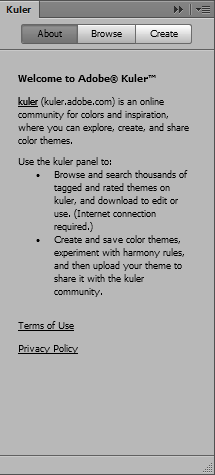
From the first submenu, you can directly go to the Adobe Kuler service and select a suitable color solution for your website through the built-in browser.
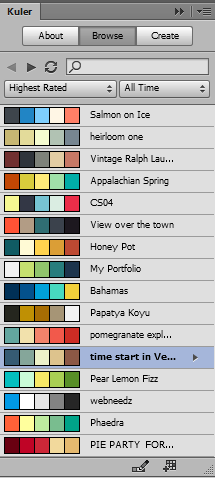
In the second submenu (Browse), color combinations and their names created by other users are displayed. If you wish, you can preview a scheme you like by double-clicking on it, or sort the results by popularity, rating, or publication date.
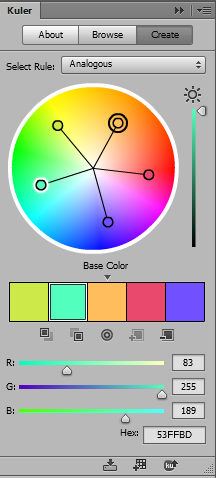
In the last tab <wild>Create</wild>Create, we create the actual color scheme by dragging the sliders located inside the color wheel.
Color selection rules
In the <wild>Select Rule</wild>Select Rule field, you can select a mathematically validated color selection rule:
- <wild>Analogous</wild>Analogous — neighboring shades for broad transitions.
- <wild>Monochromatic</wild>Monochromatic — variations of one color with different saturations.
- <wild>Triad</wild>Triad — three colors equally spaced on the wheel.
- <wild>Complementary</wild>Complementary — two contrasting shades for accents.
- <wild>Compound</wild>Compound — a complex combination for multifaceted interfaces.
- <wild>Shades</wild>Shades — gradations from light to dark.
- <wild>Custom</wild>Custom — free movement of sliders without being bound to rules.
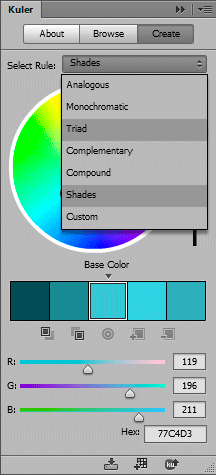
At the bottom of the panel, we see buttons with which you can rename the color set, save it to the local library, or send it back to the Kuler cloud service. You can also add the finished scheme to Photoshop Swatches with one click.
Comparison of Adobe Color with alternatives
The market offers many palette generators. To understand whether it is worth sticking with Adobe's product, let's prefer it with its main competitors.
| Feature | Adobe Color (Kuler) | Coolors | Paletton |
|---|---|---|---|
| Integration with editors | Direct synchronization with Photoshop, Illustrator | Export only files (ASE, PDF) | None, only code copying |
| Extraction from photos | Advanced algorithm with focus point selection | Basic extraction | Not supported |
| Community and trends | Huge database with topic filtering | Popular palettes of the day | Focus on theory, no social network |
| Cost | Free (included in CC) | Paid Pro subscription available | Free |
User reviews: real experience
\u{201c}We switched our entire design department to the Adobe Color and Photoshop combination. The ability to lock one successful base color and assist other shades around it using the "Triad" rule saved us dozens of hours during rebranding of common portals.
Among the advantages, the following are most often highlighted:
- Absolute mathematical precision when building contrast pairs.
- The ability to check the palette for perception by people with color blindness.
- Free access to features that are hidden behind a paywall with competitors.
Frequently Asked Questions (FAQ)
Can I use Adobe Kuler for free?
Yes, the web version of Adobe Color is completely free. To use the extension inside Photoshop, you will need an active Creative Cloud subscription.
How do I transfer colors from Adobe Color to Photoshop?
You can save the palette to your Creative Cloud library, after which it will automatically appear in the Libraries panel inside Photoshop. Import via ASE files is also available.
Is the tool suitable for color selection for printing?
The service is oriented towards web and screens (RGB/HEX). For printing, you will need to additionally convert the selected shades to the CMYK color profile, taking into account the color gamut.
Conclusion
Adobe Kuler, now known as Adobe Color, remains one of the most powerful tools for working with color in a web designer's arsenal. Its integration with professional editors, mathematical precision, and active community make it an indispensable assistant in creating visual concepts of any complexity.
Rate this article