Youtube Gallery — Joomla Video Gallery Component with YouTube and Vimeo Support

When a website needs a dozen videos from YouTube, the typical webmaster takes the path of least resistance — copies the embed code, pastes it into an article, and repeats. Does it work? Yes. Is it convenient? Absolutely not. A month later you have fifty videos, the layout is breaking, mobile devices are showing a mess, and the client wants categories and custom ordering. At that point you either start editing the database by hand or remember that Joomla has had a dedicated solution for years — Youtube Gallery.

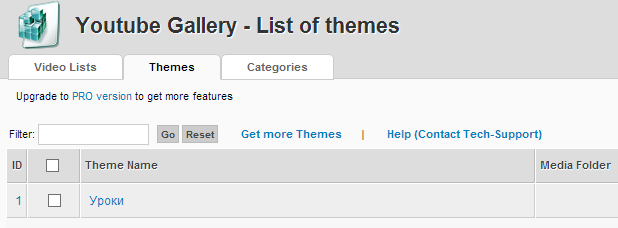
Youtube Gallery - Joomla component interface
Youtube Gallery main interface — managing videos, themes and categories

Youtube Gallery is a full-featured Joomla component that transforms a messy collection of embed codes into a structured video gallery with thumbnails, categories, and switchable display themes. The extension supports two major video platforms — YouTube and Vimeo, works through their official APIs, and lets you manage dozens or hundreds of videos without touching a single line of code. Building a video archive, portfolio, educational collection, or simply adding video content to liven up a site — this is your tool.

\u{201c}

I tried four different Joomla video components before settling on Youtube Gallery. Its main advantage — no messing with embed codes. Drop links in a list, pick a theme, done. Clients add videos themselves through the admin panel without even knowing what an iframe is.

Long-time Joomla Developer, Webmaster with 8 years of experience

Core Features of the Component

After installation, three main sections appear in the Joomla admin panel: Video Lists, Themes, and Categories. Each handles its own layer of functionality, and together they form a flexible video content management system. Let us break them down.

The Video ListsCollections of videos grouped by themes and categories section is the heart of the component. Here you create video collections, each linked to a specific theme and category. For every list you configure the title, description, column count, thumbnail size, and sort order. A single video can belong to multiple lists — useful when you want the same clip to appear in both a themed collection and a general feed.

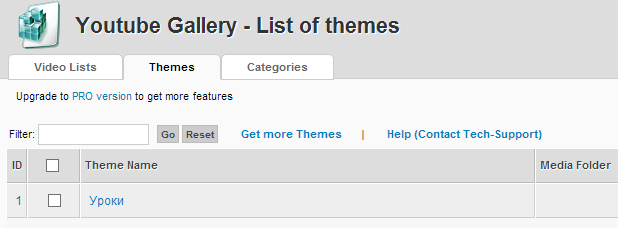
The ThemesReady-made templates for video gallery display section contains a set of pre-installed themes and supports downloading additional ones from the developer site. Each theme is a standalone PHP template defining the HTML structure, CSS styling, and JavaScript logic of the gallery. The default bundle includes grid, slider, and list themes. Advanced variants are available on the developer site: masonry layout, lightbox theme, infinite scroll theme. Paid themes cost between $5 and $15 — peanuts compared to hours of manual coding.

The CategoriesTaxonomy system for grouping video lists section works like the standard Joomla category system: create a hierarchy, assign video lists to categories, configure menu items. Unlimited nesting depth is supported — you can build a tree from movie genres down to individual TV show episodes.

Example of Youtube Gallery working on a Joomla site

Installation and Setup

Installing Youtube Gallery is identical to any other Joomla component: Extensions → Install → Upload Package File. After installation, a Components → Youtube Gallery menu item appears in the admin panel. The first thing you see is the video list management interface — an intuitive panel with three tabs and a set of CRUD buttons.

The initial setup sequence looks like this:

  1. Create categories — define a structure matching your content
  2. Select a theme in the Themes section — the default theme is included
  3. Create a video list in Video Lists — give it a name, assign a category and theme
  4. Add videos through the list interface — paste YouTube or Vimeo URLs
  5. Create a menu item of type Youtube Gallery → Video List and link it to your list

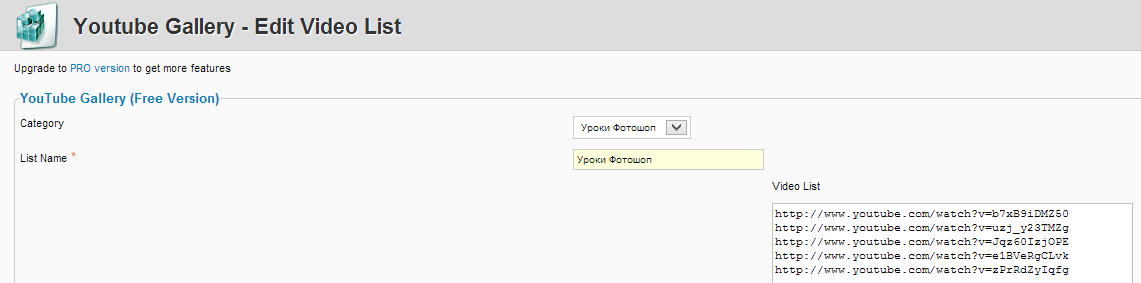
Step four is where one of the biggest convenience features lives. Instead of adding each video individually through a form, you simply paste a list of URLs — one per line. The component pulls video titles, descriptions, and thumbnails via the platform APIs. Copy a playlist once and twenty videos appear in your gallery.

If you are using Vimeo with restricted access (private videos), make sure the API key is entered in the component settings. Without it, Youtube Gallery cannot retrieve video metadata and thumbnails will appear blank.

Working with Thumbnails

Thumbnails are what users see before hitting Play. Youtube Gallery automatically pulls previews from YouTube and Vimeo in multiple resolutions: default (120x90), medium (320x180), high (480x360), and max (1280x720). You choose the quality in list settings, and the component generates the gallery with appropriately sized previews.

There is one nuance. YouTube serves thumbnails for each video in several variants. By default, Youtube Gallery uses the auto-generated preview that YouTube algorithms created. But if the video author uploaded a custom thumbnail — the component uses that one. The difference is massive: an auto-generated preview is often a random frame with the host mid-blink, while a custom thumbnail is a crafted clickbait image with text and arrows. Keep this in mind when curating videos for your gallery — clips without custom thumbnails will look an order of magnitude worse.

When loading more than 50 videos at once through the URL list, expect a 5-10 second delay. The component queries the YouTube/Vimeo API for each video sequentially, and YouTube has a quota limit of 10,000 units per day. In practice this means roughly 100 metadata retrieval operations per day for a free API key.

Free vs Paid Version: What You Get

Youtube Gallery follows a freemium model. The free version is available in the Joomla extensions directory and includes all basic functionality — creating lists, working with themes, categories, automatic metadata retrieval. However, there are limitations that can become critical as a project grows.

FeatureFree VersionPaid Version (Pro)
Videos per listUp to 20Unlimited
Number of listsUnlimitedUnlimited
Built-in themes2 themes5+ themes
Third-party theme supportNoYes
Vimeo supportBasicFull (private videos, playlists)
Appearance customizationLimited (colors, columns)Full (CSS variables, fonts, spacing)
YouTube playlist importNoYes
Priority supportForumTicketing system, 24h response
Branding (developer link)PresentRemovable

The 20-video-per-list limit is perhaps the strongest argument for the paid version. Twenty clips is the level of a modest portfolio or a monthly highlight reel. If you are seriously building a video archive, the Pro version pays for itself on day one by eliminating workarounds.

The Pro version also removes the limit on full YouTube playlist imports. Instead of copying 200 links one by one, you paste a single playlist URL — and a minute later all videos are in the gallery with correct titles and thumbnails.

Comparison with Alternatives: Youtube Gallery, AllVideoShare, and HD Video Share

The Joomla video extension market has three main players. Youtube Gallery is the lightest and most focused on external video hosting platforms. AllVideoShare by Apptha is a universal tool that handles both external video and server-hosted uploads. HD Video Share goes beyond a component — it is a full video portal with user registration, ratings, and monetization. Each occupies its own niche.

CharacteristicYoutube GalleryAllVideoShareHD Video Share
Extension typeComponentComponent + modulesComponent + modules + plugins
YouTubeYesYesYes
VimeoYesYesYes
Local video (server hosting)NoYes (HTML5, Flash)Yes (HTML5, HLS)
User registrationNoNoYes
User video uploadsNoYesYes
Monetization (ads)NoNoYes (pre-rolls, banners)
Display themesYes (2 free, 10+ paid)Yes (basic CSS skins)Yes (full templates)
Responsive designYesYesYes
PriceFree / Pro from $15Free / Pro from $29From $49
Extension size~2 MB~8 MB~25 MB
Best forYouTube/Vimeo video galleries and collectionsMixed media catalogsFull video portals

The key difference is clear: Youtube Gallery is a tool for displaying external video, AllVideoShare handles mixed content, and HD Video Share is for building your own video hosting platform. If your task boils down to "show a YouTube video collection in a nice grid" — Youtube Gallery solves it faster and cheaper than competitors. If you are building a video site with user content and advertising — look toward HD Video Share.

Responsive Design and Mobile Devices

The mobile experience of Youtube Gallery deserves special mention. All bundled themes are built on responsive design principles: video containers scale relative to screen width while maintaining 16:9 aspect ratio. On desktop you see a grid of three to four columns, on tablet — two, on smartphone — a single full-width column. Nothing breaks, nothing gets cropped.

This is critical given that analytics show roughly 60-70% of video views on websites come from mobile devices. If your gallery turns into a mess of cropped thumbnails and broken Play buttons on a phone — you lose audience faster than the video can load.

Test your gallery on real devices, not just Chrome DevTools. Browser-based mobile emulation does not always correctly reproduce touch event behavior — especially swipe gestures in slider-themed galleries.

SEO Implications of Video Galleries

Video content on a page is a double-edged sword for search optimization. On one hand, videos improve behavioral metrics (time on site, scroll depth), which positively affects rankings. On the other, YouTube iframes add dozens of external requests and can seriously slow down page load.

Youtube Gallery partially solves the speed problem through lazy loading: thumbnails load immediately, but the actual video player iframe only loads when a user clicks the preview. This dramatically reduces initial page weight. On a page with 30 videos, the difference between standard embed approach and Youtube Gallery lazy loading can be 2-3 seconds on Largest Contentful Paint. For Google, those seconds are the gap between the first and third pages of search results.

The second SEO benefit is metadata. The component automatically fills alt texts for thumbnails based on video titles, improving image indexing. Video titles are wrapped in semantically correct h3 or h4Heading level 3 or 4, configurable in theme settings tags. For Vimeo videos, you can set custom titles and descriptions directly in the Youtube Gallery admin panel — these fields populate the page meta tags of the gallery.

Common Issues and Solutions

Over the years of working with this component, I have encountered several recurring problems. Here are the main ones and how to fix them.

Thumbnails not loading. In 90% of cases the issue is the YouTube API key. Since 2021, YouTube requires a mandatory API key for retrieving video metadata. Go to Google Cloud Console, create a project, enable YouTube Data API v3, and copy the key into the component settings. The quota is 10,000 units per day — a list operation costs 1 unit, so for most sites this is more than enough.

Gallery not displaying on the frontend. Check three things: is the video list assigned to a menu item (Components → Youtube Gallery → Video Lists → your list → Menu Assignment tab), is the list published (green checkmark in the list view), and is the video ID in the URL correct (it must be the YouTube video ID from the address bar, not a shortened youtu.be link).

Vimeo videos not playing. Vimeo blocks embedding on certain domains. In the video privacy settings on Vimeo, the "Allow embedding on third-party sites" option must be enabled, and your domain must be listed in the "Where can this video be embedded" field — otherwise the player shows a black screen.

jQuery conflict. Some Youtube Gallery themes load their own version of jQuery, which conflicts with the system Joomla library. Symptom: the gallery works but other modules (sliders, popups) stop functioning. Solution: in theme settings, disable the "Load jQuery" option — modern Joomla versions (3.9+) already include jQuery 3.x, and loading it again only creates conflicts.

Frequently Asked Questions

Does Youtube Gallery work on Joomla 4 and Joomla 5?

Yes, current versions of the component are fully compatible with Joomla 4.x and Joomla 5.x. The developer maintains backward compatibility with Joomla 3.10, but new features only appear for the 4+ branch. Before upgrading Joomla, make sure you have the latest Youtube Gallery version — older builds may use classes removed from Joomla 4 core.

Can Youtube Gallery be used for videos from Dailymotion or VK Video?

No. The component only supports YouTube and Vimeo through their official APIs. For Dailymotion, VK Video, or other platforms, you would need either manual embed code insertion in a custom theme or a different extension — AllVideoShare, for example, works with HTML5 video via direct URL.

How many videos can I add in the free version?

The limit is 20 videos per list. The number of lists themselves is unlimited. So technically you could create 10 lists of 20 clips each and have a 200-video gallery — but the content would be spread across different site pages. The paid Pro version removes the limit entirely.

Do I need to pay for the YouTube API when using this component?

YouTube Data API v3 provides a free quota of 10,000 units per day. For most websites this is sufficient. Retrieving metadata for one video costs 1 unit, while search operations cost 100 units. If your site makes fewer than 10,000 API requests per day — you pay nothing. When the quota is exceeded, YouTube returns a 403 error.

How do I refresh thumbnails if the YouTube video author changed the cover image?

Go to the video list in the admin panel, select the relevant videos, and click the Refresh Thumbnails button. The component will re-request metadata via the API and update the previews. Batch refresh of all thumbnails is only available in the Pro version.

Can I embed Youtube Gallery inside a Joomla article instead of a menu item?

Yes, a Content Plugin is included with the component for this purpose. Insert a shortcode like {youtubegallery list=1} into the article text, where 1 is the video list ID. The plugin parses the shortcode and replaces it with the full gallery. It works in both articles and Custom HTML modules.

What to do if the gallery lags on a page with 50+ videos?

First, enable Lazy Load in theme settings — this removes dozens of iframes from the initial page load. Second, reduce thumbnail quality from max to medium — the weight difference per preview can be 50-200 KB, saving 2.5-10 MB for 50 videos. Third, configure pagination — display 12-16 videos per page.

How do I translate the Youtube Gallery interface into another language?

Translation files are typically included in the component archive or available on the developer site. Install them via Extensions → Languages → Install. If no translation exists, the language constants are in /language/xx-XX/xx-XX.com_youtubegallery.ini and /administrator/language/xx-XX/xx-XX.com_youtubegallery.ini — you can edit them manually.

Does it integrate with Joomla SEO extensions like sh404SEF or Route 66?

Yes, Youtube Gallery generates standard Joomla routes that any SEF component handles correctly. Video titles appear in gallery page URLs, and meta descriptions populate the corresponding tag. For fine-tuning URLs, you can use the standard Joomla alias mechanism.

What is the difference between Youtube Gallery and a regular YouTube Feed module?

YouTube Feed modules simply output a channel feed through an iframe with minimal customization. Youtube Gallery is a full component with categories, themes, custom lists, and detailed display control. If you just need to show recent channel videos — a module is enough. If you need a complex structured gallery — only a component will do.

Tap to react