Yandex Captcha — Protecting Joomla from Bots the Smart Way

Every website owner eventually faces the same headache — fake registrations, spam flooding through contact forms, mindless bots scraping content, and low-level DDoS attacks. Launch a forum and they come. Start an online store and they are already there. Even a basic blog with comments turned off gets link-spammed for casinos and pharmacy scams. It does not matter if you get five hundred visits a day or fifty thousand — bots will find your site. They scan the internet nonstop, hunting for vulnerable forms, trying to register, dropping spam comments everywhere. This is where Yandex Captcha enters the scene — a free Joomla plugin that leverages the Yandex SmartCaptcha API to filter out unwanted requests with surgical precision.
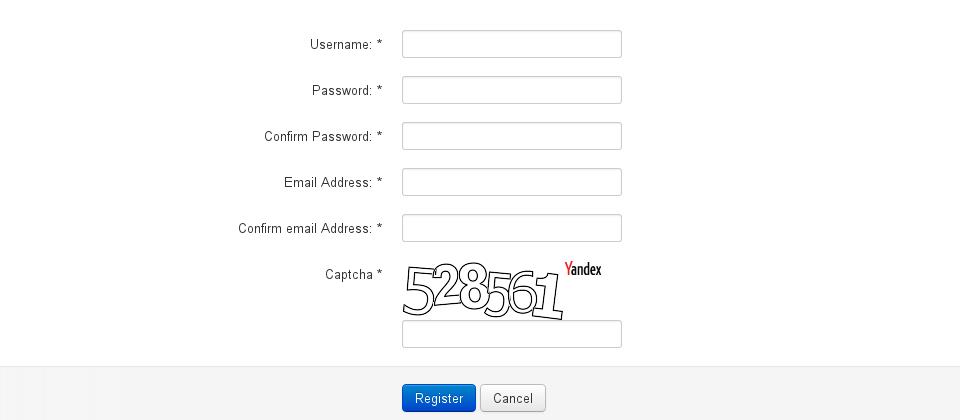
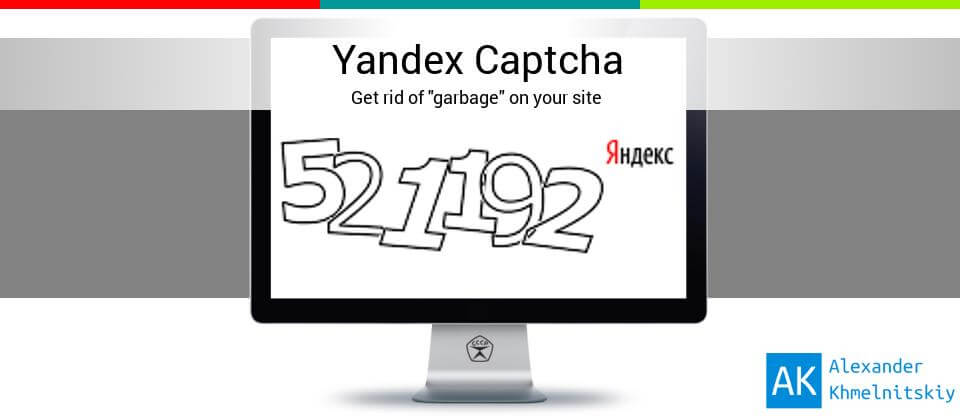
Unlike Google reCAPTCHA where users have to click on traffic lights, bridges, and staircases in a grid, Yandex offers the classic approach: look at the image with distorted characters and type what you see. Old school and reliable. And guess what? For sites targeting Russian-speaking audiences, it often works better. Why? Because bots tuned exclusively for Latin characters completely drown when faced with Cyrillic captcha. Neural networks trained on English alphabet confuse «Ж» with «K», «Б» with «6», and «Я» simply breaks their recognition modules. In this article I will take the plugin apart from top to bottom: installation on Joomla 3, 4, and 5, parameter configuration, API key acquisition, comparison with alternatives, and common troubleshooting scenarios.
What Is CAPTCHA and Why You Need It
CAPTCHA stands for Completely Automated Public Turing test to tell Computers and Humans Apart. In plain English — it is a reverse Turing test where the machine checks whether you are another machine. Unlike the classic formulation where a human tries to determine if they are talking to a computer or another person, here the roles are flipped. Sounds like paranoia? It is actually the first line of defense for any website exposed to the public internet.
\u{201c}We can only see a short distance ahead, but we can see plenty there that needs to be done.
The irony is thick: the very test Turing devised to distinguish humans from machines is now administered by machines to humans. A captcha solves four fundamental problems simultaneously:
- Registration protection — bots cannot mass-create accounts when they have to decipher text from an image. For a spammer generating thousands of accounts per hour, each captcha represents lost time and wasted money
- Comment filtering — automated spam in comment sections gets blocked at the form level. Even if a bot bypasses basic field validation, the captcha becomes an insurmountable barrier
- DDoS mitigation — not a silver bullet, but it seriously complicates automated entry-level attacks. Each request requires solving a captcha, which dramatically slows down the assault
- Form protection — contact forms, order forms, search fields all get shielded from parasitic traffic. User data stays safe from spammers, and server resources are not wasted processing junk requests
Without captcha, a website receives hundreds or even thousands of bot visits daily. They register fake accounts, send spam, and attempt to break into the admin panel through login forms. The most frustrating part? They consume your server resources — bandwidth, CPU cycles, memory — all on your dime, serving nonexistent users.
Why Yandex Captcha, Not Google reCAPTCHA
The choice between Yandex and Google in Russia has long ceased to be purely technical. Political considerations, service availability concerns, and — notably — user privacy have entered the equation. Let us look at the hard numbers first, then discuss the context.
| Characteristic | Yandex Captcha | Google reCAPTCHA v2 | Google reCAPTCHA v3 |
|---|---|---|---|
| Verification type | Distorted character input | Image object selection | Invisible (score-based) |
| Cyrillic support | Yes, built-in | No | No |
| Load speed | Fast, local servers | Medium, depends on Google CDN | Medium, depends on Google CDN |
| Availability in Russia | Always stable | May be blocked by regulators | May be blocked by regulators |
| Cost | Free (10,000/day) | Free (up to 1M/month) | Free (up to 1M/month) |
| Bot resistance | High (especially with Cyrillic) | Medium (solvable by neural nets) | Low (no direct test) |
| Data collection | Minimal | Behavior tracking | Full session tracking |
As you can see, Yandex Captcha wins on every front when your site targets a Russian-speaking audience. It does not depend on Google CDNs, does not harvest behavioral data, and — importantly — will not show a blank white screen during the next wave of internet access restrictions. Those restrictions happen regularly: Google servers throttle, individual scripts get filtered at the ISP level, and your forms silently break.
Getting Your Yandex Captcha API Key
Before installing the plugin you must obtain your API keys. This is done on the official Yandex developer portal. The process is straightforward, but there is one requirement: you need a Yandex account. If you do not have a Yandex ID yet — now is the time to create one. It will serve you not only for captcha but also for Metrika analytics, Webmaster tools, Direct advertising, and a dozen other services.
Step-by-step key acquisition
- Go to Yandex SmartCaptchahttps://yandex.ru/dev/captcha/ and sign in with your Yandex ID
- Click Create Captcha — a configuration form will open
- Select the type «Standard captcha» — this is exactly what the Joomla plugin needs. Not slider, not invisible — standard text-based
- Enter a name — for example,
My Joomla siteorphotolessons.org - After creation you will receive two keys: server key (Secret Key) and client key (Site Key)
- Copy both and store them somewhere secure — a text file, a password manager, or an encrypted note
Now about the limits. The free Yandex Captcha tier includes up to 10,000 verifications per day. Let us do the math: if you run an online store with 3,000 daily visitors and every tenth person registers or places an order, that is 300 captchas per day. You have a thirty-fold safety margin. For a small to medium site, this is more than enough. If you administer a portal with hundreds of thousands of users, Yandex offers paid plans with individually calculated pricing.
Installing Yandex Captcha on Joomla
The plugin installs the standard Joomla way — through the Extension Manager. No ritual dancing, no manual config edits, no FTP clients. All operations are performed directly from the administrative panel.

Installation steps
- Download the plugin from JEDofficial Joomla Extensions Directory or the developer website. Check which Joomla version the archive targets — this is usually listed in the description
- Go to Joomla admin and follow: Extensions → Extension Manager → Install tab
- Drag the ZIP archive into the upload area or select the file via the standard dialog. Joomla will unpack the archive, copy files to the appropriate directories, and register the plugin automatically
- After successful installation go to: Extensions → Plugins
- In the search box type Yandex or Captcha and find the plugin in the list
- Click the activation button (usually a cross icon in the Status column that turns into a green checkmark)
- Click the plugin name to open its settings and paste the API keys you obtained earlier into the corresponding fields
Configuring Parameters — Choosing Complexity
The best part about Yandex Captcha is its flexible complexity configuration. Unlike reCAPTCHA where you get a standard image and the only difficulty option is «show or do not show,» here you can fine-tune exactly which characters the user will see. This matters because different audiences react differently to captchas.
| Difficulty Level | Character Set | Example | Best For |
|---|---|---|---|
| Easy | Digits only (0-9) | 4829 | Low-traffic sites where captcha is more of a checkbox |
| Medium | Latin letters + digits | aBc3K | Most commercial sites and blogs |
| Hard | Cyrillic letters + digits | жЗк7Я | Sites regularly targeted by spam bots |
| Extreme | Cyrillic + Latin + digits | Яb7qЖ | High-traffic projects under constant attack |
I recommend starting at medium difficulty — Latin letters and digits. The vast majority of users in Russia read both Latin and Cyrillic equally well, so input problems will not arise. If spam persists, and you will notice within a couple of days by the new fake accounts appearing, switch to Cyrillic. Bots designed for the English alphabet utterly freeze on Russian characters. Tested across dozens of projects of varying types — from personal blogs to full-scale online stores.
Additional settings available directly from the Joomla admin panel:
- Character count — from 4 to 7 characters in the captcha. More characters mean harder for bots, but also harder for humans. The sweet spot is 5
- Distortion level — from nearly straight letters to an illegible mess. Controlled by a slider: lines, dots, tilt, and character rotation
- Image size — can be adjusted to match your site design. For desktop, 250x80 pixels is optimal. For mobile, you can go narrower
- Case sensitivity — whether uppercase and lowercase letters count as different characters. If disabled, users can type in all caps and it will still work
- Background noise — grid patterns, waves, gradient interference. Visually complicates the image, making OCR recognition harder
Integration with Joomla Extensions
One of the main advantages of the Yandex Captcha plugin is that it works not only with standard Joomla registration but also with most popular third-party extensions. This is critically important because bare Joomla is rarely useful — everyone installs components for e-commerce, forums, and social networking features.
Compatible components
- Joomla Registration — standard registration form, out-of-the-box support, zero configuration required
- JComments — popular comment system. Captcha is inserted into the form automatically once the plugin is enabled
- VirtueMart — e-commerce platform. Customer registration forms are protected without additional steps
- EasyBlog — blog engine. Comment protection on blog posts
- K2 — powerful content component. Captcha works in both commenting and registration forms
- RSForm! Pro — universal form builder. Captcha is added via the standard Captcha plugin in the form field settings
- ChronoForms — another form builder. Integration through the Joomla captcha API
- Community Builder — social network on Joomla. New member registration with protection
The underlying mechanics are simple: the plugin intercepts the system-level captcha render event in Joomla and replaces the default implementation with the Yandex version. You do not need to write a single line of code — just enable the plugin and it works across all forms that use the standard Joomla captcha mechanism.
When an extension is not supported
Sometimes an exotic or custom-built extension does not hook into the system captcha plugin. This happens with components written by developers who, instead of using the Joomla API, hardcode their own captcha implementation. The fix is to insert the Yandex Captcha call directly into the form template:
<?php
JPluginHelper::importPlugin('captcha');
$dispatcher = JEventDispatcher::getInstance();
$dispatcher->trigger('onInit', array('dynamic_recaptcha_1'));
?>
<div id="dynamic_recaptcha_1"></div>[/codeblock]
This code invokes the system captcha handler, which in turn triggers the Yandex Captcha plugin. Works on Joomla 3.x. For Joomla 4 and 5, use the Event Dispatching system that replaced JEventDispatcher. The plugin documentation usually contains examples for all current versions.
CAPTCHA Solutions Comparison
Let us step outside the narrow «Yandex versus Google» comparison and look at the broader market. Besides the two giants, there are other protection options available. I have compiled a comparison table of every solution I have personally worked with. Some are better, some are just marketing fluff.
| Solution | Verification Type | Price | Cyrillic | Integration Effort |
|---|---|---|---|---|
| Yandex Captcha | Text-based (character input) | Free | Yes, built-in | Joomla plugin, 5 minutes |
| Google reCAPTCHA v2 | Visual (image selection) | Free | No | Built into Joomla |
| Google reCAPTCHA v3 | Invisible (score-based) | Free | No | Built into Joomla |
| hCaptcha | Visual (image selection) | Free / Paid | No | Third-party plugin, 15 min |
| Cloudflare Turnstile | Invisible (automatic) | Free | No | JavaScript snippet, 10 min |
| CleanTalk | Behavior analysis | from $8/year | Not applicable | Joomla plugin, 10 min |
| Custom captcha | Any | Development time | Yes, if programmed | Full customization |
As someone who has tried every single one of these solutions on live projects, I will say it plainly: for a Russian-language Joomla project, Yandex Captcha is the optimal choice. It is free, independent of foreign servers, and supports Cyrillic characters. Three arguments that outweigh everything else. Compare for yourself: hCaptcha makes users click on fire hydrants and buses, Cloudflare Turnstile only works through a Cloudflare proxy, and CleanTalk costs money while collecting behavioral data. Yandex Captcha just works.
Nuances and Gotchas
After years of working with Yandex Captcha across different Joomla versions, I have accumulated a number of practical observations not found in any official documentation. Here are the pitfalls where newcomers stumble.
The double captcha problem
If your site has both the Yandex Captcha plugin and the built-in Joomla reCAPTCHA active simultaneously, users will see two captchas in a row. Or worse, one form with two mandatory captcha input fields. This is the single most common mistake made by novice Joomla administrators.
The fix is trivial: Extensions → Plugins → find the system CAPTCHA — reCAPTCHA plugin and disable it. Keep only Yandex Captcha. One captcha plugin per site is normal. Two is a bug.
Mobile display
On phones, the Yandex captcha can appear too small if the image size in pixels is not configured. Set the width to at least 200px in the plugin advanced parameters. Otherwise users will get frustrated trying to decipher four-pixel letters on a five-inch screen. This is guaranteed customer churn.
Page caching
If you use aggressive caching — JotCache, the Page Cache plugin, or a server-level cache like Varnish — the captcha may get cached and fail to refresh. Imagine three different users seeing the same captcha image. Two out of three cannot register because their response does not match what the server expects. Fix: exclude URLs with forms from caching or configure dynamic captcha loading via AJAX.
Practical Configuration Example — A Real Case
Let me walk through a real-world case so we are not dealing in abstractions. An online store on Joomla 4 with VirtueMart, approximately 200 products, 3,000 daily visits. Before captcha installation — roughly 50 fake registrations per day. Every morning the administrator spent half an hour cleaning the user database of spam accounts.
Configuration I applied:
- Character type: Cyrillic plus digits (medium-hard level)
- Character count: 5 (the golden mean)
- Distortion level: 40% (moderate — letters are readable but neural nets struggle)
- Image size: 250x80 pixels
- All extension integrations: enabled
Six months of operation, zero user complaints about captcha difficulty. And zero fake registrations. None. The administrator stopped cleaning the database and started doing real work.
Can Bots Bypass Captcha — A Reality Check
This is a contentious topic that keeps resurfacing on technical forums. Yes, modern neural networks can indeed recognize text from images. Tesseract OCR with additional training handles simple, low-distortion captchas. But Yandex does not stand still: the team constantly complicates the generation algorithm — changing fonts, adding new distortion types, introducing dynamic noise patterns.
What matters more is the economics. Currently, the cost of bypassing Yandex Captcha through specialized services ranges from 0.20 to 0.50 dollars per 1,000 captchas. For mass spam campaigns running hundreds of thousands of operations, this is prohibitively expensive. It is far more profitable to find a site with no protection at all. The numbers do not add up, so spammers move on to easier targets.
\u{201c}You do not have to outrun the bear. You just have to outrun the person next to you. With captcha it is exactly the same — you do not need to be invulnerable, you just need to be harder to crack than the next website.
This is how captcha protection actually works in the real world. Your site does not need to be impenetrable against every possible attack. It just needs to be harder to crack and spam than the neighboring project. And a Cyrillic captcha makes it an order of magnitude more difficult for the entire zoo of bots trained exclusively on the Latin alphabet.
Frequently Asked Questions
How do I install Yandex Captcha on Joomla 4 or 5?
The process is fully identical to Joomla 3.x installation. Download the plugin ZIP archive from the official repository, go to Extension Manager, upload the file. After installation activate the plugin in the Plugins section and paste the API keys obtained from the Yandex developer dashboard. The plugin works with Joomla 4 and 5 out of the box, no additional actions or code modifications are required.
Where do I get an API key for Yandex Captcha?
The API key is issued free of charge in the Yandex developer console at yandex.ru/dev/captcha/. A Yandex ID is required. After signing in, create a new captcha, select the «Standard captcha» type, and copy the server key and client key. The free tier includes up to 10,000 verifications per day, which is sufficient for the vast majority of websites.
How does Yandex Captcha differ from Google reCAPTCHA?
Key differences: Yandex uses classic distorted character input, Google makes you select objects in images or uses invisible behavior analysis. Yandex supports Cyrillic characters which significantly complicates automated recognition. Google scripts may be blocked by internet regulators in Russia. Yandex does not require a constant connection to foreign CDNs, loads faster, and does not track user behavior as extensively as Google.
How much does Yandex Captcha cost?
The basic plan is completely free. It includes up to 10,000 verifications per day. For the overwhelming majority of Joomla websites this is more than enough. If you administer a high-traffic portal with hundreds of thousands of registrations, Yandex offers paid plans with individually calculated pricing. The Joomla plugin itself is also free and distributed through the official extension directory.
Which Joomla extensions does the plugin support?
The plugin works with all Joomla core forms, as well as JComments, VirtueMart, EasyBlog, K2, RSForm! Pro, ChronoForms, Community Builder, and dozens of other extensions that use the standard Joomla captcha handler. If an extension does not automatically hook into captcha, you can insert a direct plugin call into the form template PHP code.
Can I use Yandex Captcha on an English-language website?
Yes, no problem. The plugin supports Latin characters and digits. You can disable Cyrillic entirely in settings and use only English letters and numbers. For international projects this is a perfectly workable option, though for exclusively English-speaking audiences, Google reCAPTCHA may be more familiar as users are already trained to click on traffic lights and bridges.
What if the captcha does not show up on my site?
Check three things in order. First: is the plugin actually enabled in the Joomla plugin list. Second: are both API keys entered correctly without being swapped. Third: is there a conflict with another active captcha plugin. Disable all third-party captcha solutions and keep only Yandex. If the problem persists, open the browser console (F12) and check the Console tab for JavaScript errors.
How do I increase Yandex Captcha difficulty to make it harder for bots?
In plugin settings switch the character set to Cyrillic, increase the character count to 6 or 7, raise distortion to 60-70%, and enable background noise (grid or waves). But maintain a balance: if the captcha becomes illegible for real humans, you will lose actual users. Always test changes on a couple of colleagues or friends before deploying to the production site.
Does Yandex Captcha affect search rankings?
Not directly. Captcha is not indexed by search engines and is not a ranking factor. Indirectly it helps: fewer spam comments and fake pages end up in the index, less parasitic traffic, better behavioral metrics. The only measurable downside is that captcha adds 100-200 milliseconds to page load time due to the Yandex API request.
How do I disable the default Joomla captcha when using Yandex?
Go to the admin panel: Extensions → Plugins. Find the «CAPTCHA — reCAPTCHA» plugin in the list and click the green checkmark in the Status column. It will turn into a gray cross, deactivating the plugin. Make sure the «Yandex Captcha» plugin remains activated. If both plugins stay enabled, users will see two captchas on the same form, which will guarantee errors and frustration.
Conclusion
The Yandex Captcha plugin is a simple, free, and remarkably effective way to protect a Joomla website from bots and spammers. It installs quickly — five minutes if you know what to click. It is flexibly configurable — from basic digits to teeth-grinding Cyrillic with full distortion. And, most importantly, it supports Russian characters, giving it an undeniable advantage over Western alternatives. Setup takes five minutes, configuration another five. After that the plugin runs fully autonomously, requiring zero maintenance.
If you run a Russian-language Joomla project, install Yandex Captcha and stop wrestling with Google services. It solves precisely the problem it was designed for: filtering bots from humans. And it does not simultaneously try to track your users, collect telemetry, or build advertising profiles. In today's world, that kind of respect for privacy is a genuine rarity worth appreciating.
Download Yandex Captcha Plugin124KBTap to react