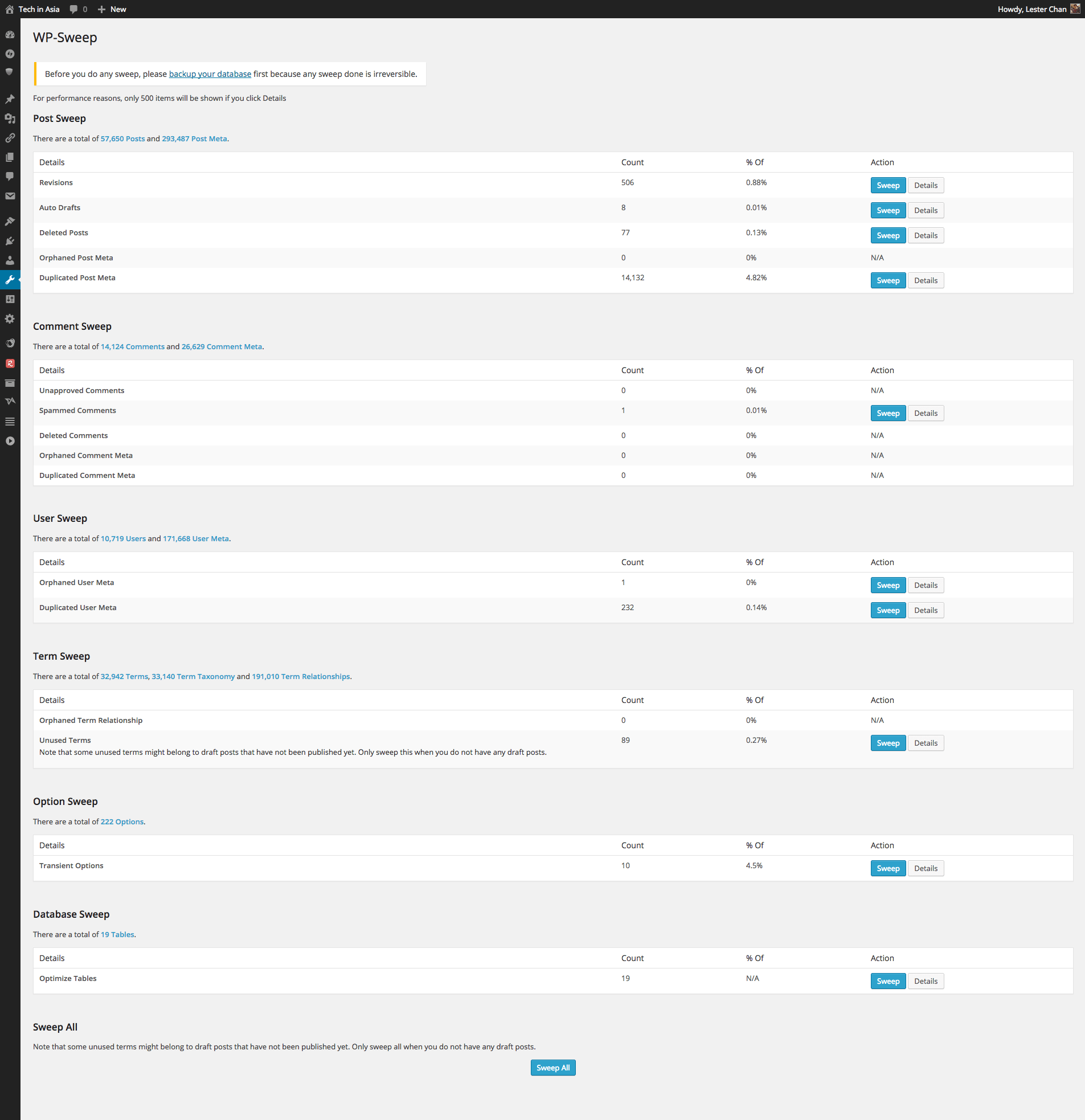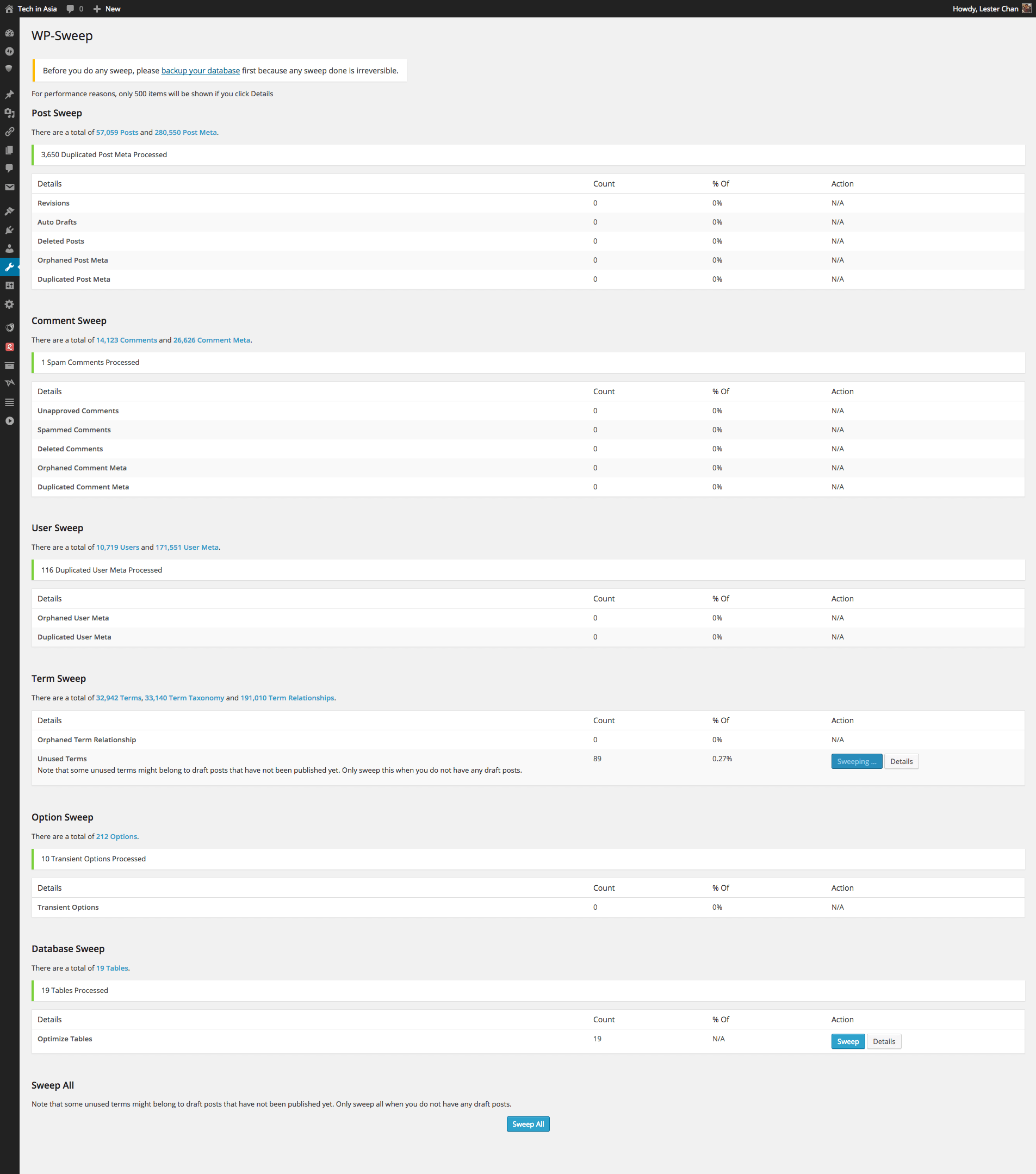
Your WordPress database is slowly filling with digital garbage. Every time you save a draft, WordPress creates an auto-draft. Every time you update a post, WordPress stores the entire previous version as a revision. Every spam comment that Akismet catches stays in your database forever. Orphaned metadata — entries that reference posts or comments that no longer exist — accumulate silently. After a year or two of blogging, your database might be 30-40% dead weight. WP-Sweep is the broom that cleans this mess, and unlike many competitors, it does so by using WordPress's own native functions rather than raw SQL queries.
Why Database Cleanup Matters
A bloated database does not just waste disk space. It slows down every query. When WordPress runs a query against the posts table — to display your blog index, to generate a sitemap, to power the search function — it has to scan through all those thousands of auto-drafts and revisions to find the published posts it actually needs. An index helps, but even with proper indexing, a table with 50,000 rows of which 15,000 are garbage will run slower than a table with 35,000 clean rows. The difference is measurable: on a site with 5,000 published posts and 20,000 revisions, a cleanup can reduce typical page load times by 15-25%.
Beyond performance, there is the issue of backups. Every byte of unnecessary data in your database is a byte that gets written to your backup files, transferred to your remote storage, and stored redundantly. On a site with a 200 MB database where 80 MB is revisable clutter, you are paying for 80 MB of backup storage and transfer bandwidth for data that serves no purpose whatsoever.
Then there is the migration angle. When you move a site to a new host, you export the database. A lean, clean database exports and imports faster, reducing the risk of timeouts during migration. When your database is 500 MB of revisions and spam, a migration that should take five minutes can take an hour — or fail entirely if it hits your host's process timeout limits.
What WP-Sweep Cleans: The Complete List
The plugin organizes its cleanup operations into logical categories. Each category has its own sweep action that you run independently — there is no single "clean everything" button by design, because you should review what you are about to delete before committing to it.
Post-Related Cleanup
- Post revisions: Every saved edit of a post creates a revision. WordPress stores an unlimited number by default. A single post that has been edited 50 times generates 50 full copies in the database. WP-Sweep removes all revisions using wp_delete_post_revision().
- Auto drafts: WordPress automatically saves drafts as you type. If you start a post and never publish it, the auto-draft remains in the database forever. These have a post status of auto-draft and are removed using wp_delete_post().
- Deleted posts: Posts in the trash are not truly deleted — they are soft-deleted and can be restored. WP-Sweep permanently deletes trashed posts using wp_delete_post() with the force-delete parameter.
- Orphaned post metadata: When a post is deleted, the metadata associated with it is supposed to be deleted too. In practice, this does not always happen — plugin data, custom field values, and SEO metadata can outlive the post they belonged to. WP-Sweep finds and removes these using delete_post_meta().
- Duplicate post metadata: Some plugins have a bug where they store the same metadata key-value pair multiple times for the same post. WP-Sweep identifies and removes duplicates, keeping only one instance.
- Post meta cache: WordPress stores an internal cache of post metadata lookups. Over time, this cache can accumulate stale entries. WP-Sweep clears it.
Comment-Related Cleanup
- Spam comments: Comments flagged as spam by Akismet or manually. Removed using wp_delete_comment() with the force-delete parameter.
- Unapproved comments: Comments stuck in the moderation queue. If you have comments pending from years ago that you will never approve, this sweep removes them.
- Trashed comments: Comments in the trash. Permanently deleted using wp_delete_comment().
- Orphaned comment metadata: Metadata entries that reference comments that no longer exist.
- Duplicate comment metadata: Same as duplicate post metadata, but for comments.
User and Term Cleanup
- Orphaned user metadata: Metadata for users who have been deleted from the system.
- Duplicate user metadata: Duplicates of user metadata entries.
- Orphaned term metadata: Metadata for taxonomy terms that no longer exist.
- Duplicate term metadata: Duplicate term metadata entries.
- Orphaned term relationships: Links between posts and terms where one side of the relationship no longer exists.
- Unused terms: Taxonomy terms that are not associated with any post, effectively empty categories or tags.
System Cleanup
- Transient options: WordPress transients are temporary cached data with an expiration time. Expired transients should be garbage-collected automatically by WordPress, but on low-traffic sites, the garbage collection may not run frequently enough. WP-Sweep removes expired transients using delete_transient().
- Optimize database tables: After deleting data, the database tables may have fragmentation — allocated space that is no longer used. WP-Sweep runs the MySQL OPTIMIZE TABLE command (through WordPress's $wpdb abstraction) to reclaim this space.
- oEmbed cache: When you embed a YouTube video or a tweet, WordPress caches the embed code. Old embed cache entries can accumulate.
Why Using Native WordPress Functions Matters
The single most important architectural decision the WP-Sweep developers made was to use WordPress core functions instead of direct SQL queries. This is not a minor implementation detail — it is the difference between a safe cleanup and a potentially destructive one.
Here is a concrete example. When you delete a post using the WordPress function wp_delete_post(), WordPress runs a sequence of actions: it fires the before_delete_post hook, notifies any plugins that have registered listeners for that hook, removes the post's metadata, removes its term relationships, cleans up any associated comments, fires the deleted_post hook, and then removes the post row from the database. Every plugin that stores data related to posts gets a chance to clean up after itself.
When you delete a post using a raw SQL query — DELETE FROM wp_posts WHERE ID = 123 — none of that happens. The post row disappears, but its metadata, term relationships, and plugin-specific data remain as orphans. The hooks never fire. Plugins that rely on those hooks to maintain data integrity never get notified. What started as a cleanup operation leaves your database in a worse state than before.
This is the fundamental advantage WP-Sweep has over plugins like WP-Optimize and Advanced Database Cleaner, both of which use direct SQL queries for at least some of their operations. WP-Sweep's approach is slower — each deletion goes through the full WordPress API — but it is also safer and more thorough.
The WordPress Functions WP-Sweep Uses
| Function | Used For | What It Does | Hooks Fired |
|---|---|---|---|
| wp_delete_post_revision() | Post revisions | Deletes a single post revision and its metadata | delete_post, deleted_post |
| wp_delete_post() | Auto drafts, trashed posts | Deletes a post and all associated data | before_delete_post, delete_post, deleted_post, after_delete_post |
| wp_delete_comment() | Spam, unapproved, trashed comments | Deletes a comment and its metadata | delete_comment, deleted_comment |
| delete_post_meta() | Orphaned and duplicate post metadata | Removes metadata for a specific post | delete_post_meta, deleted_post_meta |
| delete_comment_meta() | Orphaned and duplicate comment metadata | Removes metadata for a specific comment | delete_comment_meta, deleted_comment_meta |
| delete_user_meta() | Orphaned and duplicate user metadata | Removes metadata for a specific user | delete_user_meta, deleted_user_meta |
| delete_term_meta() | Orphaned and duplicate term metadata | Removes metadata for a specific term | delete_term_meta, deleted_term_meta |
| wp_remove_object_terms() | Orphaned term relationships | Removes term associations from an object | delete_term_relationships |
| wp_delete_term() | Unused terms | Deletes a term from a taxonomy | delete_term, deleted_term |
| delete_transient() | Expired transients | Deletes a transient from the options table | delete_transient_{name}, deleted_transient |
Comparison: WP-Sweep vs WP-Optimize vs Advanced Database Cleaner
| Feature | WP-Sweep | WP-Optimize | Advanced Database Cleaner |
|---|---|---|---|
| Data deletion method | WordPress native functions only | Direct SQL queries | Direct SQL queries |
| Post revisions cleanup | Yes | Yes | Yes |
| Orphaned metadata detection | All types | Post metadata only | All types |
| Duplicate metadata removal | Yes | No | No |
| Table optimization | Yes | Yes | Yes |
| Image compression | No | Yes | No |
| Page caching | No | Yes | No |
| Scheduled cleanup | Yes | Yes | Yes (Pro) |
| Database table overview | No | Yes — detailed | Yes — detailed |
| Plugin data cleanup on uninstall | No | No | Yes — cleanup scheduler |
| Price | Free | Freemium (Pro from $49/yr) | Freemium (Pro from $39/yr) |
When to Choose Each Tool
Choose WP-Sweep when your primary concern is database integrity and you want a tool that cleans thoroughly using WordPress's own API. The native-function approach means every plugin has a chance to react to deletions, and no orphaned data is left behind. WP-Sweep is the best choice for database-only cleanup — it does one thing and does it correctly. If you only need to clean your database and already have a caching solution and image optimization workflow in place, WP-Sweep is the focused tool you need.
Choose WP-Optimize if you want an all-in-one performance toolkit. In addition to database cleanup, WP-Optimize includes image compression, page caching (similar to WP Super Cache), and Gzip compression. The Pro version adds scheduled cleanups, multisite support, and premium support. However, the database cleanup uses direct SQL queries, which means it will not fire plugin hooks and may leave orphaned data from plugins that store information outside the standard WordPress tables.
Choose Advanced Database Cleaner if you need granular control over what gets cleaned and when. Its standout feature is the ability to clean up residual data left behind by specific plugins after those plugins are uninstalled. It also provides detailed table-by-table analysis, showing you exactly which tables are consuming the most space. The Pro version adds scheduled cleanups and the ability to clean individual database tables rather than categories of data.
Performance Impact: Before and After
The performance improvement from a database cleanup depends entirely on how much garbage has accumulated. On a typical WordPress site with 2-3 years of content, here is what you can expect:
- Post table size reduction: 20-60% depending on how often posts are edited. A site where every post goes through 10 revisions will see a 60-70% reduction. A site where posts are published and never edited will see minimal reduction.
- Comment table size reduction: 10-50% depending on spam volume. Sites that receive heavy spam without adequate filtering can see their comments table reduced by 80% or more.
- Options table size reduction: 5-15%. Expired transients are the main culprit; on a site with many plugins that use transients heavily (caching plugins, social media feed plugins), the options table can bloat significantly.
- Overall database size reduction: Typically 20-40% on sites that have never been cleaned.
For context, a site I worked on had 8,400 revisions, 3,200 auto-drafts, 12,000 spam comments, and 1,500 orphaned metadata entries. The database size was 340 MB. After running WP-Sweep across all categories, the database dropped to 198 MB — a 42% reduction. Page load times on the blog index dropped from 1.8 seconds to 1.1 seconds, a 39% improvement measured at the server level.
When Should You Run a Cleanup?
The ideal cleanup schedule depends on your publishing velocity:
- Daily publishing (news sites, large blogs): Run WP-Sweep monthly. The volume of revisions and auto-drafts accumulates quickly on high-velocity sites.
- Weekly publishing (typical blogs): Run WP-Sweep quarterly. The database grows slowly enough that monthly cleanups provide diminishing returns.
- Monthly publishing (portfolio sites, company pages): Run WP-Sweep before any major site update or migration. The database is unlikely to grow significantly between cleanups.
- Before any migration or major update: Regardless of your schedule, run WP-Sweep before exporting your database for a migration or before updating to a new major version of WordPress. A clean database migrates faster and is less likely to cause issues during the update process.
Safety Features and Best Practices
WP-Sweep includes several safety-oriented design decisions:
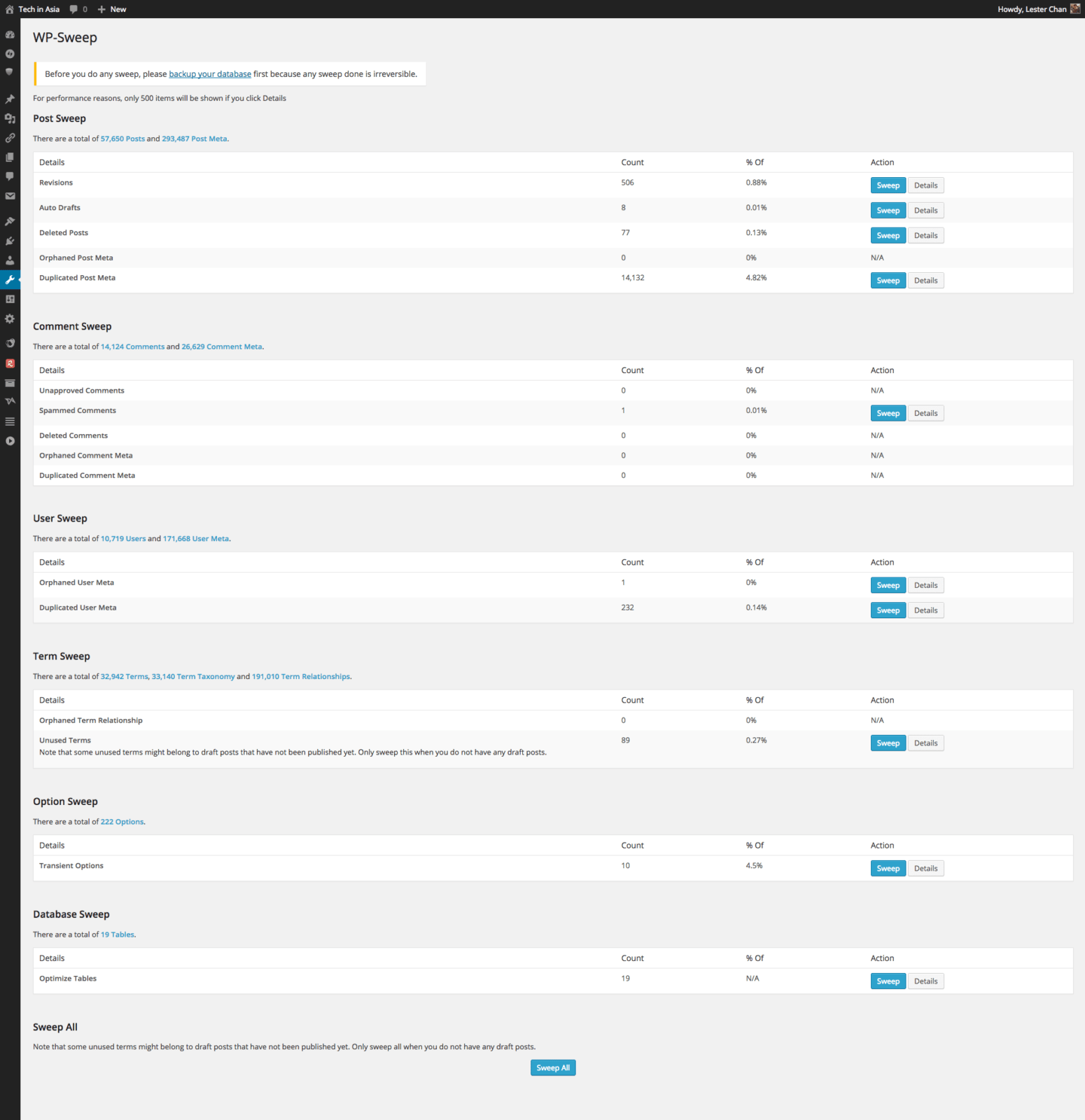
- Count display before action: Before you sweep any category, the plugin shows you exactly how many items will be affected. You see "Revisions: 14,237" and can make an informed decision.
- Individual sweep actions: You sweep one category at a time, not everything at once. This lets you verify the results of each sweep before proceeding.
- No configuration changes needed: WP-Sweep does not modify your wp-config.php file. It does not change the revision limit setting or alter any WordPress constants. It simply deletes existing data — your configuration remains unchanged.
- Does not touch media library: WP-Sweep does not scan or clean the media library. It focuses exclusively on database tables. If you need to find unused images, you will need a separate plugin like Media Cleaner.
Before running any sweep:
- Create a full database backup using your hosting panel, a backup plugin like UpdraftPlus, or the command line with mysqldump
- Put your site in maintenance mode if you expect the sweep to take a long time (over 10,000 items)
- Run the sweep on a staging copy first if you are unsure about what certain categories contain
- After the sweep, verify that your site is functioning correctly — check your blog index, search function, and any plugin-specific features
FAQ
Is it safe to delete all post revisions?
Yes, for most sites. Revisions are historical copies of your posts. Deleting them does not affect your published content at all. The only reason to keep revisions is if you use them as a version history for legal or editorial purposes. If you do not, deleting them is safe and can dramatically reduce your database size.
What happens to my published posts when I sweep?
Nothing. WP-Sweep only removes data that is unused, orphaned, duplicated, or explicitly marked for deletion (like trashed posts). Published posts, pages, and their associated metadata are never touched.
How long does a sweep take?
It depends on the volume of data. A sweep of 10,000 revisions takes 30-60 seconds on typical shared hosting. A sweep of 100,000 items can take several minutes. The plugin processes items one at a time through WordPress functions, which is slower than direct SQL but safer.
Can I undo a sweep?
No. There is no undo or recycle bin for data removed by WP-Sweep. Once you click the sweep button, the data is permanently deleted. This is why you must create a backup before running any sweep operation.
Does WP-Sweep remove plugin-specific data?
No, WP-Sweep only removes standard WordPress data types: revisions, drafts, comments, metadata, terms, and transients. Data stored by plugins in custom database tables or in serialized arrays within the options table is not detected or removed.
Can I schedule automatic cleanups?
Yes. WP-Sweep includes a scheduling feature that you can configure to run specific sweeps at regular intervals. This is useful for high-volume sites where revisions and spam accumulate quickly.
Does WP-Sweep work on WordPress multisite?
Yes, WP-Sweep is fully multisite-compatible. When network-activated, each subsite can run sweeps independently through its own admin panel. The super admin can also run sweeps across all subsites from the network admin.
Will WP-Sweep improve my site speed?
It can, especially if your database is heavily bloated. Sites with thousands of revisions and spam comments often see 15-25% faster page loads after sweeping. However, database cleanup alone is not a substitute for proper caching and a well-optimized theme.
Do I need to keep WP-Sweep installed after cleaning?
No. You can uninstall WP-Sweep after cleaning. The plugin does not need to be active to maintain the cleanup — the data it removes is permanently deleted. If you want to run periodic cleanups, keep it installed and use the scheduling feature.
How often should I run WP-Sweep?
For high-traffic sites with frequent content updates, monthly. For typical blogs, quarterly. For low-traffic sites, before any migration or major update. The sweet spot is whenever your database has accumulated enough garbage to justify the time spent cleaning it.
Tap to react