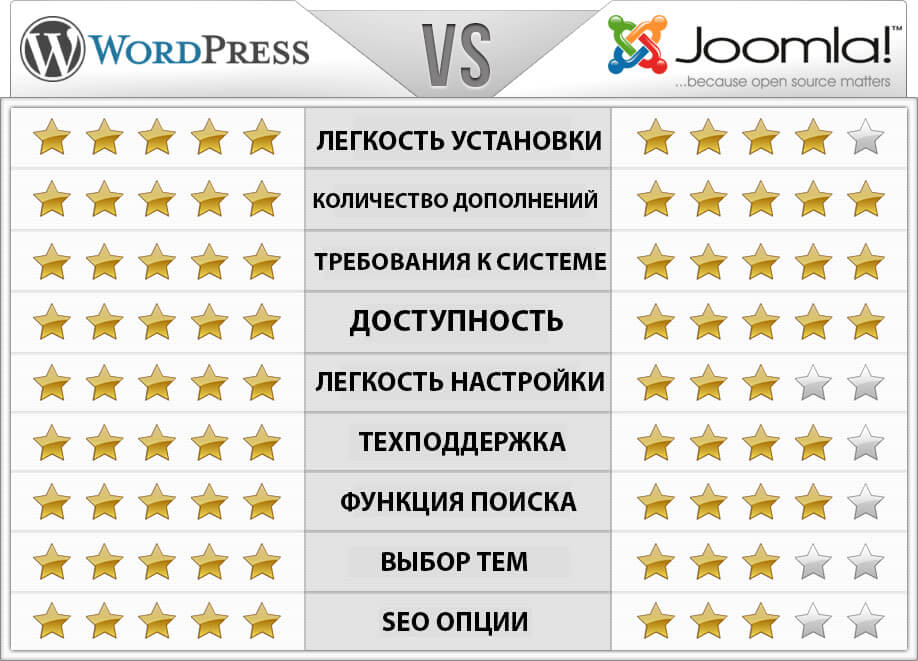
WordPress vs Joomla: Two Giants, One Decision
The WordPress vs Joomla debate has been running for nearly two decades, and if you are building a website today, you will face it head-on. These two open-source content management systems power a staggering portion of the internet — WordPress claims over 43% of all websites, while Joomla powers roughly 2.5%. That raw market share gap is the first thing people see. But market share and suitability for your specific project are two entirely different beasts. A CMS that works perfectly for a photographer's portfolio may be a disaster for a multilingual corporate intranet. The question is not which CMS is better — it is which CMS is better for you.

Let us clear one thing up right away: both systems are free, both use PHP and MySQL, both have extensive extension libraries, and both can build virtually any type of website. The differences live in the details — the admin interface philosophy, the extension architecture, the approach to multilingual content, the security model, and the learning curve. Those details decide whether you launch a site in a weekend or spend a month fighting the platform.
Ease of Use: The First-Day Experience
WordPress wins this category for one simple reason: it was designed for non-developers from day one. The classic editor and the Block Editor (Gutenberg) both follow a what-you-see-is-what-you-get philosophy. Creating a page feels like writing a document. Menus, widgets, and the Customizer give visual feedback immediately. A complete beginner can install WordPress through a hosting auto-installer, pick a theme, and publish a basic page within an hour.
Joomla takes a different approach. Its admin panel is more structured and modular, which is powerful but intimidating. Where WordPress has a unified post editor, Joomla separates articles from modules from menus — you need to understand how these components connect before you can build a page. The Joomla dashboard has more buttons, more tabs, and more configuration screens visible at once. For a developer who wants precise control, this is excellent. For someone who just wants to write a blog post, it is overkill.
\u{201c}I have trained clients on both platforms. A WordPress user becomes productive in days. A Joomla user needs weeks to feel comfortable clicking around the admin without supervision. The difference is not intelligence — it is interface design philosophy.
The menu system is the clearest example. In WordPress, you create a menu by dragging items in Appearance → Menus. In Joomla, you create menu items in the Menu Manager, then assign modules to menu positions, then configure module display conditions. Each step makes logical sense once you understand the architecture, but there is no visual preview, and the workflow is far from intuitive for newcomers.
Extension Ecosystem: Quantity vs Structure
WordPress has over 60,000 free plugins in its official repository. The sheer volume means there is almost always a ready-made solution for whatever you need — contact forms, SEO, caching, page builders, membership systems, e-commerce, you name it. The downside of this abundance: quality varies enormously. For every well-maintained plugin, there are ten that were abandoned three years ago and will break your site on the next update.
Joomla has roughly 6,000 extensions in its official directory. That sounds like a losing comparison until you understand the architectural difference. Joomla extensions are built on the MVC (Model-View-Controller) pattern by default. The framework enforces a common structure. As a result, Joomla extensions tend to be more consistent in quality and more maintainable over the long term. You will not find a Joomla equivalent of the lowest-quality WordPress plugins — the barrier to entry for Joomla extension development is simply higher.
| Ecosystem Aspect | WordPress | Joomla |
|---|---|---|
| Free extensions | 60,000+ | 6,000+ |
| Plugin architecture | Hooks and filters | MVC framework |
| Quality consistency | Highly variable | Generally consistent |
| One-click install | Yes | Yes |
| Premium marketplaces | CodeCanyon, independent stores | JED, independent stores |
| Typical extension cost | $0 – $200/year | $0 – $150/year |
Here is the practical takeaway: if you need a very specific feature and want multiple options to choose from, WordPress typically has more choices. If you need extensions that integrate deeply and predictably with the core system, Joomla's structured approach wins.
SEO Capabilities
Both platforms handle on-page SEO fundamentals well: customizable title tags, meta descriptions, clean URLs, canonical URLs, and XML sitemaps are available on both. The difference is in how they achieve it.
WordPress relies on plugins like Yoast SEO, Rank Math, or All in One SEO Pack. These plugins are extremely mature, with millions of users and years of development behind them. They offer content analysis, readability scoring, schema markup generation, and social media preview customization. The level of polish in WordPress SEO tools is unmatched in any CMS ecosystem.
Joomla has strong built-in SEO settings — you can enable SEF URLs with one click, configure URL rewriting, and set global metadata. But for advanced SEO features, you need extensions like sh404SEF, EFSEO, or JSitemap Pro. These are powerful tools, but they lack the beginner-friendly guidance that WordPress SEO plugins provide. A Joomla SEO setup requires more manual configuration and understanding of SEO concepts.
Security: Perception vs Reality
WordPress gets a bad reputation for security, but the numbers tell a more nuanced story. Because WordPress powers 43% of the web, it is the most attractive target for automated attacks. The vast majority of WordPress breaches result from outdated plugins, weak passwords, or nulled premium themes — not from core vulnerabilities. The WordPress core itself receives rapid security patches, often within hours of a discovered vulnerability.
Joomla has a smaller attack surface because fewer sites run on it. Its core includes built-in two-factor authentication, forced password strength policies, and access control lists (ACL) that are more granular than WordPress roles. The Joomla Security Strike Team maintains an impressive track record — core vulnerabilities are rare and patched quickly through automatic update notifications.
| Security Feature | WordPress | Joomla |
|---|---|---|
| Two-factor authentication | Via plugin (Wordfence, etc.) | Built into core |
| Forced password strength | Basic indicator | Configurable policy |
| ACL granularity | 5 roles, extensible | Unlimited user groups with permissions |
| Automatic core updates | Yes (minor versions) | Notification + manual trigger |
| Extension update monitoring | Via plugins | Built into extension manager |
Multilingual Support
This is where Joomla genuinely shines. Multilingual functionality is built into the Joomla core. You install language packs through the admin interface, configure content languages, and assign articles to specific languages. The system handles language switching, content associations, and language-specific menus without any third-party extension. A fully bilingual site can be configured in under an hour by a user familiar with Joomla's structure.
WordPress has no built-in multilingual support. You need a plugin like WPML, Polylang, or TranslatePress. These are excellent tools — WPML in particular rivals dedicated translation management systems — but they cost money (WPML starts at $39/year) and add complexity. Each plugin takes a slightly different approach to content translation, so switching between them later involves substantial rework.
If your project requires multilingual content from day one and you want native, free, built-in support, Joomla is the objectively correct choice.
Performance
Out of the box, Joomla is slightly faster than WordPress. Joomla's caching system is more aggressive — it includes page caching, progressive caching, and conservative caching modes right in the global configuration. Gzip compression is also built in. A default Joomla installation with caching enabled loads noticeably faster than a default WordPress installation.
WordPress can match or exceed Joomla's performance with optimization, but you need plugins to get there: a caching plugin (WP Rocket, W3 Total Cache), an image optimization plugin, a database cleanup plugin, and possibly a CDN integration plugin. This is not a dealbreaker — millions of high-traffic WordPress sites perform excellently — but it is extra work that Joomla handles out of the box.
The performance gap narrows significantly once both platforms are properly optimized. At the enterprise level, both CMSes can serve millions of page views with the right server configuration, reverse proxy caching, and CDN setup.
E-Commerce: WooCommerce vs JoomShopping and VirtueMart
For e-commerce, WordPress wins convincingly through WooCommerce. It is not just a plugin — it is an entire e-commerce ecosystem. Over five million active installations, thousands of extensions (payment gateways, shipping calculators, subscription managers, booking systems), and one of the largest developer communities in the open-source world. WooCommerce stores can scale from a single product to thousands of SKUs without switching platforms.
Joomla has two main e-commerce options: VirtueMart (the veteran, active since the Mambo days) and JoomShopping (newer, more modern architecture). Both are capable platforms. VirtueMart handles complex product catalogs with configurability that rivals Magento. JoomShopping offers a cleaner interface and more modern PHP code. However, both trail WooCommerce significantly in extension availability, community size, and third-party integrations with shipping carriers and payment processors.
For a simple store with a handful of products, any of these platforms work. For a serious e-commerce project that needs PayPal, Stripe, shipping label printing, inventory management, and CRM integration — WooCommerce is the safer bet.
Recommendations by Use Case
There is no universal winner. Here is the breakdown by project type:
- Blog or content site → WordPress. The blogging workflow is what WordPress was built for. Categories, tags, comment management, editorial calendars — all native or available through mature plugins.
- E-commerce → WordPress + WooCommerce. The ecosystem advantage is overwhelming.
- Multilingual corporate site → Joomla. Built-in multilingual, granular ACL for department-level content management, and native caching make it the stronger choice.
- Portfolio or photography site → WordPress. The theme ecosystem for visual portfolios is unmatched, and page builders like Elementor give photographers creative control without code.
- Membership or community site → Joomla. The built-in user group system and access control make complex membership structures simpler to implement without plugins.
- Custom web application → Joomla. The MVC framework, built-in ACL, and consistent extension architecture make it a better foundation for custom development.
Learning Curve Comparison
WordPress has a flatter initial learning curve. The admin panel is simpler, the terminology is intuitive (Posts, Pages, Media), and the visual editor gives immediate feedback. The plateau comes later — when you need to customize theme functionality with hooks, create custom post types, or debug plugin conflicts. At that point, the WordPress hook system can feel chaotic compared to Joomla's structured MVC approach.
Joomla has a steeper initial climb. You need to understand articles, categories, modules, components, plugins, templates, and menu assignments before you can build anything beyond a basic page. But once you understand these concepts, the ceiling is higher. Custom development in Joomla follows clear patterns, extension overrides are predictable, and the system feels more like a framework than a collection of loosely connected features.
Migration Between Platforms
Migrating from one CMS to the other is possible but never seamless. Tools like FG Joomla to WordPress handle content migration — articles, categories, images, and metadata transfer reliably. Internal links, custom fields, extension-specific data, and SEO settings may require manual cleanup. WordPress to Joomla migration is less common and has fewer automated tools, but the J2XML importer can handle content import from a WordPress WXR file.
If you are considering migration, do it early — ideally before the site is live and indexed. Migrating a live site with hundreds of indexed URLs inevitably causes temporary traffic drops and requires careful redirect planning.
Frequently Asked Questions
Which CMS is easier for beginners?
WordPress. The admin interface is simpler, the visual editor is more intuitive, and the learning resources (tutorials, videos, courses) are far more abundant. A motivated beginner can build a basic WordPress site in a day. Joomla requires understanding its component-module-menu architecture before anything works, which typically takes a week or two of dedicated learning.
Is Joomla more secure than WordPress?
Joomla has a smaller attack surface and stricter built-in security features (2FA, password policies, granular ACLs). However, most WordPress security incidents stem from outdated plugins and weak passwords, not core vulnerabilities. Both platforms have responsible security teams and patch critical issues quickly. A well-maintained WordPress site is as secure as a well-maintained Joomla site.
Which CMS has better SEO capabilities?
Both handle fundamentals equally well. WordPress has a stronger SEO plugin ecosystem (Yoast, Rank Math) with beginner-friendly content analysis and guidance. Joomla has more built-in SEO features (SEF URLs, URL rewriting, global metadata), but its SEO extensions require more manual configuration. For a novice, WordPress SEO tools are more accessible.
Can I migrate from WordPress to Joomla or vice versa?
Yes. FG Joomla to WordPress handles Joomla-to-WordPress migration well for content, categories, and images. J2XML can import WordPress WXR files into Joomla. In both directions, expect manual cleanup of internal links, custom fields, and SEO metadata. Plan redirects carefully if migrating a live site.
Which CMS is better for e-commerce?
WordPress with WooCommerce is the clear winner. The extension ecosystem, payment gateway integrations, shipping solutions, and community support are unmatched. Joomla's VirtueMart and JoomShopping are capable but have far fewer extensions and integrations.
Does Joomla have anything like WordPress page builders?
Yes. Joomla has SP Page Builder, Quix, and YOOtheme Pro, which offer drag-and-drop page building similar to Elementor or Beaver Builder. The Joomla page builder ecosystem is smaller but produces cleaner markup in many cases.
Which CMS handles multilingual sites better?
Joomla wins here decisively. Multilingual support is built into the core — no plugins required. You install language packs, configure content languages, and the system handles language switching and content associations. WordPress requires third-party plugins like WPML or Polylang, which add cost and complexity.
How much does each CMS cost?
Both core systems are free and open-source. Costs come from hosting (both require PHP/MySQL hosting, typically $5-30/month), premium themes ($30-80 one-time), premium extensions ($0-200/year per extension), and possibly developer time. Total first-year costs for a small business website typically run $100-500 on either platform.
Which CMS do large enterprises use?
Both are used at enterprise scale. WordPress powers sites for Sony, Disney, and The White House. Joomla powers sites for IKEA, Holiday Inn, and Harvard University. Enterprise adoption depends more on the development team's familiarity and specific requirements than on any inherent limitation of either platform.
Can I try both before deciding?
Yes. Set up two subdomains on a cheap hosting account, install both CMSes (most hosts offer one-click installers for both), and build a test page on each. Spend a weekend with each admin panel. Hands-on experience will tell you more than any comparison article.
Tap to react