VehicleManager — Free Vehicle Catalog Manager for Joomla CMS

VehicleManager is a free extension for Joomla 1.5, 1.6, 1.7, and 2.5 that helps you build a complete catalog or online showroom for cars, buses, motorcycles, and other vehicles. With this component, you can easily configure filtering options, categories, image galleries, and vehicle detail pages — everything a modern car dealer or fleet owner needs for an effective online presence.

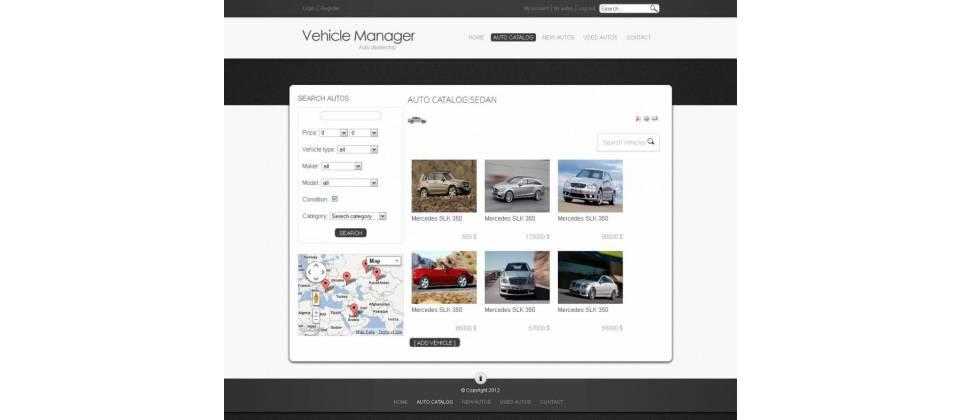
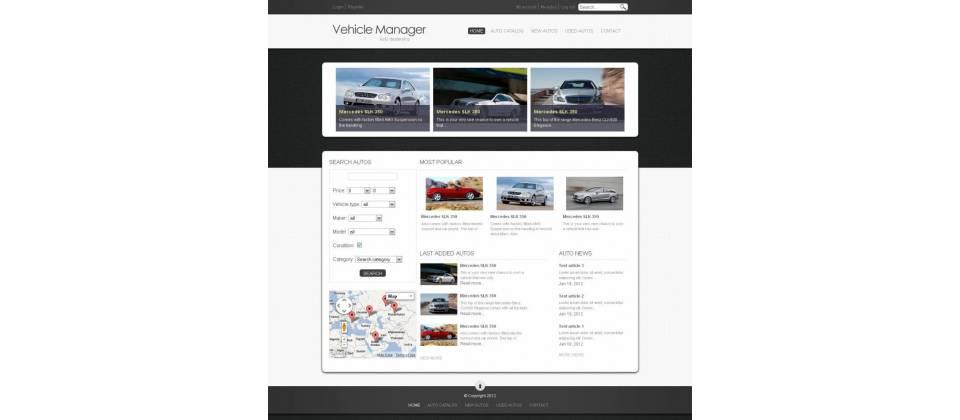
VehicleManager — vehicle catalog interface on Joomla
VehicleManager — free vehicle catalog management component for Joomla CMS

Key Features of VehicleManager

The administrator gets a tool that allows creating vehicle categories: cars, buses, bicycles, motorcycles, trucks, vehicles for sale, and rentals. The component includes a full photo gallery where users can browse high-resolution vehicle images. Each vehicle detail page contains a comprehensive set of descriptions: model, year of manufacture, engine type, transmission, number of cylinders, drivetrain, body type, and other useful information.

VehicleManager — vehicle detail card with specifications
Detailed vehicle card with technical specifications in VehicleManager

Categories and Filtering

A flexible category system lets you structure the catalog by vehicle type, purpose, and status. You can create a category tree of any nesting depth — for example: "Cars" → "Sedans" → "Business Class." Specification-based filtering helps visitors quickly find the right model by parameters: price range, year, fuel type, transmission, and dozens of other criteria.

Vehicle Specifications

VehicleManager lets you define the following parameters for each catalog entry:

  • Make and model of the vehicle
  • Year of manufacture and mileage
  • Engine type: petrol, diesel, hybrid, electric
  • Transmission: manual, automatic, semi-automatic, CVT
  • Number of cylinders and engine displacement
  • Engine power in horsepower
  • Drivetrain: front-wheel drive, rear-wheel drive, all-wheel drive
  • Body type: sedan, hatchback, wagon, coupe, SUV, and others
  • Exterior and interior color
  • Price and currency
\u{201c}

The specification form is customizable by the administrator — you can add, hide, and reorder fields depending on the vehicle type. For example, a motorcycle does not need "number of doors" and "trunk volume," while for sale listings "mileage" and "number of previous owners" are essential.

VehicleManager Documentation

Photo Gallery

The component includes a built-in image gallery for each vehicle. You can upload an unlimited number of photos: exterior view, interior, dashboard, trunk compartment, engine bay, and other angles. Images are automatically resized and displayed as a slideshow or thumbnail grid. JPEG, PNG, and GIF formats are supported.

The gallery uses Joomla's standard media library, so compression and watermark settings are inherited from the global CMS configuration.

VehicleManager — vehicle location on Google Maps
Google Maps integration for displaying vehicle location

Google Maps Integration

In the location section, site visitors can see the vehicle on a Google Map. You enter an address or coordinates, and the map is automatically embedded into the vehicle detail page. This is particularly useful for dealerships with multiple branches — the client immediately sees exactly which showroom has the car they are interested in. To enable maps, you need a free Google Maps API key from the Google Cloud Console. Enter this key in the component settings, and the map functionality activates immediately for all vehicle detail pages. Without the API key, the map section remains hidden.

The map supports standard zoom gestures, switching between road map and satellite view, and one-click route planning.

Reviews and Ratings

Site visitors have access to a review and rating system for vehicles. Each registered user can leave a review of a vehicle and rate it on a five-star scale. The mechanism works simply: the user visits a vehicle detail page, scrolls to the review block, and fills out a form — text plus a star rating. After submission, the review enters the moderation queue in the admin panel. The administrator sees all pending reviews in a dedicated section and can approve, edit, or reject each one. This protects the site from spam bots, competitors leaving negative comments, and users posting links to external resources. Approved reviews appear under the vehicle card and influence its overall rating. Reviews go through administrator pre-moderation — this protects the catalog from spam and unfair competition.

Installing VehicleManager on Joomla

The installation process follows the standard procedure for any Joomla extension and takes no more than two minutes.

Step 1: Download the Component

Download the VehicleManager component archive from the official developer site or the Joomla Extensions Directory. Make sure the file has a zip extension and is not corrupted.

Step 2: Install via Admin Panel

Log in to the Joomla administrator panel. Go to "Extensions" → "Extension Manager". On the "Install" tab, click the file selection button, choose the downloaded archive, and click "Upload & Install." After a few seconds, you will see a success message.

Step 3: Configure Basic Settings

After installation, the component appears in the "Components" menu of the admin panel. Open VehicleManager and go to "Options." Here you set:

  • Number of entries per catalog page
  • Thumbnail sizes for the gallery
  • Mileage measurement units (km or miles)
  • Currency for price display
  • Whether reviews require pre-moderation
  • Google Maps API key for map functionality

Step 4: Create Categories

In the "Categories" section, build your catalog structure. Start with the main vehicle types, then add subcategories by brand, body type, or price range — depending on your business structure.

Step 5: Add Vehicles

Click "New" in the "Vehicles" section and fill in all available fields. Upload photos, specify characteristics, set the price and status. Save the entry — the vehicle will appear in the catalog.

When adding vehicles, pay attention to these points. First, choose the correct category — this determines which section the entry appears in and which filters apply. Second, upload images at a resolution of at least 800x600 pixels — the component auto-generates thumbnails, but high-resolution originals are needed for detailed viewing. Third, fill in the meta description field — this directly affects search engine ranking. While the component lacks advanced SEO tools, basic meta tags are handled correctly.

VehicleManager vs. Alternatives

The Joomla extension market offers several solutions for vehicle catalogs. Below is a comparison of VehicleManager with commercial alternatives.

Feature VehicleManager AutoManager Pro (paid) CarDealer (paid)
Price Free from EUR 49/year from USD 79
Joomla Support 1.5, 1.6, 1.7, 2.5 3.x, 4.x 3.x, 4.x, 5.x
Vehicle Categories Unlimited nesting Unlimited nesting Up to 3 levels
Photo Gallery Built-in, unlimited Built-in, unlimited Built-in, up to 20 photos
Google Maps Yes Yes Pro version only
Reviews & Ratings Yes, with moderation Yes Yes, with moderation
Specification Filter Yes Yes, advanced Yes
Import/Export No CSV, XML CSV
Multilingual Basic Full Full
Technical Support Community forum Ticketing system Email + tickets

Practical Use Cases

Let us look at situations where VehicleManager is the optimal choice.

Car Dealer Website

A small dealership with a near-zero development budget. VehicleManager lets you create a presentable vehicle catalog with photos, prices, and specifications in one evening. Add a contact form — and your site is ready to accept customer inquiries.

Car Classifieds Board

If you are launching a private car listings site, VehicleManager provides the basic structure: categories, filters, galleries, maps, and seller contacts. To accept user-submitted ads, you can use Joomla's standard contact form with email forwarding to the administrator.

Company Fleet Catalog

A transportation company, taxi fleet, or car rental service can use VehicleManager for an internal or public vehicle catalog. Google Maps integration helps customers and dispatchers see the location of available vehicles in real time.

Automobile Museum

If you run an automobile museum or vintage car enthusiasts club website, VehicleManager serves as an excellent platform for cataloging exhibits. The photo gallery and detailed descriptions let you showcase each vehicle in its full glory.

Frequently Asked Questions

Is VehicleManager compatible with Joomla 4?

Read answer

No, VehicleManager does not officially support Joomla 3.x or 4.x. Development of the component ceased around 2013. Attempting to install it on a modern Joomla version will result in a compatibility error. For Joomla 3 and above, use commercial alternatives: AutoManager, CarDealer, or DJ-Classifieds configured for a vehicle catalog.

How many vehicles can I add to the catalog?

Read answer

Theoretically unlimited. Practically, the limit is imposed by your hosting resources. With 500 or more entries, we recommend enabling Joomla caching and optimizing images before uploading. On standard shared hosting, a comfortable limit is around 2000–3000 vehicles.

Can I change the vehicle detail page design?

Read answer

Yes. VehicleManager uses Joomla's standard templating system. You can create a template override for the component in your active template folder. View files are located in /components/com_vehiclemanager/views/. Copy the desired file to /templates/your_template/html/com_vehiclemanager/ and edit without risk of losing changes during updates.

Does the component support SEO settings?

Read answer

Basic SEO features are present: each vehicle detail page has its own URL (via Joomla router), meta tags are inherited from system-wide settings. However, dedicated SEO fields (canonical URL, Open Graph, Twitter Cards) are not included in the component. For advanced SEO, use third-party plugins like sh404SEF or EFSEO.

How do I add a custom specification field?

Read answer

VehicleManager allows the administrator to configure the list of displayed fields in the control panel. However, adding a completely new field (e.g., "city fuel consumption") requires editing the component code: modifying the data model, input form, and output template. We recommend using the existing "Notes" field for non-standard data unless you have PHP development skills.

Is there a CSV import feature for vehicles?

Read answer

There is no built-in CSV or Excel import function in VehicleManager. For bulk record creation, you would need to write a custom PHP script that works directly with the component's database tables. The tables use the jos_vm_ prefix. An alternative is using the J2XML component for content export/import, but it does not guarantee correct transfer of all specification fields.

Can I integrate a payment system for selling cars?

Read answer

No, VehicleManager is purely a catalog, not an online store. It has no shopping cart, checkout, or payment gateways. If you need online payment capability (e.g., vehicle reservation or deposit), you will need to integrate with an e-commerce component such as VirtueMart or HikaShop, or have a programmer extend the functionality.

How do I translate the component interface into another language?

Read answer

VehicleManager uses Joomla's standard language file mechanism (.ini). Translation files are located in the component's /language/ directory. To add a new language, create a copy of the English language file, rename it according to the language code (e.g., de-DE.com_vehiclemanager.ini for German), and translate all strings. Ready-made Russian and Spanish translations can be found on Joomla community forums.

Is it safe to use this component today?

Read answer

With caveats. Joomla 1.5–2.5 themselves have long been without security updates, and using these CMS versions on a public site is not recommended. However, if your project is still on Joomla 2.5 for specific reasons, VehicleManager does not introduce additional threats provided the server is properly configured and all known Joomla vulnerabilities are patched. For new projects, choose modern alternatives.

Where can I download VehicleManager?

Read answer

The official page is on the Joomla Extensions Directory (extensions.joomla.org). The distribution package can also be found on GitHub mirrors and Joomla community archives. Before installation, always verify the archive checksum: the original file should not contain any third-party code. We recommend downloading only from trusted sources.

Technical Requirements and Limitations

Parameter Value
Joomla Version 1.5, 1.6, 1.7, 2.5
PHP Version 5.2.4 or higher (5.3+ recommended)
Database MySQL 5.0.4+
License GNU GPL v2
Distribution Size approximately 350 KB (.zip archive)
Languages English, Russian (partial), Spanish (partial)
SEF Support Yes, via standard Joomla router
Mobile Responsiveness Depends on site template
Caching Standard Joomla caching

User Feedback

\u{201c}

I installed VehicleManager on a small dealership site — the client is happy. Yes, the admin panel interface is not the prettiest, but the functionality is more than sufficient. Vehicle cards look decent, the gallery works without issues. A shame the project was abandoned.

Alex, auto portal webmaster
\u{201c}

For a free solution, VehicleManager is surprisingly good. Google Maps integration, proper SEF URL handling through the built-in router, customizable specification fields — all features you usually only find in paid components. CSV import is missing, but for this price, you cannot complain.

Max, developer

Conclusion

VehicleManager is a competent free solution for building a vehicle catalog on Joomla 1.5–2.5. The component offers functionality comparable to entry-level commercial products: unlimited category nesting, detailed specifications, photo gallery, Google Maps integration, reviews, and ratings. If your project runs on one of the supported Joomla versions and needs a functional vehicle catalog without financial investment, VehicleManager deserves your attention.

The main drawback of the component is the lack of updates and support for modern Joomla versions. For new projects on Joomla 3.x and above, we recommend considering commercial alternatives. However, if you are maintaining an existing Joomla 2.5 site with a vehicle catalog, VehicleManager remains one of the best free options available.

Download

Tap to react