Tabs & Sliders — Free Joomla Plugin for Organizing Content
Ever opened a Joomla article and faced a wall of text that made your eyes glaze over? You are not alone. Content organization is one of the most underestimated aspects of Joomla site management, and most administrators simply dump everything into a single scrollable blob. The Tabs & Sliders plugin takes a different approach — it gives you two lightweight tools, tabs and toggleable sliders, that transform chaotic content into structured, navigable sections.

Unlike heavy slider carousels that scream "2014 marketing site," this plugin keeps things functional. Tabs let users flip between related sections. Sliders (also called accordions or toggles) let them expand and collapse individual content blocks. Both reduce visual clutter without hiding content from search engines.
What Tabs & Sliders Actually Does
The plugin adds two shortcode types to your Joomla editor:
- Tabs — horizontal tabbed navigation that switches between content panels.
- Sliders — vertically stacked toggles where each click expands or collapses a content section.
Both work through simple shortcodes baked right into the article content. No module configuration, no template overrides, no custom CSS required to get started. You write the shortcodes in your article, and the plugin handles the rendering.
Syntax Reference
Tabs
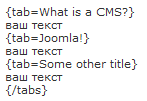
The tab syntax uses a wrapper [tabs]...[/tabs] with individual [tab title="..."]...[/tab] elements inside.
[tabs][tab title="Description"]Product description goes here.[tab title="Specifications"]Technical specs go here.[tab title="Reviews"]Customer reviews go here.[/tabs][/codeblock]
Sliders
Sliders use [slider title="..."]...[/slider] or a shorthand [spoiler]...[/spoiler] syntax depending on the version.
[slider title="Click to expand"]This content is hidden until the user clicks the title.[/slider][/codeblock>
You can stack multiple sliders vertically, and each one operates independently. Users can have several sliders open at once, or just one — whatever suits the reading flow.
Tabs vs. Sliders — When to Use Which
| Scenario | Best Choice | Why |
|---|---|---|
| Comparing features side-by-side | Tabs | Users can rapidly switch between panels |
| FAQ sections | Sliders | Users open only questions relevant to them |
| Step-by-step tutorials | Tabs | Sequential navigation matches the learning flow |
| Optional/advanced content | Sliders | Keeps main content clean, details accessible |
| Product specifications | Tabs | Structured comparison across categories |
| Troubleshooting guides | Sliders | Each problem/solution pair stays collapsed until needed |
Tabs & Sliders vs. Alternatives
| Feature | Tabs & Sliders | Regular Accordion JS | Custom CSS Tabs | Paid Joomla Extension |
|---|---|---|---|---|
| Price | Free | Free | Free | €20-60 |
| Shortcode-based | Yes | Varies | No (pure HTML/CSS) | Yes |
| Two UI patterns in one | Yes (tabs + sliders) | Usually one | Depends | Rarely |
| No Bootstrap dependency | Yes | Varies | No | Usually |
| Accessibility (ARIA) | Yes | Rare | Depends on implementation | Usually |
| Mobile responsive | Yes | Usually | Depends | Yes |
| Works in any editor position | Yes | Usually | Yes | Module positions only |
The combination of tabs and sliders in a single free plugin is what sets this apart. Most alternatives offer one or the other, forcing you to install two separate extensions or pay for a premium bundle.
Design Options
Out of the box, the plugin comes with two styling variants that you select in the plugin settings. Both are clean, minimally designed, and adapt to your template's color scheme. If neither matches your design, the plugin's CSS is straightforward to override — every element has a clear class name like .tab-slider-tab and .tab-slider-pane.
SEO and Indexing
Both tabs and sliders keep all their content in the HTML source at all times. No AJAX loading, no client-side rendering — just CSS-hidden panels. Google crawlers see everything on the first pass, which means your FAQ content, product specifications, and troubleshooting guides all get indexed regardless of whether the panels start open or closed.
Installation and Requirements
The plugin installs like any other Joomla extension. Download the ZIP, install through the Extension Manager, and enable it in the Plugin Manager. No additional modules or components to configure. Compatible with Joomla 3.x.
Requirements are minimal: PHP 5.3+ and a standards-compliant Joomla template. No Bootstrap, jQuery UI, or MooTools dependencies.
Known Limitations
No plugin is perfect, and Tabs & Sliders has a few quirks worth knowing about:
- No nested tabs. You cannot place tabs inside other tabs. Use sliders inside tabs (or vice versa) to create multi-level content organization.
- No tab persistence. If a user navigates away and returns, tabs reset to the first tab. There is no built-in URL hash support for deep-linking to a specific tab.
- Limited styling options in admin. The two included styles cover most use cases, but if you need something radically different, CSS customization is required.
Practical Use Cases
Here are real-world examples where Tabs & Sliders shine on Joomla sites:
E-commerce product pages — Put the full description in the first tab, specifications in the second, customer reviews in the third, and shipping info in the fourth. Everything on one page, no scrolling marathon.
Documentation and tutorials — Use tabs for different operating systems or software versions. Use sliders for troubleshooting FAQs where only the relevant answer needs to be visible.
Comparison articles — Joomla extension reviews, hosting comparisons, or anything where readers benefit from flipping between similar content blocks.
Landing pages — Condense testimonials, case studies, feature lists, and pricing into a compact tabbed layout that loads fast and converts well.
Final Thoughts
Tabs & Sliders solves a specific problem — content organization — without over-engineering the solution. It is free, lightweight, compatible with the Joomla editor workflow, and produces accessible, indexable HTML. If your Joomla articles regularly grow beyond a few sections and you want to give readers a way to navigate them without endless scrolling, this plugin earns its place in your extensions folder.
Advanced texture techniques include trim sheets — specialized texture atlases that place multiple different surface patterns on a single texture. This approach is widely used in the gaming industry to optimize memory and draw call counts. Instead of unique textures per object, the artist creates trim sheets with modular patterns combining on different models.
Color grading textures is critical — even quality source material looks foreign in a scene without it. Professional artists never use textures at default color settings — they adapt the color profile to the specific scene lighting. Exterior scenes get cooler tones. Interior scenes get warmer amber. Night scenes get desaturated and shifted blue.
Photogrammetry has fundamentally changed texture creation. Modern scanners capture not only color data but surface geometry with sub-millimeter accuracy. The result is materials with unprecedented detail — real crack depth, micro-surface topography, and coating optical properties that even skilled texture painters struggle to replicate manually.
The future of texturing is tied to machine learning. Neural network tools can already generate seamless textures from single photographs, automatically create normal and roughness maps, and synthesize new texture variations while maintaining stylistic unity. Stable Diffusion and specialized texture generation models are opening previously impossible possibilities.
Collecting and cataloging texture resources becomes critical over years of work. Experienced artists build personal libraries of thousands of textures. Free online libraries supplement personal collections and fill gaps — rare surfaces, specific materials, and unusual textures hard to find commercially.
Creating seamless textures from real-world photos involves several proven techniques. Beyond the classic Offset Filter + Clone Stamp method, advanced approaches include Frequency Separation — separating texture from color/tone for independent editing — and generative neural network-based seam filling. Each method has advantages depending on the task and source material type.
Optimizing textures for different platforms requires understanding each target system's technical constraints. Mobile devices limit texture size and simultaneous material count. Console games balance quality and performance. PC projects allow maximum resolution. Adapting a single texture library for multiple platforms is a standard task requiring systematic file organization.
The diversity of approaches to working with graphic resources in the modern industry is staggering. Large studios maintain entire departments specializing in texture creation and cataloging. Independent developers rely on free and paid libraries, combining ready-made resources with their own work. Students and beginning artists learn basic skills by experimenting with free materials and gradually building portfolios. This ecosystem of educational and professional resources is the foundation of the computer graphics industry, and every free resource contributes to the overall development of the field. Understanding how to properly search for, select, and adapt graphic materials is a skill developed over years of practice.
Free online resources have dramatically lowered the barrier to entry into the profession. Ten years ago, a beginning 3D artist was forced to either purchase expensive texture libraries or photograph every surface for their projects themselves. Today, dozens of sites offer thousands of free high-resolution textures, and photolessons.org has its place in this ecosystem, providing quality materials to a broad audience of users. This democratization of tools has led to an explosion in independent development, the emergence of hundreds of small studios and thousands of solo creators able to compete with large companies in certain visual content niches.
The technical quality of modern texture libraries has reached a level recently available only to major studios with seven-figure budgets. 4K and 8K resolution has become standard, PBR material calibration is performed with laboratory precision, and scanning technologies capture optical properties of real surfaces with unprecedented accuracy. Nevertheless, collections of photographs of real surfaces that have not undergone industrial processing retain their value — lighting imperfections, random artifacts, and slight distortions create the organic character that makes surfaces look alive and convincing on screen.
Creating realistic digital materials is as much an artistic challenge as a technical one. A single poorly chosen texture can destroy the impression of a carefully constructed scene. Conversely, a well-chosen and properly configured texture can compensate for geometric model simplicity and mediocre lighting. Experienced artists know that viewers subconsciously read surface materials, evaluating their authenticity, and texture quality often determines whether a digital scene is perceived as convincing or artificial.
Software tools for texture work have come a long way from simple 2D editors to complex procedural material creation systems. Substance Designer, Quixel Mixer, ArmorPaint — these tools allow creating materials with unprecedented capabilities: automatic variation generation, parametric property adjustment, export to any format and resolution. But even in the era of these powerful tools, a basic library of real-world surface photographs remains the necessary foundation from which any material creation process starts.
The popularity of free texture libraries has spawned an entire industry around their creation and maintenance. Some sites monetize free content through advertising. Others use a freemium model, providing basic textures free and charging for premium sets. Still others rely on donations and voluntary contributions. Regardless of the monetization model, the availability of free content benefits the entire industry by lowering the entry threshold and allowing more talented people to realize their potential.
Computer graphics educational programs increasingly include modules on texturing and material creation. Students learn the physics of light interaction with surfaces, learn to analyze references, and reproduce observed effects in digital materials. Working with free texture libraries gives students access to a wide range of materials for educational projects, allowing them to focus on artistic aspects of the work rather than sourcing original material.
The architecture of modern texture pipelines in large studios represents a multi-level system where each stage is controlled by separate specialists. Scanning department captures real material data. Processing department cleans and calibrates results. Authoring department creates final materials, tuning physical parameters for engine requirements. Environment artists assemble scenes using ready-made library materials. Each link in this chain contributes to final product quality, and breaking any link leads to noticeable visual degradation. Understanding this structure helps independent developers organize their own workflows as efficiently as possible, even without a large staff.
The development of PBR (Physically Based Rendering) standards has led to unified material creation approaches across the industry. Different engines — Unreal Engine, Unity, Frostbite, Decima — use the same basic principles: metallic, roughness, albedo, normal. This unification means a material created for one engine can be relatively easily adapted for another. Free texture libraries offering PBR-compatible materials have become the de facto standard for both education and professional work, allowing artists to focus on the creative process rather than the technical nuances of a specific engine.
Human visual perception of materials is the result of millions of years of evolution, during which our brains learned to instantly recognize surfaces: distinguishing wet stone from dry, living wood from dead, natural skin from artificial. This is why even small errors in digital materials are so noticeable — the brain instantly flags the discrepancy from the expected pattern. Understanding these subconscious perception patterns is the key to creating convincing digital materials. Studying real surfaces, observing how they age and interact with light, is a continuous process that shapes an artist's visual taste and determines the quality of their work on an intuitive level.
The international environment artist community actively shares experience and resources. Conferences like GDC, SIGGRAPH, Unreal Fest are platforms for presenting new techniques and tools. Online communities Polycount, Artstation, Blender Artists provide feedback and work discussion. Educational platforms Gnomon Workshop, Pluralsight, YouTube channels are knowledge sources for artists at any level. This knowledge exchange ecosystem ensures continuous growth in average work quality across the industry, ultimately benefiting end users — players, viewers, clients.
The modern computer graphics industry demands the highest quality visual content. Every element of a digital scene — from architectural surfaces to small prop details — must look believable and convincing. Textures play a fundamental role: they tell the viewer what an object is made of, how old it is, how it has been used. A professional artist spends arguably more time preparing and configuring textures than modeling geometry, and this ratio is fully justified by the impact textures have on the final visual result.
The historical development of texturing in computer graphics has progressed from simple raster overlays to complex procedural material generation systems that account for physical surface properties. Each generation of hardware opened new possibilities: increased VRAM allowed higher-resolution textures, advances in shader models added realistic reflection and refraction effects, hardware tessellation enabled runtime geometric detail. Today, textures are not just pictures mapped onto models — they are complex multilayer materials responding to lighting, weather conditions, and interactions with other objects.
Working with free texture libraries has its own characteristics and limitations that are important to know. First, the same texture may be used by different artists in different projects, leading to situations where identical surfaces appear in competing products. Second, free texture quality varies: some are carefully prepared, others require significant processing. Third, license terms may restrict use in certain types of commercial projects. Always check the specific license before using any free resource in a commercial product.
The professional texture pipeline in large studios includes multiple quality control stages. The art director approves material style and direction. Technical artists configure shaders and material parameters for optimal performance. Environment leads verify materials match the project's overall visual concept. QA testers identify artifacts, stretching, and other visual issues across various lighting conditions. This multi-level control system ensures consistently high material quality in the final product — a standard independent developers aspire to, adapting these practices to their scale.
Scientific research into human material perception shows that our brains evaluate surfaces by multiple parameters simultaneously: color, gloss, roughness, transparency, temperature, and weight (indirectly through visual cues). Each parameter is encoded in separate PBR material channels: albedo conveys color, metallic encodes electrical surface properties, roughness represents micro-relief, normal represents macro-relief. Correct configuration of each channel is critical for creating convincing materials, and an error in any channel is instantly perceived by viewers as surface unnaturalness.
Building an efficient texture pipeline is especially critical for indie developers and students. Limited budgets cannot support expensive professional library subscriptions. The solution is smart combination of free and freemium resources. Base free libraries cover common needs: wood, stone, metal, concrete. Specific materials created manually or commissioned from freelancers. This approach maintains high visual quality at moderate cost.
The evolution of texture storage formats mirrors industry development: from simple BMP files of the 1980s through DXT/CBC compression of the first 3D accelerator era to modern BC7, ASTC formats, and virtual texture technology. Choosing the right compression format affects the quality-performance balance: BC7 offers the best quality for color textures but requires modern hardware support. ASTC offers flexible quality and decoding speed options.
Texture creation and material authoring education has become a specialized field within computer graphics education. University programs and online courses cover topics from basic UV mapping to advanced procedural generation workflows. Industry-standard tools like Substance Designer require months of dedicated practice to master. The learning curve for PBR material creation is significant, but skilled material artists are in high demand across gaming, film, VFX, and architectural visualization.
The future of texturing workflows is increasingly shaped by AI and machine learning tools. Neural networks can now generate seamless textures from single photographs, upscale low-resolution images with remarkable quality, and create new texture variations from existing samples. Stable Diffusion with specialized texture models can synthesize PBR material sets from text descriptions, dramatically accelerating material creation. While not yet replacing skilled human artists, these technologies are becoming essential tools, automating tedious aspects of the work.
Quality control in texture production involves both technical validation and artistic review. Technical checks include verifying resolution, color space correctness, seamless tiling validation, and physically plausible parameter ranges. Artistic review focuses on subjective quality: does the material look right in context, match the project style, contribute to intended mood. Both types of review are essential. Automated tools help with technical aspects, but the artistic eye remains irreplaceable.
The environmental impact of large texture libraries and high-resolution materials is a growing industry concern. 4K and 8K textures dramatically increase download sizes, storage, and memory usage. Streaming technologies and virtual textures help mitigate, allowing engines to load only visible texture portions at required resolution. The fundamental quality-efficiency tension persists, and artists must make informed decisions about texture resolution based on project requirements and target platforms.
Building a personal texture library is a long-term investment paying dividends throughout an artist's career. Well-organized collections of reference photographs, accumulated over years of observing and documenting real-world surfaces, provide invaluable material creation resources. The best approaches combine systematic organization with regular curation. Many studios require artists to contribute to shared libraries, creating compounding benefits as the collective knowledge base grows.
Cross-platform development adds complexity to texture work. Materials stunning on high-end PCs may need significant optimization for mobile devices or older consoles. Understanding target platform constraints — maximum texture size, supported compression formats, available memory budget — allows artists to plan their material work accordingly. Adaptive material quality systems can dynamically adjust texture resolution and complexity based on available hardware.
The community aspect of texture creation and sharing is one of the industry's most positive developments. Open-source tools, free educational resources, and generous knowledge sharing through tutorials, forum discussions, and open-source material libraries have dramatically lowered barriers to entry. What was once accessible only to those with expensive hardware and software is now open to anyone with a computer and internet access. This democratization has led to an explosion of creativity and a new generation of talented artists who learned through freely available resources.
Frequently Asked Questions
Does Tabs & Sliders work with Joomla 4?
The plugin was developed for Joomla 3.x. Compatibility with Joomla 4 depends on whether the plugin has been updated — check the developer's page for the latest version. Some users have reported success running it on Joomla 4 with legacy mode enabled.
Can I put images and videos inside tabs and sliders?
Yes. Both tabs and sliders accept any HTML content in their body, including images, embedded videos, and other shortcodes. You can even nest module positions using the Loadextension or Modules Anywhere plugins.
How many tabs can I use in one group?
There is no hard-coded limit. However, for usability, keep tab groups to 6 or fewer tabs. More than that and the tab labels wrap or overflow on smaller screens.
Is the content inside sliders indexed by search engines?
Yes. All content is present in the HTML source at all times. Slider content is hidden with CSS (display: none), not removed from the DOM, so search engine crawlers index it normally.
How do I change the color or style of the tabs?
Two style variants are available in the plugin's settings page. For custom designs, override the plugin's CSS classes in your template's custom stylesheet. Key classes include .tab-slider-tab, .tab-slider-pane, and .tab-slider-toggle.
Can I nest tabs inside sliders or vice versa?
No, nesting tab groups inside other tab groups is not supported. However, you can place slider shortcodes inside tabs and tab shortcodes inside sliders for hybrid layouts.
Does the plugin load its own JavaScript and CSS files?
Yes, the plugin loads a small CSS file and a lightweight JavaScript file on pages where the shortcodes are used. The footprint is minimal — a few kilobytes total.
What happens to tabs on mobile screens?
Tabs collapse into a vertical stack on narrow screens (typically below 78px), with each tab label becoming a full-width clickable element. Content opens below the label instead of in a side panel.
Can I link directly to a specific tab from a URL?
No, the plugin does not support URL hash-based tab selection natively. This means links like #tab-2 will not automatically open a specific tab. You would need custom JavaScript to add this functionality.
Is the plugin free for commercial use?
Yes, Tabs & Sliders is released under the GNU GPL license, which permits use on commercial projects without licensing fees. Attribution is appreciated but not required.
Tap to react




