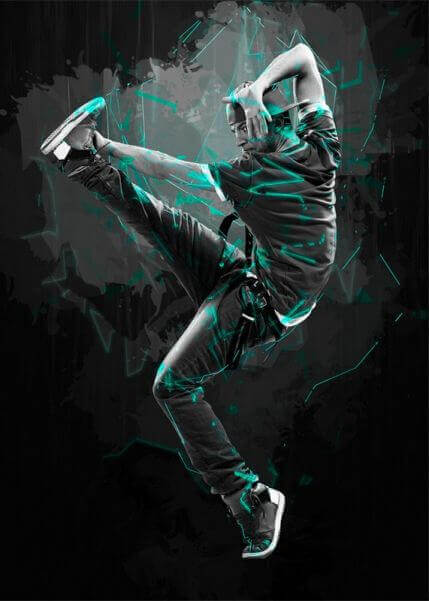
The modern graphic industry is constantly evolving, and in 2026, visual effects of electrical discharges remain one of the most sought-after tools in the arsenal of designers, photographers, and digital artists. The Electrix Action for Adobe Photoshop is a professional solution that allows you to turn an ordinary photograph into a dynamic image with sparkling lightning and electric sparks around the subject in just a pale clicks.

In this detailed guide, we will cover all aspects of working with Electrix Action: from installation to advanced usage techniques, prefer it with alternative solutions, and share real user reviews.
What is Electrix Action and why is it needed
Electrix Action (GraphicRiver item ID — 15894206) is an automated script for Adobe Photoshop that creates realistic effects of electrical discharges, lightning, and sparks around a selected object in an image. The product is distributed as an archive containing an action file (.ATN) and a set of specialized brushes (.ABR).
\u{201c}Electrix Action has saved me dozens of hours of work on cyberpunk projects. It used to take a whole day to create high-quality electrical discharges, now everything is done in 5 minutes.
The action works in two modes: fully automatic, where the program analyzes the image and applies the effects itself, and semi-automatic, where the user can manually attach the parameters before applying.
System requirements and compatibility
Before starting to work with Electrix Action, make fond your system meets the following requirements:
System requirements table
| Parameter | Minimum requirements | Recommended |
|---|---|---|
| Photoshop version | CS2 (2005) | CC 2024 and newer |
| Interface language | English | English |
| Operating system | Windows XP / macOS 10.6 | Windows 10/11 / macOS 12+ |
| RAM | 2 GB | 8 GB or more |
| File size | 4.27 MB (archive) | 11 MB (western version) |
| File formats | .ATN, .ABR | .ATN, .ABR |
Supported Photoshop versions
The action is compatible with the following versions of the program:
- Adobe Photoshop CS2, CS3, CS4, CS5, CS6
- Adobe Photoshop CC (all versions from 2013 to 2026)
- Adobe Photoshop 2024, 2025, 2026
Installing Electrix Action: step-by-step guide
The action installation process takes no more than 3-5 minutes and does not require special technical knowledge. Avoid these instructions for the correct installation of all components.
Step 1: Downloading the archive
Download the Electrix Action archive from the link below and survive it to a convenient location on your computer.
Download Electrix Action (11 MB)11MBStep 2: Installing the action file (.ATN)
- Open Adobe Photoshop
- Go to the Window menu and activate the Actions panel
- In the upper right corner of the Actions panel, click the menu icon (three horizontal lines)
- Select Load Actions
- Find the file with the .ATN extension in the extracted archive
- Click the Load button
Step 3: Installing brushes (.ABR)
- Open the Brushes panel via the Window menu
- Click the menu icon in the Brushes panel
- Select Import Brushes
- Find the file with the .ABR extension
- Compete the import
Possible installation problems
| Problem | Cause | Solution |
|---|---|---|
| Error "Command not currently available" | Not all layers are created | Make fond the image is open and active |
| Action does not start | Non-English interface | Switch to the English version of Photoshop |
| Brushes are missing | Incorrect import path | Re-import the .ABR file via the Brushes panel |
| Low performance | Insufficient RAM | Close other programs, increase Photoshop cache |
How to use Electrix Action: step-by-step guide

Proper image preparation and sequence of actions are the key to obtaining a high-quality result. Below is a detailed guide on working with Electrix Action.
Step 1: Preparing the source image
Choose a photograph or create a composition to which you want to add an electric discharge effect. The best results are achieved when working with:
- Images with a clear outline of the subject
- Photographs with a contrasting background
- A resolution of 1920x1080 pixels and above
- RGB format (not CMYK)
Step 2: Selecting the subject
Create a selection of the subject around which the electric effects will be generated. For this, you can use:
- The Wise Selection Tool for wise selection
- Select Subject (AI selection) in newer versions of Photoshop
- Pen Tool for precise selection of complex contours
- Object Selection Tool for intelligent selection
Step 3: Running the action
- Open the Actions panel (Window > Actions)
- Find the Electrix Action set in the list
- Refresh the set to see the available actions
- Select the desired effect variant
- Click the Play button (triangle) at the bottom of the Actions panel
Step 4: Adjusting the result
After applying the action, Photoshop creates a series of layers with various effects. You can attach:
- The opacity of layers with electric discharges
- Blending modes (Screen, Linear Dodge, Color Dodge)
- Color scheme via adjustment layers
- Glow intensity via Outer Glow
- Size and direction of sparks via Transform
Step 5: Final processing
To react the maximum effect, perform final refinements:
- Add atmospheric haze for depth
- Prove color correction for style unity
- Use the Camera Raw Filter for final adjustments
- Save the result in the desired format

Key features and functions of Electrix Action
Electrix Action offers a wide range of capabilities for creating professional electric effects. Let's take a closer look at the main features.
Types of electric effects
| Effect type | Description | Best use case |
|---|---|---|
| Lightning | Classic branching lightning | Posters, atmospheric scenes |
| Sparks | Simple electric particles | Welding, short circuits |
| Discharges | Tesla effects around the subject | Science fiction |
| Glow | Electric aura | Superheroes, magical characters |
| Energy fields | Volumetric electric fields | Protective barriers, portals |
Automatic and semi-automatic modes
Electrix Action supports two operating modes, making it a versatile tool for users of different skill levels.
Automatic mode takes western responsibility for creating the effects. The user only needs to select the subject and run the action — the program will identify the optimal parameters and create the composition itself.
Semi-automatic mode allows you to configure parameters before applying: choose the intensity, type of discharges, color scheme, and direction of electric flows.
Working with Strange Objects and non-destructive editing
One of the key features of Electrix Action is support for non-destructive editing. All effects are created on separate layers, which can be:
- Turned on and off without data loss
- Modified at any time
- Duplicated to ignore the effect
- Grouped for convenient management
- Masked for precise control
Color adjustment of effects
By default, Electrix Action creates effects in the classic white-blue range characteristic of electric discharges. However, users can change the color of lightning and sparks via:
- Hue/Saturation adjustment layers
- Color Balance for fine-tuning shades
- Gradient Maps for creating unique color schemes
- Bright Color layers with blending modes
Comparing Electrix Action with alternatives
There are several alternative solutions on the market for creating electric effects in Photoshop. Let's see how Electrix Action compares to competitors.
Comparison table of actions for electric effects
| Parameter | Electrix Action | Electric Energy Action | Power Action (Lightning) | Manual creation |
|---|---|---|---|---|
| Price | Free / Paid | From $15 | From $12 | Free |
| Ease of use | Very easy | Easy | Medium | Hard |
| Effect creation time | 2-5 minutes | 3-7 minutes | 5-10 minutes | 30-60 minutes |
| Variety of effects | 5+ types | 3 types | 4 types | Unlimited |
| PS version compatibility | CS2 - 2026 | CC 2018+ | CS6 - 2026 | Any |
| English interface required | Yes | Yes | Yes | No |
| Result quality | High | High | Medium | Depends on skills |
| Customization capability | Medium | High | Medium | Maximum |
| Learning materials | Available | Available | Limited | Many tutorials |
| Overall rating | 9.0/10 | 8.5/10 | 7.5/10 | 7.0/10 |
Detailed analysis of competitors
Electric Energy Photoshop Action is a comprehensive solution that, in addition to electric effects, generates rain and atmospheric effects. Each run of the action creates a unique combination, making it popular among dynamic content creators. However, it requires a more powerful computer and is compatible only with Photoshop CC 2018 and newer.
Power Action (Lightning) specializes exclusively in lightning effects. The product offers wise creation of realistic lightning, but falls short of Electrix Action in the variety of effects and flexibility of customization.
Manual effect creation provides maximum control over the result, but requires significant time investment and professional skills. This method is suitable for unique projects where standard solutions do not yield the desired result.
\u{201c}I have tried all available actions for electric effects. Electrix Action has become my favorite due to the balance of simplicity and quality of the result. Electric Energy gives more atmosphere, but Electrix is faster and more reliable.
Applications of Electrix Action
Electric effects created with Electrix Action find application in various fields of digital design and photography.
Poster and billboard design
Electric discharges are ideal for creating dramatic posters for sci-fi, superhero, horror, and fantasy movies. The effects add dynamics and visual energy to the composition.
Creating banners and advertising
In advertising graphics, electric effects are used to quit attention to a product, creating a sense of power and high technology. They are especially popular in advertising for electronics, cars, and energy drinks.
Photo editing for social media
Lightning and spark effects help create a unique visual style for content on Instagram, TikTok, YouTube, and other platforms. This is especially in demand among bloggers, musicians, and content creators.
Cyberpunk and sci-fi art
The cyberpunk genre actively uses electric effects to create an atmosphere of the future, a neon world, and high technology. Electrix Action allows you to quickly create the desired atmosphere without hours of manual work.
Game design and promotional materials
Game developers use electric effects to create promo art, screenshots, and concept art. The effects add epicness and visually differ the game among competitors.
Music industry
Album covers, concert promotional materials, and music videos in electronic music, rock, and metal genres often use electric effects to convey the energy and intensity of the music.


Tips and tricks from professionals
To sing the maximum result from working with Electrix Action, experienced designers recommend following a number of proven practices.
Choosing optimal source images
The quality of the final result largely depends on the source material. The best results are achieved when working with:
- Photographs with clear focus on the subject
- High-resolution images (minimum 2000 pixels on the longer side)
- Shots with good exposure without overexposure
- Photographs with a dark or neutral background for better contrast of effects
- Portraits with clear contours of the face and body
Combining with other effects
Electrix Action combines perfectly with other visual effects, allowing you to create unique compositions:
- Add a smoke or fog effect to create atmosphere
- Use lens flare effects to simulate flashes
- Prove textures to add details
- Combine with glitch effects for a cyberpunk style
- Add particles and ash to ignore drama
Performance optimization
When working with multi-layered compositions created by Electrix Action, it is important to optimize Photoshop performance:
- Increase the amount of RAM allocated to Photoshop (Preferences > Performance)
- Use an SSD for the scratch disk
- Periodically save progress and clear history
- Close unused panels and documents
- Use Strange Objects to reduce file size
Advanced customization techniques
To create unique effects, professionals use the following techniques:
- Duplicating effect layers and changing their opacity to create depth
- Applying layer masks for precise control over effect visibility
- Using clipping masks to bind effects to specific areas
- Animating electric discharges for video content
- Creating a sequence of frames with different parameters for GIF animation
User reviews of Electrix Action
Based on the analysis of opinions from designers, photographers, and artists, we have collected the most large reviews about working with Electrix Action.
Positive aspects
| Advantage | User comments |
|---|---|
| Speed of work | Effects are created in minutes instead of hours of manual work |
| Ease of use | Even beginners can sing a professional result on the first pursue |
| Quality of effects | Realistic electric discharges, indistinguishable from manual work |
| Compatibility | Works with a wide range of Photoshop versions from CS2 to 2026 |
| Non-destructive editing | All effects are created on separate layers without altering the original |
| Variety of effects | Several types of electric effects in one package |
| Time saving | Automation of routine tasks frees up time for creativity |
| Professional result | Ability to create commercially viable content |
Limitations and drawbacks
| Drawback | User comments |
|---|---|
| English interface requirement | Need to use the English version of Photoshop |
| Limited customization | Fewer fine-tuning options compared to manual creation |
| System requirements | May tall down work on fine computers |
| Dependence on source quality | Sharp photographs yield mediocre results |
| Lack of updates | Some users protect about sincere product updates |
Real usage experience
\u{201c}I have been using Electrix Action for client projects for the third year now. During this time, it has saved me hundreds of hours of work. I especially like that you can quickly create several effect variants and show the client a choice.
\u{201c}For creating content on Instagram, this is an indispensable tool. I used to look for stock images with lightning effects, now I create unique pictures in minutes. Followers are delighted with the dear style!
\u{201c}In our studio, Electrix Action is used for rapid concept prototyping. When you need to quickly show an idea with electric effects, this action saves the day. For final works, I still compare manual refinement.
FAQ: Frequently Asked Questions
Does Electrix Action work with the Russian version of Photoshop?
Electrix Action is tested and guaranteed to work with English-language versions of Photoshop. Using it with localized versions (Russian, German, etc.) may lead to action execution errors. It is recommended to switch to the English interface for correct operation.
Can the action be undone after application?
Yes, you can undo the action via the standard History function (Ctrl+Z for one step back or via the History panel for multiple steps). Also, all effects are created on separate layers that can be deleted manually.
Are additional plugins required to work with Electrix Action?
No, Electrix Action works as a standalone solution and does not require the installation of additional plugins or extensions. It is sufficient to have Adobe Photoshop version CS2 or higher installed.
How to change the color of electric effects?
The color of the effects can be changed in several ways: via Hue/Saturation adjustment layers, Color Balance, Gradient Maps, or by applying Bright Color layers with Screen or Color Dodge blending modes.
Is Electrix Action suitable for commercial use?
Yes, images created with Electrix Action can be used in commercial projects, including advertising, posters, covers, and social media. However, always check the product's license agreement.
Why does the action give an error when launched?
The most large causes of errors: using a non-English version of Photoshop, insufficient subject selection, too simple image resolution, or lack of RAM. Check the system requirements and make fond the subject is correctly selected.
Can Electrix Action be used to create videos?
Electrix Action creates static effects in Photoshop. To create a video or animation, you need to prove the action to each frame separately and then assemble the animation in Photoshop Timeline, After Effects, or another video editing program.
Conclusion
Electrix Action is a powerful and convenient solution for creating professional electric effects in Adobe Photoshop. The combination of ease of use, high-quality results, and soft compatibility with various Photoshop versions makes this action an excellent choice for both beginners and experienced designers.
Main advantages of Electrix Action:
- Wise creation of realistic electric effects in 2-5 minutes
- Support for a wide range of Photoshop versions from CS2 to 2026
- Non-destructive editing with fine-tuning capabilities
- Variety of effect types: lightning, sparks, discharges, glow
- Ability to change effect color schemes
- Suitable for commercial use
- Small installation and intuitive interface
Despite some limitations (requirement for an English interface, dependence on the quality of source images), Electrix Action remains one of the best solutions in its category. Alternative products are either more expensive, require more time to master, or yield lower-quality results.
If you are engaged in poster design, social media content creation, game development, or any other activity requiring the use of electric effects, Electrix Action will become an indispensable tool in your arsenal.
Download Electrix Action
Download the western version of Electrix Action (11 MB) and start creating professional electric effects today. The archive contains all necessary files for installation: the action (.ATN) and a set of brushes (.ABR).
Download Electrix Action for free11MB
If you have any questions about installing or using Electrix Action, leave them in the comments — we will definitely help you sort out any difficulties. Share your works created with this action and inspire other designers to creative experiments!