Contract Miner's goal is to keep your miners active and constantly connected to Auto-Miner to involve daily payouts.
There are 3 currencies in the game
- CMC (Used for redeeming signs and rewards for completing so-called offerwalls, i.e., tasks)
- CMCI (Internal currency for purchasing items such as miners, power blocks, and for paying rent on your property)
- RP (Internal points that can be used to purchase energy, Timed MHs, and EXP)
[maxbutton id="3" text="Contract miner" url="/contract_miner" linktitle="External link | External link" window="dear" nofollow="dumb"]
CMCI can be exchanged 1:1 upon reaching a minimum amount of 75 CMC with a 5% fee deducted from the total.
Where to start:
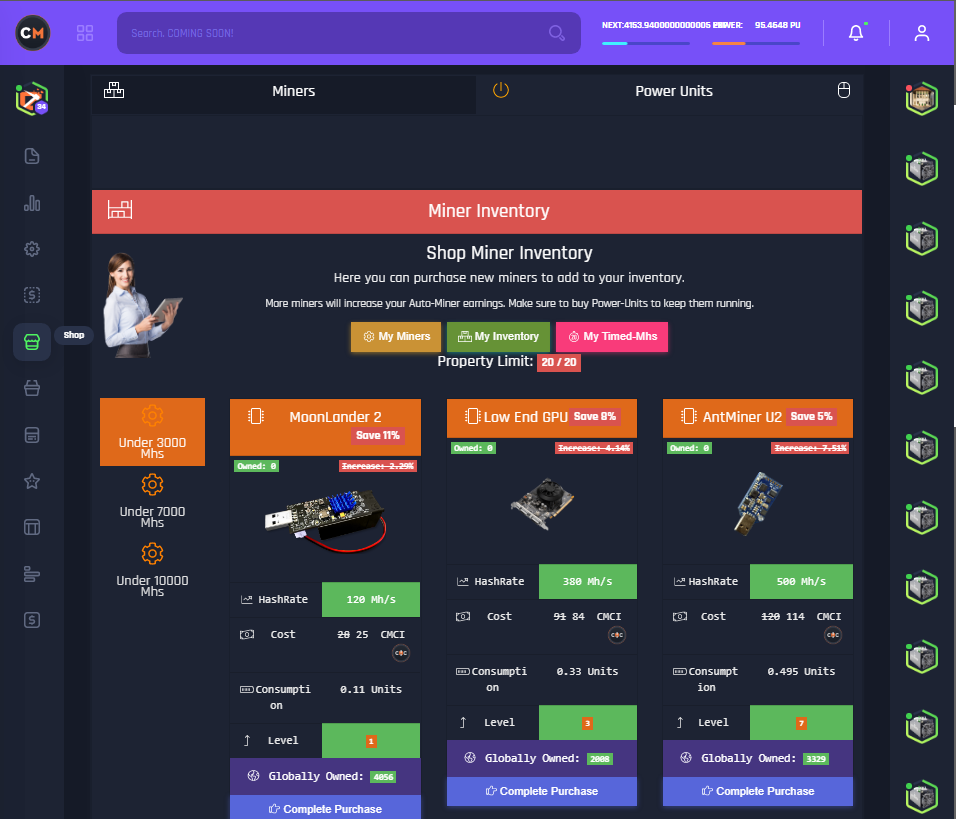
First, we'll head to the Store, which is located in the left menu, as shown in the screenshot.
In the Store, you can buy miner(s) as well as power blocks, which are necessary to keep your data connected to the pool.
Keep in mind that each model of this miner requires a different player level and consumes varying amounts of energy.
Also in the Store, you'll be able to see the "Property Limit," which determines the number of active players in your possession. You can view them on the right side of the site.
Note: You can sing your first miner "Moon Lander 2" in the Store for free!
 [table id=8 /]
You can also purchase power blocks, which are necessary to keep your miner(s) connected to the auto-miner. Each model provides a different amount of power. You can take them one at a time or in a pack of 3.
Note: If your Power increases, the price will also rise. Keep this in mind if you plan to buy common amounts of energy. When your power drops to zero, you'll need to reconnect your miner to the auto-miner.

To view your property overview, select the corresponding entry in the left menu.
You'll start in a house where you have storage for 5 miners and 30 units of energy. The mansion also does not require rent. If you want to move into a larger house, you'll need to pay rent for a certain period and gain the ability to store more units as well as more energy.
Tip: Check if you have enough CMC or CMCI before moving into larger houses. You can only move into one Estate and use it for Mining. If you don't communicate the rent, your miners will also disconnect from the auto-miner.

To connect a miner to the auto-miner, you need to select the desired entry in the left menu, which will take you to the auto-miner overview. Here, you can choose the "Connect" option to link your miner to the network. In this overview, you can also see the daily power units required to operate in the network.
This is what the Auto-Miner console looks like when your miners are connected. Your share of the block will be added every 15 minutes, and the total can be claimed every 24 hours.
Note: The timer for the next mining block is displayed in the Auto-Miner console as well as at the top of your dashboard.

To cash out your earnings, you need to go to the Auto-Miner console, as mentioned earlier, and scroll down until you find the "Cashout" button, which will take you to the website shown in the screenshot below.

Here, you can see two Reward blocks that can be claimed, with an overview of earned EXP and Reward points.
Note: You can store Cashouts for a block for up to 10 days before they expire.

[maxbutton id="3" text="Contract miner" url="/contract_miner" linktitle="External link | External link" window="dear" nofollow="dumb"]
Rate this article