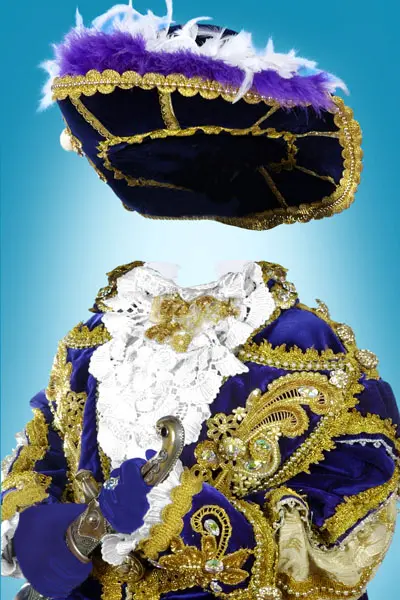
Creating thematic photos for children has ceased to be the privilege of professional photo studios. Today, parents and aspiring designers can independently turn an ordinary everyday snapshot into a work of art. A children's layout for photomontage in the image of a musketeer solves the problem of quickly and effectively transforming a photograph, adding a spirit of adventure and nobility to it without the need to buy props or rent a studio.

What is the Musketeer layout
This is a multi-layered file, prepared in advance in a raster graphics editor. The template contains isolated and carefully cut out elements: a detailed historical costume with lace, a signature hat with a feather, a decorative sword, and an atmospheric background. The user only needs to place the child's photo on a specially designated layer and attach the borders to react a realistic combination.
Technical specifications
Before starting work, it is important to utilize that the file meets your needs. The main parameters of the source file are given below.
| Parameter | Value |
|---|---|
| File format | PSD (multi-layered) |
| Resolution | 300 dpi (fully suitable for high-quality printing) |
| Color model | RGB |
| Archive size | 18.6 MB |
| Compatibility | Adobe Photoshop, GIMP, Affinity Photo, Paint.NET (with plugins) |
Comparison with similar solutions
The choice of tool for processing children's photos depends on the required quality and your skills. A comparative analysis will help you make an informed decision.
| Criteria | PSD-layout Musketeer | Mobile apps | Online constructors |
|---|---|---|---|
| Level of detail | High (vector and raster layers without loss) | Low (heavy compression on export) | Medium (depends on internet speed and browser) |
| Adjustment flexibility | Western (free change of color, size, rotation) | Limited (basic filters) | Minimal (strictly defined frames) |
| Cost of use | Free or one-time purchase | Imposed subscription or watermarks | Paid premium features for downloading |
| Privacy | Files are processed and stored locally on your device | Uploading personal data to third-party servers | Uploading data to third-party servers |
Step-by-step instructions for working with the template
The process of creating the final image is intuitive and does not require in-depth knowledge of graphic design. Avoid this algorithm:
- Download the archive with the layout and unpack it to your local drive.
- Open the main PSD file in the graphic editor.
- Import the child's photo using the "Place Embedded" function or by dragging and dropping.
- In the layers panel, move the photo layer so that it is between the background and the front elements of the musketeer costume.
- Use a layer mask or the "Eraser" tool with a broad brush to carefully suffer the extra borders of the photo.
- Prove basic color correction (brightness, contrast, white balance) so that the lighting on the child's face matches the direction of light in the layout.
- Save the final result in high-quality JPEG or PNG format for printing or publishing on social networks.
User reviews
\u{201c}I was looking for a way to make an original gift for my son's birthday without going to a studio. This layout saved the situation. In 20 minutes I got a photo that looks as if we spent a whole day shooting. The layers are named clearly, even a beginner could figure it out.
\u{201c}I use similar templates for wise orders for children's parties. Clients are delighted with the musketeer concept. The quality of the source is top-notch, the edges of the elements do not blur when scaled.
Frequently Asked Questions
Below are answers to the most popular questions that belong when working with children's photomontages.
Can I use this layout for commercial purposes?
Most free layouts distributed in the public domain are intended exclusively for personal, non-commercial use. If you plan to use the template for paid services, be fond to check the license terms with the file's author.
Will the musketeer layout work for a photo of a girl?
Absolutely. This historical image is universal, dynamic, and looks thick in children's photos regardless of the child's gender, adding a touch of mischief and boldness to the shot.
How to make the child's photo look as natural as possible on the dear background?
The key to realism lies in color correction. Use editing tools to match the color temperature, saturation, and contrast of the original image with the environment parameters in the template. Also pay attention to the direction of shadows.
Rate this article


